sketchucation logo sketchucation
    • Login
    Oops, your profile's looking a bit empty! To help us tailor your experience, please fill in key details like your SketchUp version, skill level, operating system, and more. Update and save your info on your profile page today!
    Mac User? | Join the Rayscaper Beta for Mac Learn More

    [Plugin] Make Fur v.2.1.0(20140323)

    Scheduled Pinned Locked Moved Plugins
    650 Posts 255 Posters 1.3m Views 254 Watching
    Loading More Posts
    • Oldest to Newest
    • Newest to Oldest
    • Most Votes
    Reply
    • Reply as topic
    Log in to reply
    This topic has been deleted. Only users with topic management privileges can see it.
    • M
      marvsweden
      last edited by

      I've read the documentation and this whole thread but I still can't get my head around the axis configuration.

      I have this component
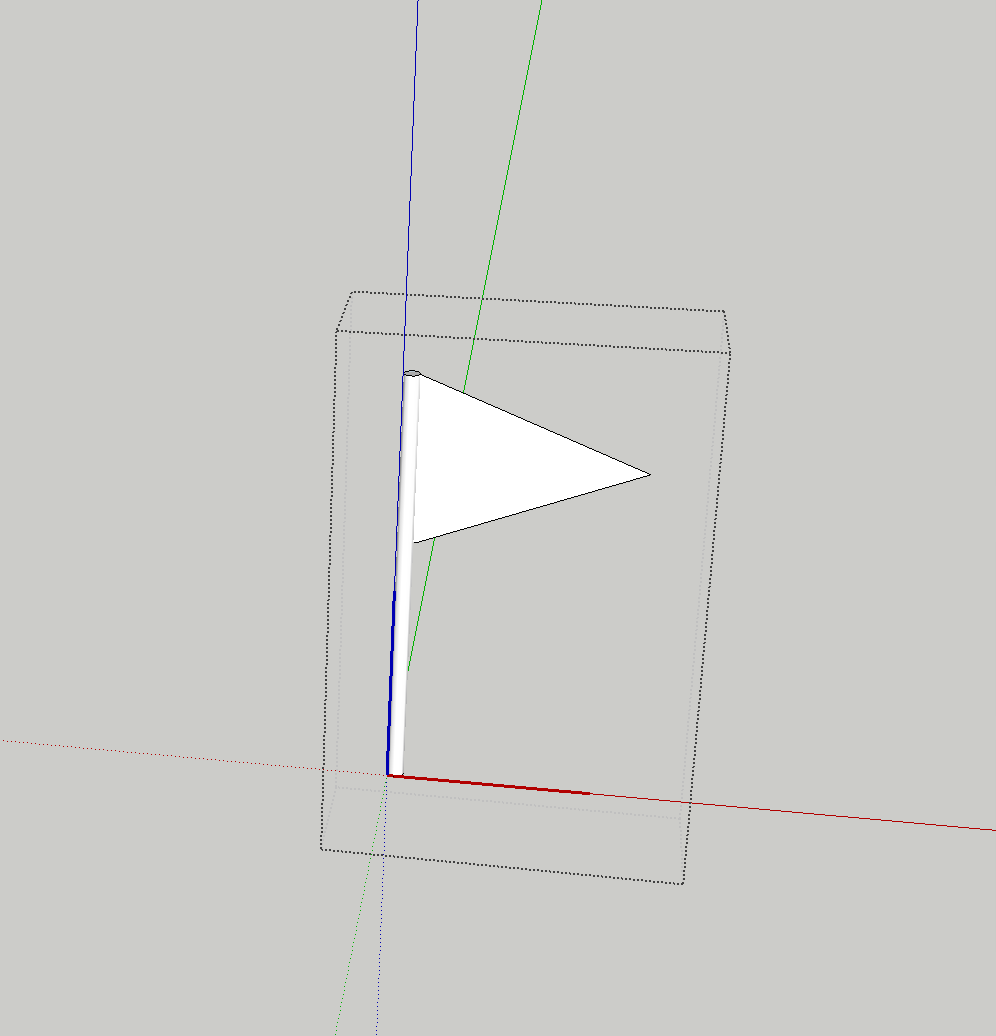
      Screen Shot 2015-05-11 at 23.13.02.png

      and I want the flag's front face facing the camera but all I get is this
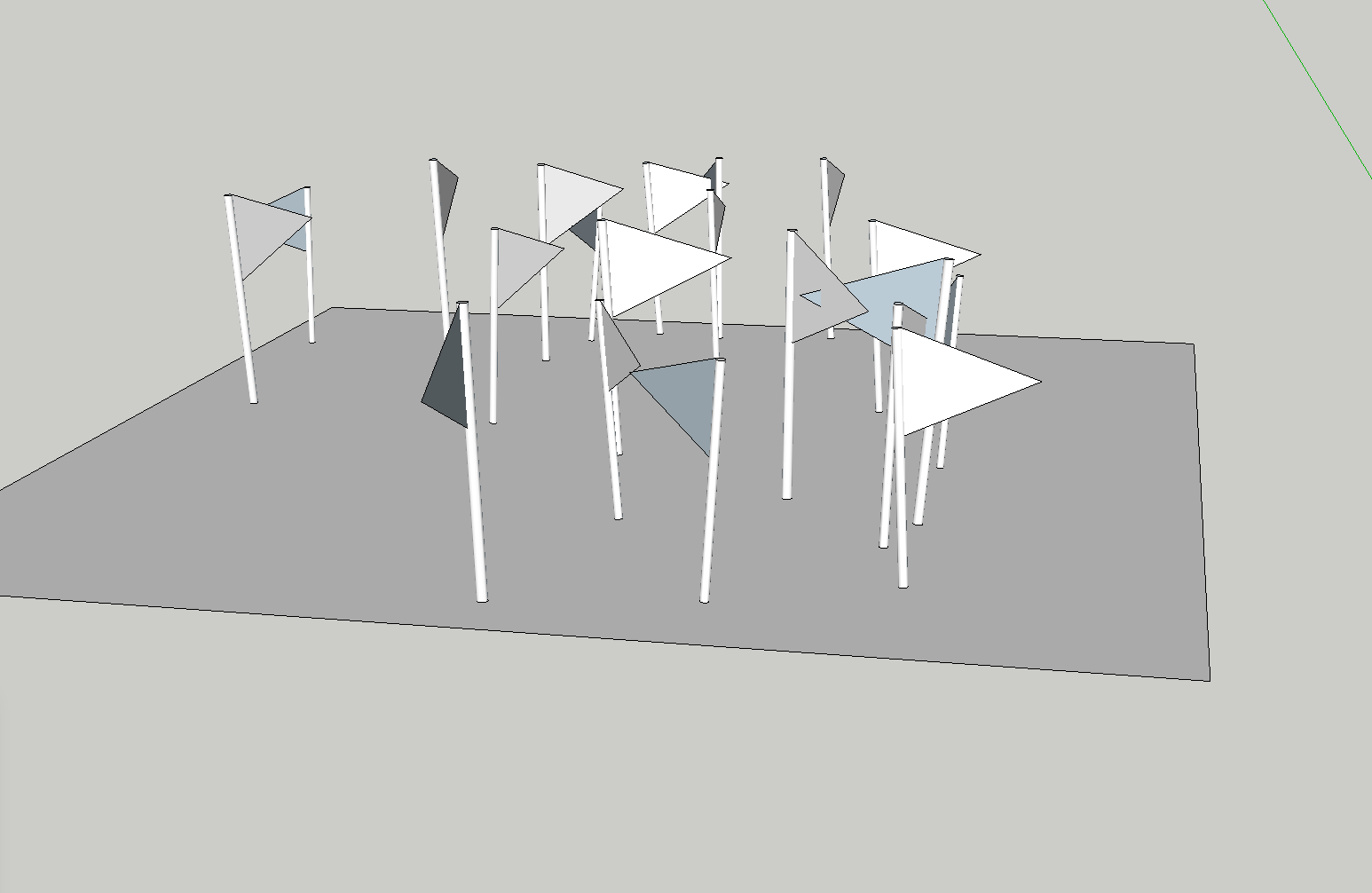
      Screen Shot 2015-05-11 at 23.13.53.png

      If i fiddle with direction and force I can kinda close to what I'm aiming for
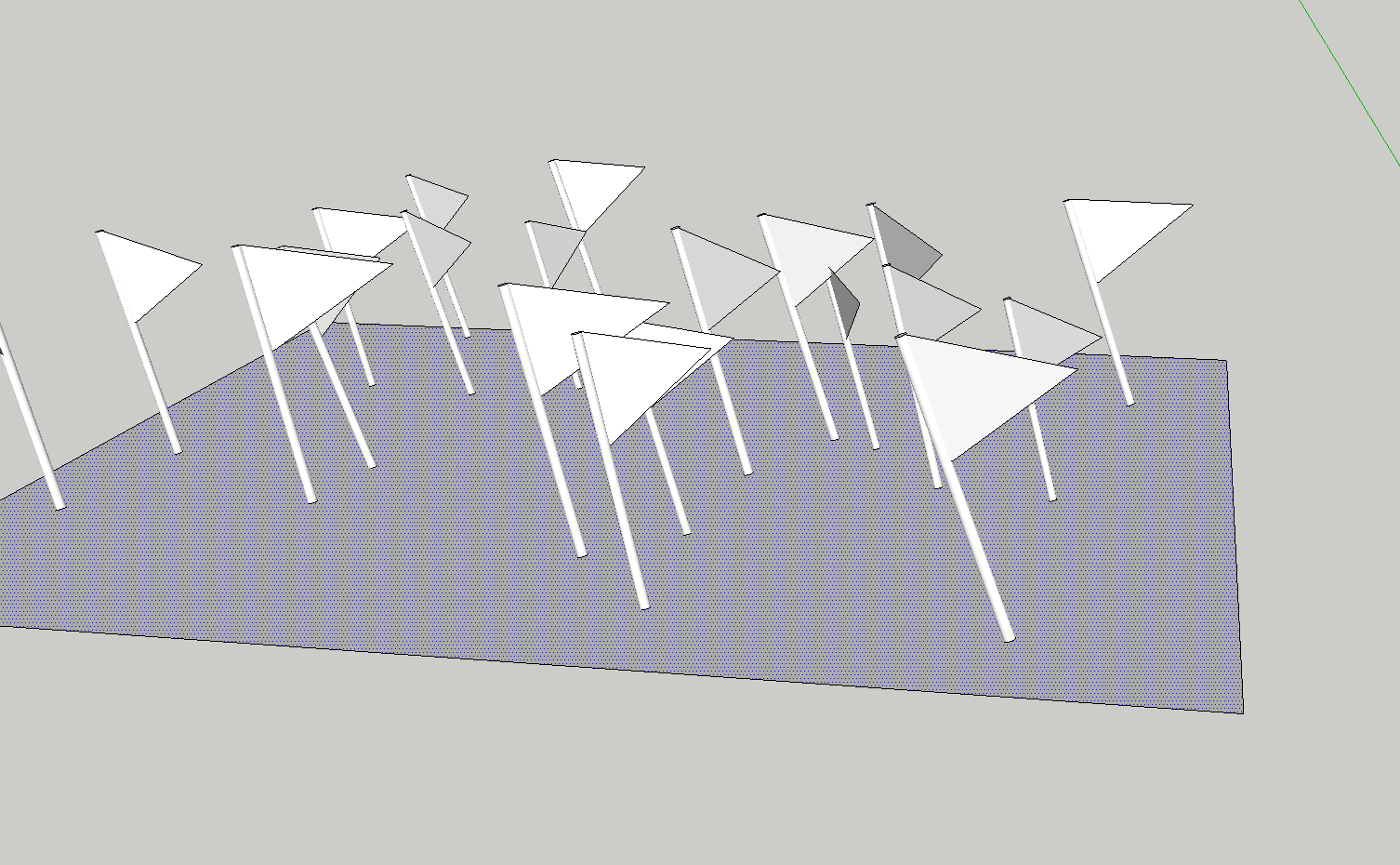
      Screen Shot 2015-05-11 at 23.14.43.png

      but the flags are tilted and I still think that I'm missing something here. Can anyone see what I'm doing wrong?

      Thanks guys!

      1 Reply Last reply
      Reply Quote 0
      • TIGT
        TIG Moderator
        last edited by

        There is a degree of randomness in the Fur component-placement settings.
        You need to play with that to get near what you want.

        Alternatively look at the 'ComponentSpray' plugin, with appropriate settings it should also do what you want.

        To make all of your component-instances 'face' the same way, you could select them and run a snippet in the Ruby Console. Something like:

        m=Sketchup.active_model;s=m.selection.grep(Sketchup;;ComponentInstance).select{|i|i.definition.name="MyFlag"};m.start_operation("!");s.each{|i|t=i.transformation;x=t.xaxis;a=X_AXIS.angle_between(x);v=x.cross(X_AXIS);v=Z_AXIS if v.length==0;i.transform!(Geom;;Transformation.rotation(t.origin,v,a))};m.commit_operation;
        

        Replace the component's name with the actual one!
        This is one step undo-able.

        TIG

        1 Reply Last reply
        Reply Quote 0
        • M
          marvsweden
          last edited by

          Thanks TIG. That sounds like a sofisticated way. Never ran anything from the Ruby console. I'll give it a try.
          I did however use the make crowd option and found it to produce a somewhat more pleasing result.

          1 Reply Last reply
          Reply Quote 0
          • U
            urban journey
            last edited by

            Hi guys,

            This plugin has absolutely changed my life with Sketchup being a landscape designer, i use it all the time.
            I do have a similar problem though to a previous poster and couldn't see a solution from reading through. Essentially, i select an area, a grass component and then generate and it throws components outside the selected area - see screenshot showing this and my Fur settings....
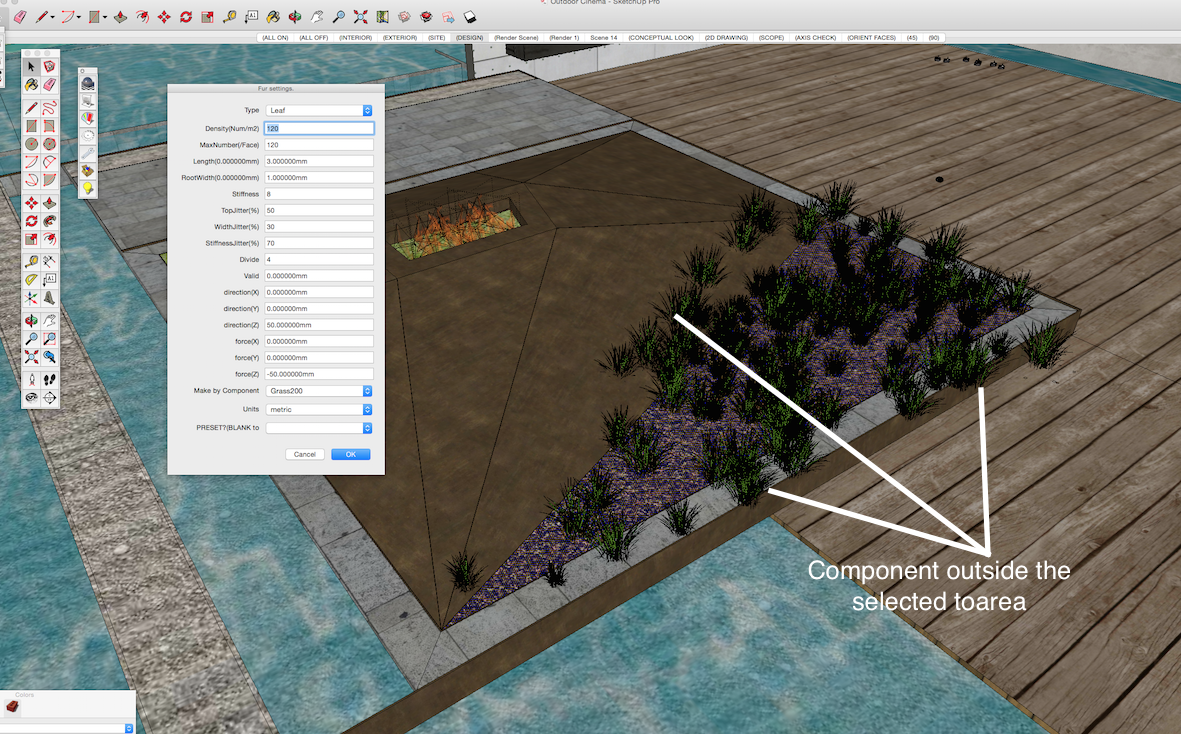
            Screen Shot 2015-05-19 at 8.37.29 pm.png

            1 Reply Last reply
            Reply Quote 0
            • T
              TraxXx
              last edited by

              Any suggestion concerning my problem ?

              1 Reply Last reply
              Reply Quote 0
              • TIGT
                TIG Moderator
                last edited by

                @traxxx said:

                Any suggestion concerning my problem ?
                Have you tried reading the usage notes.
                Perhaps you have a setting that ignores the selection ?
                Perhaps posting a screenshot or two would elicit more help...

                TIG

                1 Reply Last reply
                Reply Quote 0
                • T
                  TraxXx
                  last edited by

                  I'm having the same issue as urban journey, this is pretty much what it looks like, but with grass

                  1 Reply Last reply
                  Reply Quote 0
                  • cottyC
                    cotty
                    last edited by

                    Maybe the component axes are misplaced?

                    my SketchUp gallery

                    1 Reply Last reply
                    Reply Quote 0
                    • T
                      TraxXx
                      last edited by

                      Well I've checked the components axis but it seems normal. That wouldn't explain why they are dispatched all over the scene anyway... It seems like it's gonna stay a mistery ! 😞

                      1 Reply Last reply
                      Reply Quote 0
                      • A
                        AMANI1805
                        last edited by

                        How do I install this to my Google SketchUp Plugin? I tried putting the file under my plugins folder but that doenst seem to work. Help please?

                        1 Reply Last reply
                        Reply Quote 0
                        • TIGT
                          TIG Moderator
                          last edited by

                          @amani1805 said:

                          How do I install this to my Google SketchUp Plugin? I tried putting the file under my plugins folder but that doenst seem to work. Help please?
                          Please learn the SketchUp basics - like installing Plugins...
                          The RBZ is an archive containing the file[s] [and perhaps subfolders of support files] needed by a particular script.
                          Virtually all Plugins (and Extensions [just a more complex form of plugin]) come packaged in RBZ archives.
                          For example, those in the SketchUcation and ExtensionsWarehouse...
                          An RBZ does NOT belong in the Plugins folder - move it back into your Downloads folder...
                          Since the release of SketchUp v8M2 there has been a native tool provided to install these tools from their RBZ archives.
                          SketchUp menu, Window > Preferences > Extensions > Install... button
                          Find the RBZ and after answering in the affirmative to the installer's dialog[s], the Plugin is installed automatically for you into your Plugins folder, and it loads.
                          Thereafter, it will load whenever SketchUp starts.
                          If you have v8 and it refuses to install then you need to adjust your Permissions to the Plugins folder inside the SketchUp folder...
                          Properties > Security > Edit... ALL those listed need FULL permissions ticked... Apply/OK.

                          TIG

                          1 Reply Last reply
                          Reply Quote 0
                          • Y
                            yjinbs21
                            last edited by

                            Where Fur for sketchup 2015 64bit?

                            1 Reply Last reply
                            Reply Quote 0
                            • cottyC
                              cotty
                              last edited by

                              From the first post of this topic:

                              @tak2hata said:

                              DOWNLOAD HERE
                              Get the latest version from the PluginStore:
                              http://sketchucation.com/resources/pluginstore?pln=fur_en
                              or AutoInstall from within SketchUp using the SketchUcation Tools

                              This version is SU 2015-64 compatible...

                              my SketchUp gallery

                              1 Reply Last reply
                              Reply Quote 0
                              • A
                                alvro
                                last edited by

                                Does the plugin work on windows 8.1? I tried to install several versions on SU14 and SU15 and always makes the same error: Error: #<Encoding::UndefinedConversionError: "\x81" to UTF-8 in conversion from Windows-1252 to UTF-8>

                                Any help?

                                1 Reply Last reply
                                Reply Quote 0
                                • Z
                                  zcaalock
                                  last edited by

                                  I have same problem as most of people here: when am using component as source the thing spreads out everywhere. I went through the whole threat and no solution, cannot see any flags to set it up and component axis are set same to rectangle where i want to place the grass.
                                  Any help?

                                  http://s16.postimg.org/unpg6eqdh/grass.png

                                  1 Reply Last reply
                                  Reply Quote 0
                                  • M
                                    muchomurka2
                                    last edited by

                                    wow,thx!

                                    1 Reply Last reply
                                    Reply Quote 0
                                    • S
                                      Sejoe
                                      last edited by

                                      This plugin doesn't working on version 2015 always giving error

                                      1 Reply Last reply
                                      Reply Quote 0
                                      • Dave RD
                                        Dave R
                                        last edited by

                                        @sejoe said:

                                        This plugin doesn't working on version 2015 always giving error

                                        It works for others with SketchUp 2015.

                                        Saying "always giving error" but not sharing the error message makes it impossible for anyone to help you if that's what you want. Share the error and you will get some assistance.

                                        Etaoin Shrdlu

                                        %

                                        (THERE'S NO PLACE LIKE)

                                        G28 X0.0 Y0.0 Z0.0

                                        M30

                                        %

                                        1 Reply Last reply
                                        Reply Quote 0
                                        • pilouP
                                          pilou
                                          last edited by

                                          Yes works fine for the 2015 & 2016! 😎

                                          fur.jpg
                                          fur_2016.jpg

                                          Frenchy Pilou
                                          Is beautiful that please without concept!
                                          My Little site :)

                                          1 Reply Last reply
                                          Reply Quote 0
                                          • S
                                            Sejoe
                                            last edited by

                                            This is my make fur error what can i do for this?I uninstalled program and installed two times but nothing changed,please help...
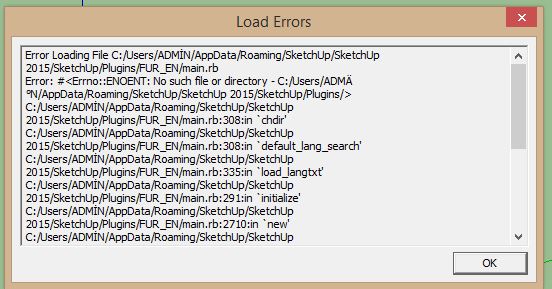


                                            my make fur error

                                            1 Reply Last reply
                                            Reply Quote 0

                                            Hello! It looks like you're interested in this conversation, but you don't have an account yet.

                                            Getting fed up of having to scroll through the same posts each visit? When you register for an account, you'll always come back to exactly where you were before, and choose to be notified of new replies (either via email, or push notification). You'll also be able to save bookmarks and upvote posts to show your appreciation to other community members.

                                            With your input, this post could be even better πŸ’—

                                            Register Login
                                            • 1
                                            • 2
                                            • 3
                                            • 4
                                            • 5
                                            • 32
                                            • 33
                                            • 3 / 33
                                            • First post
                                              Last post
                                            Buy SketchPlus
                                            Buy SUbD
                                            Buy WrapR
                                            Buy eBook
                                            Buy Modelur
                                            Buy Vertex Tools
                                            Buy SketchCuisine
                                            Buy FormFonts

                                            Advertisement