sketchucation logo sketchucation
    • Login
    Oops, your profile's looking a bit empty! To help us tailor your experience, please fill in key details like your SketchUp version, skill level, operating system, and more. Update and save your info on your profile page today!
    Mac User? | Join the Rayscaper Beta for Mac Learn More

    [Plugin] Make Fur v.2.1.0(20140323)

    Scheduled Pinned Locked Moved Plugins
    650 Posts 255 Posters 1.3m Views 254 Watching
    Loading More Posts
    • Oldest to Newest
    • Newest to Oldest
    • Most Votes
    Reply
    • Reply as topic
    Log in to reply
    This topic has been deleted. Only users with topic management privileges can see it.
    • dereiD
      derei
      last edited by

      @massimo said:

      http://sketchupdate.blogspot.com/2010/05/having-spent-last-three-hours-fiddling.html πŸ˜„

      Thanks one thousand times! β˜€

      DESIGNER AND ARTIST DEREI.UK

      1 Reply Last reply
      Reply Quote 0
      • dereiD
        derei
        last edited by

        There are also two buttons: Assign to Material and Get from Material. They seem to do nothing, but I'm sure that they do. I just don't know how to use them.

        How to apply texture on created faces? That buttons are related to this? Don't tell me that I must apply texture on every shape created 😲
        Thanks.

        DESIGNER AND ARTIST DEREI.UK

        1 Reply Last reply
        Reply Quote 0
        • B
          boestin
          last edited by

          First of all i would like to say thanks to the person who is responsible for this magnificent peace of art.
          The tool works wonderful, but i'm facing some errors. Hopefully someone will be able to help me out.

          Problem 1:
          The grass or fur is always facing downwards, in other words: upside down. It doesnt matter what i do, its always this way.

          Problem 2:
          Somehow, the color is black and white. I was hoping to see the grass turning green.

          Thanks!!

          1 Reply Last reply
          Reply Quote 0
          • GaieusG
            Gaieus
            last edited by

            Hi Boestin,

            In case 1: is the surface you want to run the plugin on a back face or a front face?

            Gai...

            1 Reply Last reply
            Reply Quote 0
            • B
              boestin
              last edited by

              Hello Gaieus,

              Thank you for you reply.
              I dont know how I can check that, I am almost sure that it is the top side because when I draw a rectangle, select it and generate fur on this I am in the Top view camera.

              1 Reply Last reply
              Reply Quote 0
              • GaieusG
                Gaieus
                last edited by

                When you draw a rectangle on the red/green plane, its back face (blue colour) is showing up by default. Right click and reverse faces to change that and now the front face (white) will show upwards.

                I am not sure this is the problem but I can imagine.

                Gai...

                1 Reply Last reply
                Reply Quote 0
                • B
                  boestin
                  last edited by

                  Thanks Gaieus!! That was the problem

                  You made my day!!

                  1 Reply Last reply
                  Reply Quote 0
                  • S
                    sectionaa
                    last edited by

                    @fletch said:

                    JC,
                    Does THIS help at all?

                    http://twilightrender.com/phpBB3/download/file.php?id=3803

                    Very useful indeed.
                    There must be a variable not shown in settings dialog which controls rotation on a specified axis.
                    (The default effect is visible in the road signs image).
                    It would be a great benefit to have that variable available, and a "jitter" control.
                    But the author has done a fantastic job.

                    1 Reply Last reply
                    Reply Quote 0
                    • S
                      sectionaa
                      last edited by

                      @gaieus said:

                      Yeah. Though already a minority of the countries, still "the sun never sets over the countries that drive on the left".
                      πŸ˜„

                      And of course the land of the rising sun drives on the left.

                      1 Reply Last reply
                      Reply Quote 0
                      • brodieB
                        brodie
                        last edited by

                        I downloaded the plugin and extracted it to my plugins folder (SU 😎 and now get a runtime error anytime I open SU. Anyone else have this issue or have a solution?

                        -Brodie

                        steelblue http://www.steelbluellc.com

                        1 Reply Last reply
                        Reply Quote 0
                        • T
                          Taavi K
                          last edited by

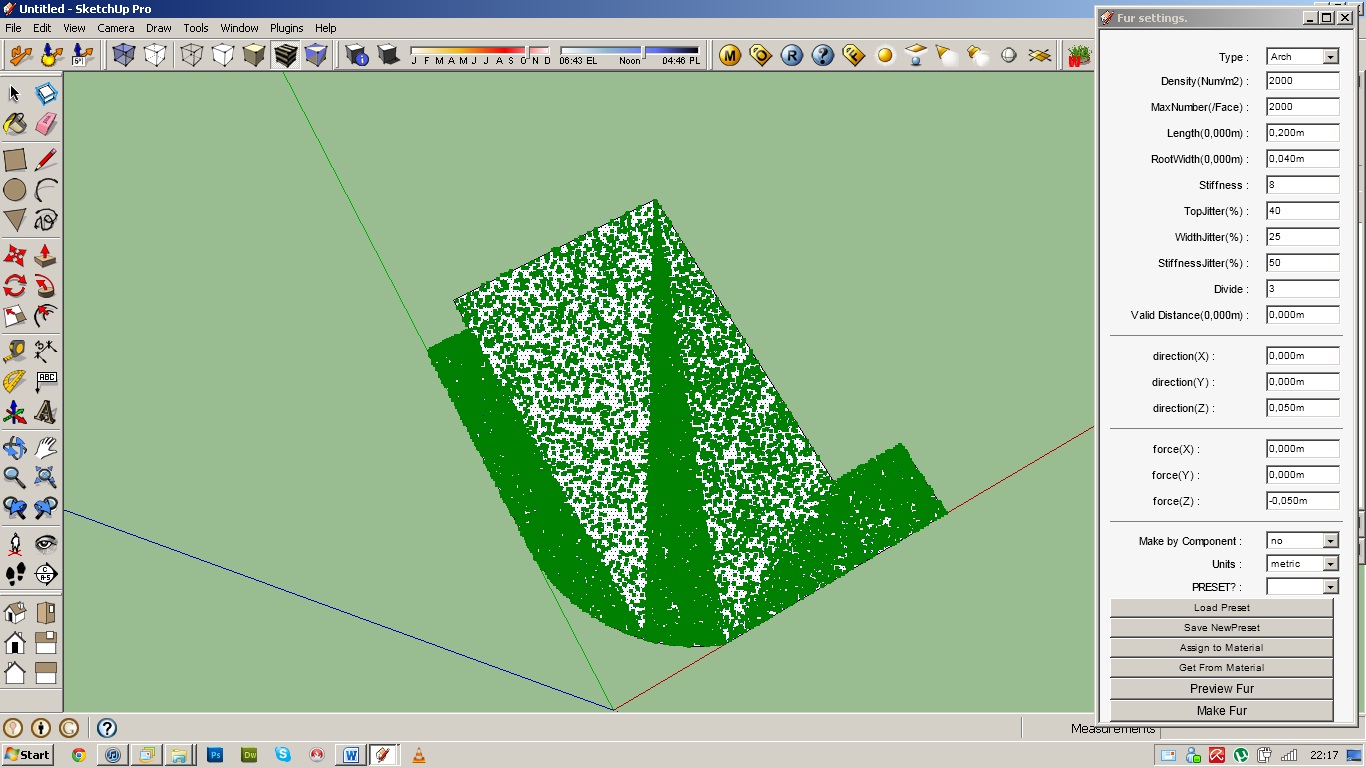
                          I ran into small problem. What can I do to lose that ... problem?

                          Problem.jpg

                          1 Reply Last reply
                          Reply Quote 0
                          • S
                            sesil5
                            last edited by

                            goodmorning!! i need your help!
                            How can i download this plugin?

                            1 Reply Last reply
                            Reply Quote 0
                            • GaieusG
                              Gaieus
                              last edited by

                              Hi Sesil,

                              It is posted as an attachment at the bottom of the first post.

                              Gai...

                              1 Reply Last reply
                              Reply Quote 0
                              • S
                                sesil5
                                last edited by

                                @gaieus said:

                                Hi Sesil,

                                It is posted as an attachment at the bottom of the first post.

                                Hi Gaieus, i found the zip file but it doesn't contains any runfile for installation. Sorry for my English,i'm from Greece.
                                Nevertheless, thank you very much.

                                1 Reply Last reply
                                Reply Quote 0
                                • GaieusG
                                  Gaieus
                                  last edited by

                                  SketchUp plugins are 8mostly) simple text files with an rb (for "ruby") extension. All you need to do is to extract all the content and then copy everything into the plugins folder of SketchUp which is by default (on a 32 bit windows) here:
                                  C:\Program Files\Google\Google SketchUp 8\Plugins\

                                  Also, here is a sticky post about the installation of zipped plugins:
                                  http://forums.sketchucation.com/viewtopic.php?f=323&t=35746

                                  Gai...

                                  1 Reply Last reply
                                  Reply Quote 0
                                  • S
                                    sesil5
                                    last edited by

                                    It's work!!! Thank you very very much. I use some other plugins like omnigrid plugin and it was necessary to make an installation. I think that i'm comfused about the programms and the plugins!!!!

                                    1 Reply Last reply
                                    Reply Quote 0
                                    • D
                                      dirtypr
                                      last edited by

                                      This is great!

                                      Thanks!

                                      1 Reply Last reply
                                      Reply Quote 0
                                      • B
                                        brokenstaral
                                        last edited by

                                        awsome!!

                                        so simple and easy to operate!!

                                        This is by far one of the best and most useful plugins I have ever seen !!!!!

                                        1 Reply Last reply
                                        Reply Quote 0
                                        • U
                                          uzairazam
                                          last edited by

                                          i am unable to create furs....when i click make fur....nothing happens....what is wrong with it plz help?

                                          1 Reply Last reply
                                          Reply Quote 0
                                          • M
                                            mazureac
                                            last edited by

                                            Thanks for a super plugin!

                                            1 Reply Last reply
                                            Reply Quote 0

                                            Hello! It looks like you're interested in this conversation, but you don't have an account yet.

                                            Getting fed up of having to scroll through the same posts each visit? When you register for an account, you'll always come back to exactly where you were before, and choose to be notified of new replies (either via email, or push notification). You'll also be able to save bookmarks and upvote posts to show your appreciation to other community members.

                                            With your input, this post could be even better πŸ’—

                                            Register Login
                                            • 1
                                            • 2
                                            • 13
                                            • 14
                                            • 15
                                            • 16
                                            • 17
                                            • 32
                                            • 33
                                            • 15 / 33
                                            • First post
                                              Last post
                                            Buy SketchPlus
                                            Buy SUbD
                                            Buy WrapR
                                            Buy eBook
                                            Buy Modelur
                                            Buy Vertex Tools
                                            Buy SketchCuisine
                                            Buy FormFonts

                                            Advertisement