sketchucation logo sketchucation
    • 登入
    Oops, your profile's looking a bit empty! To help us tailor your experience, please fill in key details like your SketchUp version, skill level, operating system, and more. Update and save your info on your profile page today!
    🔌 Smart Spline | Fluid way to handle splines for furniture design and complex structures. Download

    [Plugin] Make Fur v.2.1.0(20140323)

    已排程 已置頂 已鎖定 已移動 Plugins
    650 貼文 255 Posters 1.1m 瀏覽 254 Watching
    正在載入更多貼文
    • 從舊到新
    • 從新到舊
    • 最多點贊
    回覆
    • 在新貼文中回覆
    登入後回覆
    此主題已被刪除。只有擁有主題管理權限的使用者可以查看。
    • GaieusG 離線
      Gaieus
      最後由 編輯

      Hi Billy,

      There are two ways to build the grass:

      • you select a surface and get geometry generated by the plugin
      • or you use some of your own components (say a piece of grass) and populate the surface with that component.

      Gai...

      1 條回覆 最後回覆 回覆 引用 0
      • ? 離線
        舊使用者
        最後由 編輯

        Thanks man i get it right, i guess i just need to press enter haha

        1 條回覆 最後回覆 回覆 引用 0
        • C 離線
          cik dib
          最後由 編輯

          cool

          1 條回覆 最後回覆 回覆 引用 0
          • dereiD 離線
            derei
            最後由 編輯

            Any tutorial or explanatory PDF, please?
            I can't understand all those parameters.

            What I understand (or I think I do):
            Type - the shape of the "fur"
            Density - how much fur on square meter
            Max number/ Face - overrides "Density" and limit the number of fur/face (not dependent of face area)
            Length - how long the fur is
            RootWidth - width at base (if not rectangular)
            Divide - segments-define curvature smoothness

            direction x,y,z - how the fur is oriented
            Units - what units to use (metriv / US)


            This is what I understand, with the explanation that I think it is... the other settings I have no idea what they do. Please explain them to me.

            I want to make a "furry carpet", but what I get is or all fur oriented in same direction, or many of them, pointing downwards, trough my floor. How to make randomly oriented fur?

            Thank you.
            Please help me.

            DESIGNER AND ARTIST DEREI.UK

            1 條回覆 最後回覆 回覆 引用 0
            • massimoM 離線
              massimo Moderator
              最後由 編輯

              http://sketchupdate.blogspot.com/2010/05/having-spent-last-three-hours-fiddling.html 😄

              1 條回覆 最後回覆 回覆 引用 0
              • dereiD 離線
                derei
                最後由 編輯

                @massimo said:

                http://sketchupdate.blogspot.com/2010/05/having-spent-last-three-hours-fiddling.html 😄

                Thanks one thousand times! ☀

                DESIGNER AND ARTIST DEREI.UK

                1 條回覆 最後回覆 回覆 引用 0
                • dereiD 離線
                  derei
                  最後由 編輯

                  There are also two buttons: Assign to Material and Get from Material. They seem to do nothing, but I'm sure that they do. I just don't know how to use them.

                  How to apply texture on created faces? That buttons are related to this? Don't tell me that I must apply texture on every shape created 😲
                  Thanks.

                  DESIGNER AND ARTIST DEREI.UK

                  1 條回覆 最後回覆 回覆 引用 0
                  • B 離線
                    boestin
                    最後由 編輯

                    First of all i would like to say thanks to the person who is responsible for this magnificent peace of art.
                    The tool works wonderful, but i'm facing some errors. Hopefully someone will be able to help me out.

                    Problem 1:
                    The grass or fur is always facing downwards, in other words: upside down. It doesnt matter what i do, its always this way.

                    Problem 2:
                    Somehow, the color is black and white. I was hoping to see the grass turning green.

                    Thanks!!

                    1 條回覆 最後回覆 回覆 引用 0
                    • GaieusG 離線
                      Gaieus
                      最後由 編輯

                      Hi Boestin,

                      In case 1: is the surface you want to run the plugin on a back face or a front face?

                      Gai...

                      1 條回覆 最後回覆 回覆 引用 0
                      • B 離線
                        boestin
                        最後由 編輯

                        Hello Gaieus,

                        Thank you for you reply.
                        I dont know how I can check that, I am almost sure that it is the top side because when I draw a rectangle, select it and generate fur on this I am in the Top view camera.

                        1 條回覆 最後回覆 回覆 引用 0
                        • GaieusG 離線
                          Gaieus
                          最後由 編輯

                          When you draw a rectangle on the red/green plane, its back face (blue colour) is showing up by default. Right click and reverse faces to change that and now the front face (white) will show upwards.

                          I am not sure this is the problem but I can imagine.

                          Gai...

                          1 條回覆 最後回覆 回覆 引用 0
                          • B 離線
                            boestin
                            最後由 編輯

                            Thanks Gaieus!! That was the problem

                            You made my day!!

                            1 條回覆 最後回覆 回覆 引用 0
                            • S 離線
                              sectionaa
                              最後由 編輯

                              @fletch said:

                              JC,
                              Does THIS help at all?

                              http://twilightrender.com/phpBB3/download/file.php?id=3803

                              Very useful indeed.
                              There must be a variable not shown in settings dialog which controls rotation on a specified axis.
                              (The default effect is visible in the road signs image).
                              It would be a great benefit to have that variable available, and a "jitter" control.
                              But the author has done a fantastic job.

                              1 條回覆 最後回覆 回覆 引用 0
                              • S 離線
                                sectionaa
                                最後由 編輯

                                @gaieus said:

                                Yeah. Though already a minority of the countries, still "the sun never sets over the countries that drive on the left".
                                😄

                                And of course the land of the rising sun drives on the left.

                                1 條回覆 最後回覆 回覆 引用 0
                                • brodieB 離線
                                  brodie
                                  最後由 編輯

                                  I downloaded the plugin and extracted it to my plugins folder (SU 😎 and now get a runtime error anytime I open SU. Anyone else have this issue or have a solution?

                                  -Brodie

                                  steelblue http://www.steelbluellc.com

                                  1 條回覆 最後回覆 回覆 引用 0
                                  • T 離線
                                    Taavi K
                                    最後由 編輯

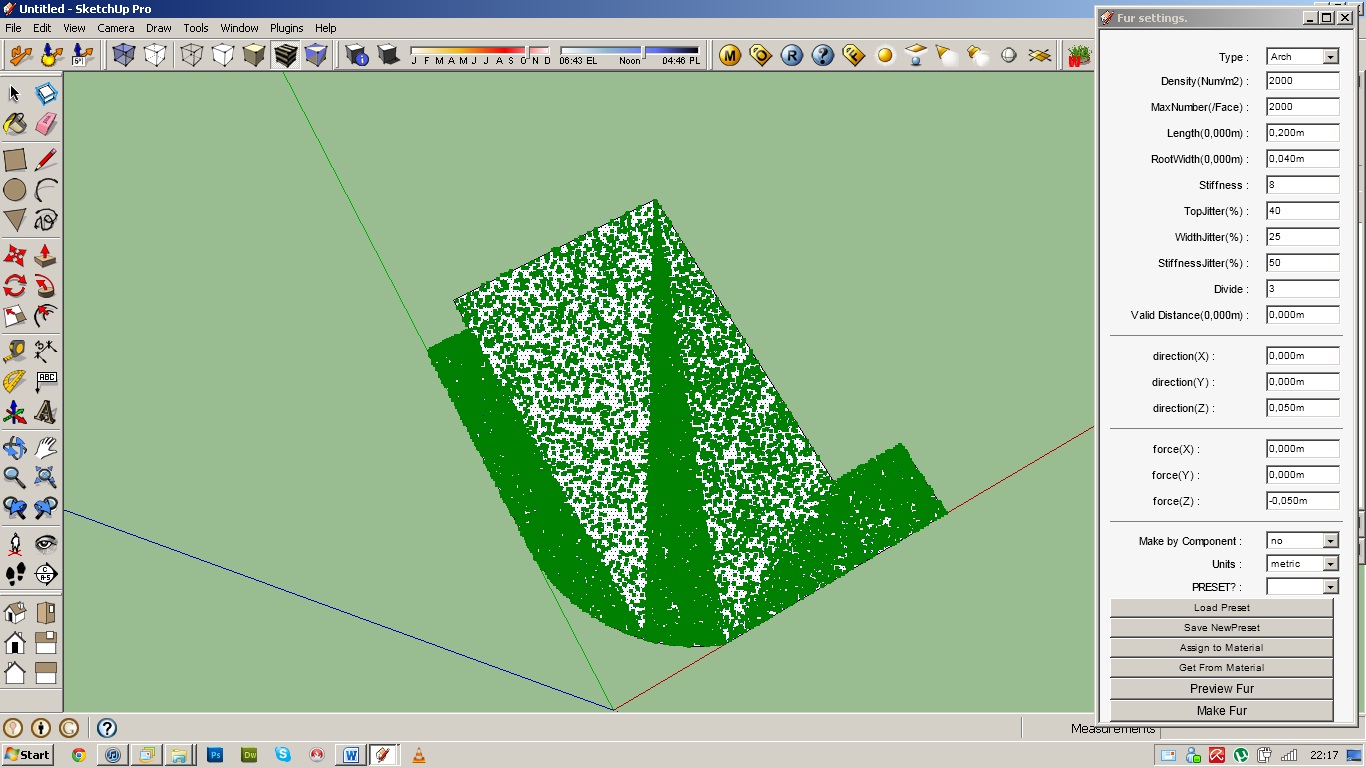
                                    I ran into small problem. What can I do to lose that ... problem?

                                    Problem.jpg

                                    1 條回覆 最後回覆 回覆 引用 0
                                    • S 離線
                                      sesil5
                                      最後由 編輯

                                      goodmorning!! i need your help!
                                      How can i download this plugin?

                                      1 條回覆 最後回覆 回覆 引用 0
                                      • GaieusG 離線
                                        Gaieus
                                        最後由 編輯

                                        Hi Sesil,

                                        It is posted as an attachment at the bottom of the first post.

                                        Gai...

                                        1 條回覆 最後回覆 回覆 引用 0
                                        • S 離線
                                          sesil5
                                          最後由 編輯

                                          @gaieus said:

                                          Hi Sesil,

                                          It is posted as an attachment at the bottom of the first post.

                                          Hi Gaieus, i found the zip file but it doesn't contains any runfile for installation. Sorry for my English,i'm from Greece.
                                          Nevertheless, thank you very much.

                                          1 條回覆 最後回覆 回覆 引用 0
                                          • GaieusG 離線
                                            Gaieus
                                            最後由 編輯

                                            SketchUp plugins are 8mostly) simple text files with an rb (for "ruby") extension. All you need to do is to extract all the content and then copy everything into the plugins folder of SketchUp which is by default (on a 32 bit windows) here:
                                            C:\Program Files\Google\Google SketchUp 8\Plugins\

                                            Also, here is a sticky post about the installation of zipped plugins:
                                            http://forums.sketchucation.com/viewtopic.php?f=323&t=35746

                                            Gai...

                                            1 條回覆 最後回覆 回覆 引用 0
                                            • 1
                                            • 2
                                            • 27
                                            • 28
                                            • 29
                                            • 30
                                            • 31
                                            • 32
                                            • 33
                                            • 29 / 33
                                            • 第一個貼文
                                              最後的貼文
                                            Buy SketchPlus
                                            Buy SUbD
                                            Buy WrapR
                                            Buy eBook
                                            Buy Modelur
                                            Buy Vertex Tools
                                            Buy SketchCuisine
                                            Buy FormFonts

                                            Advertisement


