sketchucation logo sketchucation
    • Login
    Oops, your profile's looking a bit empty! To help us tailor your experience, please fill in key details like your SketchUp version, skill level, operating system, and more. Update and save your info on your profile page today!
    Mac User? | Join the Rayscaper Beta for Mac Learn More

    [Plugin] Make Fur v.2.1.0(20140323)

    Scheduled Pinned Locked Moved Plugins
    650 Posts 255 Posters 1.3m Views 254 Watching
    Loading More Posts
    • Oldest to Newest
    • Newest to Oldest
    • Most Votes
    Reply
    • Reply as topic
    Log in to reply
    This topic has been deleted. Only users with topic management privileges can see it.
    • T
      tak2hata
      last edited by

      Hi
      I update version1.4e.
      Change is only one thing.
      remove from context menu.

      @unknownuser said:

      is there any difference between 1.4b and 1.4d(c?) if I'm on a windows machine?

      Hi ,Pyroluna.
      Recently changes do not effect windows machine.
      When I will change big thing ,I will increase version number to 1.5 higher.

      @mariocha said:

      Feedback on 1.4d.
      Yes! the web dialogs show properly now.
      But ...
      Make crowd stops short at "Calc __ polygons".
      And for Fur, units have only one choice, Imperial, Input box and web dialog. normal ?

      Hi ,Mario.
      I will examin that problem.
      Please wait.
      "Units" is only seeing units working with sketchup.
      so it can not change.

      Thanks.


      by TAK2HATA

      1 Reply Last reply
      Reply Quote 0
      • romboutR
        rombout
        last edited by

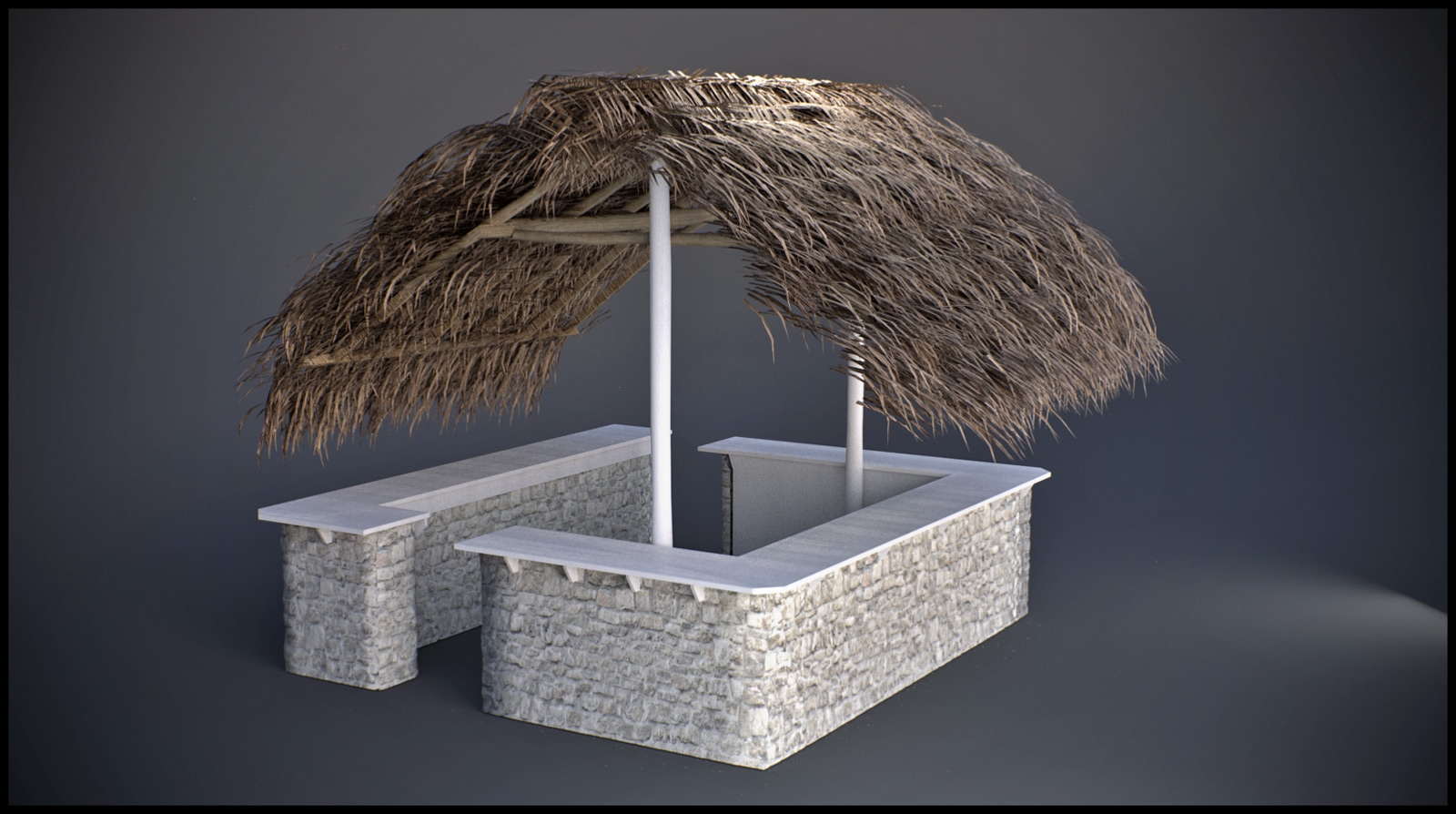
        finally had a project to test.
        this is my first and only test yet, i did need to manually adjust everything to my desire though.
        But im gonna 'play' with it a lot more!!!!!
        😎


        temp_postpro.jpg

        1 Reply Last reply
        Reply Quote 0
        • BurkhardB
          Burkhard
          last edited by

          Here is the German file


          fur_lang_de.txt

          http://www.ia-plus.de

          1 Reply Last reply
          Reply Quote 0
          • M
            MDM
            last edited by

            man this plugin is awesome 😍 🎉 🎉 🎉 🎉 🎉 🎉
            for landscaper couldn't be anything better, our dreams came through now we can grow grass in the computer, can't wait for the first mower 🤣 will be available
            great stuff I love it, and it's so much fun 😄

            Nothing is impossible :smile:

            1 Reply Last reply
            Reply Quote 0
            • F
              frv
              last edited by

              On a Mac crowd maker still does not work.
              The dialog now works fine but it does not create any crowd on the selected surface.

              Hope you can update when you have any time. But don't worry, I am already fine with the current version making crowds with the fur dialog.
              Francois

              An idea for crowd maker, it would be nice if we can project a line that guides the crowd into certain directions. For instance at stations crowds tend to walk back and forth following routes. Maybe its possible to click a line, or a curved line and crowdmaker puts the crowd with a specified with along this line.

              Francois

              1 Reply Last reply
              Reply Quote 0
              • C
                cnsdkliang
                last edited by

                Very nice plugin. 😎 😆

                1 Reply Last reply
                Reply Quote 0
                • DareDevilD
                  DareDevil
                  last edited by

                  @tak2hata said:

                  Hi,all.
                  I updated this plugin to version1.3i.

                  Webdialog sees easier.(Thanks Diego.)
                  Parameter name translates by langage text file.

                  Thanks.

                  A french translation.
                  Thanks to you all !

                  Edit :
                  The file is now in UTF8 format


                  fur_lang_fr.txt

                  1 Reply Last reply
                  Reply Quote 0
                  • A
                    AcesHigh
                    last edited by

                    people, you are talking about making grass, but if I try to make a simple rug, with fur, the file will jump in size to some 20-30mb! It will take minutes to import it into another file (like, inside of a house). And render times (to start the render) will soar in VRAY.

                    1 Reply Last reply
                    Reply Quote 0
                    • jo-keJ
                      jo-ke
                      last edited by

                      sorry, but where do I copy the language file and how can I activate it?

                      http://www.zz7.de

                      1 Reply Last reply
                      Reply Quote 0
                      • BurkhardB
                        Burkhard
                        last edited by

                        Just to the Plugins folder. After restart you'll find fur_en in the Menu>Plugins. But opening the browser it is in German.
                        (Wurde allerdings noch nicht überprüft; Gegenvorschläge sind willkommen )

                        http://www.ia-plus.de

                        1 Reply Last reply
                        Reply Quote 0
                        • jo-keJ
                          jo-ke
                          last edited by

                          @burkhard said:

                          Just to the Plugins folder. After restart you'll find fur_en in the Menu>Plugins. But opening the browser it is in German.
                          (Wurde allerdings noch nicht überprüft; Gegenvorschläge sind willkommen )

                          OK, very easy, it worked.

                          Danke

                          http://www.zz7.de

                          1 Reply Last reply
                          Reply Quote 0
                          • T
                            Technohippy
                            last edited by

                            AWESOME... many thanks

                            http://www.realitybuildingdesign.co.uk

                            1 Reply Last reply
                            Reply Quote 0
                            • M
                              MartinK
                              last edited by

                              Just downloaded this and look forward to trying it out. My respect and admiration for all those who create and make these Rubies available is beyond words...so THANKS TO ALL.

                              1 Reply Last reply
                              Reply Quote 0
                              • D
                                djrique
                                last edited by

                                Paulower

                                I downloaded this translation Portuguese-BR, but it didn't work. I put it on the sketchup plugin folder like the instructions, how I do? Thx.

                                1 Reply Last reply
                                Reply Quote 0
                                • plot-parisP
                                  plot-paris
                                  last edited by

                                  thats really a great plugin. so much fun to work with... 😄


                                  furrballs.jpg

                                  1 Reply Last reply
                                  Reply Quote 0
                                  • R
                                    robert111
                                    last edited by

                                    plot-paris , very nice modeling , can you make your fur setting thanks

                                    1 Reply Last reply
                                    Reply Quote 0
                                    • plot-parisP
                                      plot-paris
                                      last edited by

                                      thanks Robert. unfortunately I am not sure of the settings... didn't change much though, appart from the density... both creatures sprout more than 50.000 hairs...

                                      1 Reply Last reply
                                      Reply Quote 0
                                      • S
                                        silvioduque
                                        last edited by

                                        Hi all , im trying to make a nice grass i use maxwell render and this plug in seems to be perfect solution , but i really dont get it im and amateur in this, can some one here could help me in making a nice grass, configuration on plug in and how to make it, thanks all for the help in advance.

                                        files can be sent to verde<at>natarquitectura<dot>com

                                        1 Reply Last reply
                                        Reply Quote 0
                                        • M
                                          monitep
                                          last edited by

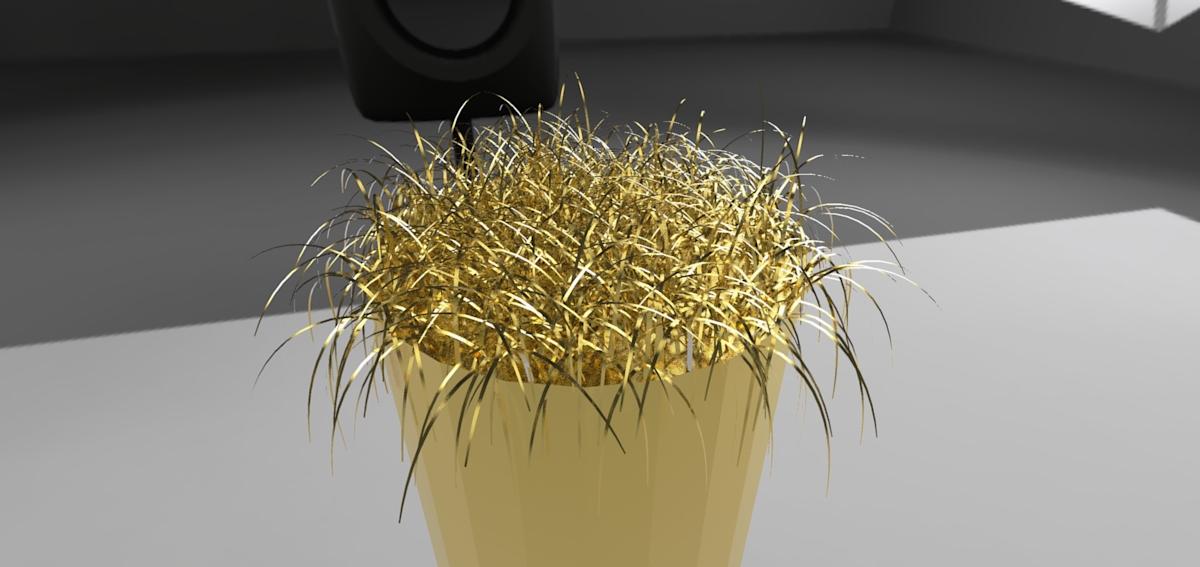
                                          Hi to all! just installed this FANTASTIC plugin! This is a very quick render in Twilight Render (preset 03, 6 min.)
                                          Thanks TAK2HATA!

                                          provaFUR.jpg

                                          1 Reply Last reply
                                          Reply Quote 0
                                          • A
                                            aser28
                                            last edited by

                                            Hi i want to make some fur rug with sketchup fur plugin anyone has experience on that plugin. I need some advice how to make good looking fur rug whats the best settings. Thanks

                                            1 Reply Last reply
                                            Reply Quote 0

                                            Hello! It looks like you're interested in this conversation, but you don't have an account yet.

                                            Getting fed up of having to scroll through the same posts each visit? When you register for an account, you'll always come back to exactly where you were before, and choose to be notified of new replies (either via email, or push notification). You'll also be able to save bookmarks and upvote posts to show your appreciation to other community members.

                                            With your input, this post could be even better 💗

                                            Register Login
                                            • 1
                                            • 2
                                            • 26
                                            • 27
                                            • 28
                                            • 29
                                            • 30
                                            • 31
                                            • 32
                                            • 33
                                            • 28 / 33
                                            • First post
                                              Last post
                                            Buy SketchPlus
                                            Buy SUbD
                                            Buy WrapR
                                            Buy eBook
                                            Buy Modelur
                                            Buy Vertex Tools
                                            Buy SketchCuisine
                                            Buy FormFonts

                                            Advertisement