When I zoom in, model gets cut off
-
I found this thread because I had the same problem. Here's the solution that I found:
Under the Camera tab, select the "Perspective" option. The clipping occurs when you are in "Parallel Projection"
-
Sorry to drag up an old thread, but I wanted to let people know how I solved the issue.
The tip above for selecting everything then creating a block worked, as it showed that I had something outside the model about 10km above the space I was working in. I was then able to select the items I wanted and group them. Then a elect all, and de-select the model and a delete got rid of what ever I'd managed to locate on the edge of the earths atmosphere. This got rid of the clipping plane and restored my sanity!
So thanks to the guys above and your tips!
-
@keea1111 said:
Hi,
Can someone help me figure out why sometimes, and seemingly without cause, I become unable to get close to my model to work the details. When I zoom in, the model gets cut off, as if I'm opening up a wall, but in perspective I'm actually 8' or so away from my model. Now, it's very difficult to draw any detail. Anyone have any experience with this...much thanks, Keea
Solution 1 (most effective):
Reduce the field of view even as low as in single digits until the clipping plane doesn't intrude. Yes, practically you'll be working in an almost paralleled projection mode (field of view = 0) but who cares if you can get the job done on every detail.Solution 2 (relatively more messy but still very effective and possible to combine with solution 1 - also the only solution for missing faces on very small polygons after using follow path tool):
Select the object / group / component that cannot be properly edited due to the clipping planes activating and scale it up a round factor (2, 3, 4, 5 even 10 times) edit it and the scale it down. Even simpler work with components and place a copy of the desired one somewhere in the scene (or in another Sketchup instance entirely) then scale it up then open it then edit it and the delete it. All the editing will translate to all other instances which are impossible (in ignoring the solution 1) to edit in their actual size and are cumbersome to scale up and down individually.Hope it helps ! That is if you didn't already find the answer

All best!
-
Read my post a few up from this. Turn OFF perspective and you can get a few thousandths of an inch up close. Playing with FOV only creates distortions in your view and doesn't solve the clipping problem.
-
Camera's boxes could be the problem as well, try to delete cameras ... it worked for me.

-
the easiest way is to open a new sketch up file and copy paste your work.

-
@zackya07 said:
the easiest way is to open a new sketch up file and copy paste your work.
The only reason this works is because the original drawing extents, if large, affect the zoom and near field clipping threshold.
Simply turning off perspective when zooming in close prevents near field clipping.
Turn it on again when backing out. Just a mouse-click.Far easier than opening a new SU window, copying and pasting, then having to re-clip and export back the edited version to the original model.
-
@twoodby said:
I found this thread because I had the same problem. Here's the solution that I found:
Under the Camera tab, select the "Perspective" option. The clipping occurs when you are in "Parallel Projection"
thank youuuuuuuuuuuuuuuuuuuu my friend
-
Hello Everyone.
I'm posting to this thread, Why, Yes you guessed it. I am having or was having this same issue. I read through all of your comments and of course, tried them all. I believe someone mentioned about the perspective which works for a few times. Then someone mentioned that an imported component may be the issue. Well, I found that the imported component was the main issue. It seems that particular component did not work well with perspective turned on. Once I deleted that component drawing worked fine.
-
If a component has geometry that is very large or is positioned far from the model origin, it will aggravate clipping issues. Always try a component in an empty file to see whether it has such issues (and also if it is excessively detailed for your needs, as that will bloat the model and hurt performance) before importing it into your real model.
-
Why is it not possible to specify the camera clipping that you want like in Blender? In Blender, you are able to change the clipping by distance in your view.
-
@keith3201 said:
Why is it not possible to specify the camera clipping that you want
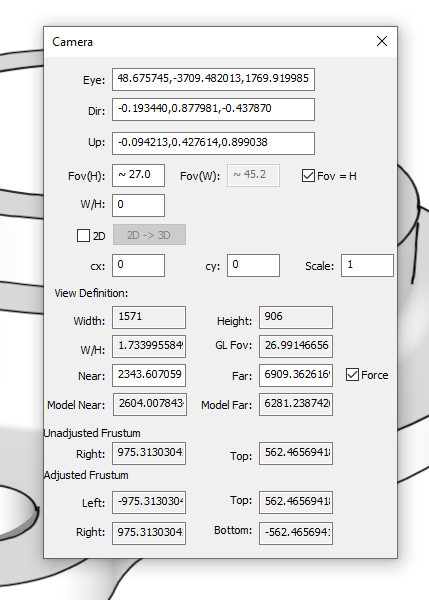
What makes you think it isn't possible. It can be set in the Windows build of SketchUp, anyway.
-
I have the windows version but there is no way that I have ever seen to access that menu. It has also never been mentioned in this topic as a way to help with the clipping problem.
-
This has been around for years. Open the Ruby Console, paste the following and press Enter.
Sketchup.send_action 10624You could also use ThomThom's Camera Tools to access the panel.
-
Thank you. This might be helpful for highly detailed models
-
You're welcome.
Generally if you are managing your model correctly clipping really shouldn't be a big problem.




Advertisement