When I zoom in, model gets cut off
-
Hi,
Can someone help me figure out why sometimes, and seemeingly without cause, I become unable to get close to my model to work the details. When I zoom in, the model gets cut off, as if I'm opening up a wall, but in perspective I'm actually 8' or so away from my model. Now, it's very difficult to draw any detail. Anyone have any experience with this...much thanks, Keea
-
I think its a common problem with sketchup I cant explain why but I am sure some one will. It may have some thing to do with your graphics card to. I usually just use the zoom extents button or you can right click and click zoom extents.
Cheers
S
-
Hi Keea,
This is a known issue called "Clipping". See if any of the below solutions can help:
http://sketchup.google.com/support/bin/answer.py?hl=en&answer=36261(especially if you have imported CAD geometry far from the origin, really tiny or very huge model "distance" wise or some weird FOV set).
-
Hi,
You've identified the problem, but the things that were suggested didn't stop the camera clipping. Strange that I have two copies of the same model in my sketch up, one works fine, I can zoom in, and the other is clipping. Any other thoughts on this problem? thanks,ps I'm moving to a mac next week from my PC, so hopefully this may solve the problem, but not sure...
-
@keea1111 said:
ps I'm moving to a mac next week from my PC, so hopefully this may solve the problem, but not sure...
It won't. Been there, doing that

Rick
-
Are you really sure that in one of the copies there is no any stray geometry somewhere in outer space? Try to zoom to extents (Shift+Z) and select all (Ctlr+A). Or the FOV is exactly the same? (Switch to the Zoom tool (Z) and see what it says in the Measurement box).
Was anything imported in the models?
-
Could be hidden geometry, on hidden layers etc.
It can also be guidelines or guide points, if they are far away they might cause the clipping, but Zoom Extent won't include them when zooming.
-
HI,
I can't detect any stray lines. I do have a section plane hanging out in space above the models. Very strange. I'll attach my model and would you mind looking at it. The FOV is 35 so that isn't the problem. Now I notice when I'm doing my lay out and changing my perspective of the model there, the camera clipping is extreme there and I can't get a close up shot. I did import some 2D trees. thanks for your time,
-
Your model is faaar away from the origin. See how far away your model axis are.
And when you do hit Zoom Extent - it does zoom far out, you can see teh model as a dot, the model axis far away, and a rectangle also far away. All the things mentioned earlier in this thread.
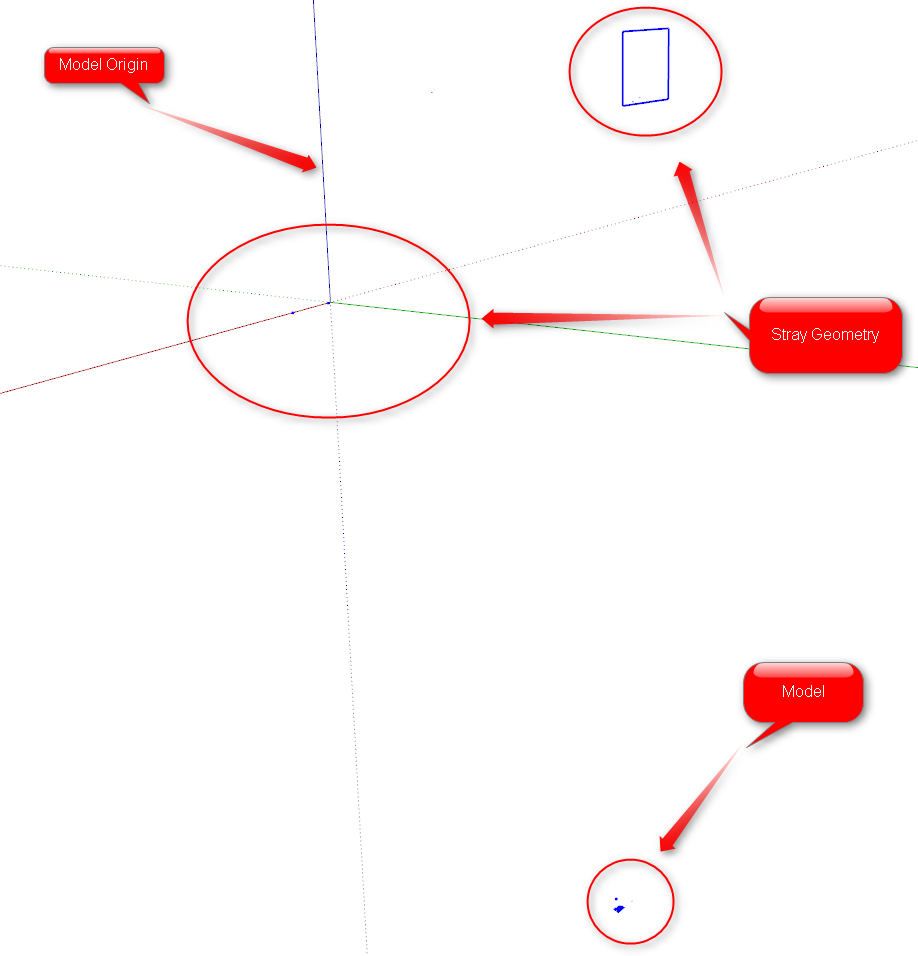
-
Hi,
I didn't realize you can't have this kind of distance in sketch up. The reason I do it this way, is so that my scenes don't show the other models, so when I send to LO, the background is clear. Do I really need my models so close together at the axis point? Are there any other solutions? The model that was clipping was the one that was not too far from the axis. Anyway, I appreciate the feedback and the learning curve. thanks, Keeaps how do you all send your scenes to LO without having to spread the models out too far?
-
@keea1111 said:
The reason I do it this way, is so that my scenes don't show the other models, so when I send to LO, the background is clear.
You have multiple models in one file?
If so, use layers and scenes. Set up scenes where you hide/unhide layers to display what you want.@keea1111 said:
Do I really need my models so close together at the axis point? Are there any other solutions?
Yes, SU handles large distances very poorly. Which is why when importing DWG or other files that one should ensure everything is close to origin.
-
HI Thom,
Thanks, that bit of advice makes sense. That helps a lot..thanks for your time here...I was doing the hiding and unhiding within some of my scenes, but never considered hiding other models...thanks and blessings,
-
I had this problem in spades, then a while back Catamountain made a remark in passing that gets around this clipping problem, but does not eliminate it.
The reason clipping happens is due to perspective. As you get in close (in proportion to the models dimensions) SU cannot resolve the angularity (like our eyes can) and clips what it cannot draw. Setting field-of-view helps, but only a little.
To solve this problem, turn OFF perspective view. You can then get real close and personal with the entity. There will be no clipping as you get closer, but it will clip as you zoom out from the entity, exactly the reverse.
Two cautions before you turn off perspective (Camera - perspective).
If the drawing is dimensionally big or complex, select the entity first, or some line nearby. That makes it easier to find when you turn off perspective.Zoom OUT so that the entity is some distance away and centered in the screen. Then turn off perspective. The view will shift a bit, and then you can zoom in as close as you want. If you don't zoom out, SU may get very far out and you could lose sight of the entity.
After you are done examining and fixing the problems, turn perspective back on.
-
This problem has cropped up again. Does anyone know a maximum distance your model can be from the sketch up work space before this clipping begins. It seems once it starts, you cannot go backward, but have to copy all of you drawings to a brand new sketchup template, redo scenes, layers, etc. Giant pain. If there were a way to 'clear' the clipping, that would be great. thanks,
-
If you ensure that you don't have small pieces of stray geoemtry far away you should be able to just move your model to the origin. There are plugins that will shift your model to be positioned near Origin for you.
-
hi the same thing had happened to me.. after a lot of searching i realized that there as a small line far away from the model. when you right click > zoom extend if the model does not fill the screen it means there is an entity floating in your workplane!!
-
Also make sure "Show hidden geometry" is turned ON.

A hidden line or soft line way out there will drive you nuts if you can't see it.If you still have difficulty finding that wayward entity, do a "Select All" (EDIT; Select All) then GROUP the entire selection and that wayward entity will be at a far end of the bounding box, highlighted in blue.
Delete it then explode the group. -
I was also experiencing the same issue after importing a massive dwg and deleting like 100 layers. Almost had to resort to sending my SU file to this thread, but turned out to be hidden geometry. Thanks Thread.
Do you think better to work of a jpg file and avoid these issues. But Dwg is so nice cos you can click to the points and its accurate.
-
Hi
If you set camera to parallel view then it does not cut off I guess... -
@zacchia said:
Hi
If you set camera to parallel view then it does not cut off I guess...Not sure if Parallel View will prevent "cutting" (clipping), but as mentioned before, if you get "near field" clipping when zooming in, then zoom out a bit, and turn OFF perspective.
Then zoom back in as close as you want. You may want to select an entity at/near what you are zooming into to guide you back in after perspective is turned off, because the whole object will jump back in view.Note that when perspective is off, you will get "far field" clipping when you zoom out on a large object.







Advertisement