Search local drive from Component browser?
-
Is there a way to search my computer for components using the components browser, or can that only search the 3D warehouse? I like to add components to my local library but don't always remember where I put them.
-
not sure of a windows counterpart but you can do this on macs.. i would assume it's possible on windows as well though
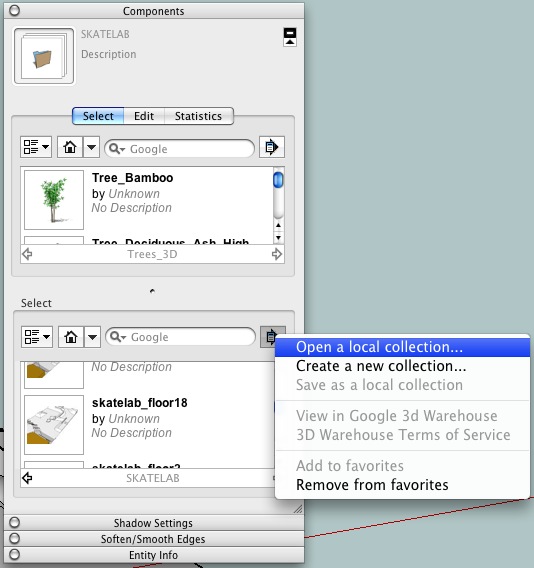
-
If you put your collection in a folder inside the SU components folder, you can access it from the "navigate" pull down menu where all the google components are stored.
-
@honoluludesktop said:
If you put your collection in a folder inside the SU components folder...
Yes, that's exactly where keep my components...I'm just looking for a faster way to find them instead of looking thru hundreds of components' thumbnails
Thanks for the replies, guys...any other ideas?
-
@d12dozr said:
@honoluludesktop said:
If you put your collection in a folder inside the SU components folder...
Yes, that's exactly where keep my components...I'm just looking for a faster way to find them instead of looking thru hundreds of components' thumbnails
Thanks for the replies, guys...any other ideas?
so you can't get the 'open local collection' dialog to show up? i can find skps anywhere on my system using that (not only the SU components folder)
see if you have something like this in the components browser --
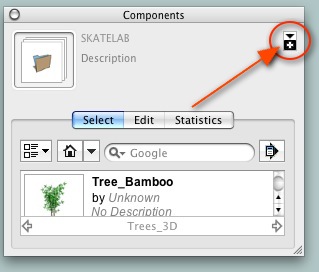

-
If you do it Jeff's way, you eventually get to search drive or folder, but that is limited to file names, and ascii information stored within the components.
-
@honoluludesktop said:
If you do it Jeff's way, you eventually get to search drive or folder, but that is limited to file names, and ascii information stored within the components.
fwiw, that's pretty much the only way mac users can browse by thumbnails.. (unless the original skps are saved a certain way or a third party app is brought in)
-
Data base management is difficult whenever the number of stuff you want access to increases. For now, I can't think of anything better then sorted folder and component names (tree_oak_large). Problem is that what ever convention you come up with, eventually need to be changed to accommodate a growing, or changing system. Maybe a plugin to rename and reorder, files and folders, using wild cards, and in batches. Ouch, beyond my capacity to envision.
-
Jeff, I can search visually that way but I was looking for a way to search the filenames...say I have a deck kit (named "Deck Kit") saved in one of my Components subfolders, but I don't remember which one. I want to type in "Deck Kit" in my Component browser and search my PC for it, hopefully that will be faster than browsing thru all my folders...ya dig?
 Am I making sense?
I have the SKP files named well like honoluludesktop says, and I know I can just search my PC for them thru Windows Explorer, but I am trying to save a step or two. -
Marcus, unless I misunderstand, or Vista is different from WinXP you can do that now. From SU's menu File > Open > select all files and type in the search file name criteria with wild cards as necessary. Or, right click a folder in SU's "Open" window and search. Or, select "look in" (top of SU's "Open" window), select any icon, my computer, a drive, or folder, right click search all within.
-
Thanks honoluludesktop, Vista must be different than XP because I don't have the option to search from SU's "Open File" window, even if I right-click a folder

-
Bummer, another reason not to upgrade my OS. I wounder about Win7. Maybe someone else can tell us. How about it Jeff? I see that you are Win7p
-
@honoluludesktop said:
Maybe a plugin to rename and reorder, files and folders, using wild cards, and in batches. Ouch, beyond my capacity to envision.
Or just any any existing utility: http://www.guyswithtowels.com/dev/apps/f2.html
-
SU's browsers aren't very good at presenting the content.
They are slow and the view options are not ideal.
Browsing by pure image is not easy as often many components look similar.
Browsing by pure text is no good either - you need to read all the text.
Best would be to have thumbnails AND text - so you scan visually by what looks to be what you are looking for - and then use the text as aid to determine if you located the correct item. -
Thomas, thanks for the link. IMO, one of the best features of OutLook, is categories, and the opportunity to cross file the same document. Ideally a SU browser that easily permits that is a first step to better access of a warehouse of components.
-
@d12dozr said:
.ya dig?
Am I making sense?ha, yeah.. i see what you're saying now. my bad.
@honoluludesktop said:
How about it Jeff? I see that you are Win7p
nah, i use macs.. 7p is my SU version but osx is my operating system.
anyway, back to the original topic.. try searching in the import dialog (File -> Import...)
i can search the entire system from there using text without leaving sketchup. -
I was thinking of this recently. The best I can think of is a combination of hierarchical (folders) organization, and filename and label filters.
I see something like vertical (column) layout in Mac's Finder for drilling into folder hierarchy, but there needs to be a text box to filter on the filename. And I find more the 2-3 levels of hierarchy cumbersome. (This is how Finder works, sort of.)
Immediate information would include: Thumbnail, file size, file name, and date last modified. Include the ability to sort of these fields.
Additionally, add the ability to label files using user-defined taxonomy (web 2.0 tagging,) because not everything fits neatly into a hierarchical structure.
-
@jim said:
I see something like vertical (column) layout in Mac's Finder for drilling into folder hierarchy, but there needs to be a text box to filter on the filename. And I find more the 2-3 levels of hierarchy cumbersome. (This is how Finder works, sort of.)
Immediate information would include: Thumbnail, file size, file name, and date last modified. Include the ability to sort of these fields.
Additionally, add the ability to label files using user-defined taxonomy (web 2.0 tagging,) because not everything fits neatly into a hierarchical structure.
jim, mac's finder is a bit more powerful than it might appear. (in fact, i'd argue that searching for anything on a mac is a lot easier/faster than windows)
a quick rundown of searching in the finder:
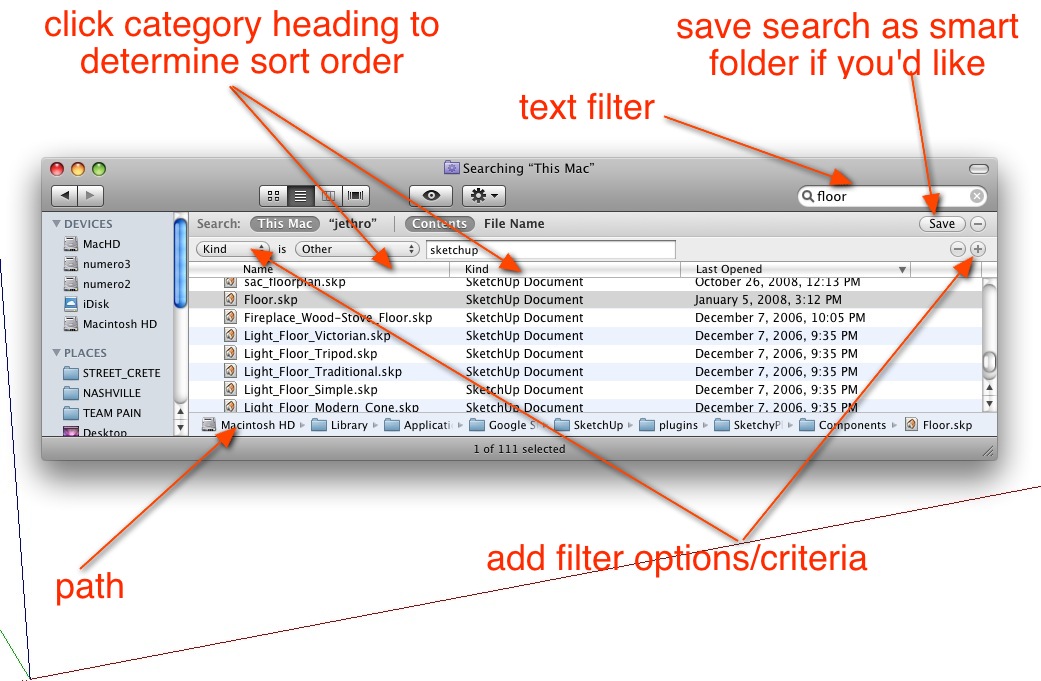
depending on your filter selections, you can search things such as a line of code from a ruby file etc..
if you save as a smart folder (or create one via- Finder->File->New Smart File) then you will always have quick access to that particular search and the folder is automatically updated as the files on the system change. -
Thanks Jeff. I just got a second-hand Mac recently and am still learning about it. Finder has everything but SU thumbnails, it seems.
-
Thanks for the explanation, Jeff




Hello! It looks like you're interested in this conversation, but you don't have an account yet.
Getting fed up of having to scroll through the same posts each visit? When you register for an account, you'll always come back to exactly where you were before, and choose to be notified of new replies (either via email, or push notification). You'll also be able to save bookmarks and upvote posts to show your appreciation to other community members.
With your input, this post could be even better 💗
Register Login


Advertisement