Vray for Sketchup 6 help much appreciated
-
Hi
I've been using sketchup for a little while to produce some architectural models. I am using sketchup 6 along with Vray for sketchup 6. I have now just completed going through the vray for sketchup manual by ASGVIS along with using the neccessary scenes and am still finding my feet a litle and would appreciate help.
I have added a brick texture to my model and 'texture mapping' tutorial from the above mentioned manual and when produced with the final render i cant but notice that the brickwork to me looks quite pale on both the images produced, but it could just be me being paranoid. I wold be grateful for your view on it. (i know i can add bump and displacement but that didnt seem to make a difference in terms of it appearing pale).
Secondly and probably more importantly can anybody point me in the direction of Vismat materials for Vray sketchup 6. I know that Vismat materials have been released and distributed but they all seem to be geared towards Vray sketchup 7 which when i import into Vray sketchup 6 i get the error message 'Invalid ASGvis material file' (altough a rare few do work).
Much appreciated if anybody can help me out thanks.
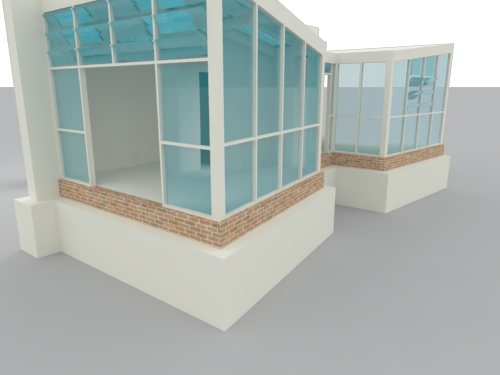
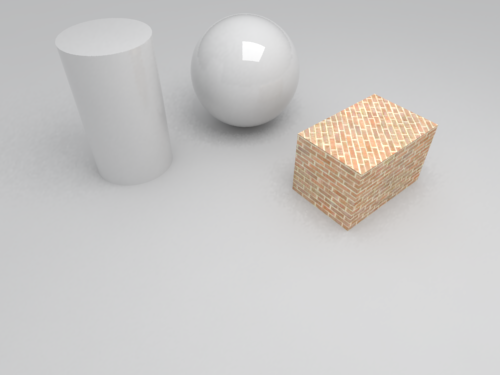
-
@avg said:
Vray sketchup 6
- this isn't a V-Ray version. The same release had two installers "V-Ray for Sketchup 6" and "V-Ray for Sketchup 7", but they where still the same V-Ray version.
In the original release there was no version info.
In the first service release you could find the version info from Vray Options Window -> About
In the very latest the version info is from SU -> Window Menu -> Preferences -> Extensions -> Then locate V-Ray for Sketchup@avg said:
I have added a brick texture to my model and 'texture mapping' tutorial from the above mentioned manual and when produced with the final render i cant but notice that the brickwork to me looks quite pale on both the images produced, but it could just be me being paranoid. I wold be grateful for your view on it. (i know i can add bump and displacement but that didnt seem to make a difference in terms of it appearing pale).
This seem to be more of a lighting or camera exposure thing. Might get some results by playing with the colour mapping.
Note that the rest of the material in the model are very plain - and it all affects the result and impression of the scene.@avg said:
Secondly and probably more importantly can anybody point me in the direction of Vismat materials for Vray sketchup 6. I know that Vismat materials have been released and distributed but they all seem to be geared towards Vray sketchup 7 which when i import into Vray sketchup 6 i get the error message 'Invalid ASGvis material file' (altough a rare few do work).
Sorry, can't answer this one. I don't use third party vismaps. I rather look for good texture than trying to get these vizmaps to work.
-
Thanks for getting back back to me. I think i got muddled up with my terminology but it should have been as you mentioned below 'Vray for Sketchup 6' not 'Vray Sketchup 6'.
Therefore i'm sure and hope that i have been using the correct Vray which i sure i am.
I'm sure you tell i'm a novice
-
@avg said:
Thanks for getting back back to me. I think i got muddled up with my terminology but it should have been as you mentioned below 'Vray for Sketchup 6' not 'Vray Sketchup 6'.
No - what I mean is that the version number comes in a numerical format, like 1.05.30 or 1.44.66.
'Vray for Sketchup 6' or 'Vray Sketchup 6' simply refer for what version of Sketchup the installer was made for - but is no indication of the version number of V-Ray.

Hello! It looks like you're interested in this conversation, but you don't have an account yet.
Getting fed up of having to scroll through the same posts each visit? When you register for an account, you'll always come back to exactly where you were before, and choose to be notified of new replies (either via email, or push notification). You'll also be able to save bookmarks and upvote posts to show your appreciation to other community members.
With your input, this post could be even better 💗
Register Login


Advertisement