sketchucation logo sketchucation
    • 登入
    Oops, your profile's looking a bit empty! To help us tailor your experience, please fill in key details like your SketchUp version, skill level, operating system, and more. Update and save your info on your profile page today!
    🔌 Smart Spline | Fluid way to handle splines for furniture design and complex structures. Download

    [Plugin] Flattery papercraft tools

    已排程 已置頂 已鎖定 已移動 Plugins
    91 貼文 41 Posters 92.1k 瀏覽 41 Watching
    正在載入更多貼文
    • 從舊到新
    • 從新到舊
    • 最多點贊
    回覆
    • 在新貼文中回覆
    登入後回覆
    此主題已被刪除。只有擁有主題管理權限的使用者可以查看。
    • TIGT 離線
      TIG Moderator
      最後由 編輯

      @subsonic mike said:

      Once extracted I moved the entire extracted folder to its location

      NO ?
      I suspect you need to move the contents of that folder into Plugins...
      In the Plugins folder there should be one file called flattery.rb and a folder called flattery containing loads of other files.
      If you unzipped a file called flattery.zip into a folder called flattery then it's one level too deep.... 😕

      TIG

      1 條回覆 最後回覆 回覆 引用 0
      • Subsonic MikeS 離線
        Subsonic Mike
        最後由 編輯

        I think its best I start again
        just one thing, is it usual to get an error when you try to extract it directly to the plugins folder?

        Design Crash Learn

        1 條回覆 最後回覆 回覆 引用 0
        • thomthomT 離線
          thomthom
          最後由 編輯

          @subsonic mike said:

          just one thing, is it usual to get an error when you try to extract it directly to the plugins folder?

          No.
          Exactly what error do you get?
          (Error messages are very useful in debugging a problem, so please include them when posting.)

          Thomas Thomassen — SketchUp Monkey & Coding addict
          List of my plugins and link to the CookieWare fund

          1 條回覆 最後回覆 回覆 引用 0
          • Subsonic MikeS 離線
            Subsonic Mike
            最後由 編輯

            OK I extracted the files for the 11th time to get the error but this time it extracted fine!
            BUT the files dont show up when I look in the plugins folder. So I open 7 zip to extract them again but 7 zip shows them in the plugins folder.
            WHAT'S HAPPENING TO MY COMPUTER!

            Design Crash Learn

            1 條回覆 最後回覆 回覆 引用 0
            • TIGT 離線
              TIG Moderator
              最後由 編輯

              @subsonic mike said:

              OK I extracted the files for the 11th time to get the error but this time it extracted fine!
              BUT the files dont show up when I look in the plugins folder. So I open 7 zip to extract them again but 7 zip shows them in the plugins folder.
              WHAT'S HAPPENING TO MY COMPUTER!

              I think you have a Compatibility Files issue with Vista - it tucked them away in a Compatibility folder to protect you!
              Look in the top bar of the Plugins folder window are there any weird folders or icons there...
              Vista can be a pain when it decides that you shouldn't add files to some folders...

              TIG

              1 條回覆 最後回覆 回覆 引用 0
              • Subsonic MikeS 離線
                Subsonic Mike
                最後由 編輯

                I cant seem to see any weird folders icons.

                Design Crash Learn

                1 條回覆 最後回覆 回覆 引用 0
                • TIGT 離線
                  TIG Moderator
                  最後由 編輯

                  Ensure that you don't have any flattery folder or file in your Plugins folder - if you do move them out...
                  Download the zip file to say your desktop.
                  Extract it to a folder with the name of the zip file.
                  Open the folder and select the file and folder in it.
                  Copy.
                  Open the Plugins folder and Paste.
                  You should now have the correct file+folder installed.
                  Restart Sketchup and 'flattery' might need activating from the Preferences > Extensions section.
                  Its toolbar is activated off View > Toolbars...

                  TIG

                  1 條回覆 最後回覆 回覆 引用 0
                  • Subsonic MikeS 離線
                    Subsonic Mike
                    最後由 編輯

                    IT WORKS! 😍
                    Thank you so much guys for helping me get it working! Thank you!

                    Design Crash Learn

                    1 條回覆 最後回覆 回覆 引用 0
                    • TIGT 離線
                      TIG Moderator
                      最後由 編輯

                      Hoooooooooray!

                      TIG

                      1 條回覆 最後回覆 回覆 引用 0
                      • G 離線
                        Gaiv
                        最後由 編輯

                        hi everybody, i study architecture and i really love this plugin, it's very very cool because it's help me a lot to makes paper craft 😄 ... thank you conceptor but i just have a little problem, i don't understand how to use the " index Edges" function 😕 and it's very important for me because i have a very complex modeling to do and it's impossible without this function... someone can help me?

                        1 條回覆 最後回覆 回覆 引用 0
                        • TIGT 離線
                          TIG Moderator
                          最後由 編輯

                          As explained on the tools web-page

                          @unknownuser said:

                          When your model is fully constructed, and you are about to unfold it, select the entire thing and press the Index Edges button. This marks all of the edges in your model so that later, when your model is unfolded, Flattery will know what used to be connected. This is critical for the Reunite Edges tool, and helpful for the Add Tabs tool.

                          So do it at the start and thenunfold...

                          TIG

                          1 條回覆 最後回覆 回覆 引用 0
                          • G 離線
                            Gaiv
                            最後由 編輯

                            it's what i do, but there is nothing 😒 when the volume is complete i select all the model and i press the index Edges button but nothing appear =s
                            maybe it's a bug?

                            1 條回覆 最後回覆 回覆 引用 0
                            • TIGT 離線
                              TIG Moderator
                              最後由 編輯

                              I think you misunderstand.
                              The Index tool 'marks' all edges so that the tool knows which edges were common before unfolding and for tabbing etc. It doesn't add any 'text' at all ???

                              However, here's a way... once you have unfolded/tabbed the form as desired, then you select all of the flattened edges [faces , un-indexed edges etc are ignored so you don't need to be too careful]... now run this snippet of code in the Ruby Console - copy/paste it

                              m=Sketchup.active_model;es=m.active_entities;ss=m.selection;ss.to_a.each{|e|next if e.class!=Sketchup;;Edge;id=e.get_attribute("Unfold","edge_id",nil);next if !id;  pt=e.start.position.offset(e.line[1],e.length/2);es.add_text(id.to_s,pt,[0,0,0])}
                              

                              Text representing the edges' id code will be added centrally to the pairs edges that share each code... 1, 2, 3 etc

                              TIG

                              1 條回覆 最後回覆 回覆 引用 0
                              • BepB 離線
                                Bep
                                最後由 編輯

                                Hello Tig,

                                I am getting this message in the ruby console.
                                Am i doing something wrong?

                                m=Sketchup.active_model;es=m.active_entities;ss=m.selection;ss.to_a.each{|e|next if e.class!=Sketchup;;Edge;id=e.get_attribute("Unfold","edge_id",nil);next if !id;  pt=e.start.position.offset(e.line[1],e.length/2);es.add_text(id.to_s,pt,[0,0,0])}
                                Error; #<NoMethodError; undefined method `active_m' for Sketchup;Module>
                                (eval);184[/ruby]
                                

                                Bep

                                "History is written by the winners"

                                1 條回覆 最後回覆 回覆 引用 0
                                • TIGT 離線
                                  TIG Moderator
                                  最後由 編輯

                                  @bep said:

                                  Hello Tig,

                                  I am getting this message in the ruby console.
                                  Am i doing something wrong?

                                  m=Sketchup.active_model;es=m.active_entities;ss=m.selection;ss.to_a.each{|e|next if e.class!=Sketchup;;Edge;id=e.get_attribute("Unfold","edge_id",nil);next if !id;  pt=e.start.position.offset(e.line[1],e.length/2);es.add_text(id.to_s,pt,[0,0,0])}
                                  > Error; #<NoMethodError; undefined method `active_m' for Sketchup;Module>
                                  > (eval);184[/ruby]
                                  

                                  Bep

                                  Sorry 😳
                                  A typo crept in between testing and posting...
                                  The correct code 'm=Sketchup.active_model**;**' has now been edited in... 😒

                                  TIG

                                  1 條回覆 最後回覆 回覆 引用 0
                                  • BepB 離線
                                    Bep
                                    最後由 編輯

                                    Thanks Tig ,

                                    Now it works 👍 (I just cant see the typo ❓ )
                                    The ruby also gives a number to the sides that are still connected.
                                    Could it skip these sides ?

                                    Greetings,

                                    Bep

                                    "History is written by the winners"

                                    1 條回覆 最後回覆 回覆 引用 0
                                    • G 離線
                                      Gaiv
                                      最後由 編輯

                                      @tig said:

                                      @bep said:

                                      Hello Tig,

                                      I am getting this message in the ruby console.
                                      Am i doing something wrong?

                                      m=Sketchup.active_model;es=m.active_entities;ss=m.selection;ss.to_a.each{|e|next if e.class!=Sketchup;;Edge;id=e.get_attribute("Unfold","edge_id",nil);next if !id;  pt=e.start.position.offset(e.line[1],e.length/2);es.add_text(id.to_s,pt,[0,0,0])}
                                      > > Error; #<NoMethodError; undefined method `active_m' for Sketchup;Module>
                                      > > (eval);184[/ruby]
                                      

                                      Bep

                                      Sorry 😳
                                      A typo crept in between testing and posting...
                                      The correct code 'm=Sketchup.active_model**;**' has now been edited in... 😒

                                      hi i've tried the ruby console code but nothing happened and there is still no number on the faces =s when i write the code in the ruby i have this message :
                                      m=Sketchup.active_model;es=m.active_entities;ss=m.selection;ss.to_a.each{|e|next if e.class!=Sketchup::Edge;id=e.get_attribute("Unfold","edge_id",nil);next if !id; pt=e.start.position.offset(e.line[1],e.length/2);es.add_text(id.to_s,pt,[0,0,0])}
                                      [#Sketchup::Group:0x1e45fad8]

                                      but no number is it normal ? i work on mac maybe it's the problem? i don't know but pleasee help meeeee 😞

                                      1 條回覆 最後回覆 回覆 引用 0
                                      • TIGT 離線
                                        TIG Moderator
                                        最後由 編輯

                                        You have selected one group.
                                        You must select faces/edges - perhaps inside that group...

                                        TIG

                                        1 條回覆 最後回覆 回覆 引用 0
                                        • bmikeB 離線
                                          bmike
                                          最後由 編輯

                                          no luck here, SU8 pro.

                                          downloaded, extracted. copied the 'flattery' folder (left the MACOSx folder along) into plugins.
                                          noticed there was no flattery.rb, found it inside the flattery folder, moved it to plugins.
                                          shows up in my window>preference as being checked on, but can't seem to load it.

                                          mike beganyi design + consulting llc

                                          1 條回覆 最後回覆 回覆 引用 0
                                          • TIGT 離線
                                            TIG Moderator
                                            最後由 編輯

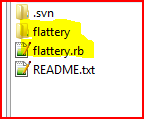
                                            If you reread the README file... it says to put flattery.rb and the flattery folder [with its contents intact] into the Plugins folder...
                                            It needs activating from Preferences > Extensions and then View > Toolbar...Capture.PNG
                                            TIG

                                            1 條回覆 最後回覆 回覆 引用 0
                                            • 1
                                            • 2
                                            • 3
                                            • 4
                                            • 5
                                            • 3 / 5
                                            • 第一個貼文
                                              最後的貼文
                                            Buy SketchPlus
                                            Buy SUbD
                                            Buy WrapR
                                            Buy eBook
                                            Buy Modelur
                                            Buy Vertex Tools
                                            Buy SketchCuisine
                                            Buy FormFonts

                                            Advertisement



