sketchucation logo sketchucation
    • Login
    Oops, your profile's looking a bit empty! To help us tailor your experience, please fill in key details like your SketchUp version, skill level, operating system, and more. Update and save your info on your profile page today!
    Mac User? | Join the Rayscaper Beta for Mac Learn More

    [Plugin] Flattery papercraft tools

    Scheduled Pinned Locked Moved Plugins
    91 Posts 41 Posters 136.2k Views 41 Watching
    Loading More Posts
    • Oldest to Newest
    • Newest to Oldest
    • Most Votes
    Reply
    • Reply as topic
    Log in to reply
    This topic has been deleted. Only users with topic management privileges can see it.
    • P
      Pumpkin Pirate
      last edited by

      Hello everyone!
      A while ago, I made a plugin for designing papercraft patterns. It allows you to unfold models into flat patterns, add tabs, and export them as SVGs. Just recently, I finally got around to polishing it up and putting it online. I call it Flattery, and you can get it here.[mod=:d3wg1npy]NOTE the latest version available from the PluginStore works in >= v2014 AND also earlier versions...
      TIG
      .[/mod:d3wg1npy]http://sketchucation.com/pluginstore?pln=Flattery

      It's got three main tools for designing patterns.

      The Unfold tool unfolds models into flat patterns:

      http://www.pumpkinpirate.info/static/flattery/img/unfold.gif

      the Reunite Edges tool lets you adjust the layout of the patterns:

      http://www.pumpkinpirate.info/static/flattery/img/reunite.gif

      and the Add Tabs tool makes glue tabs:

      http://www.pumpkinpirate.info/static/flattery/img/tabs.gif

      It's also got an SVG export button so you can export your pattern to a program like Illustrator or Inkscape to color and print it.

      1 Reply Last reply
      Reply Quote 0
      • EscapeArtistE
        EscapeArtist
        last edited by

        Nice. This could also be used for simple sheet metal patterns. Thanks!

        1 Reply Last reply
        Reply Quote 0
        • pilouP
          pilou
          last edited by

          Seems a true gem! ๐Ÿ˜ฒ ๐Ÿ˜Ž

          Frenchy Pilou
          Is beautiful that please without concept!
          My Little site :)

          1 Reply Last reply
          Reply Quote 0
          • GaieusG
            Gaieus
            last edited by

            This is very cool! I know Jim has a plugin to unfold geometry but this seems to be a much more "advanced" tool!
            Then there is the Waybe plugin but then that's commercial.

            So this will definitely be a hit for many hobbyists and such! ๐Ÿ‘

            If you do not mind, I have "borrowed" some of your images for The Daily CatchUp. ๐Ÿ˜‰

            Gai...

            1 Reply Last reply
            Reply Quote 0
            • X
              xrok1
              last edited by

              very nice. it would be great if you could predefine the tab sizes or have all tabs after the first one be doubleclick to repeat size. also the option to have auto number tab and corresponding edge (one that appears red when creating tab). ๐Ÿ˜„

              โ€œThere are three classes of people: those who see. Those who see when they are shown. Those who do not see.โ€

              http://www.Twilightrender.com try it!

              1 Reply Last reply
              Reply Quote 0
              • MALAISEM
                MALAISE
                last edited by

                Thanks for this really usefull plugin. ๐Ÿ‘ ๐Ÿ‘ Pumpkin Pirate

                I like it.

                PAM

                La Connaissance n'a de valeur que partagรฉe

                1 Reply Last reply
                Reply Quote 0
                • P
                  Pumpkin Pirate
                  last edited by

                  @gaieus said:

                  This is very cool! I know Jim has a plugin to unfold geometry but this seems to be a much more "advanced" tool!
                  Then there is the Waybe plugin but then that's commercial.

                  So this will definitely be a hit for many hobbyists and such! ๐Ÿ‘

                  If you do not mind, I have "borrowed" some of your images for The Daily CatchUp. ๐Ÿ˜‰

                  Wow, no, I don't mind at all! In fact I'm thrilled!

                  @xrok1 said:

                  very nice. it would be great if you could predefine the tab sizes or have all tabs after the first one be doubleclick to repeat size. also the option to have auto number tab and corresponding edge (one that appears red when creating tab). ๐Ÿ˜„

                  A setting for the width of the double-click tabs seems like a pretty good idea. Not so sure about automatic numbering, though. It would be kind of difficult to get it into the SVG file in a reliable way, and I've generally found that it's hard to know the best order to glue tabs in until you've tried putting the model together a few times. I'll think about it though.

                  1 Reply Last reply
                  Reply Quote 0
                  • X
                    xrok1
                    last edited by

                    thanks for considering it. with regards to the numbering, its not for the order of assembly, i was thinking more for organizing what goes where when gluing. (tab A glues to edge A) but you could glue tab Z to edge Z first it doesn't matter.

                    โ€œThere are three classes of people: those who see. Those who see when they are shown. Those who do not see.โ€

                    http://www.Twilightrender.com try it!

                    1 Reply Last reply
                    Reply Quote 0
                    • utilerU
                      utiler
                      last edited by

                      Very cool mate; and very generous!!! ๐Ÿ‘
                      Welcome the the forum! ๐ŸŽ‰

                      Just Curious...

                      1 Reply Last reply
                      Reply Quote 0
                      • pilouP
                        pilou
                        last edited by

                        Not sure that I have patience to glue all the pieces ๐Ÿ’š
                        But very cool plug! ๐Ÿ˜Ž
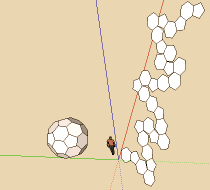
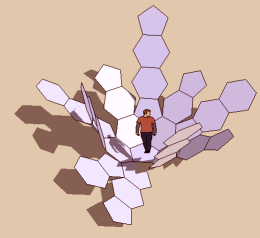
                        puzzle.png


                        puz2.png

                        Frenchy Pilou
                        Is beautiful that please without concept!
                        My Little site :)

                        1 Reply Last reply
                        Reply Quote 0
                        • I
                          ideas_arte
                          last edited by

                          wonderful! very very very grateful to you.
                          This plugin has me very happy!

                          http://www.addemoticons.com/emoticon/animated/AddEmoticons04262.gif

                          http://www.addemoticons.com/emoticon/animated/AddEmoticons04262.gif

                          http://www.addemoticons.com/emoticon/animated/AddEmoticons04262.gif

                          Best wishes


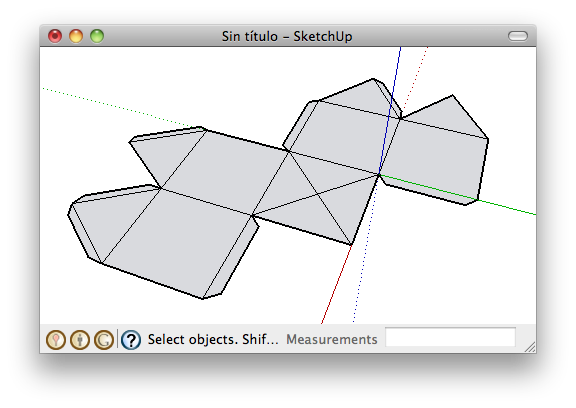
                          su model


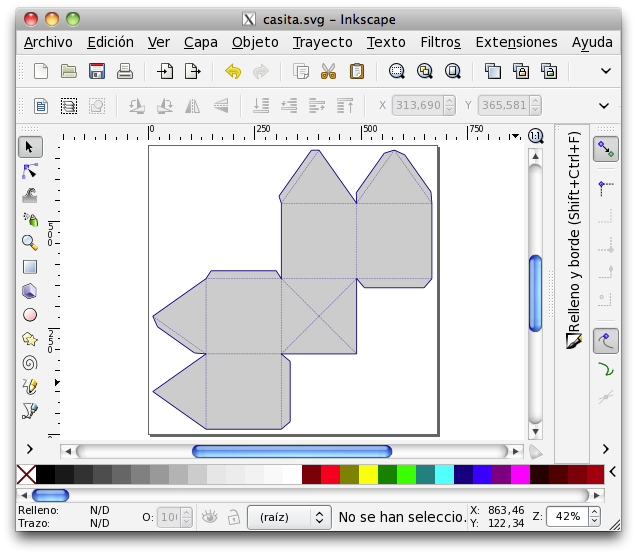
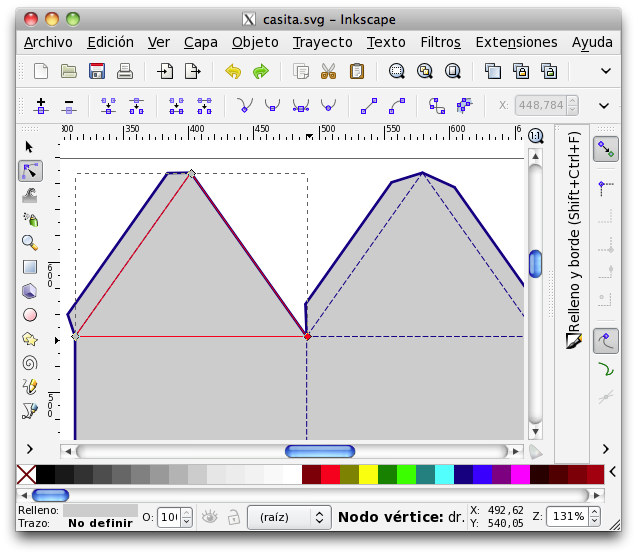
                          svg in Inkscape


                          export good, good editing

                          1 Reply Last reply
                          Reply Quote 0
                          • Mike LuceyM
                            Mike Lucey
                            last edited by

                            Thanks Pumkin Pirate,

                            This plugin will prove to be very useful. BTW, I have made a donation and hope that others will do likewise to help you continue its development ๐Ÿ‘

                            Mike

                            Support us so we can support you! Upgrade to Premium Membership!

                            1 Reply Last reply
                            Reply Quote 0
                            • P
                              Pumpkin Pirate
                              last edited by

                              @mike lucey said:

                              Thanks Pumkin Pirate,

                              This plugin will prove to be very useful. BTW, I have made a donation and hope that others will do likewise to help you continue its development ๐Ÿ‘

                              Mike

                              Wow, Thank you! I'm glad you found it useful. I'm going to do my best to keep it steadily improving.

                              1 Reply Last reply
                              Reply Quote 0
                              • T
                                tfdesign
                                last edited by

                                @escapeartist said:

                                This could also be used for simple sheet metal patterns.

                                Exactly my thoughts too! If bend radii could be specified too, as well as thickness (I haven't checked yet), this tool will be as powerful as the one in Solidworks!

                                A brilliant addition. Thanks very much!

                                Tom

                                My book "Let's SketchUp!" Download from here

                                1 Reply Last reply
                                Reply Quote 0
                                • N
                                  no8one
                                  last edited by

                                  Heyy !!
                                  plzz some help
                                  i downloaded this awesome plugin but when i put it in the plugins folder it's not shown in skitchup
                                  and i tired it on 2 computers
                                  plzz helpp ,,

                                  1 Reply Last reply
                                  Reply Quote 0
                                  • Subsonic MikeS
                                    Subsonic Mike
                                    last edited by

                                    I need help to.
                                    I do all that it says in the readme but it doesn't appear on sketchup
                                    Please help!

                                    Design Crash Learn

                                    1 Reply Last reply
                                    Reply Quote 0
                                    • TIGT
                                      TIG Moderator
                                      last edited by

                                      @subsonic mike said:

                                      I need help to.
                                      I do all that it says in the readme but it doesn't appear on sketchup
                                      Please help!

                                      Did you activate its Extension under Preferences ๐Ÿ˜•

                                      TIG

                                      1 Reply Last reply
                                      Reply Quote 0
                                      • Subsonic MikeS
                                        Subsonic Mike
                                        last edited by

                                        No, how?

                                        Design Crash Learn

                                        1 Reply Last reply
                                        Reply Quote 0
                                        • mitcorbM
                                          mitcorb
                                          last edited by

                                          In Sketchup: top line menu: Window>Preferences>Extensions Check box on plugin name.

                                          I take the slow, deliberate approach in my aimless wandering.

                                          1 Reply Last reply
                                          Reply Quote 0
                                          • M
                                            mozzie
                                            last edited by

                                            Did you copy the unzipped files?

                                            1 Reply Last reply
                                            Reply Quote 0

                                            Hello! It looks like you're interested in this conversation, but you don't have an account yet.

                                            Getting fed up of having to scroll through the same posts each visit? When you register for an account, you'll always come back to exactly where you were before, and choose to be notified of new replies (either via email, or push notification). You'll also be able to save bookmarks and upvote posts to show your appreciation to other community members.

                                            With your input, this post could be even better ๐Ÿ’—

                                            Register Login
                                            • 1
                                            • 2
                                            • 3
                                            • 4
                                            • 5
                                            • 5 / 5
                                            • First post
                                              Last post
                                            Buy SketchPlus
                                            Buy SUbD
                                            Buy WrapR
                                            Buy eBook
                                            Buy Modelur
                                            Buy Vertex Tools
                                            Buy SketchCuisine
                                            Buy FormFonts

                                            Advertisement