V-Ray Light - Lumens - Light size?
-
@unknownuser said:
Lumious power (lm) - total emitted visible light power measured in lumens. When this setting is used, the intensity of the light will not depend on its size. A typical 100W electric bulb emits about 1500 lumens of light.
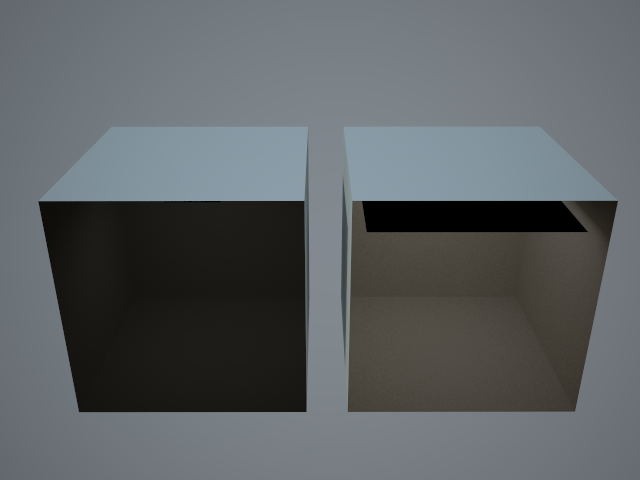
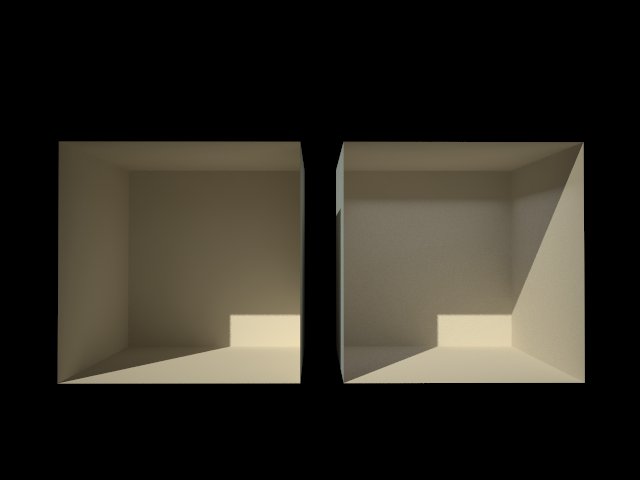
Attached is a test model - a cube 10x10x10m. One side with and X-Ray material on the backside to look into the cube.
In each cube is a light set to 5000 lumens.
The only difference is the size of the light. As you can see - the light inside the cube is quite different. So I'm confused by what the V-Ray manual says about the lumens light unit.
-
This post definitely threw me off a bit. I was very worried that something had gone terribly wrong. After thinking about this for a bit, and discussing it further with one of the guys here in the office, we have figured out the cause of this behavior. This is actually expected behavior. The larger a light source is, the more rays it will cast, and the more it will effect the scene. If you had a plane with an emissive material applied to it, it would behave the same way. The intensity of the emissive material wouldn't change, but the influence it has on the scene would. I hope that makes sense.
-
 Yes - thanks for clearing that up.
 -
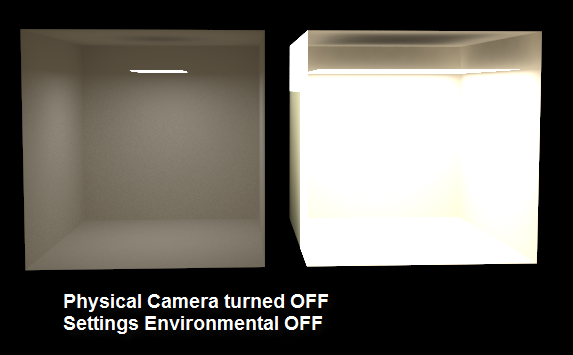
self explanatory!
-
SU v 7.1.6860
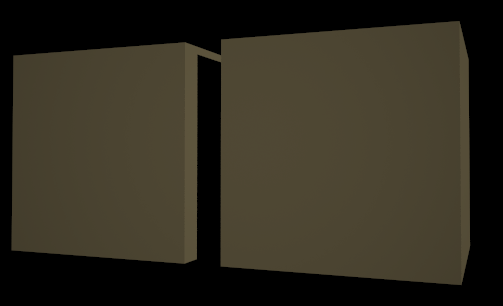
VRayForSketchUp-1.48.67-windows-installerOnce again this is thomthom's file rotated to view the back side of the 2 boxes.
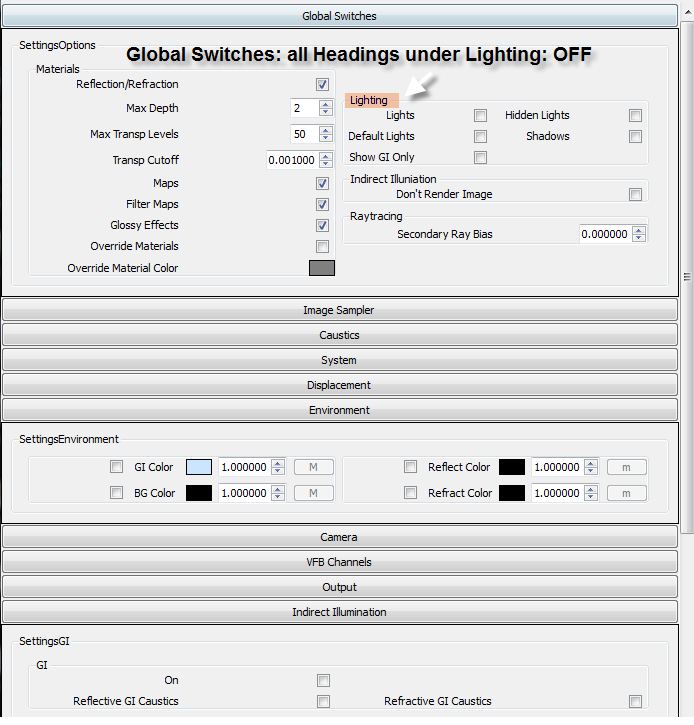
Rendering setting for attached pic:
Global Switches: all Headings under Lighting: OFF
Indirect Illumination: OFF
Camera: Standard:
Settings Environment: Both OFF(SU shadow on or off makes no diff to rendered image)
Unless I'm missing other settings in Vray:
Why is the SU shadow still illuminating the rendered Vray Scene?
-
@tomot said:
@thomthom said:
:thumb: Yes - thanks for clearing that up.
I like small simple scenes thomthom
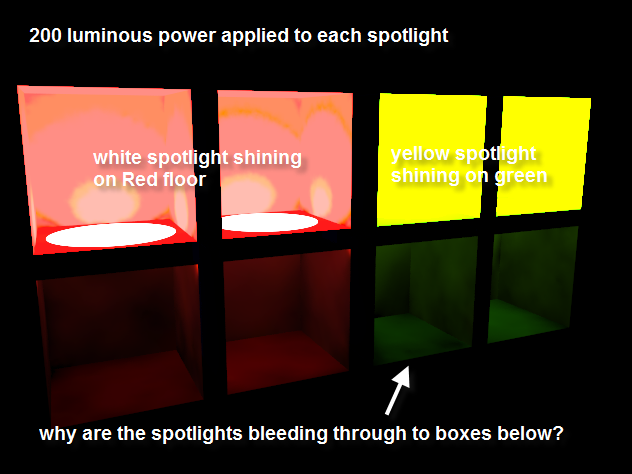
 After a simple copy & paste. I added 1 IES light to each box as shown in the pic. I also removed the light planes from the 3 IES light boxes prior to rendering. The attached pic clearly shows a number of unintended results.
I've not had too much experience with IES - but from what I understand the result from them can vary greatly from IES to IES. But you mention you set the IES lights to 5000lm and 10000lm - but there is no lumens light unit for IES lights. You have only the Power property to adjust the intensity of what the IES is set up to be.
-
@tomot said:
self explanatory!
? I'm not really sure what you mean by this. The burned out right cube? If that's the case - and you did not adjust the intensity when you turned off Physical Camera then that is normal. With physical camera you need a lot more light. So when you turn it off you must adjust accordingly.
-
@tomot said:
SU v 7.1.6860
VRayForSketchUp-1.48.67-windows-installerOnce again this is thomthom's file rotated to view the back side of the 2 boxes.
Rendering setting for attached pic:
Global Switches: all Headings under Lighting: OFF
Indirect Illumination: OFF
Camera: Standard:
Settings Environment: Both OFF(SU shadow on or off makes no diff to rendered image)
Unless I'm missing other settings in Vray:
Why is the SU shadow still illuminating the rendered Vray Scene?Default Lights? Is that on?
-
-
@thomthom said:
@tomot said:
@thomthom said:
:thumb: Yes - thanks for clearing that up.
I like small simple scenes thomthom
After a simple copy & paste. I added 1 IES light to each box as shown in the pic. I also removed the light planes from the 3 IES light boxes prior to rendering. The attached pic clearly shows a number of unintended results.I've not had too much experience with IES - but from what I understand the result from them can vary greatly from IES to IES. But you mention you set the IES lights to 5000lm and 10000lm - but there is no lumens light unit for IES lights. You have only the Power property to adjust the intensity of what the IES is set up to be.
I made a mistake! the picture was showing Spotlights, not IES lights. I have now edited the picture information

-
@thomthom said:
:thumb: Yes - thanks for clearing that up.
I like small simple scenes thomthom
After a simple copy & paste. I added 1spotlight to each box as shown in the pic. I also removed the light planes from the light boxes prior to rendering. The attached pic clearly shows a number of unintended results.thomthom is had to edit my previous post, and picture information. I hope this might attract a better response.
-
i tested this one again and again tomot including the old version. so it seems to me its a bug, whilst i reported that to the beta testing section of asgvis.
-
this bug is still there? i'm using 1.49.01
 there is still a slight difference.



Hello! It looks like you're interested in this conversation, but you don't have an account yet.
Getting fed up of having to scroll through the same posts each visit? When you register for an account, you'll always come back to exactly where you were before, and choose to be notified of new replies (either via email, or push notification). You'll also be able to save bookmarks and upvote posts to show your appreciation to other community members.
With your input, this post could be even better 💗
Register Login


Advertisement