sketchucation logo sketchucation
    • 登入
    Oops, your profile's looking a bit empty! To help us tailor your experience, please fill in key details like your SketchUp version, skill level, operating system, and more. Update and save your info on your profile page today!
    🔌 Smart Spline | Fluid way to handle splines for furniture design and complex structures. Download

    [Plugin] Extrude Edges by Loft

    已排程 已置頂 已鎖定 已移動 Plugins
    70 貼文 33 Posters 64.4k 瀏覽 33 Watching
    正在載入更多貼文
    • 從舊到新
    • 從新到舊
    • 最多點贊
    回覆
    • 在新貼文中回覆
    登入後回覆
    此主題已被刪除。只有擁有主題管理權限的使用者可以查看。
    • TIGT 離線
      TIG Moderator
      最後由 編輯

      Thanks rclub24...
      As you say, firstly in the case of most of the EEby.. tools the profile[s] and rail[s] must be 'curves' [probably better thought of a 'polylines' - as they are not necessarily what many think of as 'curves' ?] - you can easily use weld.rb to fix them if they are not !
      Secondly use the EEby.. tool that's best suited for what you want to make - here it's EEbyRails not EEbyLoft ???***
      Read the tools' guides, look at what other exciting things users are doing with these tools, and above all keep experimenting [and asking when in problems]...
      In passing... your model has some problems - Layer0 and another is "off" - don't put geometry on separate layers - model on Layer) and then put groups/component-instances on layers to control visibility - it doesn't separate geometry so you can't weld the 'hoops' into a curve because they are split by geometry on layers that are not visible !!! Though I suspect EEbyRails is what you want NOT EEbyLoft anyway*** ???
      🤓

      TIG

      1 條回覆 最後回覆 回覆 引用 0
      • Rich O BrienR 線上
        Rich O Brien Moderator
        最後由 編輯

        @TIG

        it's always a pleasure to try explain the best way to utilise your toolset. Anytime you post solutions you clearly explain the merits of exploring different approaches. Still find it hard to understand the terminology you guys use at times. But that's half the battle!

        Cheers,
        Rich

        Download the free D'oh Book for SketchUp 📖

        1 條回覆 最後回覆 回覆 引用 0
        • L 離線
          lildavido
          最後由 編輯

          Hi there,

          I have tried all the suggestions with the copy pasting , and the line to start and stop.
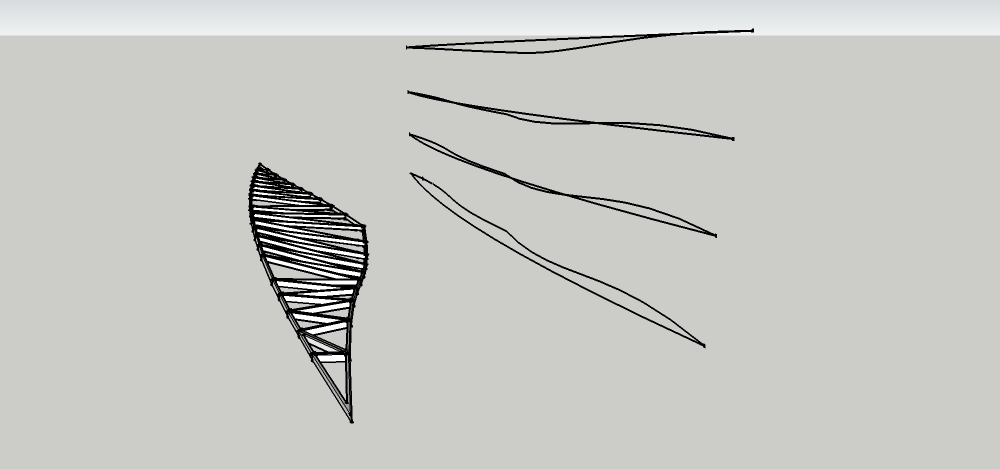
          But i am encountering problems with the loft tool. As it keeps twisting sometimes but sometimes it works., but now i cant seem to find any faces.
          When i try and loft it , it makes 0 faces. here's the skp file. and what i want to achieve.
          Basically making a curved truss . As shown on the left.

          Thanks for your help. its a weird prob... 😒


          an image of the problem


          the skp file

          1 條回覆 最後回覆 回覆 引用 0
          • TIGT 離線
            TIG Moderator
            最後由 編輯

            Here's v1.7 with a 'Quad Face' option [smoothed diagonals] added to complement thomthom's Quad-Tools.
            See here for notes and link to the zipped toolset http://forums.sketchucation.com/viewtopic.php?p=231016#p231016

            TIG

            1 條回覆 最後回覆 回覆 引用 0
            • TIGT 離線
              TIG Moderator
              最後由 編輯

              Here's v1.8 with a 'Quad Face' option [smoothed+hidden+soft diagonals] added to complement thomthom's imminent Quad-Tools.
              See here for notes and link to the zipped toolset http://forums.sketchucation.com/viewtopic.php?p=231016#p231016

              TIG

              1 條回覆 最後回覆 回覆 引用 0
              • TIGT 離線
                TIG Moderator
                最後由 編輯

                Here's an update v1.9 http://forums.sketchucation.com/viewtopic.php?p=231016#p231016
                Smooth now ignores edges with only one face...

                TIG

                1 條回覆 最後回覆 回覆 引用 0
                • TIGT 離線
                  TIG Moderator
                  最後由 編輯

                  Here's update v2.0 http://forums.sketchucation.com/viewtopic.php?p=231016#p231016
                  The Quad Faces option now meets Thomthom's latest specs... See the notes and get in from the linked zipped set...

                  TIG

                  1 條回覆 最後回覆 回覆 引用 0
                  • thomthomT 離線
                    thomthom
                    最後由 編輯

                    👍 👍

                    Good stuff TIG. Very speedy updates.

                    Thomas Thomassen — SketchUp Monkey & Coding addict
                    List of my plugins and link to the CookieWare fund

                    1 條回覆 最後回覆 回覆 引用 0
                    • TIGT 離線
                      TIG Moderator
                      最後由 編輯

                      I only needed to change one line of code in two files !
                      Writing the version notes etc, assembling the zipped file and editing the forum threads took most of the time 😒

                      TIG

                      1 條回覆 最後回覆 回覆 引用 0
                      • N 離線
                        newson888
                        最後由 編輯

                        😍 great

                        1 條回覆 最後回覆 回覆 引用 0
                        • 1
                        • 2
                        • 3
                        • 4
                        • 4 / 4
                        • 第一個貼文
                          最後的貼文
                        Buy SketchPlus
                        Buy SUbD
                        Buy WrapR
                        Buy eBook
                        Buy Modelur
                        Buy Vertex Tools
                        Buy SketchCuisine
                        Buy FormFonts

                        Advertisement