Problems in Bump Mapping
-
I'm using SketchUp Pro 7.1 and have VRay for SketchUp 7.. I want to use bump map for textures but can't seem to do it in an effective way.. I 've tried it in the following ways...
Case I
-
I use the texture library to apply a brick texture
-
I export it as a jpg to make its bump map in photoshop
-
I make its bump map
-
On importing it in vray for sketchup[the bump map] it doesn't align correctly

Case II
-
I export a jpg of brick texture that's present in material library of sketchup
-
I import it as a texture using the import graphic option in the file menu,.
-
It shows up in vray material editor.
-
Alignment of bump is also fine...
5.. But the texture isn't seamless..
What should I do to solve this??
P.s. I have attached a zip file containing the screenshots of each case....
----Arjun Kamal
-
-
1.25 MB of screenshots? How many large are they?
A couple of JPEGs of your render results posted in the thread would make it easier.
-
these screenshots show step by step what i'm doin'
-
I see. You're not exporting the texture. You're exporting a Sketchup view. That's why it doesn't match.
This is how you export textures from Sketchup:
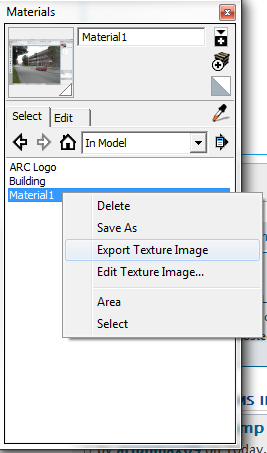
-
Wow!!! 3 yrs of having SketchUp..... never noticed this cool option!!!
Thanks a lot ThomThom!!!!


Hello! It looks like you're interested in this conversation, but you don't have an account yet.
Getting fed up of having to scroll through the same posts each visit? When you register for an account, you'll always come back to exactly where you were before, and choose to be notified of new replies (either via email, or push notification). You'll also be able to save bookmarks and upvote posts to show your appreciation to other community members.
With your input, this post could be even better 💗
Register Login


Advertisement