[Concept] Materials++
-
[floatr:2py5465l]
 [/floatr:2py5465l]
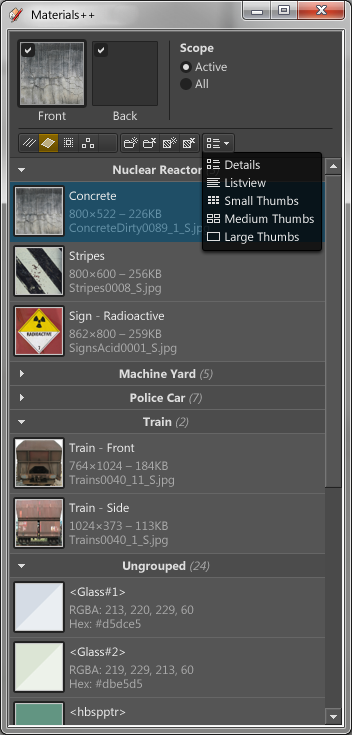
Fed up with the SketchUp material browser popping up every time I activate the paint tool I've decided to recreate it my way. The small idea has now developed into a larger idea, which also includes the Material Editor.Additional paint bucket modes:
- Current scope or full model scope. When in full model scope groups and components are ignored and you paint straight on the edge or face you click on. (Or
DrawingElement) - Target filter - choose to paint only Edges, Faces, Groups and/or Components.
- Paint with different materials for front and back.
Material Editor
- Groups. So when you start adding third party components with lots of odd components you can just collapse that group and keep it out of your way.
- Multiselect - for export, delete, area etc.
- Listview with material preview
- Detail mode, with more info on material details.
Maybe?
- Filter / Search list?
- Material Context Menu - Copy/Paste Hex values.
- V-Ray integration - Asset collection.
Any additional ideas whirling out there? Before I start with the coding I want to map this out properly first.
I want to try and keep it as simple as possible without too many elements. - Current scope or full model scope. When in full model scope groups and components are ignored and you paint straight on the edge or face you click on. (Or
-
What should I say? Very promising concept.
 The mock-up looks very professional. Best if Sketchup had already received necessary improvements natively, but as this is not the case I think you take a very courageous step.
I like the idea of painting directly on geometry inside nested components.
Sometimes it would be necessary for me to rotate a material about 90° (UVs, not editing image file), I think that would be good in material edit mode.
I wlike having better control over the arrangement of materials (alphabetic order, or the great idea of groups).
And of course, when opening a file, it shows by default the materials in that model instead of the way it currently is. -
A colour picker a la the native one would be very helpful. Very cool idea overall though, i look forward to seeing you work the ruby magic

-
Wow -- Very cool idea ThomThom!
Very promising interface.I love the idea of directly painting any face!
Copy/Transfer UVs are good - via local or global.
Groups are good. Would there be a way to preset groups? Or perhaps an option to display a tree-view of the Material directory. I hate getting confused where I'm at in the current browser. There's no need for Favorites, just show me a directory tree

When viewing materials in the model, perhaps a usage-counter when listing details? How many faces or objects are using that material (with a right-click "select all users")
A UV key-nudge for transforms (position, rotation, scale). A reset transforms (position, rotation, scale, all).
A simple name search field. Have a big list (even nested)? Just type "brick" and it'll then only list all "brick" materials.
-
looks awesome tt.
you think it will work on macs?
-
@alz said:
Groups are good. Would there be a way to preset groups?
I was thinking of attaching the Group data with the material. So when copying between models or loading components it'd follow.
@alz said:
Or perhaps an option to display a tree-view of the Material directory. I hate getting confused where I'm at in the current browser. There's no need for Favorites, just show me a directory tree
Initial idea was just a list of material in the model. There is no way to load
.skmfiles into SU via ruby.@alz said:
When viewing materials in the model, perhaps a usage-counter when listing details? How many faces or objects are using that material (with a right-click "select all users")
There is no efficient way of getting this data from the model. Would have to iterate the whole model - not something you want to happen often.
But could be part of a report. I was thinking of a report that would list what definitions where a material has been used.@alz said:
A UV key-nudge for transforms (position, rotation, scale). A reset transforms (position, rotation, scale, all).
Can you elaborate on this?n Not sure if I fully understand.@alz said:
A simple name search field. Have a big list (even nested)? Just type "brick" and it'll then only list all "brick" materials.
Yea - this is something I think would be useful.
-
@unknownuser said:
you think it will work on macs?
Good question. I hope it will. But you never know when making stuff with webdialogs. Heck - might even find it failing on PC.
sigh
Would not be the first projects of mine to fall apart due to flawed API.
-
@thomthom said:
@alz said:
A UV key-nudge for transforms (position, rotation, scale). A reset transforms (position, rotation, scale, all).
Can you elaborate on this?n Not sure if I fully understand.I just realized this branches over to UV editing and not the core idea behind your Material browser, so it might not make sense. But in the vibe of paint control, it'd provide a way to push and pull UVs via the keyboard. I think there's already some plugins out there that do this, so it's probably not the best suggestion for your time
-
I'll put it in the "Look at later" pile. But I think I'll skip it for the initial release.
-
Thom,
A button to rotate a texture and duplicate it in the process through 90 degrees would be useful. It's easy enough to do on a single planar face using texture>position but for simply dropping a texture on a curved surface, I'd like to have the two orientations readily available. -
Ah -- here's one I found myself wanting this morning --
A browser option to swap or condense materials. Select a bunch of materials in your list and swap them all for a different material.
-
Ah yes, merge. Good one.
-
WOW!
Me wants.... -
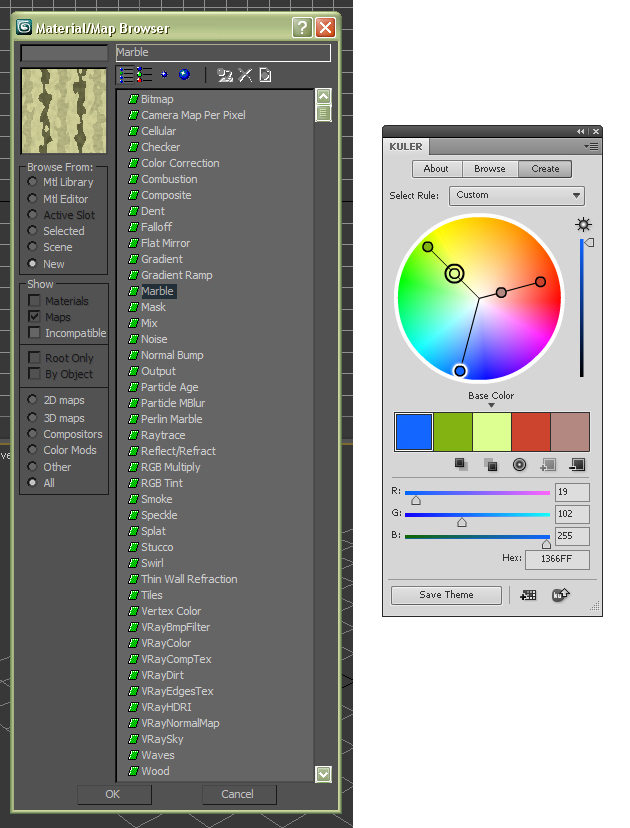
My wish list:
-Procedural materials
-Something like Adobe Kuler
-
-
@remus said:
A colour picker a la the native one would be very helpful.
I've long wanted a color picker for use with SU Ruby.
Had planned to see if Chameleon could be setup as a WebDialog to give us a quick and dirty picker. It's a free (BSD license,) totally Js based popup picker.
http://karmatics.com/chameleon/I can get the native color picker to popup thru Sketchup.send_action but can't figure out how to get the return color value. (There is an object for Win32 that can be embedded in webpages for the crappy Win3.0 style picker on MSIE, but noone wants that one, and it's not cross-platform.)
So me thinks Chameleon might be a fasttrack solution. I wanted to make it a standalone WebDialog that could be called from ANY ruby, or from ANY WebDialog (via a callback to ruby.)
-
@alz said:
Ah -- here's one I found myself wanting this morning --
A browser option to swap or condense materials. Select a bunch of materials in your list and swap them all for a different material.
You mean something like Repaint? I'm working on a GUI for this, with one-for-many replacement, and drag-and-drop selections. Early testing was going well, but my day job slowed development...
-
Cool, sounds very interesting and promising!!! I have two suggestions, but I guess they are probably not possible. Anyway:
-
A BIGGER color wheel then the standard one, which is realy not handy.
-
The ability to use "Ctrl-Z" in the materials section!
-
-
Ability to add a directory of textures to the library?
-
@pieterv said:
Cool, sounds very interesting and promising!!! I have two suggestions, but I guess they are probably not possible. Anyway:
-
A BIGGER color wheel then the standard one, which is realy not handy.
-
The ability to use "Ctrl-Z" in the materials section!
Ugh, the colour wheel - I really can't stand that thing. I don't see how people manage to use it? Oh well, I can add it to the list - but it won't be priority. In fact, the material editing is lower on the list - first comes the browser part of it.
Btw, what do you mean by Ctrl+Z in the material section? You want Ctrl+Z to undo changes in the model?
-









Advertisement