How can I add new styles to SU on a Mac?
-
Chuck,
I really don't know - I don't have such a menu item.I suspect it might be connected to some plugin you have - SketchyPhysics perhaps? If so, you might have misfiled one of the ruby scripts.
-
No, plugins cannot affect existing SU windows. You should really be able to figure out I believe (I am on a PC so will not be too much of a help here).
-
Having had a quick look at the API docs (from a non-ruby coders viewpoint!) I agree with Gai's comment insofar as it refers to the kind of entry represented by --Runtime-- Of course, scripts can and do affect menus as far as plugin names etc are concerned.
I suggest you post the question in the Developers forum.
I don't think it's just a "Mac thing".
-
@chrisjk said:
Make sure they go in the correct folder:-
Macintosh HD/Library/Application Support/Google SketchUp 7/SketchUp/Styles
The Styles folder will also have sub-folders, create your own for imports if you want.
Chris,
Thank you.
I have one more question. While I was trying to add these last night a "Runtime" sub menu popped up in the Styles menu. Any idea what that is or how to get rid of it?
Kind regards,
Chuck -
@chrisjk said:
Chuck,
I really don't know - I don't have such a menu item.I suspect it might be connected to some plugin you have - SketchyPhysics perhaps? If so, you might have misfiled one of the ruby scripts.
I have not added any plugins.
Kind regards,
Chuck -
i managed to get the same thing to happen....
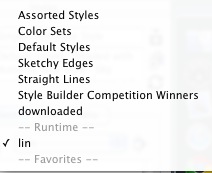
i did that by placing a folder named 'lin' inside another styles folder (the default styles folder)..
the folder that you named 'Lin Collection' should go directly into the styles folder --
Macintosh HD/Library/Application Support/Google SketchUp 7/SketchUp/Styles
if you have any folders inside of the ones already located inside the styles folder (color sets, default styles, sketchy edges, etc..) then the runtime thing will show up...
-
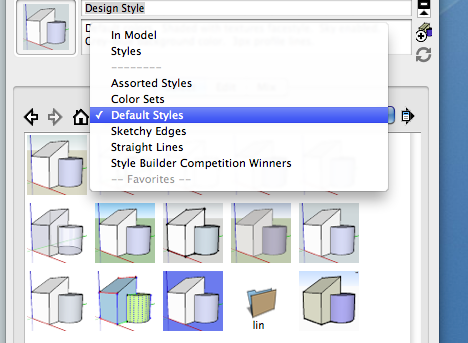
That's intriguing, I put a lin subfolder inside the Default styles folder and I get no Runtime line but just a picture of a folder in the thumbnails of styles.
Baffled!
-
weird.. i'm now getting the same thing as you chris..
i can't get runtime to show up again.
-
@unknownuser said:
weird.. i'm now getting the same thing as you chris..
i can't get runtime to show up again.
What is this runtime? Do you folks think it will effect something?
What about deleting the whole program? Or plists?
Kind regards,
Chuck -
@unknownuser said:
i managed to get the same thing to happen....
[attachment=0:iy42ai4q]<!-- ia0 -->screen 5.jpg<!-- ia0 -->[/attachment:iy42ai4q]
i did that by placing a folder named 'lin' inside another styles folder (the default styles folder)..
the folder that you named 'Lin Collection' should go directly into the styles folder --
Macintosh HD/Library/Application Support/Google SketchUp 7/SketchUp/Styles
if you have any folders inside of the ones already located inside the styles folder (color sets, default styles, sketchy edges, etc..) then the runtime thing will show up...
I don't have any folders in other folders. Before I knew about how to add them I was just trying to drag them into the styles menu window or double clicking on them and Style Builder would open.
Kind regards,
Chuck -
Chuck,
I doubt very much that it's anything to worry about - I'd just leave it.


Hello! It looks like you're interested in this conversation, but you don't have an account yet.
Getting fed up of having to scroll through the same posts each visit? When you register for an account, you'll always come back to exactly where you were before, and choose to be notified of new replies (either via email, or push notification). You'll also be able to save bookmarks and upvote posts to show your appreciation to other community members.
With your input, this post could be even better 💗
Register Login


Advertisement