sketchucation logo sketchucation
    • 登入
    Oops, your profile's looking a bit empty! To help us tailor your experience, please fill in key details like your SketchUp version, skill level, operating system, and more. Update and save your info on your profile page today!
    🔌 Smart Spline | Fluid way to handle splines for furniture design and complex structures. Download

    Bonzai 2.0 released

    已排程 已置頂 已鎖定 已移動 Extensions & Applications Discussions
    extensions
    215 貼文 28 Posters 37.3k 瀏覽 28 Watching
    正在載入更多貼文
    • 從舊到新
    • 從新到舊
    • 最多點贊
    回覆
    • 在新貼文中回覆
    登入後回覆
    此主題已被刪除。只有擁有主題管理權限的使用者可以查看。
    • B 離線
      bonzai3d support
      最後由 編輯

      Tom (tfdesign),

      Yes, and Yes.

      The next major update for formZ (version 7) will include most of the interface improvements that bonzai3d has, making it easier and faster to use. Thus learning bonzai3d now can be a stepping point towards learning formZ 7.

      (You may also find that bonzai3d is powerful enough that it meets your needs!)

      Complete Cocoa implementation is in the works, and will be available soon. 😉

      EDIT -- bonzai3d is a already a COCOA application -- sorry for this error.

      Explore * Design * Deliver
      http://www.bonzai3d.com
      Version 2.5 Now Available!

      1 條回覆 最後回覆 回覆 引用 0
      • utilerU 離線
        utiler
        最後由 編輯

        Back on topic;

        If there's ever been a feature required in SU it is this: the ability to cut 2 planes with a component.

        See How Bonzai does it......
        http://www.formz.com/products/bonzai3d/bonzai3dVideo_320.php

        Also to note is the many great plug-ins that we've seen here recently regarding free form modeling are all included in Bonzai3D, and more!!! ❓

        Just Curious...

        1 條回覆 最後回覆 回覆 引用 0
        • soloS 離線
          solo
          最後由 編輯

          Dang!! those video tutorials are great, clear and concise.
          I need to get my teeth into this app, it looks excellent.

          Was watching the Nurbs video, why could'nt everything be this easy?

          http://www.solos-art.com

          If you see a toilet in your dreams do not use it.

          1 條回覆 最後回覆 回覆 引用 0
          • utilerU 離線
            utiler
            最後由 編輯

            Exactly, Pete. It looks way too easy.

            And self healing geometry when inserting components??????

            My wish for SU4, and SU5, and 6, and 7, and.....

            Just Curious...

            1 條回覆 最後回覆 回覆 引用 0
            • thomthomT 離線
              thomthom
              最後由 編輯

              @utiler said:

              If there's ever been a feature required in SU it is this: the ability to cut 2 planes with a component.

              That's possible - by nesting two sections cuts in a group/component.

              @utiler said:

              And self healing geometry when inserting components??????
              My wish for SU4, and SU5, and 6, and 7, and.....

              SU self heal its cut-out component. ...but 2D only.... 😕

              But have you looked at the photomatching? b3d got it right - picking points on the model and the photo. no messing about with fiddly handles.

              Thomas Thomassen — SketchUp Monkey & Coding addict
              List of my plugins and link to the CookieWare fund

              1 條回覆 最後回覆 回覆 引用 0
              • T 離線
                tfdesign
                最後由 編輯

                @utiler said:

                Exactly, Pete. It looks way too easy.

                And self healing geometry when inserting components??????

                My wish for SU4, and SU5, and 6, and 7, and.....

                Google, are you listening? There's anew kid in town. Are you gonna let those boots walk right over you? 😒 😄

                My book "Let's SketchUp!" Download from here

                1 條回覆 最後回覆 回覆 引用 0
                • utilerU 離線
                  utiler
                  最後由 編輯

                  Sure Thomas, you can nest section cuts in a component. but then to be able to move the component after insertion and have the associated geometry follow is the key.

                  I did have a look at matching photos, just like the rest of Bonzai; it seems ridiculously simple....

                  It is interesting to note too, that quite a few 'freeform' plugins that have been developed by the talented guys here in the past year or so replicate similar function to Bonzai.
                  Or am I seeing things.....?

                  Just Curious...

                  1 條回覆 最後回覆 回覆 引用 0
                  • jeff hammondJ 離線
                    jeff hammond
                    最後由 編輯

                    wondering where i should go to ask for super simple step-by-steps with bonzai.. (ala the newbie forum here)
                    i dunno, you guys are finding the bonzai interface so simple but not me 😞
                    iRhino is still looking much more attractive to me as i can actually draw things with it.

                    dotdotdot

                    1 條回覆 最後回覆 回覆 引用 0
                    • thomthomT 離線
                      thomthom
                      最後由 編輯

                      Jeff, have you checked out the videos on their site?

                      Thomas Thomassen — SketchUp Monkey & Coding addict
                      List of my plugins and link to the CookieWare fund

                      1 條回覆 最後回覆 回覆 引用 0
                      • jeff hammondJ 離線
                        jeff hammond
                        最後由 編輯

                        @thomthom said:

                        Jeff, have you checked out the videos on their site?

                        yeah, i have.. they are good sales pitches and have helped me figure out certain things but there aren't any videos/tuts (that i've found) that take you through drawing an actual object.. it's always 'check me out making this random thing with no direction/goal'

                        the rhino tuts are helpful for people like me.. step by step for drawing things such as pliers or something that i have no business drawing but i can apply those steps to things that i actually need to draw.

                        anyway, one basic thing that i can't figure out is this:
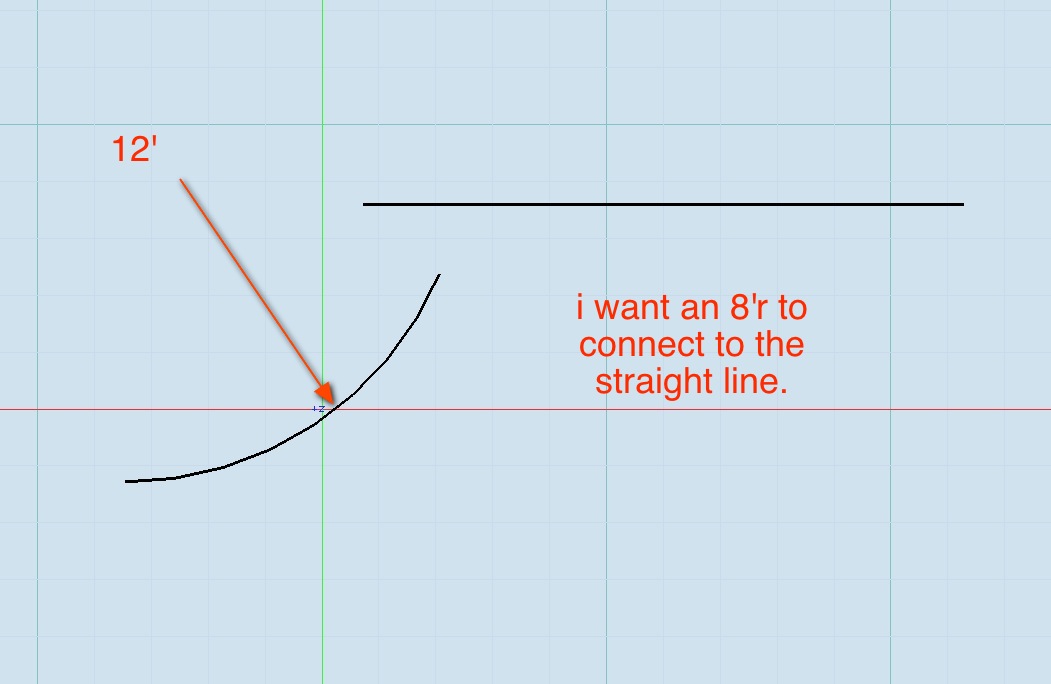
                        screen 2.jpg

                        the fillet tool doesn't seem to work on arcs.
                        anyone?

                        dotdotdot

                        1 條回覆 最後回覆 回覆 引用 0
                        • B 離線
                          bonzai3d support
                          最後由 編輯

                          Step 1: Right click on the arc and pick 'Show Controls' from the popup menu:

                          http://img534.imageshack.us/img534/2946/76105667.jpg

                          Step 2: Edit the angular control on the arc so both objects overlap:

                          http://img28.imageshack.us/img28/6422/32217101.jpg

                          Step 3: Activate the trim tool and click the parts of both objects you want to keep:

                          http://img94.imageshack.us/img94/5656/57630160.jpg

                          Explore * Design * Deliver
                          http://www.bonzai3d.com
                          Version 2.5 Now Available!

                          1 條回覆 最後回覆 回覆 引用 0
                          • jeff hammondJ 離線
                            jeff hammond
                            最後由 編輯

                            hey b3ds, thanks for chiming in
                            but...

                            i was talking about the other way.. in SU, i used to have a lengthy workaround for this until TIG wrote the TrueTangents ruby.. in rhino, it's much easier: (it's one operation with the option to trim/join automatically)
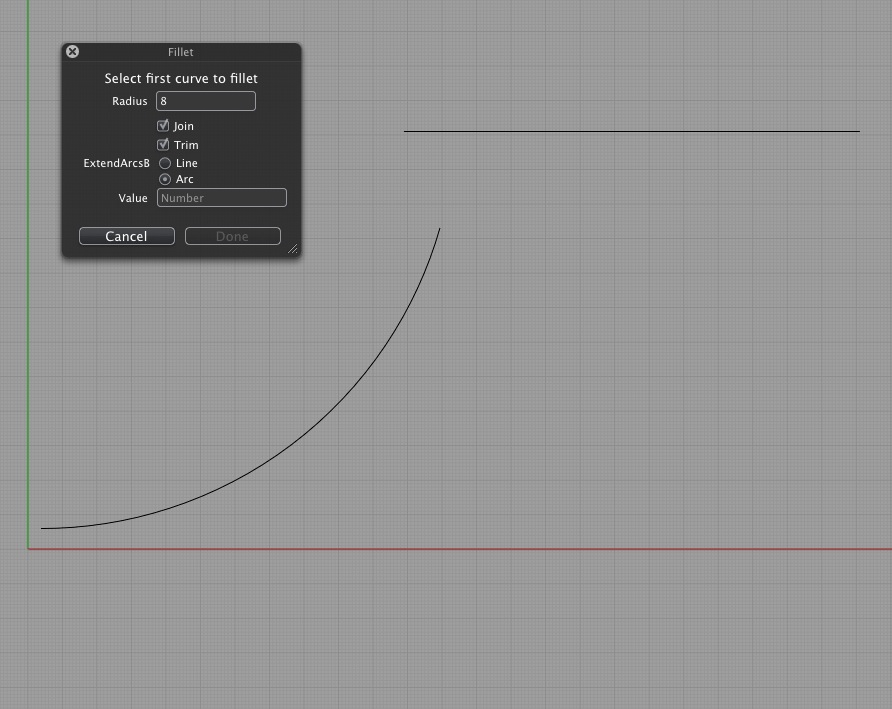
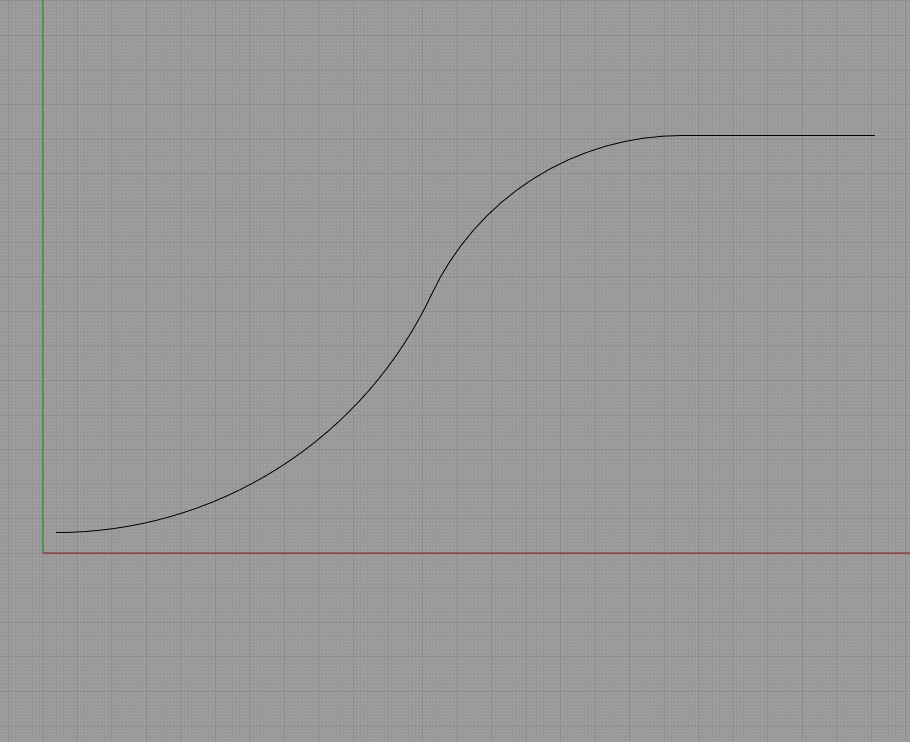
                            screen 3.jpg
                            screen 4.jpg

                            dotdotdot

                            1 條回覆 最後回覆 回覆 引用 0
                            • X 離線
                              xrok1
                              最後由 編輯

                              i think you could use the fillet tool once the arc and line are joined. correct me if i'm wrong.

                              “There are three classes of people: those who see. Those who see when they are shown. Those who do not see.”

                              http://www.Twilightrender.com try it!

                              1 條回覆 最後回覆 回覆 引用 0
                              • jeff hammondJ 離線
                                jeff hammond
                                最後由 編輯

                                @xrok1 said:

                                i think you could use the fillet tool once the arc and line are joined. correct me if i'm wrong.

                                ha! you are right
                                thanks

                                dotdotdot

                                1 條回覆 最後回覆 回覆 引用 0
                                • X 離線
                                  xrok1
                                  最後由 編輯

                                  ahh, yes, trim them then use the join tool to connect them, then the fillet will work.

                                  “There are three classes of people: those who see. Those who see when they are shown. Those who do not see.”

                                  http://www.Twilightrender.com try it!

                                  1 條回覆 最後回覆 回覆 引用 0
                                  • ken28875K 離線
                                    ken28875
                                    最後由 編輯

                                    Hi all,

                                    I just realized that so many people have heard about Bonzai3D. I just found out about that program today and went to their website to check it out. This is really a Sketchup clone but with some tools that sketchup does not have.

                                    I was particularly interested in the videos about Bulge, Bending, Sweep, Revolve/Helices, Stairs, Thickness, Nurbs and Maetrials/Texture mapping.

                                    Although some plugins from the SU ruby genius can replicate the same functions than the ones in the videos, it might take a little bit more work.

                                    I have been using Sketchup since it came out 10 years ago and love it, therefore I don't want to give up on it and try to learn a new program. But I am quite interested in trying Bonzai3D and see how good it is compared to SU.

                                    It seems like it allows to import/export in Skp format. Maybe this is a good thing to model back and forth between both programs.

                                    Has anyone used it what are your thoughts on that new software?

                                    Thanks and have a terrific day! ☀

                                    _KN

                                    Follow Your Dreams.

                                    1 條回覆 最後回覆 回覆 引用 0
                                    • T 離線
                                      tfdesign
                                      最後由 編輯

                                      This is a classic example of why I don't get on that well with Mac Rhino. There is no history (yet). Once you've made, say a fillet like the one above, it's impossible to correct later on, without redrafting the whole corner again. Does FormZ have a history? What about Bonzai3D? (I've been paying too much attention to importing SAT files to notice 😳 )

                                      My book "Let's SketchUp!" Download from here

                                      1 條回覆 最後回覆 回覆 引用 0
                                      • jeff hammondJ 離線
                                        jeff hammond
                                        最後由 編輯

                                        @xrok1 said:

                                        ahh, yes, trim them then use the join tool to connect them, then the fillet will work.

                                        meh, there seems to be some quirks with it still.. might sign up at the bonzai forum and post there.

                                        dotdotdot

                                        1 條回覆 最後回覆 回覆 引用 0
                                        • thomthomT 離線
                                          thomthom
                                          最後由 編輯

                                          @ken28875 said:

                                          This is really a Sketchup clone but with some tools that sketchup does not have.

                                          On the surface it might look similar. But it's fundamentally a different modelling tool.
                                          SketchUp is a surface modeller. While Bonzai is a NURBS modeller. Significant difference there.

                                          Thomas Thomassen — SketchUp Monkey & Coding addict
                                          List of my plugins and link to the CookieWare fund

                                          1 條回覆 最後回覆 回覆 引用 0
                                          • utilerU 離線
                                            utiler
                                            最後由 編輯

                                            @thomthom said:

                                            On the surface it might look similar. But it's fundamentally a different modelling tool.
                                            SketchUp is a surface modeller. While Bonzai is a NURBS modeller. Significant difference there.

                                            Good point, Thom.

                                            Just Curious...

                                            1 條回覆 最後回覆 回覆 引用 0
                                            • 1
                                            • 2
                                            • 3
                                            • 4
                                            • 5
                                            • 10
                                            • 11
                                            • 1 / 11
                                            • 第一個貼文
                                              最後的貼文
                                            Buy SketchPlus
                                            Buy SUbD
                                            Buy WrapR
                                            Buy eBook
                                            Buy Modelur
                                            Buy Vertex Tools
                                            Buy SketchCuisine
                                            Buy FormFonts

                                            Advertisement



