sketchucation logo sketchucation
    • 登入
    Oops, your profile's looking a bit empty! To help us tailor your experience, please fill in key details like your SketchUp version, skill level, operating system, and more. Update and save your info on your profile page today!
    🔌 Smart Spline | Fluid way to handle splines for furniture design and complex structures. Download

    Bonzai 2.0 released

    已排程 已置頂 已鎖定 已移動 Extensions & Applications Discussions
    extensions
    215 貼文 28 Posters 37.3k 瀏覽 28 Watching
    正在載入更多貼文
    • 從舊到新
    • 從新到舊
    • 最多點贊
    回覆
    • 在新貼文中回覆
    登入後回覆
    此主題已被刪除。只有擁有主題管理權限的使用者可以查看。
    • B 離線
      bonzai3d support
      最後由 編輯

      Dedmin,

      Thanks for your suggestions, we will see what we can do to add these. 😄

      Rocky,

      The Unfold tool is a tool that is reserved for formZ. (As you may know, formZ will soon be receiving the interface overhaul that we have given to bonzai3d -- and it will include many "even more advanced" tools than what bonzai3d currently has.)

      The Grid Snap should affect the starting of a drawing (with a rectangle, vector line, etc) and it does in our tests. If you check this again, are you sure that this is not working properly for you?

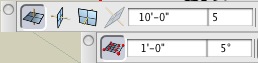
      If you compare your current Reference Plane grid settings (as shown on the top in the image below) is this set to be an integer multiple of the grid snap settings (shown at the bottom) that you are using?
      Picture 3.jpg
      (If you do not have the modules of your plane grid and grid snap aligned, then it may appear that it is not affecting the starting point.)

      (If you do indeed have a case where this is not working properly for you, please email us a more detailed description of the problem, and attach a BNZ.zip file (to support@bonzai3d.com) in which you are able to reproduce this so we can look into this further. )

      The RenderZone Trial Plugin does not expire. Its only limitations are the watermark, and the resolution limit.

      Sketch Rendering is based on the RenderZone rendering, and as such will have the same two limitations as described above.

      Doodle actually produces vector information which is based on the Wireframe or Hidden Line display. You can display this at whatever resolution you like, regardless of whether or not you choose to add the RenderZone plugin.

      Explore * Design * Deliver
      http://www.bonzai3d.com
      Version 2.5 Now Available!

      1 條回覆 最後回覆 回覆 引用 0
      • X 離線
        xrok1
        最後由 編輯

        i guess the grid snap confused me a bit because there is no visual reference (highlighting possible snaps as one passes over them) and the grid setting is set to 5 divisions (2'), but the snaps are set to 1' ???. why don't the grid snaps show up on the grid (possibly ghosted) or just use the grid settings to snap to? i don't see the need for both. but thanks for the response.

        “There are three classes of people: those who see. Those who see when they are shown. Those who do not see.”

        http://www.Twilightrender.com try it!

        1 條回覆 最後回覆 回覆 引用 0
        • B 離線
          bonzai3d support
          最後由 編輯

          Rocky,

          It is easy to align the reference plane grid and the grid snaps, but it is not required. For example, I frequently work with my grid snap set anywhere between 1/8" - 6" -- but typically keep a 12" or 24" reference plane grid.

          (This way I can quickly work to create the size objects I want without completely overloading the screen with all the reference plane grid lines...)

          Explore * Design * Deliver
          http://www.bonzai3d.com
          Version 2.5 Now Available!

          1 條回覆 最後回覆 回覆 引用 0
          • X 離線
            xrok1
            最後由 編輯

            fair enough, thanks for the explaination.

            can we possibly get a vague hint on the timeframe for the next formz release? i really love the bonzai interface, but am also intrigued by formz's extra features. 😎

            “There are three classes of people: those who see. Those who see when they are shown. Those who do not see.”

            http://www.Twilightrender.com try it!

            1 條回覆 最後回覆 回覆 引用 0
            • B 離線
              bonzai3d support
              最後由 編輯

              Rocky,

              Our current estimate for formZ 7 is sometime this summer. 😄

              Explore * Design * Deliver
              http://www.bonzai3d.com
              Version 2.5 Now Available!

              1 條回覆 最後回覆 回覆 引用 0
              • pilouP 離線
                pilou
                最後由 編輯

                What happend after the Bonzaï trial time?

                Frenchy Pilou
                Is beautiful that please without concept!
                My Little site :)

                1 條回覆 最後回覆 回覆 引用 0
                • T 離線
                  tfdesign
                  最後由 編輯

                  @mike lucey said:

                  SketchUcation is more than just a SketchUp Forum. I would like to think that we are open to discussing all kinds and types of applications. To limit discussions just to SketchUp would be a mistake in my opinion. The advantage of using a totally independent forum like SketchUcation is that a user will never have to worry about saying exactly what is on their mind. Heck, even SketchUp has been 'cussed' on this forum on many occasions and that is the way it should be if its justifiable.

                  Mike, we must get together for a pint or two sometime! 😄

                  My book "Let's SketchUp!" Download from here

                  1 條回覆 最後回覆 回覆 引用 0
                  • T 離線
                    tfdesign
                    最後由 編輯

                    @dedmin said:

                    How about a some kind of BOM?

                    [flash=425,344:wgsogdnk]http://www.youtube.com/v/SXn2QVipK2o&hl=en_GB&fs=1&[/flash:wgsogdnk]

                    Why is it that whenever I see the word BOM, I think of Inspector Clouseau?! 😒 😆

                    Apart from that, very good suggestion dedmin 😄

                    My book "Let's SketchUp!" Download from here

                    1 條回覆 最後回覆 回覆 引用 0
                    • Mike LuceyM 離線
                      Mike Lucey
                      最後由 編輯

                      @tfdesign said:

                      Mike, we must get together for a pint or two sometime! 😄[/quote]

                      .... or three or four!

                      Support us so we can support you! Upgrade to Premium Membership!

                      1 條回覆 最後回覆 回覆 引用 0
                      • T 離線
                        tfdesign
                        最後由 編輯

                        Yes! Two steaks for me, two for you too!

                        You know what though, I don't know what is a longer distance away, From Birmingham to Ireland, or the Journey from Birmingham to Hollyhead, North Wales! As for that ferry too? 🤢 😆 😆

                        better make that 6 pints! 😉 😎

                        My book "Let's SketchUp!" Download from here

                        1 條回覆 最後回覆 回覆 引用 0
                        • B 離線
                          bonzai3d support
                          最後由 編輯

                          Tom (tfdesign),

                          Yes, and Yes.

                          The next major update for formZ (version 7) will include most of the interface improvements that bonzai3d has, making it easier and faster to use. Thus learning bonzai3d now can be a stepping point towards learning formZ 7.

                          (You may also find that bonzai3d is powerful enough that it meets your needs!)

                          Complete Cocoa implementation is in the works, and will be available soon. 😉

                          EDIT -- bonzai3d is a already a COCOA application -- sorry for this error.

                          Explore * Design * Deliver
                          http://www.bonzai3d.com
                          Version 2.5 Now Available!

                          1 條回覆 最後回覆 回覆 引用 0
                          • utilerU 離線
                            utiler
                            最後由 編輯

                            Back on topic;

                            If there's ever been a feature required in SU it is this: the ability to cut 2 planes with a component.

                            See How Bonzai does it......
                            http://www.formz.com/products/bonzai3d/bonzai3dVideo_320.php

                            Also to note is the many great plug-ins that we've seen here recently regarding free form modeling are all included in Bonzai3D, and more!!! ❓

                            Just Curious...

                            1 條回覆 最後回覆 回覆 引用 0
                            • soloS 離線
                              solo
                              最後由 編輯

                              Dang!! those video tutorials are great, clear and concise.
                              I need to get my teeth into this app, it looks excellent.

                              Was watching the Nurbs video, why could'nt everything be this easy?

                              http://www.solos-art.com

                              If you see a toilet in your dreams do not use it.

                              1 條回覆 最後回覆 回覆 引用 0
                              • utilerU 離線
                                utiler
                                最後由 編輯

                                Exactly, Pete. It looks way too easy.

                                And self healing geometry when inserting components??????

                                My wish for SU4, and SU5, and 6, and 7, and.....

                                Just Curious...

                                1 條回覆 最後回覆 回覆 引用 0
                                • thomthomT 離線
                                  thomthom
                                  最後由 編輯

                                  @utiler said:

                                  If there's ever been a feature required in SU it is this: the ability to cut 2 planes with a component.

                                  That's possible - by nesting two sections cuts in a group/component.

                                  @utiler said:

                                  And self healing geometry when inserting components??????
                                  My wish for SU4, and SU5, and 6, and 7, and.....

                                  SU self heal its cut-out component. ...but 2D only.... 😕

                                  But have you looked at the photomatching? b3d got it right - picking points on the model and the photo. no messing about with fiddly handles.

                                  Thomas Thomassen — SketchUp Monkey & Coding addict
                                  List of my plugins and link to the CookieWare fund

                                  1 條回覆 最後回覆 回覆 引用 0
                                  • T 離線
                                    tfdesign
                                    最後由 編輯

                                    @utiler said:

                                    Exactly, Pete. It looks way too easy.

                                    And self healing geometry when inserting components??????

                                    My wish for SU4, and SU5, and 6, and 7, and.....

                                    Google, are you listening? There's anew kid in town. Are you gonna let those boots walk right over you? 😒 😄

                                    My book "Let's SketchUp!" Download from here

                                    1 條回覆 最後回覆 回覆 引用 0
                                    • utilerU 離線
                                      utiler
                                      最後由 編輯

                                      Sure Thomas, you can nest section cuts in a component. but then to be able to move the component after insertion and have the associated geometry follow is the key.

                                      I did have a look at matching photos, just like the rest of Bonzai; it seems ridiculously simple....

                                      It is interesting to note too, that quite a few 'freeform' plugins that have been developed by the talented guys here in the past year or so replicate similar function to Bonzai.
                                      Or am I seeing things.....?

                                      Just Curious...

                                      1 條回覆 最後回覆 回覆 引用 0
                                      • jeff hammondJ 離線
                                        jeff hammond
                                        最後由 編輯

                                        wondering where i should go to ask for super simple step-by-steps with bonzai.. (ala the newbie forum here)
                                        i dunno, you guys are finding the bonzai interface so simple but not me 😞
                                        iRhino is still looking much more attractive to me as i can actually draw things with it.

                                        dotdotdot

                                        1 條回覆 最後回覆 回覆 引用 0
                                        • thomthomT 離線
                                          thomthom
                                          最後由 編輯

                                          Jeff, have you checked out the videos on their site?

                                          Thomas Thomassen — SketchUp Monkey & Coding addict
                                          List of my plugins and link to the CookieWare fund

                                          1 條回覆 最後回覆 回覆 引用 0
                                          • jeff hammondJ 離線
                                            jeff hammond
                                            最後由 編輯

                                            @thomthom said:

                                            Jeff, have you checked out the videos on their site?

                                            yeah, i have.. they are good sales pitches and have helped me figure out certain things but there aren't any videos/tuts (that i've found) that take you through drawing an actual object.. it's always 'check me out making this random thing with no direction/goal'

                                            the rhino tuts are helpful for people like me.. step by step for drawing things such as pliers or something that i have no business drawing but i can apply those steps to things that i actually need to draw.

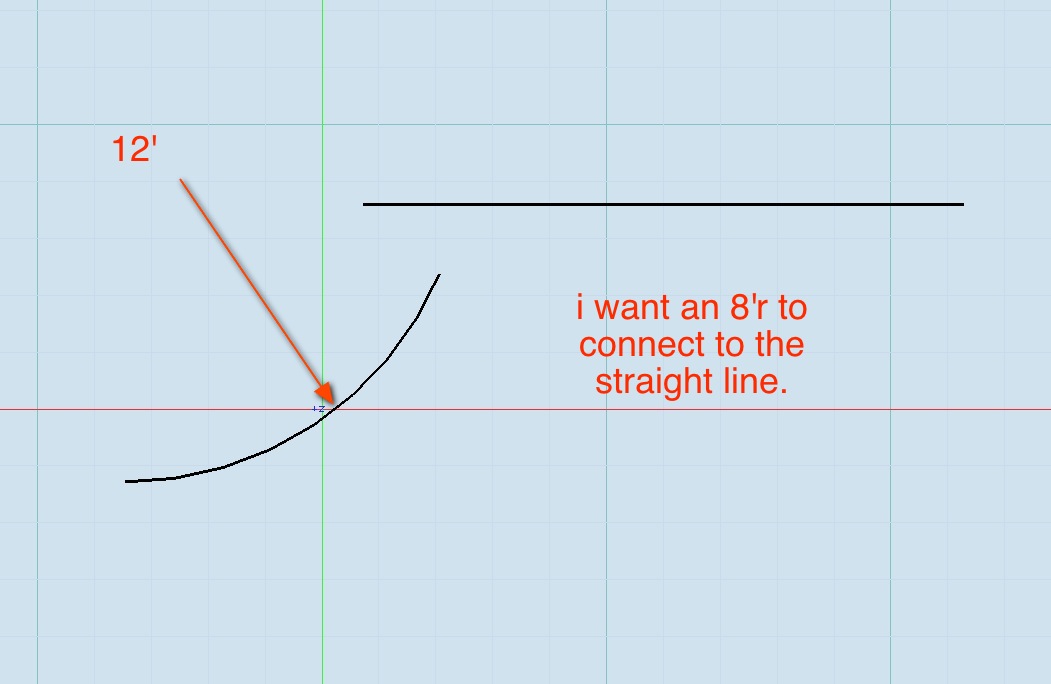
                                            anyway, one basic thing that i can't figure out is this:
                                            screen 2.jpg

                                            the fillet tool doesn't seem to work on arcs.
                                            anyone?

                                            dotdotdot

                                            1 條回覆 最後回覆 回覆 引用 0
                                            • 1
                                            • 2
                                            • 5
                                            • 6
                                            • 7
                                            • 8
                                            • 9
                                            • 10
                                            • 11
                                            • 7 / 11
                                            • 第一個貼文
                                              最後的貼文
                                            Buy SketchPlus
                                            Buy SUbD
                                            Buy WrapR
                                            Buy eBook
                                            Buy Modelur
                                            Buy Vertex Tools
                                            Buy SketchCuisine
                                            Buy FormFonts

                                            Advertisement



