[Plugin] ExtrudeTools - Full Set
-
@mishgan said:
hi,
how can i download this plugin??? i don't see the zip file...What Massimo said. Or you could download the RBZ file and install it automatically via Install Extension or, even better, install the Sketchucation Plugin Store and install it automatically that way.
-
Hello. I have an error reboot after installing Extrude Tools v2.5 .:
Error al cargar archivo C:/Users/Iván/AppData/Roaming/SketchUp/SketchUp 2014/SketchUp/Plugins/ExtrudeTools/ExtrudeToolsLoader.rb
Error: #<LocalJumpError: unexpected return>
C:/Users/Iván/AppData/Roaming/SketchUp/SketchUp 2014/SketchUp/Plugins/ExtrudeTools/ExtrudeToolsLoader.rb:33:in<module:ExtrudeTools>' C:/Users/Iván/AppData/Roaming/SketchUp/SketchUp 2014/SketchUp/Plugins/ExtrudeTools/ExtrudeToolsLoader.rb:23:in<top (required)>'
C:/Program Files (x86)/SketchUp/SketchUp 2014/Tools/extensions.rb:197:inrequire' C:/Program Files (x86)/SketchUp/SketchUp 2014/Tools/extensions.rb:197:inload'
C:/Users/Iván/AppData/Roaming/SketchUp/SketchUp 2014/SketchUp/Plugins/ExtrudeTools.rb:68:inregister_extension' C:/Users/Iván/AppData/Roaming/SketchUp/SketchUp 2014/SketchUp/Plugins/ExtrudeTools.rb:68:inmodule:ExtrudeTools'
C:/Users/Iván/AppData/Roaming/SketchUp/SketchUp 2014/SketchUp/Plugins/ExtrudeTools.rb:29:in `<top (required)>'

-
Your Windows user-name is Iván - with an accent !
Prior to v2014 user-names containing accented characters were well known to cause issues with Ruby scripts - e.g. when using 'File' methods [you still show v8 in your user-profile, but the reported error is in v2014].This issue is improved in v2014... BUT such accents etc can still cause problems in FILE related code used by many scripts...
I'll try coming up with a fix and reissue this toolset shortly - look for a new version later today...
Let me know if it works...However, having an accented user-name WILL still cause issues with SketchUp pre-v2014... AND in several other toolsets' code in even v2014 too.
-
Here's v2.6 http://sketchucation.com/pluginstore?pln=ExtrudeTools
It is re-coded in an attempt to allow users who have accents in their Windows user-name to still successfully load and use the toolset in v2014... -
Woo uuu !!! Excellent, it worked instantly. Thank you very much TIG, my laptop is new and the seller put the accent on the user name. I was already forming to not have this plugin. Thank you very much for taking the time to help me. Thank you again. Greetings.
-
Glad to be of help...

If you get similar issues with other scripts, then please let the author know.
This kind of report is rare, but there are possible workarounds - at least for v2014... -
Extrude Edges by Faces by Rails makes my SU2015 64bit always crash immediately after finishing - it works fine on the same model in SU2013. No error message, just crash and bug splat window the second I click yes or no to erasing the original curves.
All other tools work.
It's amazing though, how much faster this and many other operations are executed in the new 64bit version.
-
@pherim said:
Extrude Edges by Faces by Rails makes my SU2015 64bit always crash immediately after finishing - it works fine on the same model in SU2013. No error message, just crash and bug splat window the second I click yes or no to erasing the original curves.
All other tools work.
It's amazing though, how much faster this and many other operations are executed in the new 64bit version.
Looks like we ought to continue this issue in this 'Extrusion Tools' thread ?
I'll investigate...PS: I see the issue too, trying to see its cause

-
Your recommendation in the other thread made me try out every tool in this set, and that's how I discovered this issue.
Sorry for keeping you busy like this.
-
Here's v2.7, now in the PluginStore
http://sketchucation.com/plugin/1103-extrudetools
The update coversExtrudeEdgesByRailsByFace- it has been adjusted to work properly in v2015, which unexpectedly showed a glitch when calling another tool from within its mouse-click method...
As a 'side-effect' it also has some improved graphics, prompting etc... -
I confirm that it works now. Thanks!
-
Hello there i am here to report a crash of my sketchup 8 pro when using Extrude Edges by Rails by Face
it crashes only when the profile its segmented more than 12 times for example if a segment a circle 13 times it will crash the sketchup a bug splat but when i segment circles below 12 it does the job fine can someone please tell me whats going on
-
I have just installed this plugin through plugin store tool bar's autoinstall.
I watched the video on youtube and followed step by step. but the tools didn't work for me.
Is there any way there could be a more detailed video tutorial preferably with audio?
Also am I missing something in the operations and or installation of this tool?
Thanks for your response.Manijeh
-
No toolbar
Can anyone assist me?
I have downloaded the TIG Extrude tools to SketchUp.
Unfortunately I can not find the toolbar..Pls help
Best regards
Per -
@perper said:
No toolbar.
Can anyone assist me?
I have downloaded the TIG Extrude tools to SketchUp.
Unfortunately I can not find the toolbar..
You said you downloaded the RBZ.
You have NOT said you have installed it !So if you haven't...
Window > Preferences > Extensions > Install...button...
Choose the Plugin's RBZ and answer in the affirmative to any questions...
NOTE: if you installed it with the SketchUcation PluginStore Toolset's dialog within SketchUp itself it should Auto-Install.Assuming it is installed...
Look in the v2015 "Extensions" menu [called "Plugins" in ALL pre-v2015 SketchUps] for "Extrusion Tools..." submenu items...
Are they there ?
Also check that the "Extrusion Tools" Toolbar is activated...If none of this works come back.
-
Sketchup 2015 Pro
Whenever I extrude an edge, by any means, and save, it undoes the extrusion and will continue to undo every time I save. It acts just like Ctrl-Z whenever I hit Ctrl-S, and it crashes occasionally.
Thank you. It was working fine. -
Ok, I figured it out. Extrude Tools have a conflict with SUSolid plugin. I really need both. I am emailing the dev of SUSolid now. Is there anything I can send you to check on your end? Thank you.
-
You could help us help you if you posted the SKP file you're working with. Otherwise we'll just be guessing.
-
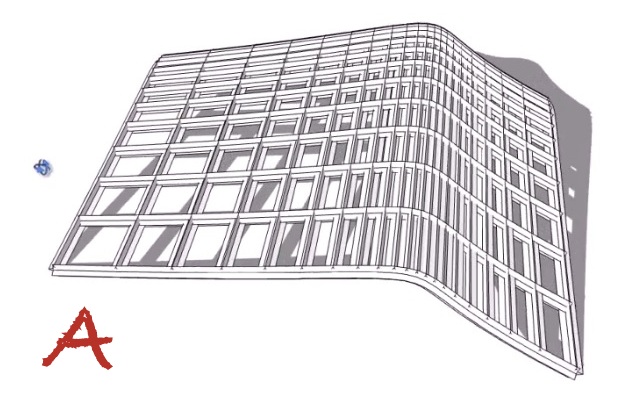
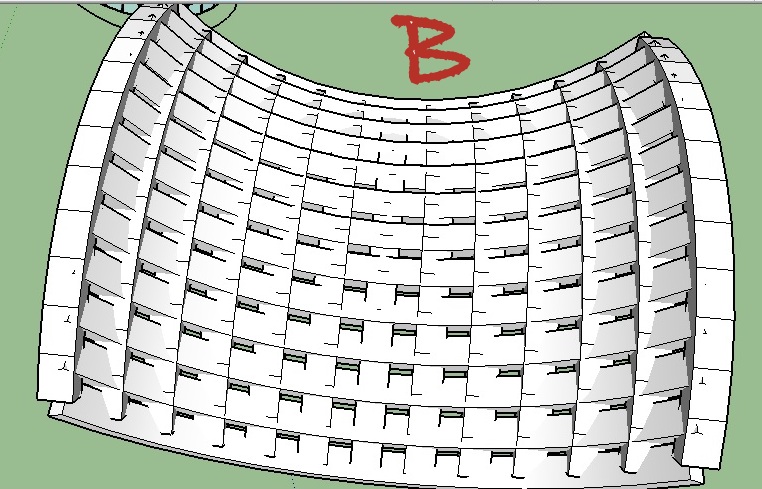
I'm new to this tool. I was just using the 'Extrude edges by Rails by face' tool when i realised that the ribs produced in my model by selecting the Profiles and rails option were quite different from the one shown in the tutorial. They weren't so smooth or so detailed but rather plain and conflicting. I'm attaching the pictures of the required rib formation titled 'A' versus the ribs produced in my model titled 'B'. I know the two shapes are quite different but that doesn't explain why the rib designs are different.
Can anybody tell me what must've brought about this change? Is there some change in settings that you must do to change the rib type? My extrude tools version is extrude tools V2.7. Any help will be appreciated
-
Posting the SKPs would be a great help [purge first].
It's hard to tell what shape you have defined for the extrusion face[s].
the orientation of that face and the order you pick rails/profiles in the 'mesh' all affect the result...




Advertisement