[Plugin] ExtrudeTools - Full Set
-
@Chri et al
The '
Application Data' Plugins folder-path is NOT the folder-path into which YOUR Plugins should normally 'go'.
You will not be able to install or manage these files, unless they have FULL security permissions to that folder-path [which is unlikely, as it's very limited by default, and also difficult to reset too].
C:/Documents and Settings/USERNAME/Application Data/SketchUp/SketchUp 2014/SketchUp/PluginsThere is a also a similar path, which is actually pointing to the same folder...
C:/Documents and Settings/USERNAME/AppData/Roaming/SketchUp/SketchUp 2014/SketchUp/Plugins
This path could also have restricted permissions...
BUT every user gets their own fully accessible Plugins folder-path.

Where you can install and manage your plugins files - you will automatically have FULL security permissions using that folder-path.
That 'Users' Plugins folder is the default one...To find your very own Plugins folder use this in the Ruby Console:
Sketchup.find_support_file('Plugins')
It will return something like this:
C:/Users/USERNAME/AppData/Roaming/SketchUp/SketchUp 2014/SketchUp/PluginsAlthough it is effectively the same folder as the Application Data || /Documents and Settings/../AppData ones again - using this path you automatically get proper FULL permissions...
If you have tried to install Plugins into an alternative Plugins folder-path [even if in reality it is pointing at the same Plugins folder], in all likelihood you probably do not have FULL security permissions when approaching it down that folder-path...

So the chances are you have once again started the specter of the 'VirtualStore' / 'Compatibility Files' fiasco, which was meant to be avoided by the improved Users Plugins folder introduced in v2014...So please use to the usual
C:/Users/../Pluginspath...
-
Here's an update http://sketchucation.com/pluginstore?pln=ExtrudeTools
v2.4 now includes ALL lingvo files in a v2014 compatible encoding. -
@tig said:
Here's an update http://sketchucation.com/pluginstore?pln=ExtrudeTools
v2.4 now includes ALL lingvo files in a v2014 compatible encoding.Hi TIG
Now , it works for me
Thanks a lotChri
-
Yes it was an odd one.
SketchUp v2014's Ruby2.0 demands that scripts are in UTF8-without-BOM encoding.
I had previously updated all of my files and reissued them - or so I thought...
Somehow a few rogue lingvo translation files got through the net - they were in the now unacceptable ANSI format - particularly the FR ones - so I assume the person translating them for me must have used a new empty Notepad file and copy+pasted into it, rather that a straight copy of the EN-US version which was already correctly encoded.
These files caused no issues, unless your locale was FR - in which case there was the loading error because the file could not be read into v2014.
I have now been through all of my scripts that have lingvo files and corrected the encodings and republished, so hopefully this little glitch is behind us... -
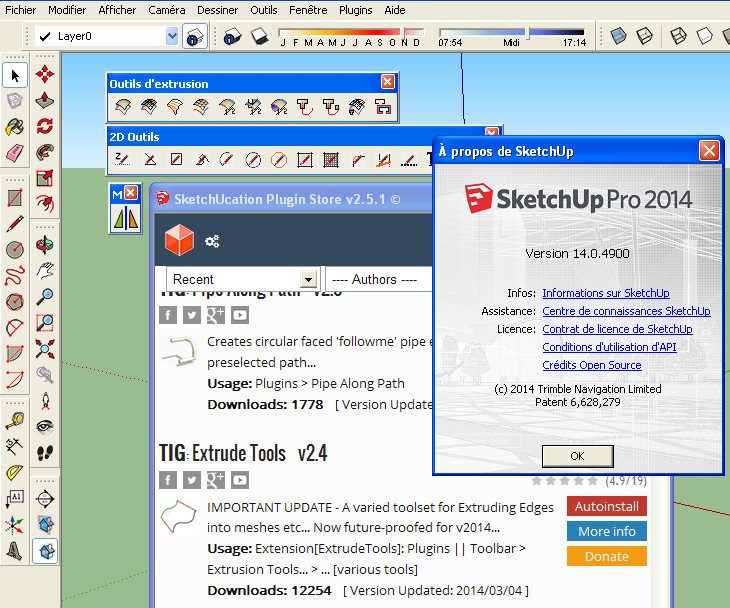
This is the first plugin i download here and its amazing, i'm just a little bit lost since i seem to not be able to find the toolbars... can i get some help with this please
(sorry if i reposted btw) -
@rich o brien said:
@unknownuser said:
Try this: Enable the toolbar in View>Toolbars. Pull all of the toolbars off the top rows. Does the Extrude Tool toolbar show up in the upper left corner? If so, you have now found it and can place it where you need but you really ought to install the current version of SU2013. there was a bug in the first release that caused new toolbars to appear under the existing ones. It was fixed though.
Dave earlier mentioned this...
To me it looks like this is related to the bug Dave flagged.
What happens when you check for update under the Help menu?
Seriously best easy way to solve it thanks
-
I have installed ExtrudeTools in SU 2013 & 2014 on Mac and the plugin works fine but there is a problem with spanish translation, all lingvo files are in UTF-8, I haven't modified them, the translation works ok in Menu, tooltips of the toolbar and Extrude Edges By Offset tool, the rest no.
This is very strange, do other users with the same problem?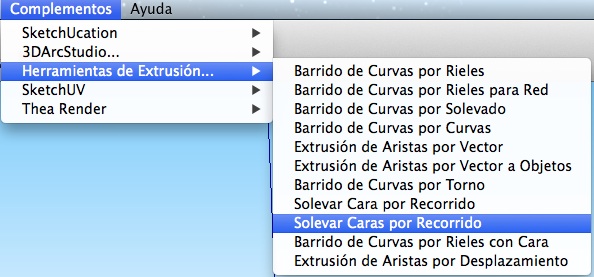
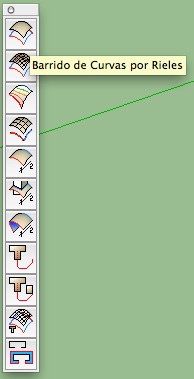
Mac OSX 10.9.2, SU 2013 & SU 2014, no messages in Ruby Console.
-
@Oxer do you have the very latest set ? v2.4.
I had to do an update because some of the lingvo files were encoded incorrectly...If I understand you correctly...
The translations works in Menus, Toolbars' tooltips and all text for the 'Extrude Edges By Offset' tool.
But nowhere else in any of the other 'EEby' toolsTo double-check I swapped all of my EN-US lingvo names for ES...
I confirm that oddly the translations work as you set out.
For some reason I can't see the dialogs etc in all but the Offets tool remain in English, although checking for the strings in the rb and lingvo files shows a proper match...BUT I HAVE NOW found the errors in the coding...
I'll issue an update to fix this asap... -
http://sketchucation.com/pluginstore?pln=ExtrudeTools
Here is an updated version in the PluginStore, v2.5.
It fixes various longstanding, but previously unreported, glitches with some of the lingvo files... -
Thank you very much TIG!!
Now the translations work fine again. -
hi,
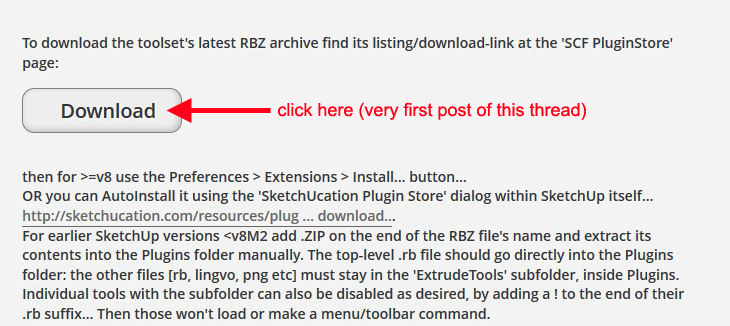
how can i download this plugin??? i don't see the zip file... -
-
@mishgan said:
hi,
how can i download this plugin??? i don't see the zip file...What Massimo said. Or you could download the RBZ file and install it automatically via Install Extension or, even better, install the Sketchucation Plugin Store and install it automatically that way.
-
Hello. I have an error reboot after installing Extrude Tools v2.5 .:
Error al cargar archivo C:/Users/Iván/AppData/Roaming/SketchUp/SketchUp 2014/SketchUp/Plugins/ExtrudeTools/ExtrudeToolsLoader.rb
Error: #<LocalJumpError: unexpected return>
C:/Users/Iván/AppData/Roaming/SketchUp/SketchUp 2014/SketchUp/Plugins/ExtrudeTools/ExtrudeToolsLoader.rb:33:in<module:ExtrudeTools>' C:/Users/Iván/AppData/Roaming/SketchUp/SketchUp 2014/SketchUp/Plugins/ExtrudeTools/ExtrudeToolsLoader.rb:23:in<top (required)>'
C:/Program Files (x86)/SketchUp/SketchUp 2014/Tools/extensions.rb:197:inrequire' C:/Program Files (x86)/SketchUp/SketchUp 2014/Tools/extensions.rb:197:inload'
C:/Users/Iván/AppData/Roaming/SketchUp/SketchUp 2014/SketchUp/Plugins/ExtrudeTools.rb:68:inregister_extension' C:/Users/Iván/AppData/Roaming/SketchUp/SketchUp 2014/SketchUp/Plugins/ExtrudeTools.rb:68:inmodule:ExtrudeTools'
C:/Users/Iván/AppData/Roaming/SketchUp/SketchUp 2014/SketchUp/Plugins/ExtrudeTools.rb:29:in `<top (required)>'

-
Your Windows user-name is Iván - with an accent !
Prior to v2014 user-names containing accented characters were well known to cause issues with Ruby scripts - e.g. when using 'File' methods [you still show v8 in your user-profile, but the reported error is in v2014].This issue is improved in v2014... BUT such accents etc can still cause problems in FILE related code used by many scripts...
I'll try coming up with a fix and reissue this toolset shortly - look for a new version later today...
Let me know if it works...However, having an accented user-name WILL still cause issues with SketchUp pre-v2014... AND in several other toolsets' code in even v2014 too.
-
Here's v2.6 http://sketchucation.com/pluginstore?pln=ExtrudeTools
It is re-coded in an attempt to allow users who have accents in their Windows user-name to still successfully load and use the toolset in v2014... -
Woo uuu !!! Excellent, it worked instantly. Thank you very much TIG, my laptop is new and the seller put the accent on the user name. I was already forming to not have this plugin. Thank you very much for taking the time to help me. Thank you again. Greetings.
-
Glad to be of help...
If you get similar issues with other scripts, then please let the author know.
This kind of report is rare, but there are possible workarounds - at least for v2014... -
Extrude Edges by Faces by Rails makes my SU2015 64bit always crash immediately after finishing - it works fine on the same model in SU2013. No error message, just crash and bug splat window the second I click yes or no to erasing the original curves.
All other tools work.
It's amazing though, how much faster this and many other operations are executed in the new 64bit version.
-
@pherim said:
Extrude Edges by Faces by Rails makes my SU2015 64bit always crash immediately after finishing - it works fine on the same model in SU2013. No error message, just crash and bug splat window the second I click yes or no to erasing the original curves.
All other tools work.
It's amazing though, how much faster this and many other operations are executed in the new 64bit version.
Looks like we ought to continue this issue in this 'Extrusion Tools' thread ?
I'll investigate...PS: I see the issue too, trying to see its cause







Advertisement