sketchucation logo sketchucation
    • Login
    Oops, your profile's looking a bit empty! To help us tailor your experience, please fill in key details like your SketchUp version, skill level, operating system, and more. Update and save your info on your profile page today!
    ⚠️ Update | Sketchucation Tools 5.0.8 released with licensing improvements and bugfixes Download

    [Plugin] Edge Tools

    Scheduled Pinned Locked Moved Plugins
    211 Posts 74 Posters 323.4k Views 74 Watching
    Loading More Posts
    • Oldest to Newest
    • Newest to Oldest
    • Most Votes
    Reply
    • Reply as topic
    Log in to reply
    This topic has been deleted. Only users with topic management privileges can see it.
    • guanjinG
      guanjin
      last edited by

      @thomthom said:

      That you can do with the native Move - using the copy array modifier.

      Not quite understand,Can only offset the surface line,As above, and CAD functions.I'm just too greedy,Tool itself is very strong
      painyi.gif

      I come from China, is to learn

      1 Reply Last reply
      Reply Quote 0
      • thomthomT
        thomthom
        last edited by

        SketchUp's Move Tool
        http://support.google.com/sketchup/bin/answer.py?hl=en&answer=94867

        You just need to do a linear array to do what you showed in the CAD animation.

        Thomas Thomassen β€” SketchUp Monkey & Coding addict
        List of my plugins and link to the CookieWare fund

        1 Reply Last reply
        Reply Quote 0
        • guanjinG
          guanjin
          last edited by

          @thomthom said:

          SketchUp's Move Tool
          http://support.google.com/sketchup/bin/answer.py?hl=en&answer=94867

          You just need to do a linear array to do what you showed in the CAD animation.

          Thank you thom thom
          This is very complex, πŸ˜„ πŸ˜„

          I come from China, is to learn

          1 Reply Last reply
          Reply Quote 0
          • brookefoxB
            brookefox
            last edited by

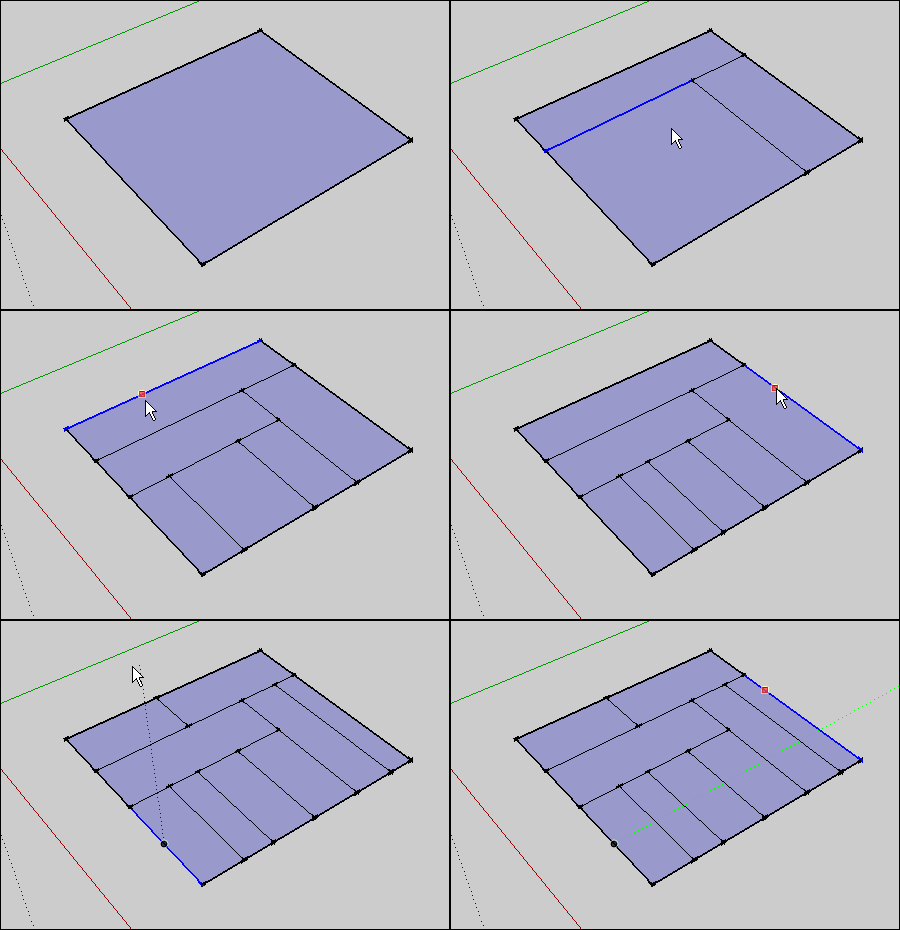
            Please see the image for a use of 'face divide' for quickly uniformly hatching a face. It works very well for this as I understand it: click an edge, move to the farthest edge to check distance (and alternatively input a distance), then divide by a number which will result in the size hatch you want.

            Thank you.

            FORGET THIS: Any chance for a mod so it can be used like copy multiple, thereby saving a step, or is this already possible? I see up above that you say it is... I guess your way only takes two steps, just like copy multiple. So, yeah, forget it.edge tools -1.JPG
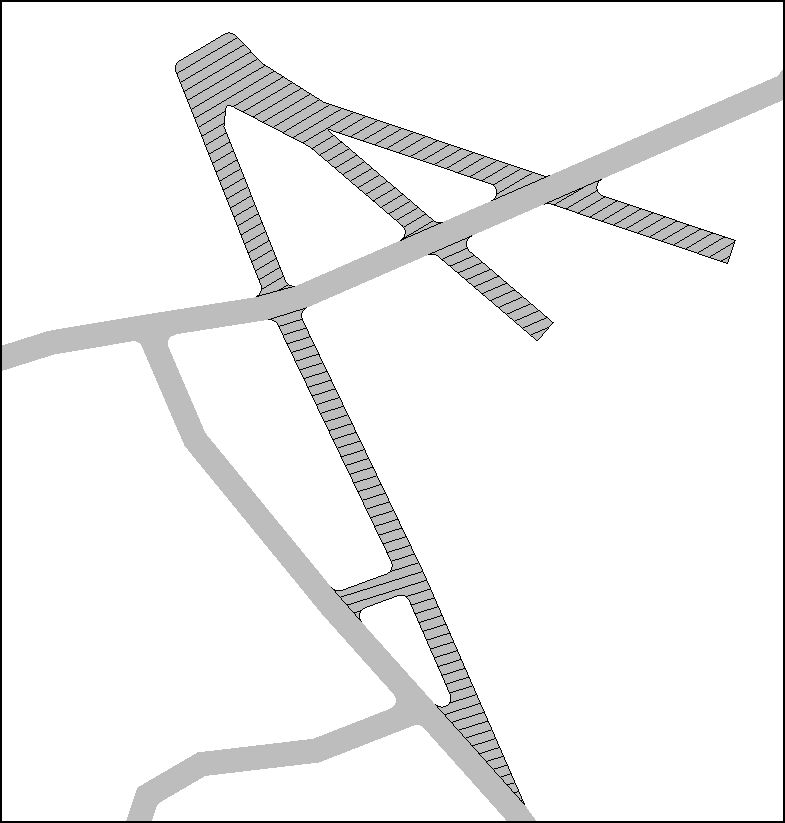
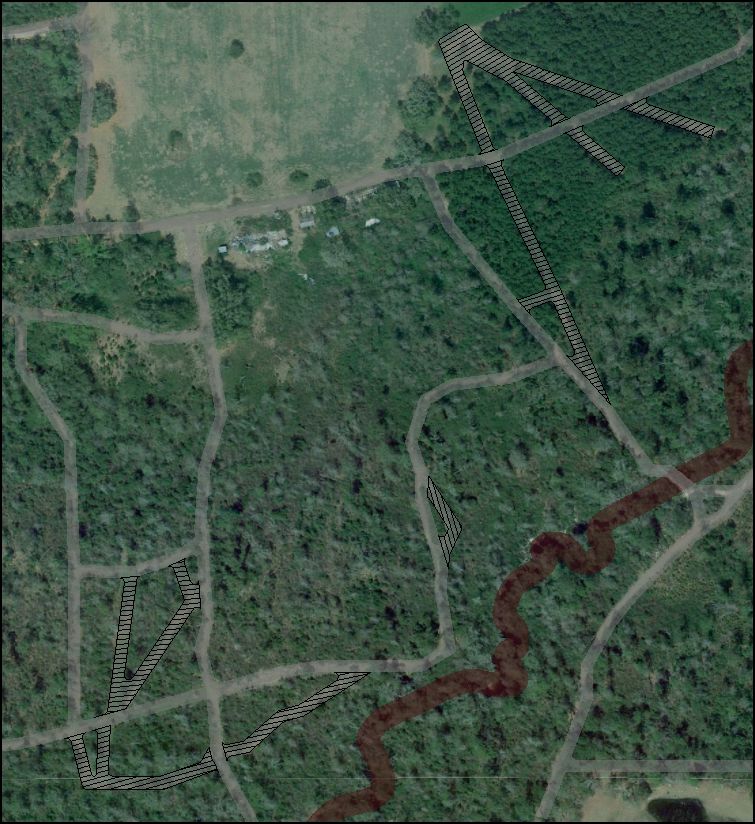
            With this hatch roads to be abandoned are indicated. The potential transparency of such edge hatches reads much better than textures, IMO. Yes, I agree, it is surely not the best way to do this, creating as it does 500 or so new edges.edge tools -2.JPG
            ~ Brooke

            1 Reply Last reply
            Reply Quote 0
            • F
              function
              last edited by

              Hi, I updated to ttLib 2.6 and the new edge tool and it no longer gives me thr heads up display or red circles 😞

              1 Reply Last reply
              Reply Quote 0
              • thomthomT
                thomthom
                last edited by

                @function said:

                Hi, I updated to ttLib 2.6 and the new edge tool and it no longer gives me thr heads up display or red circles 😞

                Any errors in the Ruby Console?

                Are you sure you installed the updates correctly?

                Thomas Thomassen β€” SketchUp Monkey & Coding addict
                List of my plugins and link to the CookieWare fund

                1 Reply Last reply
                Reply Quote 0
                • F
                  function
                  last edited by

                  Ill have to look when I get home. I installed fredos multi directory at the time, and since it wasnt working I installed it back to root plug folder.. Maybe it is the division of the lib in different directories

                  1 Reply Last reply
                  Reply Quote 0
                  • R
                    rv1974
                    last edited by

                    I'm really missing 'divide face' tool working with multiple (connected) edges. πŸ˜’

                    1 Reply Last reply
                    Reply Quote 0
                    • thomthomT
                      thomthom
                      last edited by

                      @rv1974 said:

                      I'm really missing 'divide face' tool working with multiple (connected) edges. πŸ˜’

                      Wouldn't Tools on Surface do what you want there?

                      Thomas Thomassen β€” SketchUp Monkey & Coding addict
                      List of my plugins and link to the CookieWare fund

                      1 Reply Last reply
                      Reply Quote 0
                      • R
                        rv1974
                        last edited by

                        @thomthom said:

                        @rv1974 said:

                        I'm really missing 'divide face' tool working with multiple (connected) edges. πŸ˜’

                        Wouldn't Tools on Surface do what you want there?

                        doh! I forgot TOS offset works non-curves. thanks!

                        1 Reply Last reply
                        Reply Quote 0
                        • R
                          rv1974
                          last edited by

                          I re-found why TOS offset is no good for me. Can one make it to extend the resulted curve to the face border?
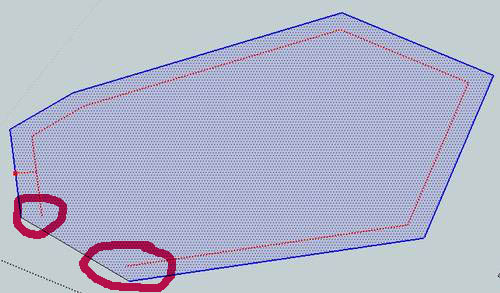

                          33.JPG

                          1 Reply Last reply
                          Reply Quote 0
                          • Dave RD
                            Dave R
                            last edited by

                            It is doing what it should do and it it mathematically correct. You can extend those line segments with the Line tool. You could also try using Matt666's ExtendTool.

                            Etaoin Shrdlu

                            %

                            (THERE'S NO PLACE LIKE)

                            G28 X0.0 Y0.0 Z0.0

                            M30

                            %

                            1 Reply Last reply
                            Reply Quote 0
                            • R
                              rv1974
                              last edited by

                              @dave r said:

                              It is doing what it should do and it it mathematically correct. You can extend those line segments with the Line tool. You could also try using Matt666's ExtendTool.

                              Yes captain I realize that it's undoubtedly correct behavior. Initially I just asked Thomthom to extend his 'divide tool' (by accepting multiple edges)

                              1 Reply Last reply
                              Reply Quote 0
                              • thomthomT
                                thomthom
                                last edited by

                                @rv1974 said:

                                @dave r said:

                                It is doing what it should do and it it mathematically correct. You can extend those line segments with the Line tool. You could also try using Matt666's ExtendTool.

                                Yes captain I realize that it's undoubtedly correct behavior. Initially I just asked Thomthom to extend his 'divide tool' (by accepting multiple edges)

                                The key concept of the Divide Tool was that you didn't pre-pick edges. It was to allow you to quickly pick a reference edge and make a split. Multiple edges would be a completely different tool.

                                Thomas Thomassen β€” SketchUp Monkey & Coding addict
                                List of my plugins and link to the CookieWare fund

                                1 Reply Last reply
                                Reply Quote 0
                                • R
                                  rv1974
                                  last edited by

                                  @thomthom said:

                                  @rv1974 said:

                                  @dave r said:

                                  It is doing what it should do and it it mathematically correct. You can extend those line segments with the Line tool. You could also try using Matt666's ExtendTool.

                                  Yes captain I realize that it's undoubtedly correct behavior. Initially I just asked Thomthom to extend his 'divide tool' (by accepting multiple edges)

                                  The key concept of the Divide Tool was that you didn't pre-pick edges. It was to allow you to quickly pick a reference edge and make a split. Multiple edges would be a completely different tool.

                                  ..would be completely different amazingtool πŸ˜‰

                                  1 Reply Last reply
                                  Reply Quote 0
                                  • pilouP
                                    pilou
                                    last edited by

                                    Put file In V6 πŸ˜‰
                                    It's better for everybody! πŸ˜„
                                    An image ist sufficient! πŸ€“

                                    Frenchy Pilou
                                    Is beautiful that please without concept!
                                    My Little site :)

                                    1 Reply Last reply
                                    Reply Quote 0
                                    • R
                                      rumcajs
                                      last edited by

                                      Thanks to great plugin. It is something that i looked for, just it misses something.

                                      I have a REQ to update/upgrade.

                                      This is what I did:

                                      http://i47.tinypic.com/6sqpnd.png

                                      (the light red lines are original locations of the diagonals, which I tried to remove. You can see I succeed to removed only two).

                                      I had a scull which contains triangles and I wanted to reduce the triangles, so that I want to remove the diagonal of the rectangle shape area. Therefor I select two lines which are nearly parallel and the diagonal. Then I clicked the green colinear icon. It works to flat the edges onto one plane, so I can delete the diagonal. But if I want to correct the next area, then the previous area will generate diagonal... Here I am where I was on the start. Could it be possible to define the area (select faces), which is already fine and I won't be touched? So the edges of that face won't be touched?

                                      This is the point what I miss. A possibility to limit the edges to move (=forbid some edges/faces to move) and/or possibility to define angle, in which it can be moved.
                                      My original idea, before I found this thread was to have a definition plane, such as it is in the Fredo Scale tools (the Stretching with orientation of scaling box). So if you would have such orientation plane, you could define, where the plane should be moved (angle& position). Purpose of such plane is to define position and angle of the plane. Something like Fredo already did in his great Fredo Scale tools (they are good for control, and that is what I like and therefor mention here as good example). The plane needs only one direction to move, and this would define axis perpendicularly to the plane. I expect that the angle possibilities are defined by the selected tool and the differences between selected edges (so in my case, when I have 3 edges, only two angles are possible to infer - just an assumption).


                                      head 17 middle line corrected on eye center .skp

                                      1 Reply Last reply
                                      Reply Quote 0
                                      • R
                                        rumcajs
                                        last edited by

                                        OK I attached file to previous post of mine. But I think the image is sufficient, and if you think it is not, then install fredo Scale tool, because the Stretching tool + twist tool, is enough to get inspiration.

                                        1 Reply Last reply
                                        Reply Quote 0
                                        • beginnerB
                                          beginner
                                          last edited by

                                          ThomThom,
                                          Really good plugin.
                                          You can appreciate it if you work with AutoCAD files.
                                          Thanks πŸ‘ πŸ‘ πŸ‘

                                          Regards, SU 'beginner'

                                          1 Reply Last reply
                                          Reply Quote 0
                                          • J
                                            jorge2011
                                            last edited by

                                            Thom, if I when be able use the new toolbar "architecture"?. πŸ˜„ thanks

                                            1 Reply Last reply
                                            Reply Quote 0

                                            Hello! It looks like you're interested in this conversation, but you don't have an account yet.

                                            Getting fed up of having to scroll through the same posts each visit? When you register for an account, you'll always come back to exactly where you were before, and choose to be notified of new replies (either via email, or push notification). You'll also be able to save bookmarks and upvote posts to show your appreciation to other community members.

                                            With your input, this post could be even better πŸ’—

                                            Register Login
                                            • 1
                                            • 2
                                            • 3
                                            • 4
                                            • 5
                                            • 10
                                            • 11
                                            • 1 / 11
                                            • First post
                                              Last post
                                            Buy SketchPlus
                                            Buy SUbD
                                            Buy WrapR
                                            Buy eBook
                                            Buy Modelur
                                            Buy Vertex Tools
                                            Buy SketchCuisine
                                            Buy FormFonts

                                            Advertisement