[Plugin] Heightmap from model
-
Hey Didier! Trying to get google terrain into UDK and tought this plugin was just what i needed. Got a problem though.
First off, 18700016 rays to shoot? Thats a bit much, why does that number get so large? The model is just a small section of terrain.
After the export when i open the raw file in Photoshop it does not show up as heightmap, but more like a grey mess.Any suggestions? I've got the plane version of sketchup pro and your plugin is the only one installed. Do i need additional plugins installed or something?
Pardon my noobiness!
Cheers!
-
Hi Hanstania,
What this plugin does is the inverse of thomthom's 'Bitmap to mesh' here: http://forums.sketchucation.com/viewtopic.php?t=31339
As you can see a heightmap is a grey scale image so you'll get a greyscale image with my plugin. The size (in pixels) of this image is basically the size of your SU viewport. 18700016 rays to shoot is the result of width_of_your viewport * height_of_your viewport. For instance, a 1024*768 viewport will give 786432 rays and 786432 pixels in the calculated heightmap.
You can resize down your viewport or lower your screen resolution to get smaller (but less accurate) images.
Ensure to 'zoom-extents' your terrain in a top-down orthographic view before launching the script.
You don't need to install anything else that the script.
Please post an example of the 'grey mess' you got
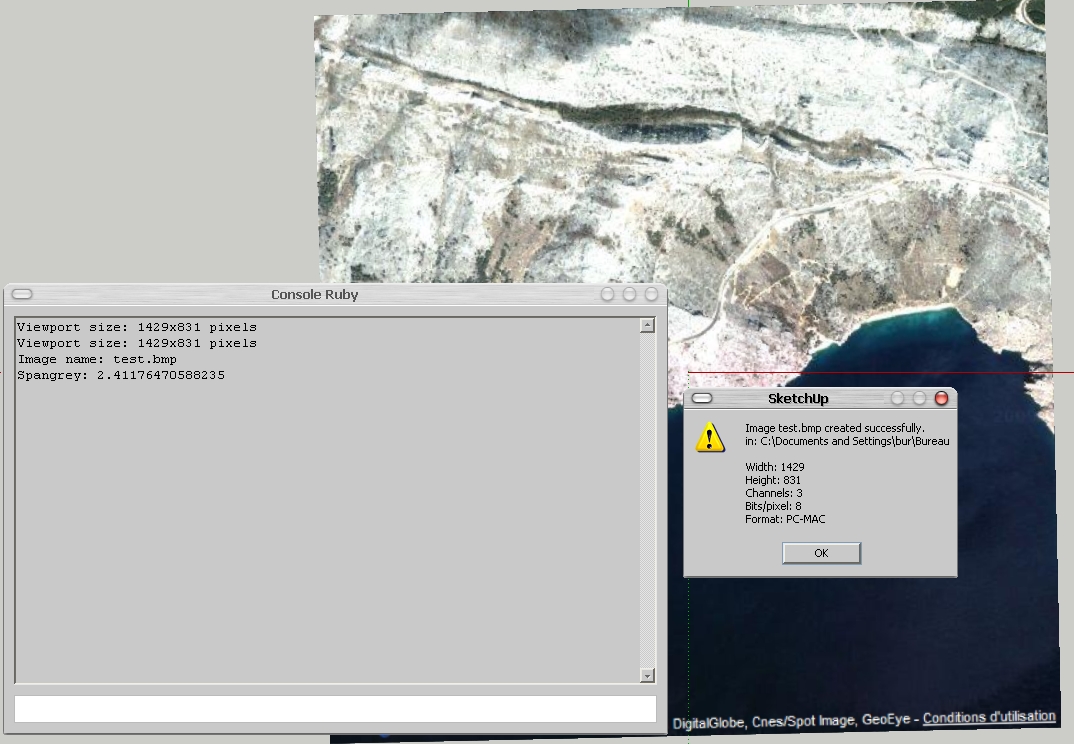
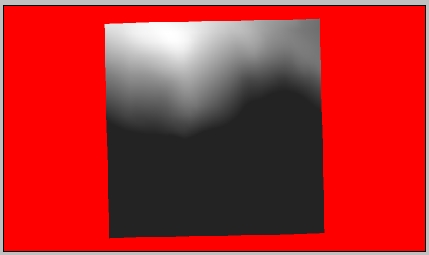
Below are 2 images of a GE captured terrain (mountain and sea) and the resulting heightmap on a red mask. It took 6 minutes to process.
-
I got it to work properly. I wasn't paying enough attention to formats/image sizes and what not. Oops.
Thanks anyway Didier and thanks alot for this plugin, it's been extremely helpful when recreating realworld locations.
-
@didier bur said:
Hi all,
After a long silence, here is another toy I wrote to export SU terrains to Unity3D game engine, which uses RAW heightmaps to create terrains. I thought it could be of any interest to others, so here it is.
Features:- creates BMP or RAW images, greyscale or color, 8 bits or 16 bits from any view of your model (top view recommanded of course)
- creates a colored mask where no faces found in the view
- can crop the image to the model projection
- can blur the heightmap before writing it.
Extract in Plugins folder, PDF doc included.
Regards,
EDIT: new release May 5th 2010, instant bugsplat fix

hi, i'm using heightmap from model plugin, and have got the heightmap. but i don't know the minimum and maximum elevation of the mode. Does the plugin provide these values? Without these values i can't generate a accurate terrain in other 3D software.
-
If you know the over all height of the data in the height-map... you can Import it, then Select the imported mesh and Scale it vertically, typing in the known height WITH A UNITS SUFFIX - e.g. if it's 25m high type 25
**m**+enter and instead of scaling x25 it will rescale so the total height is 25m...
Done -
Hi,
Before using the tool, open the Ruby console and type:Sketchup.active_model.bounds.min.z (Enter) Sketchup.active_model.bounds.max.z (Enter)This will output the minimum and maximum altitudes in your model (in inches).
Hope this helps, -
@didier bur said:
Hi,
Before using the tool, open the Ruby console and type:Sketchup.active_model.bounds.min.z (Enter) > Sketchup.active_model.bounds.max.z (Enter)This will output the minimum and maximum altitudes in your model (in inches).
Hope this helps,Thank you very much.
I have got some code and made a .rb file by myself,
it can label the min and max elevation value (in current unit setting)
Anyway, thanks again for your reply. -
really need that.
-
 Tips to unpack it :
[mod=Respect the original author:1hft24br]Please respect the author's wish to not have the code visible. Just because a plugin is free doesn't mean the source code is.[/mod:1hft24br]
 You can use the scrambler to protect your code:
http://www.sketchup.com/intl/en/developer/docs/utilities -
NOt working in SU 2014. Its in plugins folder, no crashing on startup, but there is no plugin menu option for this script, any idea ?
thx
-
Hey Didier Bur, Im using the SketchUp Make 2014, and the extensions are .rbz(Ruby) files, so I could not install your extension .rb, and i tried to add a "z" at the end as well, but it didn't install. So I was wondering if you could write a new version for this 2014 build ?
-
@cooldown said:
Hey Didier Bur, Im using the SketchUp Make 2014, and the extensions are .rbz(Ruby) files, so I could not install your extension .rb, and i tried to add a "z" at the end as well, but it didn't install. So I was wondering if you could write a new version for this 2014 build ?
Although Didier should update this plugin to work in SU2014, your method of installing it is incorrect, too. Changing .rb to .rbz is the wrong way to go. SketchUp still uses .rb as the extension for plugins. The .rbz extension is for packaging and to allow you to install via Install Extension, the Sketchucation Plugin Store, or the Extension Warehouse. Changing the extension of the zip file to .rbz will make it possible to install using Install Extension.
Before you change the extension, though, edit the last line of the rb file as indicated here:
-
@dave r said:
@cooldown said:
Hey Didier Bur, Im using the SketchUp Make 2014, and the extensions are .rbz(Ruby) files, so I could not install your extension .rb, and i tried to add a "z" at the end as well, but it didn't install. So I was wondering if you could write a new version for this 2014 build ?
Although Didier should update this plugin to work in SU2014, your method of installing it is incorrect, too. Changing .rb to .rbz is the wrong way to go. SketchUp still uses .rb as the extension for plugins. The .rbz extension is for packaging and to allow you to install via Install Extension, the Sketchucation Plugin Store, or the Extension Warehouse. Changing the extension of the zip file to .rbz will make it possible to install using Install Extension.
Before you change the extension, though, edit the last line of the rb file as indicated here: http://sketchucation.com/forums/viewtopic.php?f=323%26amp;t=12354%26amp;p=529566%26amp;hilit=unpack#p515316
Dave R, thanks for the reply, I understand what you told me to do, but the link you gave is not opening, could you tell me what to edit on the last line of the code ?
-
I edited Dave's link - it now takes you to my post about that edit fix for many of Didier's packed plugins...
-
Thanks TIG
-
Didier has agreed that I might update some of his scripts in the PluginStore, to make them v2014/2015 compatible...
Please get the latest version from the PluginStore http://sketchucation.com/pluginstore?pln=mesh2HeightMap -
2015 sketchup pro, iMac recent model OSX yosemite
The latest .rbz version installs just fine from the prefs. It shows up on my menu and reminds me if the projection/view is not orthographic. It goes to the next panel to choose an option BUT when I click OK, nothing happens. I've tried this on different machines and the new version fails on sketch 2014 as well. BUT the older version (.rb with the pdf attachment) works fine on an old Mac running sketch pro 7.1!
Is there something I'm missing here? Does the new version fully support OS X?
any suggestions?
many thanks,
-
Please try it on your MAC in v2014/2015 with the Ruby Console open...
Are there any error messages ? -
Hello, I'm having troubles with the plugin.
Installation seems OK as I'm able to launch it (after having selected a Top View and unchecked Perspective).
I have the height map option window and when I click OK it crashes (I've tried default setup and other setup it's the same).I'm using MacOSX Sierra and Sketchup 2015 (version 15.3.329).
Any help would be nice but this thread is quite old so...
Note: my geo area is not square (hope that's not the issue).
Full stack:
Exception Name: NSInternalInconsistencyException
Description: Invalid parameter not satisfying: value != nil
User Info: {
NSStackTraceKey = "0x7fffa0b35b7b 0x7fffb38becad 0x7fff9f1eb232 0x7fffa0c1e390 0x7fff9d492c56 0x10d6fae3b 0x10d7d9cab 0x1133b03f2 0x11339b149 0x1133a729f 0x1133a669b 0x1133a65e0 0x113285d82 0x1133ad9b1 0x1133ace94 0x10d7f03b8 0x11327fc54 0x10d7f022d 0x10d7c8d06 0x10da447ab 0x7fffb43ce03d 0x7fff9d5064e7 0x7fff9d044de2 0x7fff9d044b4e 0x7fffb43ce03d 0x7fff9d0cdb99 0x7fff9d0cdb10 0x7fff9d0cd93d 0x7fff9cf842ac 0x7fff9e6d60d5 0x7fff9e6d5346 0x7fff9e6eadc4 0x7fff9e736c96 0x7fff9e7622bb 0x7fff9e76226a 0x7fff9e76213d 0x7fff9e762b77 0x7fff9e762826 0x7fff9cf74079 0x7fff9d1ee322 0x7fff9d5044eb 0x7fff9cde8fbd 0x7fff9cdb3a8a 0x10d622874 0x1";
}0 CoreFoundation 0x00007fff9f1e652b __exceptionPreprocess + 171
1 libobjc.A.dylib 0x00007fffb38becad objc_exception_throw + 48
2 CoreFoundation 0x00007fff9f1eb232 +[NSException raise:format:arguments:] + 98
3 Foundation 0x00007fffa0c1e390 -[NSAssertionHandler handleFailureInMethod:object:file:lineNumber:description:] + 195
4 AppKit 0x00007fff9d492c56 -[NSSavePanel setNameFieldStringValue:] + 146
5 SketchUp 0x000000010d6fae3b ZN14RubyUIUtilsMac13ShowSavePanelERKN6atlast5utils14atlast_ustringES4_S4_PS2 + 269
6 SketchUp 0x000000010d7d9cab _Z16InitRubyUIModulev + 7676
7 Ruby 0x00000001133b03f2 vm_call_cfunc + 1074
8 Ruby 0x000000011339b149 vm_exec_core + 13289
9 Ruby 0x00000001133a729f vm_exec + 127
10 Ruby 0x00000001133a669b vm_invoke_proc + 171
11 Ruby 0x00000001133a65e0 rb_vm_invoke_proc + 32
12 Ruby 0x0000000113285d82 proc_call + 114
13 Ruby 0x00000001133ad9b1 vm_call0_body + 2017
14 Ruby 0x00000001133ace94 rb_call0 + 404
15 SketchUp 0x000000010d7f03b8 _Z15protect_funcallmmiz + 786
16 Ruby 0x000000011327fc54 rb_protect + 212
17 SketchUp 0x000000010d7f022d _Z15protect_funcallmmiz + 391
18 SketchUp 0x000000010d7c8d06 _ZNK12CRubyCommand6InvokeEv + 94
19 SketchUp 0x000000010da447ab _ZN8CCommand13InvokeCommandEi + 39
20 libsystem_trace.dylib 0x00007fffb43ce03d _os_activity_initiate + 61
21 AppKit 0x00007fff9d5064e7 -[NSApplication(NSResponder) sendAction:to:from:] + 456
22 AppKit 0x00007fff9d044de2 -[NSMenuItem _corePerformAction] + 324
23 AppKit 0x00007fff9d044b4e -[NSCarbonMenuImpl performActionWithHighlightingForItemAtIndex:] + 114
24 libsystem_trace.dylib 0x00007fffb43ce03d _os_activity_initiate + 61
25 AppKit 0x00007fff9d0cdb99 -[NSMenu performActionForItemAtIndex:] + 121
26 AppKit 0x00007fff9d0cdb10 -[NSMenu _internalPerformActionForItemAtIndex:] + 94
27 AppKit 0x00007fff9d0cd93d -[NSCarbonMenuImpl _carbonCommandProcessEvent:handlerCallRef:] + 107
28 AppKit 0x00007fff9cf842ac NSSLMMenuEventHandler + 986
29 HIToolbox 0x00007fff9e6d60d5 _ZL23DispatchEventToHandlersP14EventTargetRecP14OpaqueEventRefP14HandlerCallRec + 1708
30 HIToolbox 0x00007fff9e6d5346 _ZL30SendEventToEventTargetInternalP14OpaqueEventRefP20OpaqueEventTargetRefP14HandlerCallRec + 428
31 HIToolbox 0x00007fff9e6eadc4 SendEventToEventTarget + 40
32 HIToolbox 0x00007fff9e736c96 _ZL18SendHICommandEventjPK9HICommandjjhPKvP20OpaqueEventTargetRefS5_PP14OpaqueEventRef + 411
33 HIToolbox 0x00007fff9e7622bb SendMenuCommandWithContextAndModifiers + 59
34 HIToolbox 0x00007fff9e76226a SendMenuItemSelectedEvent + 188
35 HIToolbox 0x00007fff9e76213d ZL19FinishMenuSelectionP13SelectionDataP10MenuResultS2 + 96
36 HIToolbox 0x00007fff9e762b77 _ZL14MenuSelectCoreP8MenuData5PointdjPP13OpaqueMenuRefPt + 702
37 HIToolbox 0x00007fff9e762826 _HandleMenuSelection2 + 460
38 AppKit 0x00007fff9cf74079 _NSHandleCarbonMenuEvent + 239
39 AppKit 0x00007fff9d1ee322 _DPSEventHandledByCarbon + 54
40 AppKit 0x00007fff9d5044eb -[NSApplication(NSEvent) _nextEventMatchingEventMask:untilDate:inMode:dequeue:] + 613
41 AppKit 0x00007fff9cde8fbd -[NSApplication run] + 926
42 AppKit 0x00007fff9cdb3a8a NSApplicationMain + 1237
43 SketchUp 0x000000010d622874 start + 52 -
Hi again, I thought maybe there is an issue with retina screens.
If I open Ruby console:
Viewport size: 2880x1468 pixelsSketchup.active_model.bounds.min.z
~ -3,77mSketchup.active_model.bounds.max.z
~ 30,09m





Advertisement