sketchucation logo sketchucation
    • 登入
    Oops, your profile's looking a bit empty! To help us tailor your experience, please fill in key details like your SketchUp version, skill level, operating system, and more. Update and save your info on your profile page today!
    🔌 Smart Spline | Fluid way to handle splines for furniture design and complex structures. Download

    [Plugin] Extrude Edges by Rails

    已排程 已置頂 已鎖定 已移動 Plugins
    381 貼文 71 Posters 354.3k 瀏覽 71 Watching
    正在載入更多貼文
    • 從舊到新
    • 從新到舊
    • 最多點贊
    回覆
    • 在新貼文中回覆
    登入後回覆
    此主題已被刪除。只有擁有主題管理權限的使用者可以查看。
    • C 離線
      cmoreink
      最後由 編輯

      I have tried all that and nothing. Once I get home from work I'll PM you with SKP file and maybe we can resolve the issue.

      my portfolio

      1 條回覆 最後回覆 回覆 引用 0
      • TIGT 離線
        TIG Moderator
        最後由 編輯

        @cmoreink said:

        I have tried all that and nothing. Once I get home from work I'll PM you with SKP file and maybe we can resolve the issue.

        No problem - we will fix it... 🤓

        TIG

        1 條回覆 最後回覆 回覆 引用 0
        • jeff hammondJ 離線
          jeff hammond
          最後由 編輯

          @driven said:

          It may just be my machine, so if any other Mac user with all 4 installed wants to quit SU with it (the toolbar) open and see if they get an extra button on restart, and let me know, I'd be grateful.

          tried it a couple of times and no 5th button..

          dotdotdot

          1 條回覆 最後回覆 回覆 引用 0
          • pilouP 離線
            pilou
            最後由 編輯

            @unknownuser said:

            and no 5th button..

            ??? the are only 4 😉

            Works fine for me 😉

            fine.jpg

            Frenchy Pilou
            Is beautiful that please without concept!
            My Little site :)

            1 條回覆 最後回覆 回覆 引用 0
            • TIGT 離線
              TIG Moderator
              最後由 編輯

              @unknownuser said:

              Works fine for me 😉

              Me too. Tried every combo of arc direction etc and no problems... The only thing we don't know is his 'scale' - perhaps it's tiny ? 💭
              Wait till his PM SKP arrives... 😕
              EDIT: I just tried it with 3 curves <1mm long and it either made a partial mesh or made no mesh at all - It's to do with the size that SUp can make a face - a bit like FollowMe use over very small arcs - it can do the really small triangular faces... So that is one possibility - let's see what the actual problem SKP is like... 😕

              TIG

              1 條回覆 最後回覆 回覆 引用 0
              • jeff hammondJ 離線
                jeff hammond
                最後由 編輯

                @unknownuser said:

                @unknownuser said:

                and no 5th button..

                ??? the are only 4 😉

                right

                i was replying to driven who said he was getting a 5th(blank) button.

                dotdotdot

                1 條回覆 最後回覆 回覆 引用 0
                • pilouP 離線
                  pilou
                  最後由 編輯

                  Oh sorry 😳

                  Frenchy Pilou
                  Is beautiful that please without concept!
                  My Little site :)

                  1 條回覆 最後回覆 回覆 引用 0
                  • TIGT 離線
                    TIG Moderator
                    最後由 編輯

                    cmoreink

                    I got your SKP via PM.
                    I tried it and it works fine for me - here's the file back...
                    I assume you are using SUp v6 [from the the SKP version] - it might be a SUp version related problem BUT I don't see how.
                    The SKP was purgeable of several unused things but it worked fine for me before that anyway.
                    The SKP had 'no problems to fix' in Model Info.
                    Working with it through all of the combos I did highlight a couple of minor picking glitches that I'll fix in a future release - however these weren't related to your problem.

                    So to recap - I pick the nearest long rail, then the short profile that joins the rails then the other farther away long rail and then the profile again... The mesh is made perfectly... 😕

                    If you copy the profile to the other ends of the rails so all of th four curves touch at their ends - and then pick this copy as the 'melding-profile' at the end, can you get a mesh to form then ? ❓FFbR[TIGd].pngFFbR[TIGd].skp

                    TIG

                    1 條回覆 最後回覆 回覆 引用 0
                    • TIGT 離線
                      TIG Moderator
                      最後由 編輯

                      Here's v2.4 - 20100123 Minor glitch in picking order of curves resolved. FR lingvo file updated by Pilou.
                      http://forums.sketchucation.com/viewtopic.php?p=201286#p201286

                      TIG

                      1 條回覆 最後回覆 回覆 引用 0
                      • C 離線
                        cmoreink
                        最後由 編輯

                        I give up, it's a no go 😢
                        I also installed EEbR v2.4 but no show 😢

                        my portfolio

                        1 條回覆 最後回覆 回覆 引用 0
                        • D 離線
                          driven
                          最後由 編輯

                          @cmoreink said:

                          I give up, it's a no go 😢
                          I also installed EEbR v2.4 but no show 😢

                          Hi, one ? and one suggestion

                          have you installed the full new combo set, if not do that first

                          so that makes this the second suggestion, download TIGs demo skp (on top of one of these threads) and try out all his curves. If you use step back rather then delete, you get a fresh set of rails each try.

                          good luck

                          learn from the mistakes of others, you may not live long enough to make them all yourself...

                          1 條回覆 最後回覆 回覆 引用 0
                          • C 離線
                            cmoreink
                            最後由 編輯

                            I have dl TIGs curves and I get the same results as mine.

                            my portfolio

                            1 條回覆 最後回覆 回覆 引用 0
                            • TIGT 離線
                              TIG Moderator
                              最後由 編輯

                              @cmoreink said:

                              I give up, it's a no go 😢
                              I also installed EEbR v2.4 but no show 😢

                              Don't give up !
                              Any v6 users out there getting goodresults ?
                              😕

                              TIG

                              1 條回覆 最後回覆 回覆 引用 0
                              • pilouP 離線
                                pilou
                                最後由 編輯

                                Maybe a problem of video card?
                                Or conflict with another plug?
                                Where is the file for test it?
                                I have no problem with the V6 😉

                                Frenchy Pilou
                                Is beautiful that please without concept!
                                My Little site :)

                                1 條回覆 最後回覆 回覆 引用 0
                                • C 離線
                                  cmoreink
                                  最後由 編輯

                                  I'm running some tests with free v7.1 and I'll have an answer soon
                                  I do believe that there is a conflict with another plug.
                                  Which file test? TIGs or mine?

                                  Mr. TIG
                                  I just finished testing EEbR v2.4 on SU v7.1 (free) and it worked 😄 so I strongly believe that there is a conflict between plugins (now I just have to find which ones)
                                  I'm also attaching my plugins list, do you see a plug that it could conflict with your EEbR?
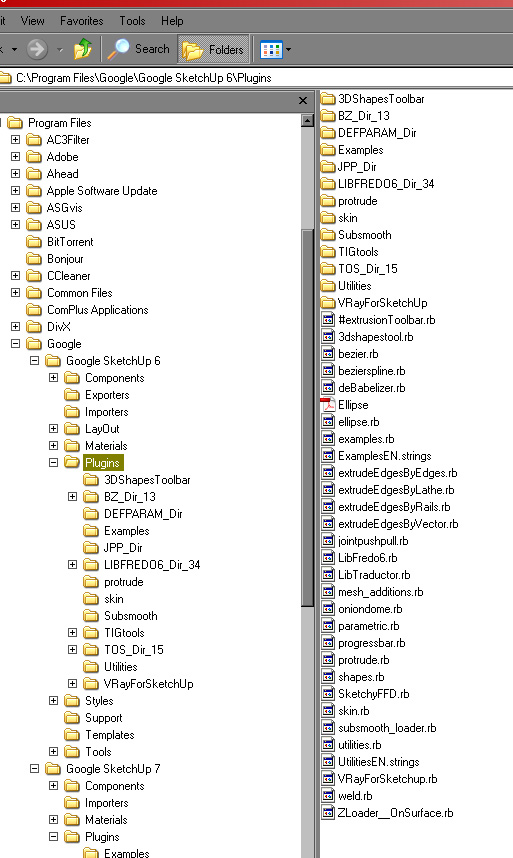

                                  plugins.jpg

                                  my portfolio

                                  1 條回覆 最後回覆 回覆 引用 0
                                  • pilouP 離線
                                    pilou
                                    最後由 編輯

                                    @unknownuser said:

                                    Which file test? TIGs or mine?

                                    Yours 😉
                                    But as seems it works now in the V7 seems that is not your file 😄
                                    I have 10* yours plugs in the V6 and no problem 😉

                                    Frenchy Pilou
                                    Is beautiful that please without concept!
                                    My Little site :)

                                    1 條回覆 最後回覆 回覆 引用 0
                                    • TIGT 離線
                                      TIG Moderator
                                      最後由 編輯

                                      I've looked at your list and Vray.. is the only one I'm unsure of - try renaming it with .txt at the end temporarily so it doesn't load and retry EEbyR.
                                      I can't see what might be the problem with a clash 😕

                                      TIG

                                      1 條回覆 最後回覆 回覆 引用 0
                                      • kenK 離線
                                        ken
                                        最後由 編輯

                                        TIG

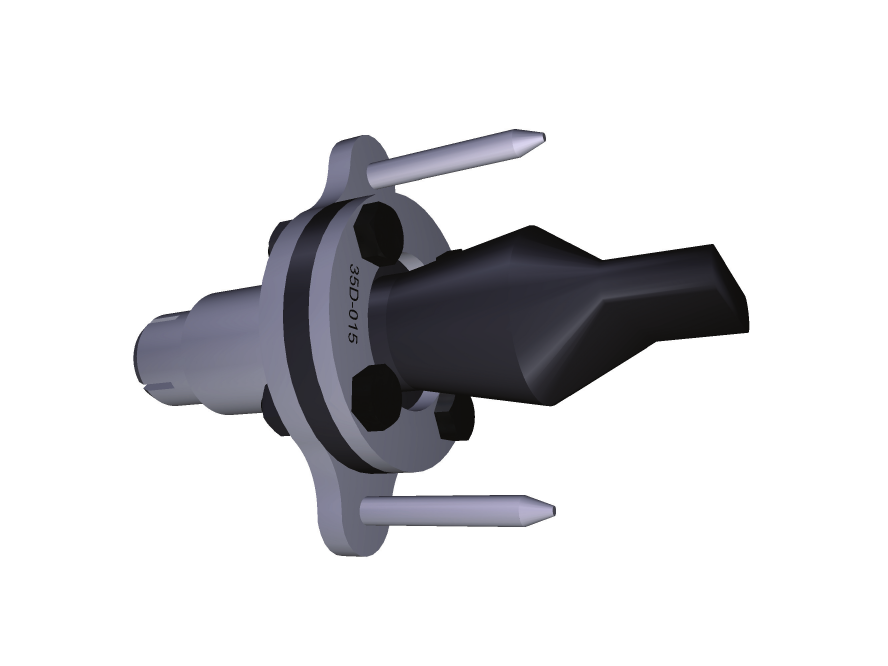
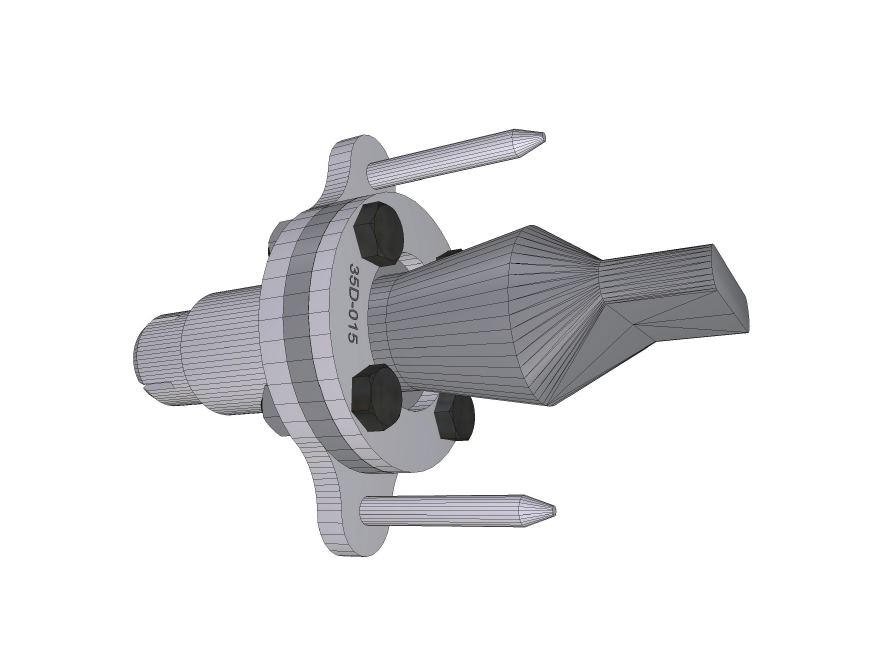
                                        Thanks for these very useful plugins and the toolbars. I am sending a 3d PDF attached file of a rubber check valve. The rubber top section, I don't know how I could have made it without your plugins.

                                        Open the file with Adobe Reader 9.2 and you should see the model in the 3d viewer mod.

                                        Again TIG thanks

                                        Ken


                                        ToTig.pdf

                                        Fight like your the third monkey on Noah's Ark gangway.

                                        1 條回覆 最後回覆 回覆 引用 0
                                        • TIGT 離線
                                          TIG Moderator
                                          最後由 編輯

                                          Ken

                                          Thanks for the praise - glad my tools are useful...
                                          Good to see some different types of use - looks quite technical...
                                          Here are a couple of 'stills' for others to see... hope you don't mind...ToTigEEby--Illus.pngToTigEEby--.png
                                          TIG

                                          1 條回覆 最後回覆 回覆 引用 0
                                          • JClementsJ 離線
                                            JClements
                                            最後由 編輯

                                            Ken, nice one.
                                            I did this four years ago. Wish I would have had the script then.
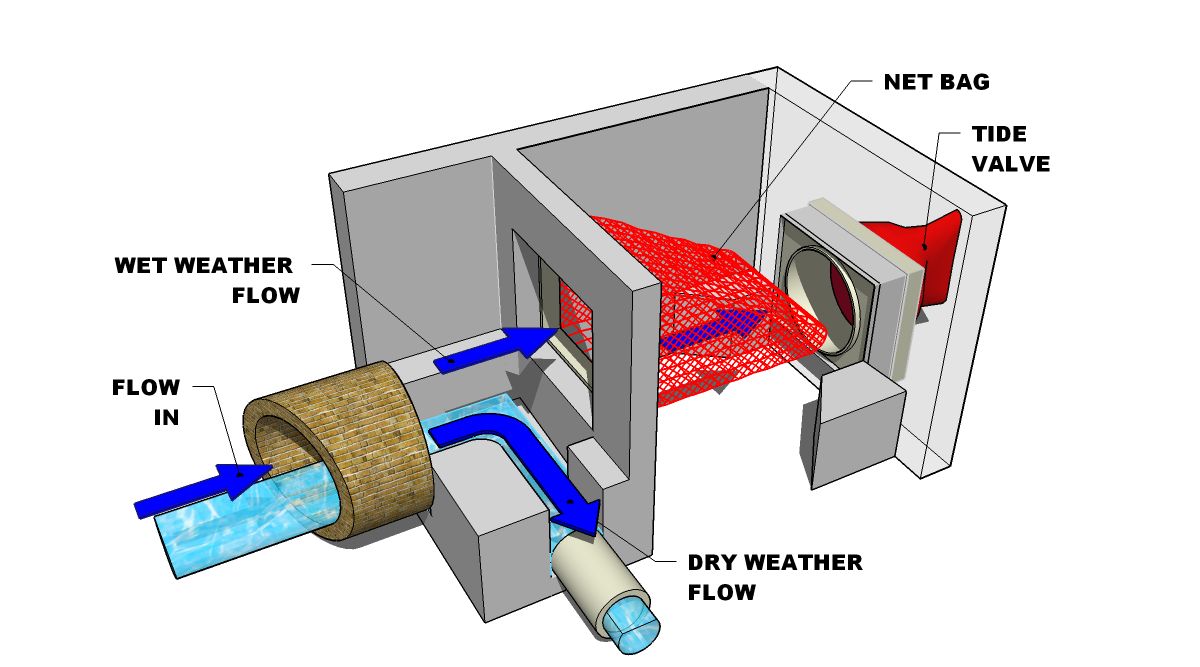
                                            Floatable_Control_-_Netbag_Retrofit -_2004.jpg

                                            What application did you use to create the 3D PDF?

                                            John | Illustrator | Beaverton, Oregon

                                            1 條回覆 最後回覆 回覆 引用 0
                                            • 1
                                            • 2
                                            • 15
                                            • 16
                                            • 17
                                            • 18
                                            • 19
                                            • 20
                                            • 17 / 20
                                            • 第一個貼文
                                              最後的貼文
                                            Buy SketchPlus
                                            Buy SUbD
                                            Buy WrapR
                                            Buy eBook
                                            Buy Modelur
                                            Buy Vertex Tools
                                            Buy SketchCuisine
                                            Buy FormFonts

                                            Advertisement