sketchucation logo sketchucation
    • 登入
    Oops, your profile's looking a bit empty! To help us tailor your experience, please fill in key details like your SketchUp version, skill level, operating system, and more. Update and save your info on your profile page today!
    🔌 Smart Spline | Fluid way to handle splines for furniture design and complex structures. Download

    [Plugin] Extrude Edges by Rails

    已排程 已置頂 已鎖定 已移動 Plugins
    381 貼文 71 Posters 354.1k 瀏覽 71 Watching
    正在載入更多貼文
    • 從舊到新
    • 從新到舊
    • 最多點贊
    回覆
    • 在新貼文中回覆
    登入後回覆
    此主題已被刪除。只有擁有主題管理權限的使用者可以查看。
    • TIGT 離線
      TIG Moderator
      最後由 編輯

      Here's v2.3 - a typo preventing the Plugins Menu item from working has been corrected. 😳
      http://forums.sketchucation.com/viewtopic.php?p=201286#p201286

      TIG

      1 條回覆 最後回覆 回覆 引用 0
      • D 離線
        driven
        最後由 編輯

        @tig said:

        Here's v2.3 - a typo preventing the Plugins Menu item from working has been corrected. :oops:

        hi, after fresh instal of SU7, + v2.3, I have Plugin Drop-Down Menu functionality on EEbyR only, is the same typo in the others?

        still got my extra Button, you'll just have to do an extra tool for it...

        cheers john

        learn from the mistakes of others, you may not live long enough to make them all yourself...

        1 條回覆 最後回覆 回覆 引用 0
        • TIGT 離線
          TIG Moderator
          最後由 編輯

          @driven said:

          @tig said:

          Here's v2.3 - a typo preventing the Plugins Menu item from working has been corrected. 😳

          hi, after fresh install of SU7, + v2.3, I have Plugin Drop-Down Menu functionality on EEbyR only, is the same typo in the others?
          still got my extra Button, you'll just have to do an extra tool for it...

          cheers john

          You need to re-download any/all EEby.. tools - they all had the same typo for each 😳 [the wonders of a last minute copy/paste !]
          They are all fixed now 😄

          TIG

          1 條回覆 最後回覆 回覆 引用 0
          • D 離線
            driven
            最後由 編輯

            double success, only four buttons, Plugin Menu working and everything else back in...success...jpg

            learn from the mistakes of others, you may not live long enough to make them all yourself...

            1 條回覆 最後回覆 回覆 引用 0
            • boofredlayB 離線
              boofredlay
              最後由 編輯

              I installed v2.3 but still only see the single EEbR button toolbar.
              SU7, PC XP.

              http://www.coroflot.com/boofredlay

              1 條回覆 最後回覆 回覆 引用 0
              • TIGT 離線
                TIG Moderator
                最後由 編輯

                @unknownuser said:

                I installed v2.3 but still only see the single EEbR button toolbar.

                Have you downloaded all of the separate EEby.. rubies [..Edges,..Lathe,..Rails and ..Vector] from the other threads ?
                You must have those in the Plugins folder too for their buttons to get made...
                Also remember that their various lingvo and png files etc that come with each ruby need to go in the TIGtools folder in Plugins... 💭

                TIG

                1 條回覆 最後回覆 回覆 引用 0
                • boofredlayB 離線
                  boofredlay
                  最後由 編輯

                  Ah, I understand. I have not downloaded the others. Thanks.

                  http://www.coroflot.com/boofredlay

                  1 條回覆 最後回覆 回覆 引用 0
                  • JClementsJ 離線
                    JClements
                    最後由 編輯

                    TIG:

                    Any chance you could ZIP all of the related scripts which use your toolbar, together in one file?

                    John | Illustrator | Beaverton, Oregon

                    1 條回覆 最後回覆 回覆 引用 0
                    • C 離線
                      cmoreink
                      最後由 編輯

                      Thank you TIG 😉

                      my portfolio

                      1 條回覆 最後回覆 回覆 引用 0
                      • D 離線
                        driven
                        最後由 編輯

                        Hi TIG,

                        the fifth button comes and goes depending on the last saved state,

                        if I turn Extrusion Toolbar off before quitting SU when I turn it back on it stays as 4 buttons for that session, any number of drawings.

                        if I don't turn it off before quitting SU it reappears with a 5th button.

                        not a big deal, but really hard to figure out when working on hi-poly drawings that I turn on and off all the time to let SU have a rest.

                        Only just now found some time to put my finger on a pattern and test the theory.

                        that's why it went away with the fresh instal and stayed away until I shut down for dinner, reappeared when I turned back on and has been subconsciously driving me nuts for the last 4 hours, even though it's not effecting anything else...

                        It may just be my machine, so if any other Mac user with all 4 installed wants to quit SU with it (the toolbar) open and see if they get an extra button on restart, and let me know, I'd be grateful.

                        john

                        learn from the mistakes of others, you may not live long enough to make them all yourself...

                        1 條回覆 最後回覆 回覆 引用 0
                        • pilouP 離線
                          pilou
                          最後由 編輯

                          @unknownuser said:

                          Any chance you could ZIP all of the related scripts which use your toolbar, together in one file?

                          Take a look here 😉

                          Frenchy Pilou
                          Is beautiful that please without concept!
                          My Little site :)

                          1 條回覆 最後回覆 回覆 引用 0
                          • C 離線
                            cmoreink
                            最後由 編輯

                            Hi TIG, good news and bad news:
                            good news: downloaded EEbE, EEbV and EEbL all work great and as you can see at screen shots I also have a nice toolbar with all icons
                            bad news: downloaded EEbR and it does not work 👿
                            please look at the screen shots and tell me if I'm doing something wrong (I hope it's me) or is there a conflict?
                            So I drew my 1st curve (not welded, not a group, it has 12 segments and it's as a one), I drew my 2nd and 3rd, click EEbR, selected 1st curve (profile, melding), selected 2nd curve (1st rail), selected 3rd curve (2nd rail), selected melding curve (1st curve, profile) and I got nothing. Only few "crosses) at each segment... what to do?
                            [EDIT]
                            so I decided to give one more try by selecting EEbR from Plugins menu instead of clicking on icon. When I click on Plugins menu and select EEbR from a pulldown menu I get nothing, I mean nothing, 0, it does not ask at the bottom of the screen to select the Profile Curve, etc. so I believe that there is a conflict somewhere...
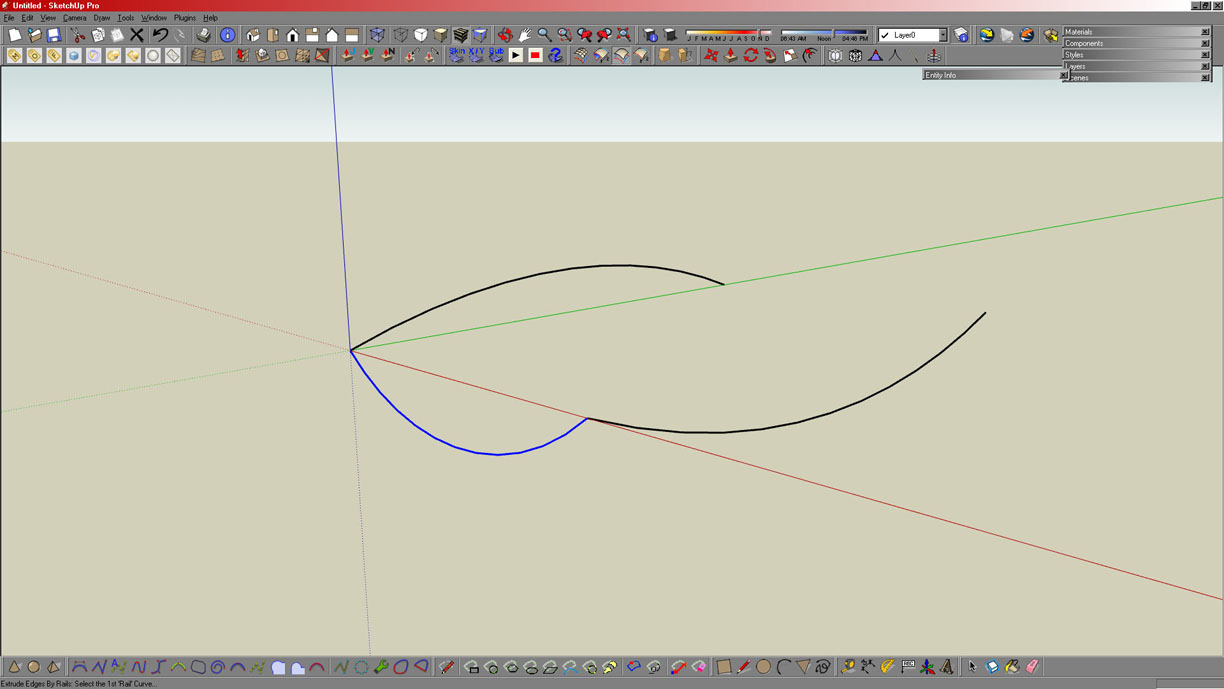
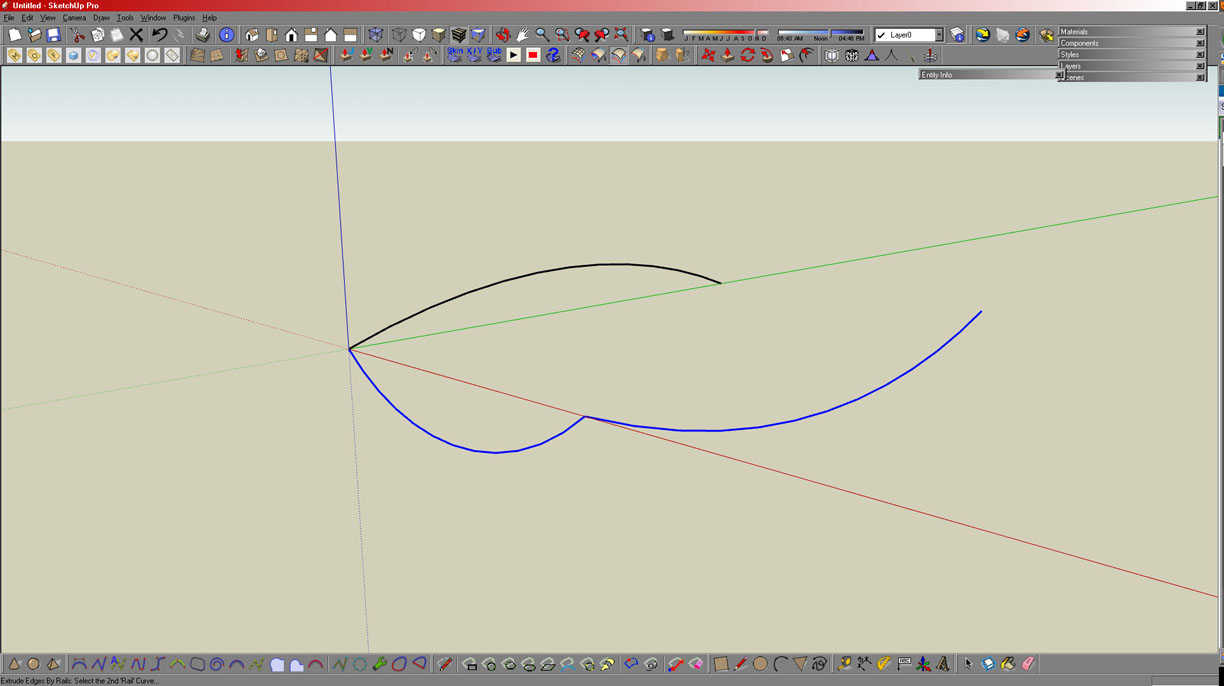
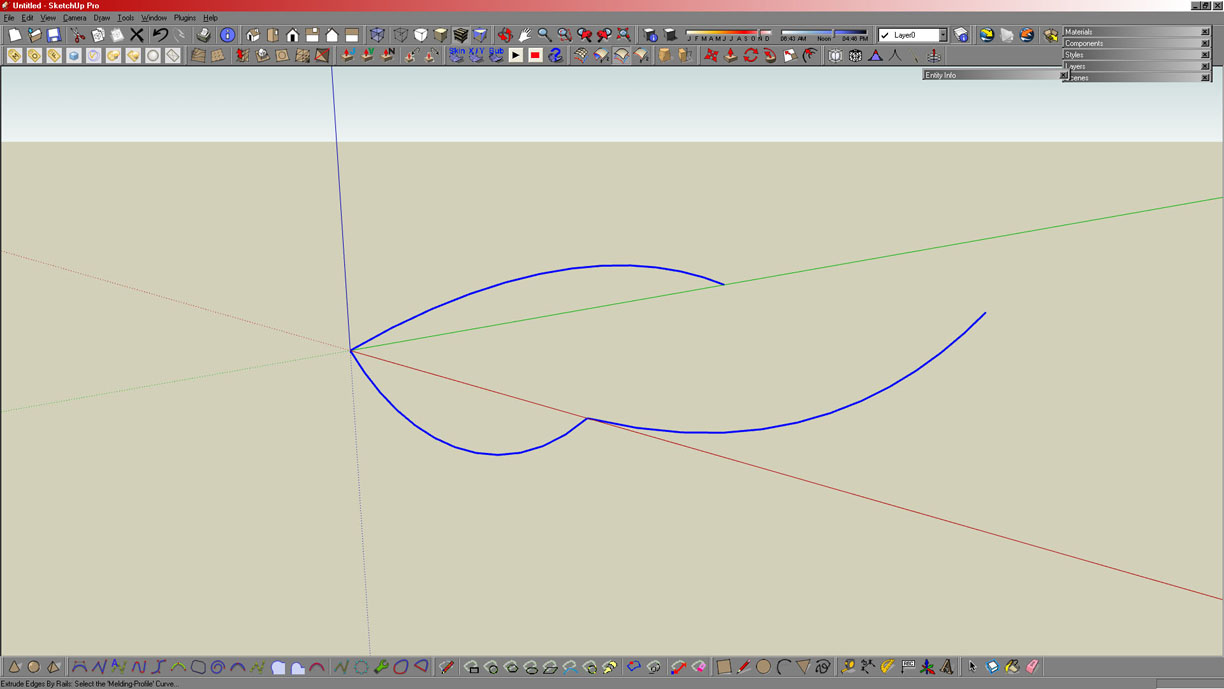
                            after drawing 3 curves I click on EEbR icon and select my 1st curve (profile, melding)


                            2nd curve (1st rail) selected


                            3rd curve (2nd rail) selected


                            1st curve (melding, profile) selected with final outcome, crosses at each segment

                            my portfolio

                            1 條回覆 最後回覆 回覆 引用 0
                            • TIGT 離線
                              TIG Moderator
                              最後由 編輯

                              @cmoreink said:

                              Hi TIG, good news and bad news:
                              good news: downloaded EEbE, EEbV and EEbL all work great and as you can see at screen shots I also have a nice toolbar with all icons
                              bad news: downloaded EEbR and it does not work 👿
                              please look at the screen shots and tell me if I'm doing something wrong (I hope it's me) or is there a conflict?
                              So I drew my 1st curve (not welded, not a group, it has 12 segments and it's as a one), I drew my 2nd and 3rd, click EEbR, selected 1st curve (profile, melding), selected 2nd curve (1st rail), selected 3rd curve (2nd rail), selected melding curve (1st curve, profile) and I got nothing. Only few "crosses) at each segment... what to do?
                              [EDIT]
                              so I decided to give one more try by selecting EEbR from Plugins menu instead of clicking on icon. When I click on Plugins menu and select EEbR from a pulldown menu I get nothing, I mean nothing, 0, it does not ask at the bottom of the screen to select the Profile Curve, etc. so I believe that there is a conflict somewhere...
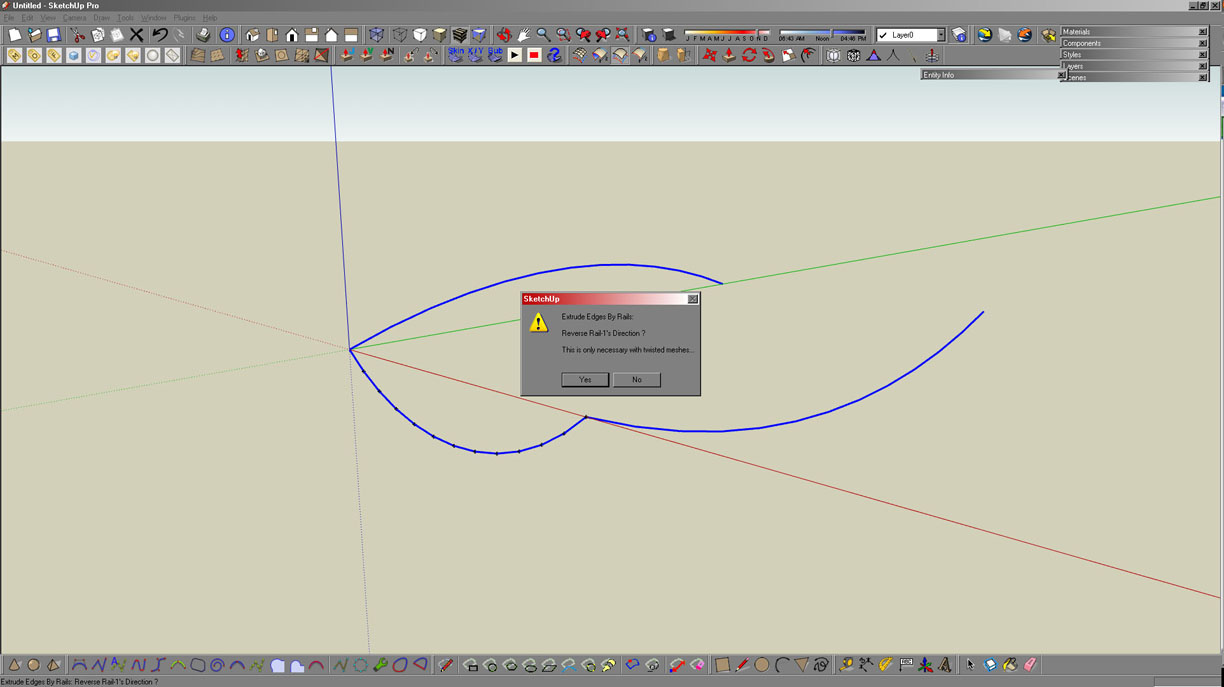
                              The menu glitch was fixed by the last update for all EEby.. tools - so get the latest update - that'll fix that menu problem.
                              I can't reproduce your problem...
                              I've draw a reproduction of your curves as far as I can tell, and even tried reversing the curves' ends' pick order etc in several permutations
                              Note that the melding-profile can be another curve or the first-picked profile curve: just as the rail-2 could also be rail-1 - but you can also just make a copy of a profile/rail the the other end of the rail/profile and pick that instead as the melding-profile or rail-2...
                              Sometimes [rarely] SUp's database gets muddled with some curve's info and this can cause EEbyR meshes to twist or fail etc [very rarely without making anything at all] BUT there are several fixes for this:
                              e.g. you can try...

                              Copying the profile curve [Move+Ctrl] to the other end of rail-1 and picking that as the melding-profile instead.
                              Picking the profiles/rails in reverse order, or swapped order - if the mesh is 'upside-down' then reverse faces later.
                              Erasing and remaking one of the curves.
                              Ditto - but if it's an arc reverse the direction of picking the arc's ends.
                              Selecting one of the curves and exploding it, then immediately welding the still highlighted lines back into a curve.
                              Selecting one of the curves and Edit>Cut it to the clipboard, and then Edit>Paste_in_Place.
                              Repeating the explode or cut/paste operations for each/all profiles/rails.
                              Selecting one of the curves and grouping it, then selecting the group and exploding it back into place.
                              Similarly - selecting one of the curves and grouping it, copying [Move+Ctrl] the group, erasing the original group and curve, moving the copy into place and then exploding it.

                              These approaches are quick to do and one should fix such problems, which occur only very rarely... I have never yet had a set of curves that won't mesh appropriately... even if you have to bash them around a bit sometimes 👊

                              Hope this helps - if not PM me with a copy of the problem SKP and I'll look at it... 🤓

                              TIG

                              1 條回覆 最後回覆 回覆 引用 0
                              • C 離線
                                cmoreink
                                最後由 編輯

                                I have tried all that and nothing. Once I get home from work I'll PM you with SKP file and maybe we can resolve the issue.

                                my portfolio

                                1 條回覆 最後回覆 回覆 引用 0
                                • TIGT 離線
                                  TIG Moderator
                                  最後由 編輯

                                  @cmoreink said:

                                  I have tried all that and nothing. Once I get home from work I'll PM you with SKP file and maybe we can resolve the issue.

                                  No problem - we will fix it... 🤓

                                  TIG

                                  1 條回覆 最後回覆 回覆 引用 0
                                  • jeff hammondJ 離線
                                    jeff hammond
                                    最後由 編輯

                                    @driven said:

                                    It may just be my machine, so if any other Mac user with all 4 installed wants to quit SU with it (the toolbar) open and see if they get an extra button on restart, and let me know, I'd be grateful.

                                    tried it a couple of times and no 5th button..

                                    dotdotdot

                                    1 條回覆 最後回覆 回覆 引用 0
                                    • pilouP 離線
                                      pilou
                                      最後由 編輯

                                      @unknownuser said:

                                      and no 5th button..

                                      ??? the are only 4 😉

                                      Works fine for me 😉

                                      fine.jpg

                                      Frenchy Pilou
                                      Is beautiful that please without concept!
                                      My Little site :)

                                      1 條回覆 最後回覆 回覆 引用 0
                                      • TIGT 離線
                                        TIG Moderator
                                        最後由 編輯

                                        @unknownuser said:

                                        Works fine for me 😉

                                        Me too. Tried every combo of arc direction etc and no problems... The only thing we don't know is his 'scale' - perhaps it's tiny ? 💭
                                        Wait till his PM SKP arrives... 😕
                                        EDIT: I just tried it with 3 curves <1mm long and it either made a partial mesh or made no mesh at all - It's to do with the size that SUp can make a face - a bit like FollowMe use over very small arcs - it can do the really small triangular faces... So that is one possibility - let's see what the actual problem SKP is like... 😕

                                        TIG

                                        1 條回覆 最後回覆 回覆 引用 0
                                        • jeff hammondJ 離線
                                          jeff hammond
                                          最後由 編輯

                                          @unknownuser said:

                                          @unknownuser said:

                                          and no 5th button..

                                          ??? the are only 4 😉

                                          right

                                          i was replying to driven who said he was getting a 5th(blank) button.

                                          dotdotdot

                                          1 條回覆 最後回覆 回覆 引用 0
                                          • pilouP 離線
                                            pilou
                                            最後由 編輯

                                            Oh sorry 😳

                                            Frenchy Pilou
                                            Is beautiful that please without concept!
                                            My Little site :)

                                            1 條回覆 最後回覆 回覆 引用 0
                                            • 1
                                            • 2
                                            • 16
                                            • 17
                                            • 18
                                            • 19
                                            • 20
                                            • 20 / 20
                                            • 第一個貼文
                                              最後的貼文
                                            Buy SketchPlus
                                            Buy SUbD
                                            Buy WrapR
                                            Buy eBook
                                            Buy Modelur
                                            Buy Vertex Tools
                                            Buy SketchCuisine
                                            Buy FormFonts

                                            Advertisement