[Plugin] Extrude Edges by Rails
-
@jim said:
Hi TIG, FYI.
extrudeEdgesByRails.rb;161; warning; parenthesize argument(s) for future version
> etc
Thanks
It's already fixed in new versions... out soon
x=db"text"
becomes
x=(db("text"))
etc... -
Here's v2.2 with various minor glitch fixes and a new combined Toolbar with other Extrusion Tools...
http://forums.sketchucation.com/viewtopic.php?p=201286#p201286 -
hi TIG,
thanks again,
EEbyR and EEbyV don't work out of the plugins menu, but do from toolbar buttons
EEbyR's toobar image is blank once EEbyV is loaded, but both work
EEbyV looks really useful, but what is 'extrude by sweep' mentioned in the ruby text?
john
EDIT just combined the the 3 Tig folder's and I have all three working icon/buttons, but still no functionality from plugin folder, so can I just comment them out of there. -
Same for me

All works but only with icone
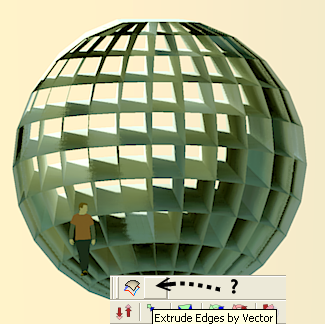
When existing imageEEV here is blank
-
If you extract [NOT drag/drop] the contents of this zip you should get three .rb files, which are the script itself, the deBabelizer script and the toolbar maker script. Also there should be a folder [TIGtools] containing the lingvo files and pngs for the buttons and an htm donation link, with a folder of its images too.
The three rb files go into Plugins folder and the TIGtools folder goes into Plugins folder too. The script looks for the pngs to form the toolbar icons in there - so apparently you have messed up the folders as it's not finding them...
If you extract a zip file any decent zip-application will keep the file/folder structure - you can either extract the contents directly into the Plugins folder where everything will be in the right place OR into a tempoarry folder on your desktop - and then move its contents to the Plugins folder later...
Since some of the TIGtools folder's contents and also the other add-on .rb files might already exist answer Yes to overwrite them with these new versions...
NOTE: Depending on your 'administrator' rights with Vista etc you might be getting incremented copied of files/folders - please look in Plugins and check - you should have one .rb for each of the EEby... scripts you've insatlled, one #extrusionToolbar.rb script to make the toolbar, one deBabelizer.rb to translate languages and one TIGtools folder which itself will contain several .lingvo [translation] files and .png images for the toolbar buttons, and also the htm donation link file and a folder of that file's images...
If you have any duplicate folders combine their contents all into the original one and then erase the empty ones, and also any '..Copy..' .rb files you might find too.
If this IS happening then it's probably best to extract zips to a temporary folder on your desktop and then move everything [keeping the same folder structure] into Plugins, overwriting any existing stuff...Hope this helps...
-
@driven said:
hi TIG,
what is 'extrude by sweep' mentioned in the ruby text?
john'ExtrudeEdgesBySweep' was a proto-tool that's now abandoned [I had hoped for results different from EEbyR but the new algorithms produced inconsistent results that were almost identical anyway, so I gave up on it] - all references to it should have been removed - they is now, and will be omitted in any updates... Sorry for the confusion...
-
@tig said:
Sorry for the confusion...
no apology needed, most people don't read the rubies, and I just thought it was maybe yet another super-duper 'secret' tool that I'd missed and that it was maybe why I get a blank tool button.
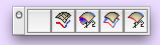
However, now knowing that it's not and still not having the ability to use any of the EE tools from the plugin menu, I've been trying a few things to get that functionality back and I can't.Basically
1: I have a 'spare' Button that does nothing if there is any single EE tool installed (so, I'll get 2,3 or 4 buttons, never one)
2: Plugin Menu function does not work with one or all EE tools installed (they are there) with or without #extrusionToolbar.rb.I don't think it's a 'Mac' thing, your scripts never give me those sort of issues, and it's not an install issue either, although Mac's do Copy/Paste + Drag/Drop differently to PC's, I know that and have a fairly bullet proof procedure I use all the time.
-
@driven said:
@tig said:
Sorry for the confusion...
no apology needed, most people don't read the rubies, and I just thought it was maybe yet another super-duper 'secret' tool that I'd missed and that it was maybe why I get a blank tool button.[attachment=0:3504o1ud]<!-- ia0 -->BlankButton.jpg<!-- ia0 -->[/attachment:3504o1ud]
However, now knowing that it's not and still not having the ability to use any of the EE tools from the plugin menu, I've been trying a few things to get that functionality back and I can't.Basically
1: I have a 'spare' Button that does nothing if there is any single EE tool installed (so, I'll get 2,3 or 4 buttons, never one)
2: Plugin Menu function does not work with one or all EE tools installed (they are there) with or without #extrusionToolbar.rb.I don't think it's a 'Mac' thing, your scripts never give me those sort of issues, and it's not an install issue either, although Mac's do Copy/Paste + Drag/Drop differently to PC's, I know that and have a fairly bullet proof procedure I use all the time.
When you hover over the blank button what tooltip or VCB message do you get ?
In the Plugins Menu do you have duplicate EEby.. entries ?
I suspect you have two copies of something around somewhere... Are all your plugins in the a same folder ?? -
How many tools must have now the Extrude Bar tools?
-
I get the two icons on the right (EEbR and EEbV), but what are the next two?
-
@unknownuser said:
How many tools must have now the Extrude Bar tools?
You can have 1, 2, 3 or 4 buttons, depending on which Plugins you have downloaded - which can be any of these - EEbyEdges, EEbyLathe, EEbyRails and EEbyVector... [EE=ExtrudeEdges - saves typing... damn I did it anyway
 ]
]
You also need #extrusionToolbar.rb which makes the toolbar when it loads [if any one of these other rb files is in the Plugins folder] - the other rubies then load and make a Plugins>Menu item and a 'Extrusion Tools' Toolbar button for themselves [if it finds the toolbar has been made beforehand] - if a button .png is missing [e.g. perhaps you have put it in the wrong place] you get a blank button but the tooltip and VCB texts should still work etc... -
@tig said:
When you hover over the blank button what tooltip or VCB message do you get ?
In the Plugins Menu do you have duplicate EEby.. entries ?
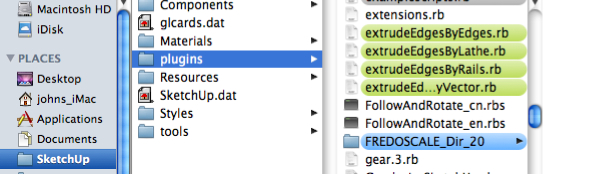
I suspect you have two copies of something around somewhere... Are all your plugins in the a same folder ??No tooltip message, but it does toggle grey [on/off], effects nothing
No duplicates, even took out lath.rb, just in case
All my plugins are in same folder
-
I know Fredo has had problems with files being copied into duplicate Plugins folders in different places ? Any cahce of this ?
Any other Mac users getting similar problems with these tools ?
Any Mac users getting NO problems with these tools ?
Help appreciated...
-
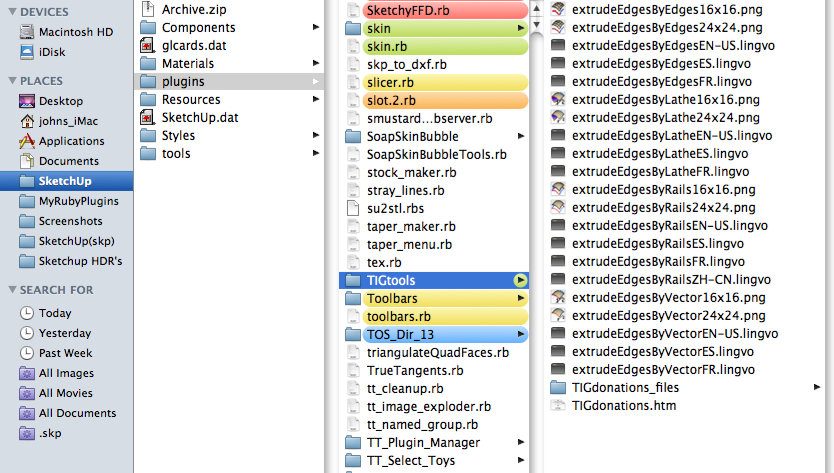
and this one
-
@driven said:
and this one
That's right...
But what is the exact full path to your Mac's Plugins folder ? As I said some users seem to end up with 2... -
Is there a new version of #extrusionToolbar.rb that shows the fourth icon?
Mine is dated 1/19/2010.I have:
extrudeEdgesByVector.rb
extrudeEdgesByRails.rb
extrudeEdgesByEdges.rb
extrudeEdgesByLathe.rb -
@bob james said:
Is there a new version of #extrusionToolbar.rb that shows the fourth icon?
Mine is dated 1/19/2010.
I have:
extrudeEdgesByVector.rb
extrudeEdgesByRails.rb
extrudeEdgesByEdges.rb
extrudeEdgesByLathe.rb#extrusionToolbar.rb was last modified on that date and is still at v1.0 - it's a very simple file that checks for any of these four main rubies and if any are found it makes the toolbar.
The main rubies then load in alphanumric order and make their menu item and check for the toolbar, and if that's found they add their button to it.
If they can't find the png images you'll get the blank button...Either the Mac has a different way of making 'empty' toolbars and adds a blank button from #extrusionToolbar.rb even before the others get made - which explains why it's first in the list, or something else is adrift...
Other users' feedback is needed... There are hundreds of you

-

looking at script changes , I wondered if this may be a problem for mac's it's not how you use to do it?
cmd=UI::Command.new(textstring){extrudeEdgesByRails()} UI.menu("Plugins").add_item(textstring){cmd} cmd.status_bar_text=textstring+instructions if $extrusionToolbar cmd.tooltip=textstring cmd.small_icon="TIGtools/extrudeEdgesByRails16x16.png" cmd.large_icon="TIGtools/extrudeEdgesByRails24x24.png" $extrusionToolbar.add_item(cmd) end#if -
@driven said:
looking at script changes , I wondered if this may be a problem for mac's it's not how you use to do it?
cmd=UI::Command.new(textstring){extrudeEdgesByRails()}
UI.menu("Plugins").add_item(textstring){cmd}
cmd.status_bar_text=textstring+instructions
if $extrusionToolbar
cmd.tooltip=textstring
cmd.small_icon="TIGtools/extrudeEdgesByRails16x16.png"
cmd.large_icon="TIGtools/extrudeEdgesByRails24x24.png"
$extrusionToolbar.add_item(cmd)
end#ifThis method makes a $global variable pointing at the toolbar - that way a pre-existing toolbar can get extra buttons added as a ruby loads... Works fine on a PC - I'm wondering if Macs are so different...
We need to hear from Mac users - if it's only happening to you then... if it's happening to all of them then...
-
@tig said:
Either the Mac has a different way of making 'empty' toolbars and adds a blank button from #extrusionToolbar.rb even before the others get made - which explains why it's first in the list, or something else is adrift...
Other users' feedback is needed... There are hundreds of you :enlight:
#extrusionToolbar.rb only gave one(1)tool image with EEbyR_V2.1 so this is only sinceV2.2 and the other updated EEtools
and YEAH- where are the other Mac users.....





Advertisement