sketchucation logo sketchucation
    • Login
    Oops, your profile's looking a bit empty! To help us tailor your experience, please fill in key details like your SketchUp version, skill level, operating system, and more. Update and save your info on your profile page today!
    Mac User? | Join the Rayscaper Beta for Mac Learn More

    [Plugin] Extrude Edges by Rails

    Scheduled Pinned Locked Moved Plugins
    381 Posts 71 Posters 424.8k Views 71 Watching
    Loading More Posts
    • Oldest to Newest
    • Newest to Oldest
    • Most Votes
    Reply
    • Reply as topic
    Log in to reply
    This topic has been deleted. Only users with topic management privileges can see it.
    • H
      hsjzyangbin
      last edited by

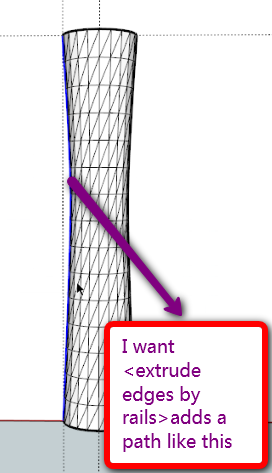
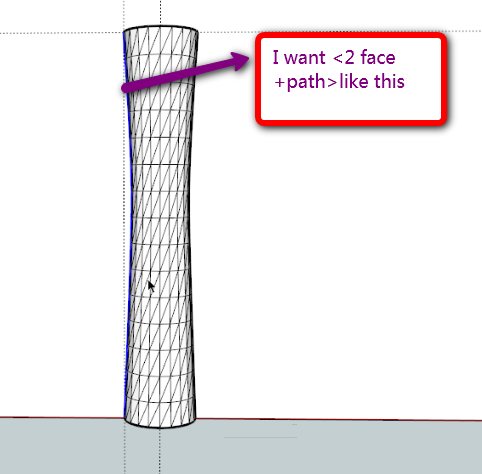
      Hi,TIG,I have a idea that <extrude edges by rails> adds a path like this,thanks

      next:I wish it could be add rotate and scale function

      gogo.png


      gg2.png

      1 Reply Last reply
      Reply Quote 0
      • H
        hsjzyangbin
        last edited by

        @tig said:

        I don't understand you diagram.
        You can already do this ?
        Are you wanting some sort of 2-face FollowMe ? Just use the faces edges [welded into a curve] as your Rails ?
        With EEbyRv2 [that is about to be launched] you will be able to choose the Profile, Rail1 and Rail2 and then a 'Melding-Profile' that fixes the end form too - is that what you want ? It will allow a definite start and end profile location form to be predefined...
        ❓

        Yes,it could be "2-face +2-path+FollowMe" 😍
        I also do not have this plug-in, I use the LATHE. RB command generates images shown, as you said, the first path to the same, choose the second Rails as a control Rails
        "lathe" you can see it http://www.sketchupbbs.com/thread-40382-1-1.html

        1 Reply Last reply
        Reply Quote 0
        • charly2008C
          charly2008
          last edited by

          Hi,


          Beautiful Work.jpg

          He who makes no mistakes, makes nothing

          1 Reply Last reply
          Reply Quote 0
          • TIGT
            TIG Moderator
            last edited by

            @hsjzyangbin said:

            @tig said:

            I don't understand you diagram.
            You can already do this ?
            Are you wanting some sort of 2-face FollowMe ? Just use the faces edges [welded into a curve] as your Rails ?
            With EEbyRv2 [that is about to be launched] you will be able to choose the Profile, Rail1 and Rail2 and then a 'Melding-Profile' that fixes the end form too - is that what you want ? It will allow a definite start and end profile location form to be predefined...
            ❓

            Yes,it could be "2-face +2-path+FollowMe" 😍
            I also do not have this plug-in, I use the LATHE. RB command generates images shown, as you said, the first path to the same, choose the second Rails as a control Rails
            "lathe" you can see it http://www.sketchupbbs.com/thread-40382-1-1.html

            I too have a lathe.rb that is somewhat similar...

            TIG

            1 Reply Last reply
            Reply Quote 0
            • H
              hsjzyangbin
              last edited by

              @tig said:

              I too have a lathe.rb that is somewhat similar...

              希望我的提议对你的插件有用,谢谢!

              1 Reply Last reply
              Reply Quote 0
              • TIGT
                TIG Moderator
                last edited by

                @hsjzyangbin said:

                @tig said:

                I too have a lathe.rb that is somewhat similar...

                希望我的提议对你的插件有用,谢谢!

                Your proposal for my plug-in very useful, thank you!

                TIG

                1 Reply Last reply
                Reply Quote 0
                • david_hD
                  david_h
                  last edited by

                  very fun indeed. Is there a toolbar? I get the command in my Plugins Tab, but Is there an onscreen toolbar as well?

                  If I make it look easy...It is probably easy

                  1 Reply Last reply
                  Reply Quote 0
                  • TIGT
                    TIG Moderator
                    last edited by

                    No Toolbar yet OR webdialog BUT it's on the list - trying to get v2 and segmentation right first...

                    TIG

                    1 Reply Last reply
                    Reply Quote 0
                    • TIGT
                      TIG Moderator
                      last edited by

                      http://forums.sketchucation.com/viewtopic.php?p=201286#p201286
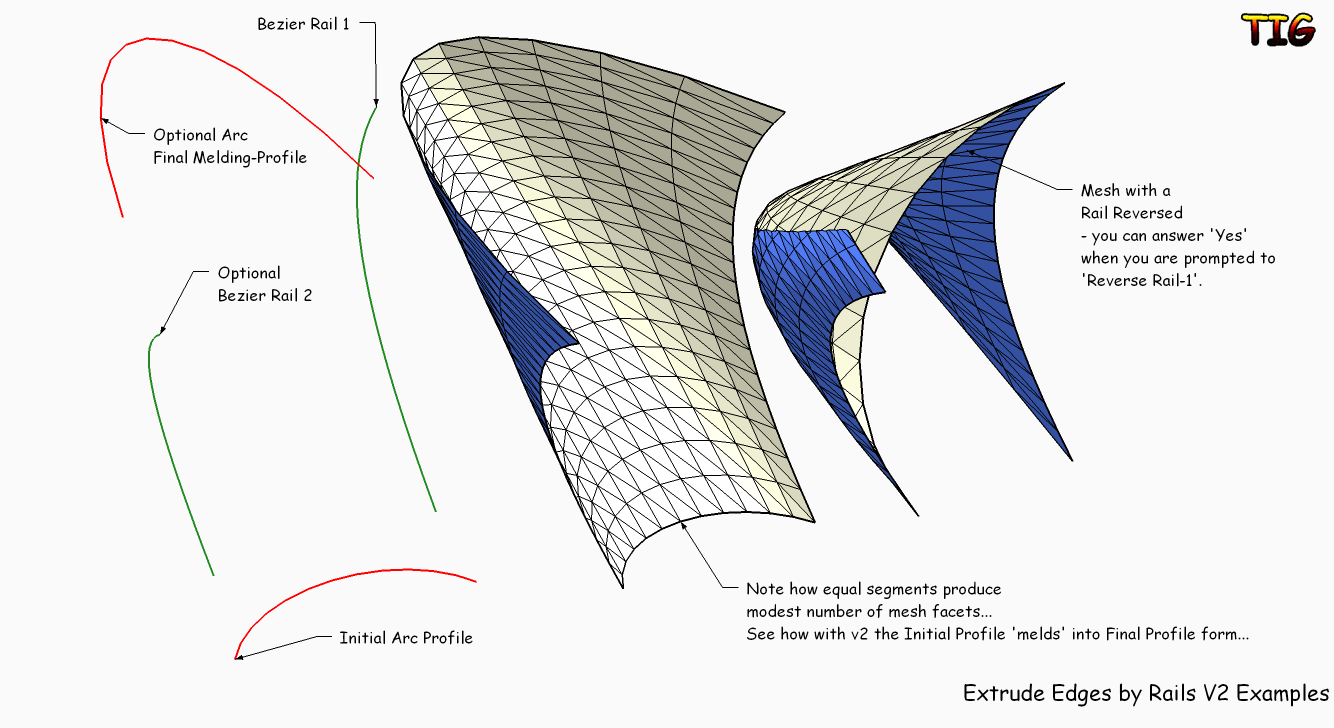
                      Here's v2 - now allows a final 'melding-profile' if desired and facets minimized...

                      TIG

                      1 Reply Last reply
                      Reply Quote 0
                      • TIGT
                        TIG Moderator
                        last edited by

                        Here's some examples of EEbyRails v2ExtrudeEdgesByRailsV2Examples.pngExtrudeEdgesByRailsV2Examples.skp

                        TIG

                        1 Reply Last reply
                        Reply Quote 0
                        • EarthMoverE
                          EarthMover
                          last edited by

                          Amazing work on the new version. You've created almost a patch method with really clean mesh results. THis is going to make a lot of people happy!

                          3D Artist at Clearstory 3D Imaging
                          Guide Tool at Winning With Sketchup
                          Content Creator at Skapeup

                          1 Reply Last reply
                          Reply Quote 0
                          • D
                            Daniel S
                            last edited by

                            Thank you TIG!! Amazing!!!

                            This plugin deserves its own toolbar... what about adding one?

                            EEbyRails toolbar.jpg
                            Daniel S


                            EEbyRails icons.zip

                            1 Reply Last reply
                            Reply Quote 0
                            • TIGT
                              TIG Moderator
                              last edited by

                              @daniel s said:

                              Thank you TIG!! Amazing!!!
                              This plugin deserves its own toolbar... what about adding one?
                              Daniel S

                              Thanks for the button pngs.
                              Now I've got it working v2.1 will probably have a toolbar and I'm looking at consolidating the closing dialogs into a single [web]dialog... Might take a good few days as I am busy on other things right now...

                              TIG

                              1 Reply Last reply
                              Reply Quote 0
                              • A
                                alpro
                                last edited by

                                Thanks TIG, I'm sure that this is gonna be one of my most used rubies. Awesome work.

                                Mike

                                1 Reply Last reply
                                Reply Quote 0
                                • TIGT
                                  TIG Moderator
                                  last edited by

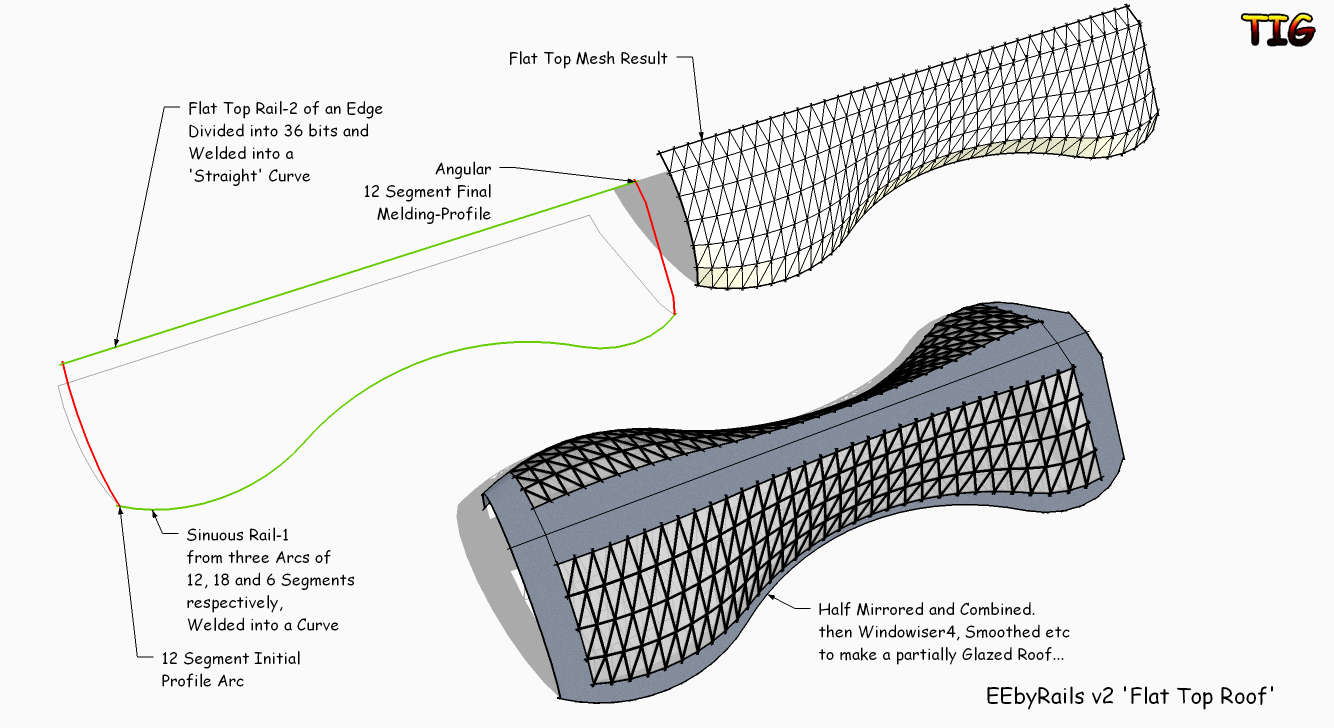
                                  Here's an EEbyRails new V2 example of making a 'flat-topped' sinuous roof barrel, with one end arched and the other angular, in two halves...EEbyRailsV2_FlatTop.png

                                  TIG

                                  1 Reply Last reply
                                  Reply Quote 0
                                  • Rich O BrienR
                                    Rich O Brien Moderator
                                    last edited by

                                    This is way more than an improvement, this is exceptional scripting that pushing SU in a new direction

                                    Hats Off to you 👍

                                    Download the free D'oh Book for SketchUp 📖

                                    1 Reply Last reply
                                    Reply Quote 0
                                    • JClementsJ
                                      JClements
                                      last edited by

                                      THANKS AGAIN!

                                      Question: Is there a way to control where the dialogs appear, or once the first appears allow the user to move it and all subsequent dialogs use the location of the first?

                                      John | Illustrator | Beaverton, Oregon

                                      1 Reply Last reply
                                      Reply Quote 0
                                      • TIGT
                                        TIG Moderator
                                        last edited by

                                        @jclements said:

                                        THANKS AGAIN!

                                        Question: Is there a way to control where the dialogs appear, or once the first appears allow the user to move it and all subsequent dialogs use the location of the first?

                                        You cannot affect the location or much to do with the basic UI dialogs... BUT you can with a 'web-dialog' - which is where I am heading with this... Look out for the next update...

                                        TIG

                                        1 Reply Last reply
                                        Reply Quote 0
                                        • D
                                          driven
                                          last edited by

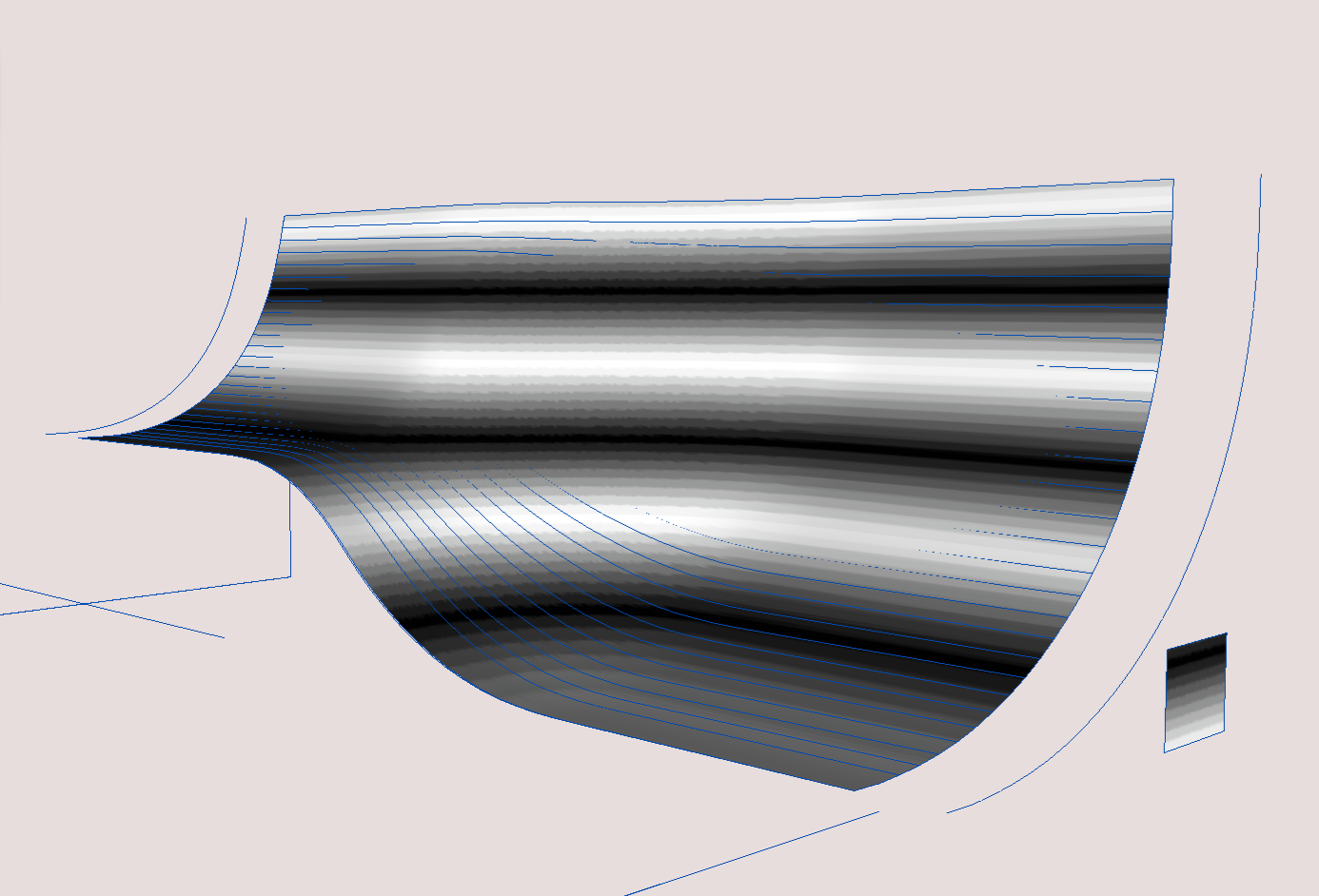
                                          EEbyR_v2 mesh sitting ing original sline for comparision

                                          Hi Tig,

                                          couple of oddities on the mac, when trying to do something I need, however just had a go at one of my manually manipulated splines versions of Jeffs ramp, and 80% of the new skin line up perfectly with the previous splines and the 10% are probably out due to manual error (someone else must have done those)

                                          But there is lifting of 2nd rail along the whole length? Pic attached.

                                          main difference- it's an hour or two quicker just on this.

                                          fantastic, I'll try and have another play later on and report back

                                          john
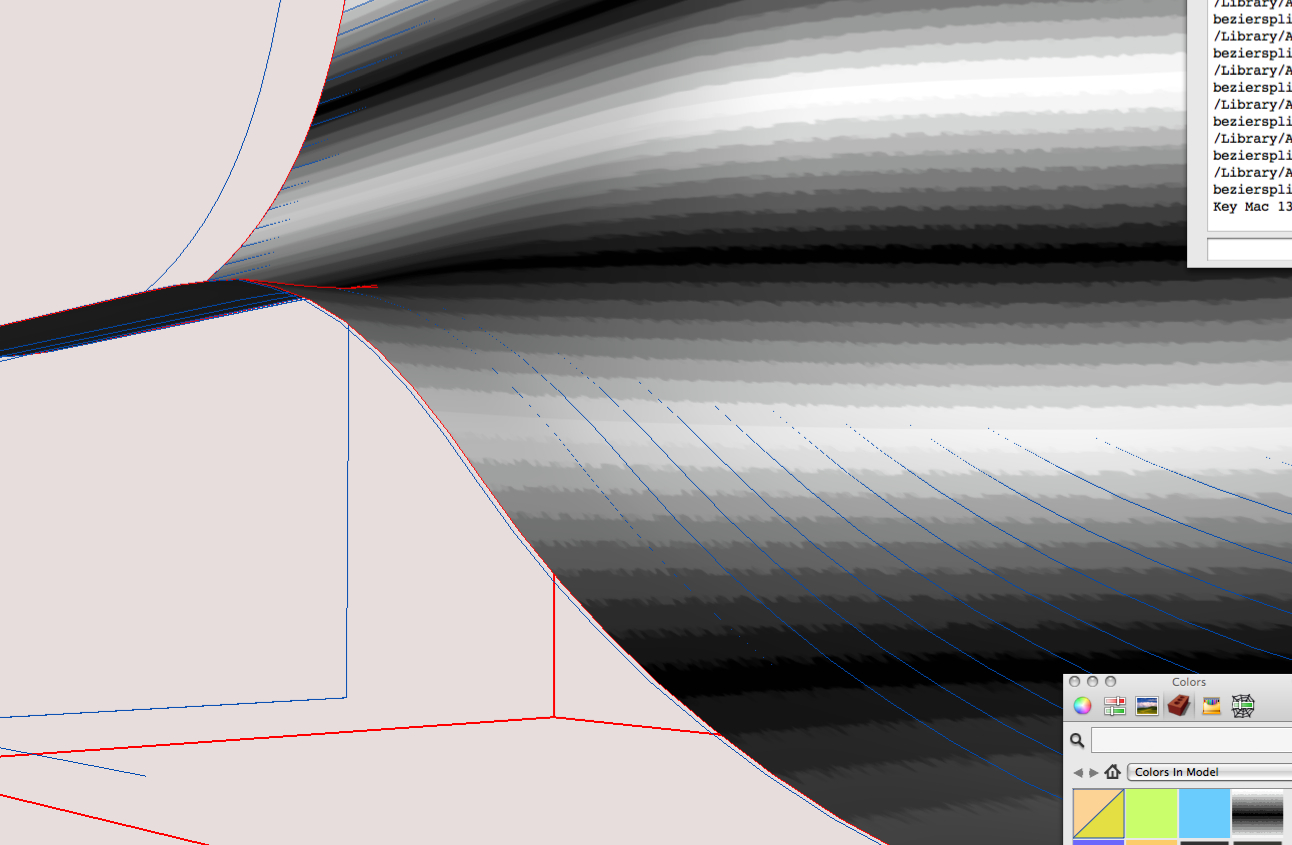

                                          showing the lifting of secons rail edge

                                          learn from the mistakes of others, you may not live long enough to make them all yourself...

                                          1 Reply Last reply
                                          Reply Quote 0
                                          • utilerU
                                            utiler
                                            last edited by

                                            Thanks TIG for all you do for GSU and the dedicated community... you, along with many other script writers really are appreciated by the masses!!!! 🎉

                                            Just Curious...

                                            1 Reply Last reply
                                            Reply Quote 0

                                            Hello! It looks like you're interested in this conversation, but you don't have an account yet.

                                            Getting fed up of having to scroll through the same posts each visit? When you register for an account, you'll always come back to exactly where you were before, and choose to be notified of new replies (either via email, or push notification). You'll also be able to save bookmarks and upvote posts to show your appreciation to other community members.

                                            With your input, this post could be even better 💗

                                            Register Login
                                            • 1
                                            • 2
                                            • 5
                                            • 6
                                            • 7
                                            • 8
                                            • 9
                                            • 19
                                            • 20
                                            • 7 / 20
                                            • First post
                                              Last post
                                            Buy SketchPlus
                                            Buy SUbD
                                            Buy WrapR
                                            Buy eBook
                                            Buy Modelur
                                            Buy Vertex Tools
                                            Buy SketchCuisine
                                            Buy FormFonts

                                            Advertisement