sketchucation logo sketchucation
    • 登入
    Oops, your profile's looking a bit empty! To help us tailor your experience, please fill in key details like your SketchUp version, skill level, operating system, and more. Update and save your info on your profile page today!
    ⚠️ Important | Libfredo 15.6b introduces important bugfixes for Fredo's Extensions Update

    Mac OSX and plugin problems

    已排程 已置頂 已鎖定 已移動 Developers' Forum
    21 貼文 6 Posters 917 瀏覽 6 Watching
    正在載入更多貼文
    • 從舊到新
    • 從新到舊
    • 最多點贊
    回覆
    • 在新貼文中回覆
    登入後回覆
    此主題已被刪除。只有擁有主題管理權限的使用者可以查看。
    • B 離線
      bowesy
      最後由 編輯

      Despite downloading .rb plugins into the plugin folder they will not show up in Sketchup. Does anyone have any ideas why? Is it a Mac problem?

      1 條回覆 最後回覆 回覆 引用 0
      • thomthomT 離線
        thomthom
        最後由 編輯

        Exactly where are you putting the plugins on your system?

        There seem to be some confusion to mupliple places to put them...

        Thomas Thomassen — SketchUp Monkey & Coding addict
        List of my plugins and link to the CookieWare fund

        1 條回覆 最後回覆 回覆 引用 0
        • B 離線
          bowesy
          最後由 編輯

          Hi ThomThom,

          I go into applications>Google Sketchup>Contents>Plugins folder and drop .rb files in there. I make sure Sketchup is turned off when I do this. Then when I fire up Sketchup I cannot find them in either the menu bar or in any context menu!? What do you think?

          1 條回覆 最後回覆 回覆 引用 0
          • thomthomT 離線
            thomthom
            最後由 編輯

            Should be
            Macintosh HD/Library/Application Support/Google SketchUp 7/SketchUp/Plugins/
            http://sketchuptips.blogspot.com/2008/03/how-to-download-and-install-plugins.html

            Thomas Thomassen — SketchUp Monkey & Coding addict
            List of my plugins and link to the CookieWare fund

            1 條回覆 最後回覆 回覆 引用 0
            • B 離線
              bowesy
              最後由 編輯

              Yep - thats what I do. I'm on SUPro6 but there shouldn't be a difference. I've just tried downloading your link hello.rb but still the same result. Right clicking on mac doesn't say save but download which goes to the download folder. I've even then dragged it onto the desktop and then into the plugins folder but I cannot find it in SU anywhere. One thing though, since erasing all previous plug-ins which didn't work, I've lost Plug-ins from the drop down menu so maybe I should back up an older version. Pretty frustrating though because for all the joys of a Mac, I never had this problem on a PC!

              1 條回覆 最後回覆 回覆 引用 0
              • thomthomT 離線
                thomthom
                最後由 編輯

                @bowesy said:

                Yep - thats what I do.

                @bowesy said:

                applications>Google Sketchup>Contents>Plugins
                is not the same as Macintosh HD/Library/Application Support/Google SketchUp 7/SketchUp/Plugins/

                Thomas Thomassen — SketchUp Monkey & Coding addict
                List of my plugins and link to the CookieWare fund

                1 條回覆 最後回覆 回覆 引用 0
                • B 離線
                  bowesy
                  最後由 編輯

                  Ah ok! I'll drag the plugins folder out of contents and see how I go. Cheers.

                  1 條回覆 最後回覆 回覆 引用 0
                  • TIGT 離線
                    TIG Moderator
                    最後由 編輯

                    To find where your OS looks for Plugins paste this into the Ruby Console:

                    Sketchup.find_support_file("Plugins")
                    

                    The string returned is the path to the Plugins folder - so put your plugins & sub-folders into there ???

                    TIG

                    1 條回覆 最後回覆 回覆 引用 0
                    • B 離線
                      bowesy
                      最後由 編輯

                      Thanks TIG. SU looks in plugins according to that string. I've time machined back to an earlier version of my SU and got all the plugins back but I have noticed that it never had sketchup.rb in there. Neither is there a tools folder available. Do you have the plug-in sketchup.rb at all?

                      1 條回覆 最後回覆 回覆 引用 0
                      • thomthomT 離線
                        thomthom
                        最後由 編輯

                        @bowesy said:

                        Thanks TIG. SU looks in plugins according to that string. I've time machined back to an earlier version of my SU and got all the plugins back but I have noticed that it never had sketchup.rb in there. Neither is there a tools folder available. Do you have the plug-in sketchup.rb at all?

                        Where abouts in the system are you now? Where did you get the sketchup.rb file?
                        sketchup.rb is a file all plugins require and should be left where Sketchup installs it.

                        Thomas Thomassen — SketchUp Monkey & Coding addict
                        List of my plugins and link to the CookieWare fund

                        1 條回覆 最後回覆 回覆 引用 0
                        • B 離線
                          bowesy
                          最後由 編輯

                          From what I can gather it cant ever have been there. I've read that this has been a bit of a problem with SU6 - some copies just didn't ship with it and some sketchup.rb files were old versions and didn't work with SU6. I downloaded a copy from somewhere - may well have been an archived page from the Google site but it didn't work

                          1 條回覆 最後回覆 回覆 引用 0
                          • thomthomT 離線
                            thomthom
                            最後由 編輯

                            Some plugins might have shipped a copy, and if that's an old copy it will cause problems. You should not need to download an extra copy.

                            Thomas Thomassen — SketchUp Monkey & Coding addict
                            List of my plugins and link to the CookieWare fund

                            1 條回覆 最後回覆 回覆 引用 0
                            • thomthomT 離線
                              thomthom
                              最後由 編輯

                              I checked my Windows installation - sketchup.rb is located in the Tools folder where Sketchup was installed. Not sure where it belongs in Mac, but you should never have to deal with that file at all. You might want to reinstall Sketchup again to get a clean installation.

                              Thomas Thomassen — SketchUp Monkey & Coding addict
                              List of my plugins and link to the CookieWare fund

                              1 條回覆 最後回覆 回覆 引用 0
                              • B 離線
                                bowesy
                                最後由 編輯

                                I've just had a eureka moment!! Thanks Jeff and thanks ThomThom - it's obvious that I'm not that computer literate isn't it?! If only I had followed ThomThom's directions to the letter earlier we wouldn't still be here!!?

                                1 條回覆 最後回覆 回覆 引用 0
                                • jeff hammondJ 離線
                                  jeff hammond
                                  最後由 編輯

                                  @bowesy said:

                                  Ah ok! I'll drag the plugins folder out of contents and see how I go. Cheers.

                                  no, don't do that..

                                  thom pointed this out earlier but i'll try again..

                                  this:

                                  applications>Google Sketchup>Contents>Plugins

                                  is not the same thing as this:

                                  Macintosh HD/Library/Application Support/Google SketchUp 7/SketchUp/Plugins/

                                  (which is where the plugins should be placed)

                                  you're right clicking on the SU app icon and that's not where you need to be.. follow the path highlighted in red above

                                  dotdotdot

                                  1 條回覆 最後回覆 回覆 引用 0
                                  • thomthomT 離線
                                    thomthom
                                    最後由 編輯

                                    I'm still wondering where you got that sketchup.rb file from... might you have moved it away from somewhere you should not?

                                    Thomas Thomassen — SketchUp Monkey & Coding addict
                                    List of my plugins and link to the CookieWare fund

                                    1 條回覆 最後回覆 回覆 引用 0
                                    • daleD 離線
                                      dale
                                      最後由 編輯

                                      On my mac the SketchUp.rb is located in the HD/Library/Application Support/Google SketchUp 7/SketchUp/tools
                                      If you use spotlight you can trace it. My get info window looks as follows:
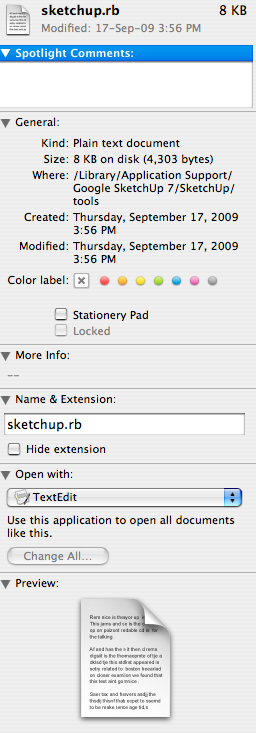

                                      Picture 76.png

                                      Just monkeying around....like Monsanto

                                      1 條回覆 最後回覆 回覆 引用 0
                                      • B 離線
                                        bowesy
                                        最後由 編輯

                                        Cant remember where I found the sketchup.rb file. I'll check thru my history files - think I probably googled "sketchup.rb download" and then just searched through!

                                        1 條回覆 最後回覆 回覆 引用 0
                                        • thomthomT 離線
                                          thomthom
                                          最後由 編輯

                                          @honoluludesktop said:

                                          In a windows box, don't you need to install sketchup.rb in the plugin folder? Or will the system find it in the Tools folder?

                                          No, you never need to bother about the sketchup.rb file. It's installed by Sketchup. And the Tools folder acts just like the Plugins folder with the exception that it contains the bundled Sketchup ruby extensions.

                                          Thomas Thomassen — SketchUp Monkey & Coding addict
                                          List of my plugins and link to the CookieWare fund

                                          1 條回覆 最後回覆 回覆 引用 0
                                          • honoluludesktopH 離線
                                            honoluludesktop
                                            最後由 編輯

                                            In a windows box, don't you need to install sketchup.rb in the plugin folder? Or will the system find it in the Tools folder? Hmm....The file in the plugin folder is different from the one in Tools, which has something for the ruby console.


                                            1 條回覆 最後回覆 回覆 引用 0
                                            • 1
                                            • 2
                                            • 1 / 2
                                            • 第一個貼文
                                              最後的貼文
                                            Buy SketchPlus
                                            Buy SUbD
                                            Buy WrapR
                                            Buy eBook
                                            Buy Modelur
                                            Buy Vertex Tools
                                            Buy SketchCuisine
                                            Buy FormFonts

                                            Advertisement


