sketchucation logo sketchucation
    • 登入
    Oops, your profile's looking a bit empty! To help us tailor your experience, please fill in key details like your SketchUp version, skill level, operating system, and more. Update and save your info on your profile page today!
    🔌 Smart Spline | Fluid way to handle splines for furniture design and complex structures. Download

    [Plugin] importDXFtext

    已排程 已置頂 已鎖定 已移動 Plugins
    165 貼文 18 Posters 93.2k 瀏覽 18 Watching
    正在載入更多貼文
    • 從舊到新
    • 從新到舊
    • 最多點贊
    回覆
    • 在新貼文中回覆
    登入後回覆
    此主題已被刪除。只有擁有主題管理權限的使用者可以查看。
    • uwesketchU 離線
      uwesketch
      最後由 編輯

      The "Knickarmmarkise" is now good and yes, the attachment point is 6, not 5.

      But all other MTEXTs are now either a bit off or completely off.
      It looks like that the higher the rotation angle the more off the text is placed.
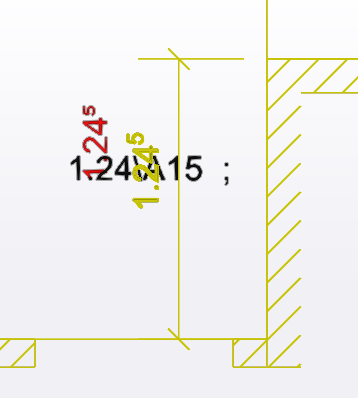
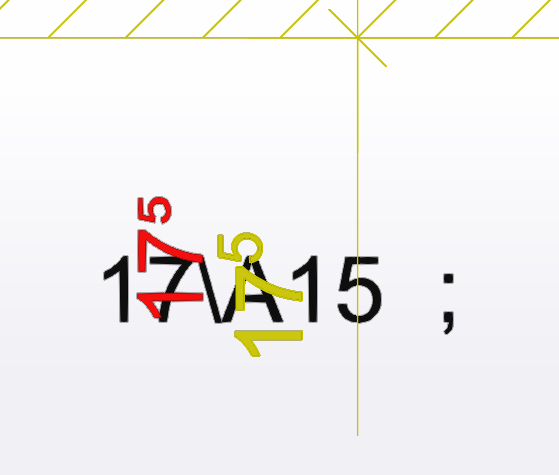
      The "SN Q4" texts are about 26meter off, the dimension value 17^5 is 23m off, the 1.24^5 dimension value is 34meter off. the "OK Mauer ca. 549.79" is about 6m off to the right.

      The "Masse am Bau:" has not changed position compared to version 4.0.
      BTW in version 3.4, 3.5, 3.6, etc it was correct. Can you not compare to the code of v3.4?

      1 條回覆 最後回覆 回覆 引用 0
      • TIGT 離線
        TIG Moderator
        最後由 編輯

        One step forward, one step back !

        I'll investigate...

        TIG

        1 條回覆 最後回覆 回覆 引用 0
        • uwesketchU 離線
          uwesketch
          最後由 編輯

          Thanks. Can you also look into why TEXTs are not created anymore in SketchUp, even though in the console it says that "Making .. TEXT Entities"
          ?

          1 條回覆 最後回覆 回覆 引用 0
          • TIGT 離線
            TIG Moderator
            最後由 編輯

            Another problem !

            TIG

            1 條回覆 最後回覆 回覆 引用 0
            • TIGT 離線
              TIG Moderator
              最後由 編輯

              I'll look at the alignment issue shortly...

              However, the current TEXT import does work for me, albeit with text pieces miles from the origin, making selecting / viewing / editing them very awkward [even with the help of the Outliner] - when using your TEXT dxf example - is this the issue you are referring to ?
              e.g. the first piece of TEXT processed is -
              X = 2677161.876174174 [42.25 miles from the origin] Y = 1237562.802 ... Text = "430287"

              Also note that in that file several ATTRIBS also have no 'string' at all [code 1] - the omission is in the DXF file, not the ruby side...

              TIG

              1 條回覆 最後回覆 回覆 引用 0
              • uwesketchU 離線
                uwesketch
                最後由 編輯

                Yes, it is the file called map with Isocontours TEXT.dxf.
                I am running with v4.1
                after the import finished, I see only 250 sub groups. 225 ATEXT and 25 MTEXT.
                They are either called "ATEXT #..." or "MTEXT #...".
                But there are no sub groups called "TEXT #..." in the outliner.

                The first TEXT entry listed in the console is:

                Layer = 01139
                Color = 0
                X = 2677161.876174174
                Y = 1237562.802
                Z = 0.0
                Height = 0.9999999999999997
                Text = 430287
                Oblique = 15.0
                Justification_H = 2
                Justification_V = 2
                Style = STANDARD
                Rotation = 0.0

                Yes, the origin is far off. This is the Swiss coordinate system LV95.

                There are or instance two TEXT called Rinderweidstrasse and Rinderweidweg. These should be easily visible in Sketchup in the very top right of he imported group, but they do not exist.
                (choose parallel projection, top view, then in the outliner select an ATEXT and then "yoom selection" in the context menu)
                BTW, the first 12 MTEXT are in the bottom left corner of the group near the Origin, the other MTEXTs and the ATEXTs are in the top right corner of the group.

                1 條回覆 最後回覆 回覆 引用 0
                • TIGT 離線
                  TIG Moderator
                  最後由 編輯

                  Here's v4.2
                  https://sketchucation.com/pluginstore?pln=importDXFtext
                  Which attempts to address some of the recent issues...
                  Please test and report...

                  TIG

                  1 條回覆 最後回覆 回覆 引用 0
                  • uwesketchU 離線
                    uwesketch
                    最後由 編輯

                    I tested v4.2: better again 😄

                    TEXTs are still not imported, the console output is a bit different now, but in Sketchup there are no TEXT groups created. Only 25 MTEXT and 225 ATEXT groups.
                    I am testing btw with SketchUp 2022. DXFImport v3.4 is running on SketchUp 2021.
                    console output of importing "map with Isocontours TEXT.dxf":
                    Making 74 TEXT Entities...
                    74 : 0
                    Making 25 MTEXT Entities...
                    25 : 0
                    Making 436 ATTRIBUTE TEXT Entities...
                    225 : 211

                    Rotation testing (dxf issues with special chars.dxf):
                    Here the 3DText objects that were far off in the lat version, are now closer again, but still not fully correct:
                    It seems the attachment point for rotation is not read correctly:

                    In below screen shots, black is the unrotated text from v3.4, green is where it should be according to the DXF definition, red is where the import is placed.
                    Looks like all are attachment point issues, except the "Masse am Bau:" which is shifted down since version 3.4.
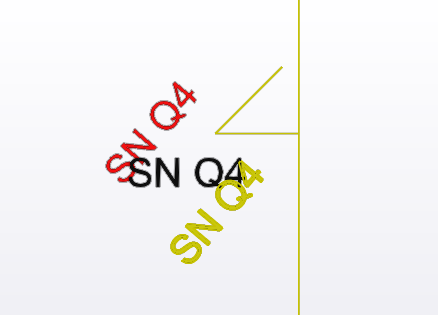
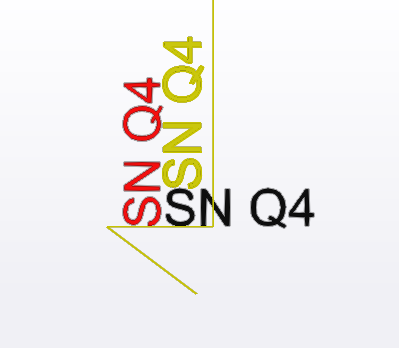
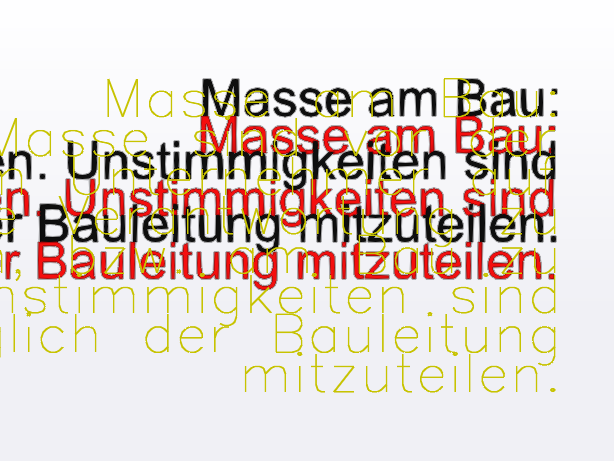
                    DXF v4.2 rotation issue 1 SNQ4.png


                    DXF v4.2 rotation issue 2 SNQ4.png


                    DXF v4.2 AttachmentPoint issue 3 Masse am Bau.png


                    DXF v4.2 rotation issue 4 Dim text.png


                    DXF v4.2 rotation issue 5 Dim text.png

                    1 條回覆 最後回覆 回覆 引用 0
                    • TIGT 離線
                      TIG Moderator
                      最後由 編輯

                      The TEXT is NOT imported for me.
                      Says 74 made, 0 failed.
                      But in the Outliner there's nothing ! a mystery...
                      Investigating...

                      TIG

                      1 條回覆 最後回覆 回覆 引用 0
                      • TIGT 離線
                        TIG Moderator
                        最後由 編輯

                        I got to the bottom of this !
                        It did process all of the TEXT but then it wasn't adding the 3d-text geometry !!
                        Another stupid temp-typo...
                        Now it's fixed...
                        Here's v4.3
                        https://sketchucation.com/pluginstore?pln=importDXFtext

                        I'll look at the rotation reports next...

                        TIG

                        1 條回覆 最後回覆 回覆 引用 0
                        • uwesketchU 離線
                          uwesketch
                          最後由 編輯

                          @tig said:

                          I got to the bottom of this !
                          It did process all of the TEXT but then it wasn't adding the 3d-text geometry !!
                          Now it's fixed...

                          I tested v4.3 re TEXT: IT IS BACK 😄 Great!
                          And the position and rotation of TEXT is very precise.
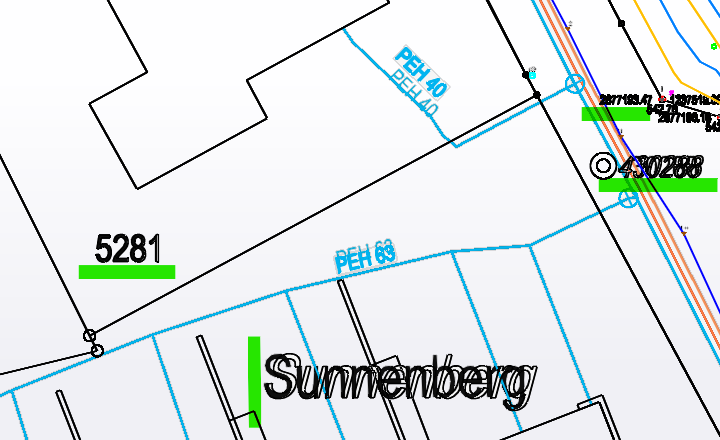
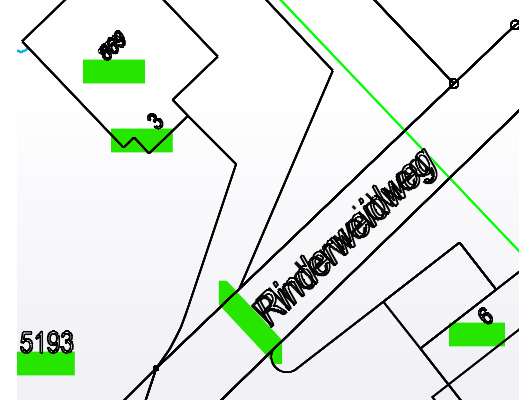
                          Funny, that two TEXTs ("Sunnenberg" and "Rinderweidweg") are slightly off (only by a 1/4 of the font height).
                          In below screen shots, green are TEXTs that are precisely positioned, red marked the two longer TEXTs that are a bit shifted. I think it can be ignored, but still wanted to let you know.
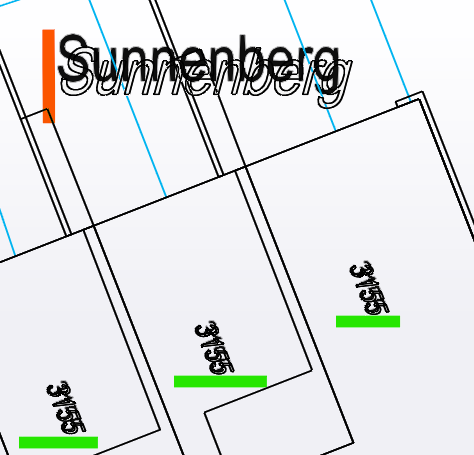
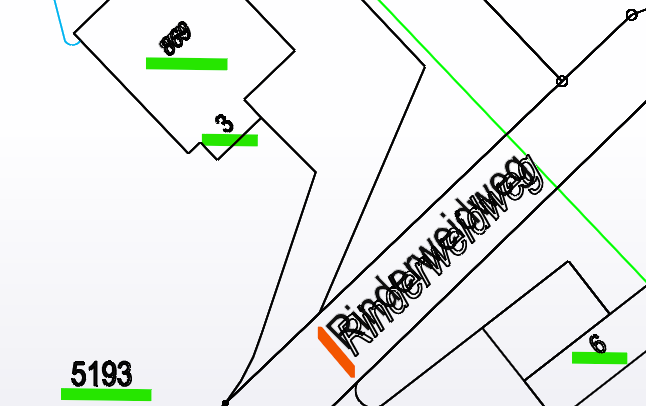
                          DXF v4.3 TEXT position issue 1 Sunnenberg.png


                          DXF v4.3 TEXT position issue 2 Rinderweidweg.png

                          1 條回覆 最後回覆 回覆 引用 0
                          • TIGT 離線
                            TIG Moderator
                            最後由 編輯

                            The dropped tail of the 'g' is causing the issue - it's fixable...

                            TIG

                            1 條回覆 最後回覆 回覆 引用 0
                            • uwesketchU 離線
                              uwesketch
                              最後由 編輯

                              Makes sense. Then it could be fixed consistently as done with MTEXT.

                              1 條回覆 最後回覆 回覆 引用 0
                              • TIGT 離線
                                TIG Moderator
                                最後由 編輯

                                Here's v4.4 which fixes the dropped letters, like 'g', affecting the text's insertion-point.
                                https://sketchucation.com/pluginstore?pln=importDXFtext

                                Please re-comment on the rotation/alignment issues you've previously raised, as recent changes might have had an influence...

                                TIG

                                1 條回覆 最後回覆 回覆 引用 0
                                • uwesketchU 離線
                                  uwesketch
                                  最後由 編輯

                                  TEXT is now all fine. Perfect!
                                  DXF v4.4 TEXT position issue 1 Sunnenberg.png
                                  DXF v4.4 TEXT position issue 2 Rinderweidweg.png

                                  In the same file there are as well some MTEXTs. (The blueish texts).
                                  These MTEXTS are still shifted as soon as there is a rotation involved.
                                  Later I will also send a report based on our other test file.

                                  DXF v4.4 MTEXT position issue 3 if rotated.png

                                  1 條回覆 最後回覆 回覆 引用 0
                                  • TIGT 離線
                                    TIG Moderator
                                    最後由 編輯

                                    Thanks, I'll investigate it all tomorrow...

                                    TIG

                                    1 條回覆 最後回覆 回覆 引用 0
                                    • uwesketchU 離線
                                      uwesketch
                                      最後由 編輯

                                      I tested v4.4 with the testfile "dxf issues with special chars.dxf".
                                      The displacement of rotated MTexts is the same as with v4.2 reported in this post:

                                      http://sketchucation.com/forums/viewtopic.php?f=323&t=23002&p=678093#p678060

                                      1 條回覆 最後回覆 回覆 引用 0
                                      • TIGT 離線
                                        TIG Moderator
                                        最後由 編輯

                                        Here's v4.5
                                        I'm hopeful it addresses the alignment / rotation weirdness...
                                        https://sketchucation.com/pluginstore?pln=importDXFtext
                                        Please test and report back...

                                        TIG

                                        1 條回覆 最後回覆 回覆 引用 0
                                        • uwesketchU 離線
                                          uwesketch
                                          最後由 編輯

                                          The first test with the imported file "map with Isocontours TEXT.dxf" showed no differences to the dxf file anymore. Very nice!

                                          Also the file "dxf issues with special chars.dxf" did not show position diffs due to rotation. But there is another issue, which I will report in a later post, as it does not have to do with rotation.

                                          However I have another file called "map with Isocontours.dxf" where all text are MTEXTs. (see attachment)
                                          99% are at the right position, but the imported text is slightly wider than the text in dxf.
                                          I checked the dxf and saw, that these MTEXTs have a "width factor" of 0.84 defined. This factor pretty much explains the difference. It is defined on style level. The style is called "ERSTELLTER_STIL_1" and in code 41 you find the 0.84. I think the factor could be applied as well in SketchUp by using the "Scale feature".
                                          Text scaling issue:
                                          During import, this style is also read and the factor properly reported as WidthFactor, but it is not applied.
                                          The console output is:

                                          
                                          2 DXF STYLES;
                                          
                                          Name = ERSTELLTER_STIL_1
                                          Height = 0.0
                                          WidthFactor = 0.84
                                          Oblique = 0.0
                                          Flipped = 0
                                          FontFile = 
                                          FontName = Arial
                                          Color = 256
                                          

                                          In below screen shot, green is the DXF file, red the imported 3DText.
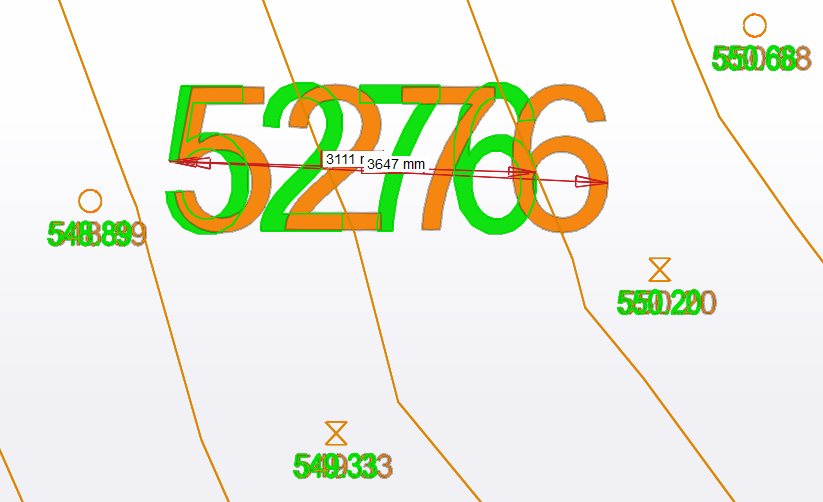
                                          DXF v4.5 MTEXT scaling issue 1.png

                                          Only two MTEXTS are not right positioned:
                                          It seems it has to do with the letters qpgjy, but this time it is shifted downwards.

                                          In below screen shots, green is the DXF file, red the imported 3DText.
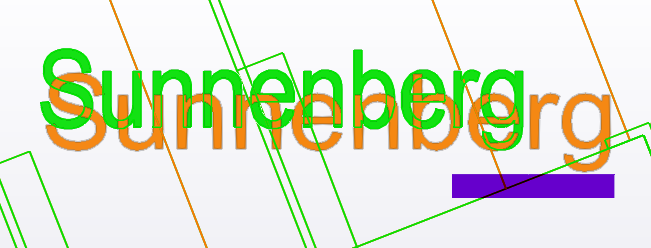
                                          DXF v4.5 MTEXT scaling and shifting issue 2.png

                                          DXF v4.5 MTEXT scaling and shifting issue 3.png


                                          map with Isocontours.dxf

                                          1 條回覆 最後回覆 回覆 引用 0
                                          • TIGT 離線
                                            TIG Moderator
                                            最後由 編輯

                                            Here's v4.6
                                            https://sketchucation.com/pluginstore?pln=importDXFtext
                                            I think it addresses the Mtext dropped string problem if there are certain dropped letters like 'g'.
                                            The width-scaling should also now works. [Also the DXF Style 'Standard' is now applied more logically]
                                            Some add string formatting with residual \A characters is also improved ?

                                            Please report back...

                                            TIG

                                            1 條回覆 最後回覆 回覆 引用 0
                                            • 1
                                            • 2
                                            • 3
                                            • 4
                                            • 5
                                            • 6
                                            • 7
                                            • 8
                                            • 9
                                            • 5 / 9
                                            • 第一個貼文
                                              最後的貼文
                                            Buy SketchPlus
                                            Buy SUbD
                                            Buy WrapR
                                            Buy eBook
                                            Buy Modelur
                                            Buy Vertex Tools
                                            Buy SketchCuisine
                                            Buy FormFonts

                                            Advertisement