[Plugin] CleanUp
-
Hi Thom, hope you're doing well.

Between your CleanUp Tools and Edge Tools I'm wondering if you have thought about adding an option to move all verticies to Z=0. I often import dwg files that for some reason some lines are just that tiny bit off Z which causes all sorts of issues in finding out what is and isn't flattened....
What do you think?
Love your work!
-
@utiler said:
I'm wondering if you have thought about adding an option to move all verticies to Z=0. I often import dwg files that for some reason some lines are just that tiny bit off Z which causes all sorts of issues in finding out what is and isn't flattened....
"There's an extension for that!": Architect Tools (Look for the big weight-icon that will flatten everything like the Hulk)
-
Thanks so much for your plugins, enjoy the cookie. I'm pretty new posting on this forum althought I have been following all of you guys and your fantastic work for a long time. Recently I'm working in a large model and your plugin is givin me a couple of errors of the model.
Results of Validity Check.
CLoop (1154934) does not reference CFace (1161656) - fixed
The plane equation for CFace (4395989) is not valid - fixedBoth of then never seem to be fixed after running the plugin. Also straight after closing Sketchup, it will create a bug splat! Is driving me mad
 and can't find which part of the model is doing it. Any help will be great. Thank you
 -
@antonio.calvo said:
...and can't find which part of the model is doing it.
Without having a look at the model no one else will be able to find it too...
-
@antonio.calvo said:
Thanks so much for your plugins, enjoy the cookie. I'm pretty new posting on this forum althought I have been following all of you guys and your fantastic work for a long time. Recently I'm working in a large model and your plugin is givin me a couple of errors of the model.
Results of Validity Check.
CLoop (1154934) does not reference CFace (1161656) - fixed
The plane equation for CFace (4395989) is not valid - fixedBoth of then never seem to be fixed after running the plugin. Also straight after closing Sketchup, it will create a bug splat! Is driving me mad
and can't find which part of the model is doing it. Any help will be great. Thank you
Try running Edge Tools on the problem model's geometry [edit 'containers' to access their contents etc]...
Duplicated vertices that are not 'welded' have been cited as culprits for this kind of thing...
http://sketchucation.com/pluginstore?pln=tt_edgetools -
Thanks TIG, spoke with Rich and that was he suggestion too. So i run edge inspector in each component of the model and ended up fixing thousands of tiny gaps/edges. After the whole process (didn't take as long as I was imagining) all fixed and no more crashes! Thanks again for all your tips and great plugins.
-
Hi
I imported an STL file into sketchup 2014 and I am trying to clean the faces with cleanup and it appears to cause some problems.
CEdge (15569) and CEdge (1510) connect the same 2 vertices - fixed
CEdge (14024) and CEdge (1479) connect the same 2 vertices - fixed
CEdge (1268) and CEdge (15568) connect the same 2 vertices - fixed
The plane equation for CFace (15570) is not valid - fixed
The plane equation for CFace (15576) is not valid - fixed
The plane equation for CFace (15588) is not valid - fixed
The plane equation for CFace (15637) is not valid - fixed
The plane equation for CFace (15643) is not valid - fixed
The plane equation for CFace (15655) is not valid - fixed
The plane equation for CFace (15606) is not valid - fixed
The plane equation for CFace (15662) is not valid - fixed
The plane equation for CFace (15675) is not valid - fixed
The plane equation for CFace (15829) is not valid - fixed
The plane equation for CFace (15822) is not valid - fixed
The plane equation for CFace (15781) is not valid - fixed
The plane equation for CFace (15795) is not valid - fixed
The plane equation for CFace (15802) is not valid - fixed
The plane equation for CFace (15815) is not valid - fixed
The plane equation for CFace (15755) is not valid - fixed
The plane equation for CFace (15767) is not valid - fixed
The plane equation for CFace (15774) is not valid - fixedI am using SuSolid to check whether the model is watertight. Directly after i import, the SuSolid shows no problem with the model. However after i ran cleanup, some issues appear. I am using Sketchup 2014.
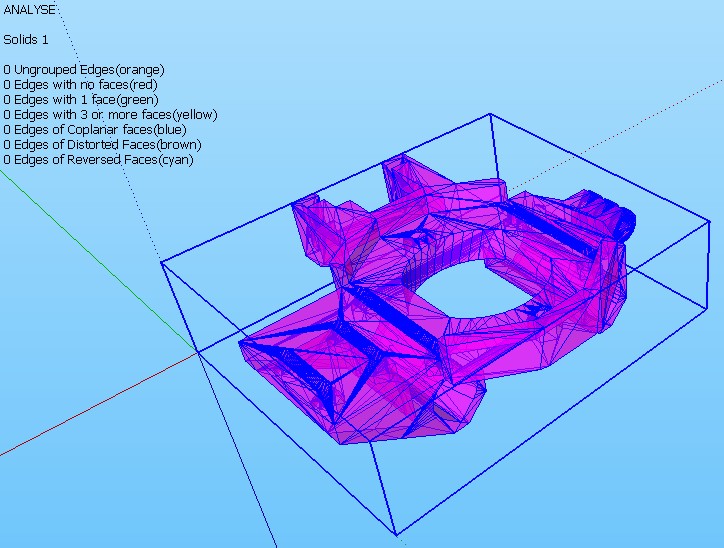
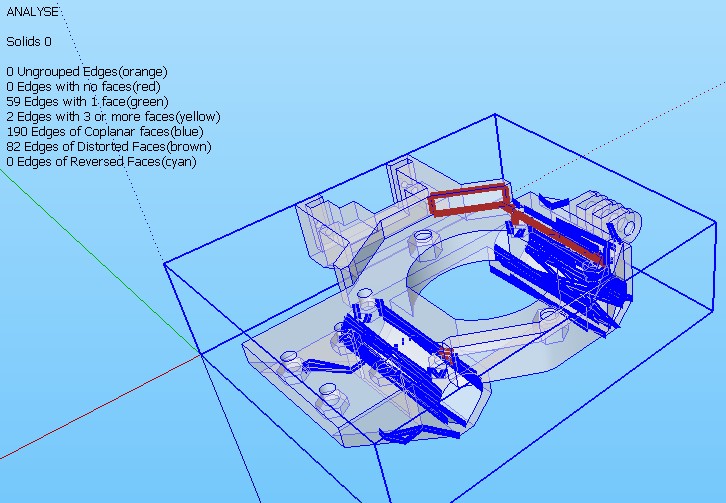
-
And the question is?
-
zhenning:
I have used MeshLab to decimate models and found it is best to limit the number of actions taken to one at a time and the sequence can also affect the out come. I have not used ThomThom's plugin but, trying to limit the number of corrections to few at a time may help you keep it a solid. In addition using Tig's solid solver has quite often helped after cleanup. What analyzer are you using one of the 3d printers? -
zhenning:
Arg forgot
http://sketchucation.com/forums/viewtopic.php?p=359994#p359994 -
@cotty said:
And the question is?
The cleanup seems to delete wrong faces? The coplanar error appears only after the cleanup plugin is used to clean the model.
-
Attached is the file:
After some trials, the errors happens when i tried merge faces

-
Initial application of cleanup does a good job of fixing errors, then running TIG's solid solver had problems to the point of destroying model. That just haapens some times.
After cleanup suggest you save the file as a stl you can then use one of the free apps some 3 d printers have and attempt to fix the model. The attached jpg shows my results using NetFab more work need to be done. Shapeway had a free service where they would run your model thru there app and possibly fix model. Sadly I have lost link and will have to look for it. Here is info I have
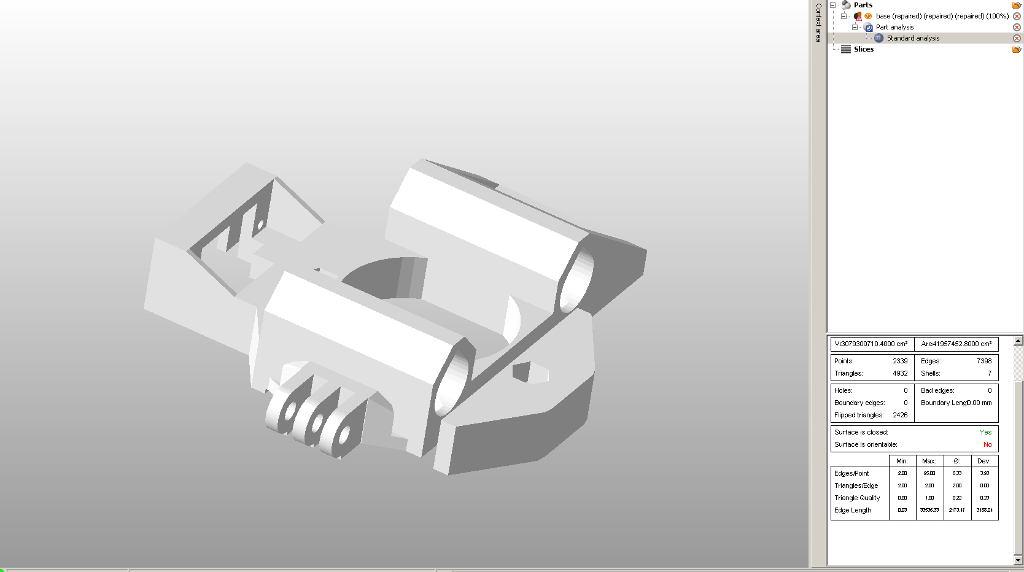
And the link on use of the app. It free version so does not give full capability -
Found 1 link http://www.shapeways.com/tutorials/how_to_use_meshlab_and_netfabb.
Since Su has a STL export plugin you do not need to use MESHLAB -
-
Found the cause of it. Actually its from the stl
I have used netfabb to try to fix it. So, the CFace errors are those extra surfaces added from netfabb to make the model water tight. Then only i imported into sketchup and try to clean it. I managed to solve it by importing the stl directly, clean using cleanup, redraw uneven and erroneous faces. No problem after that. Thanks for the replies mac1

-
@lersince1991 said:
Is Cleanup working in SKU 2015? Doesn't seem to be appearing in the extensions tab at all?
Did you also install the latest Lib for thomthom's tools ?
He updated everything to suit v2015 a few weeks ago... -
Is Cleanup working in SKU 2015? Doesn't seem to be appearing in the extensions tab at all?
Edit: Sorry it is working! (I thought I had restarted ketchup but I hadn't)
-
@tig said:
@lersince1991 said:
Is Cleanup working in SKU 2015? Doesn't seem to be appearing in the extensions tab at all?
Did you also install the latest Lib for thomthom's tools ?
He updated everything to suit v2015 a few weeks ago...Edited:
@unknownuser said:Sorry it is working! (I thought I had restarted ketchup but I hadn't)
Sorry for alerting you!
I'm now using the sketchucation extension manager which is a god send for keeping everything up to date and installing quickly! -
I use SU 2015 x64 Portable. First starting SU was correct with plugins. Next start SU appear errors loading cleanup. TT Lib (latest version) had already installed with extension manager but SU says that it not install. Screenshot below. What is it? Why CleanUp is not loading.
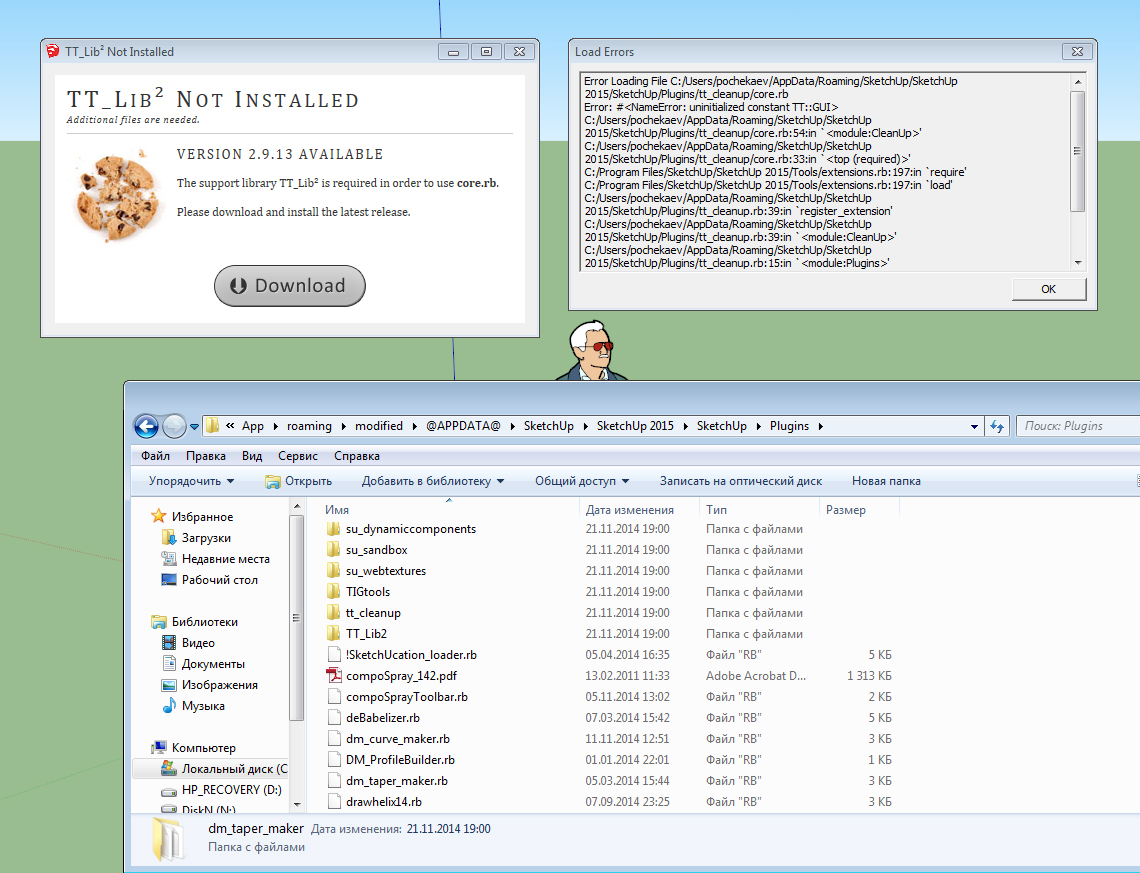






Advertisement