sketchucation logo sketchucation
    • Login
    Oops, your profile's looking a bit empty! To help us tailor your experience, please fill in key details like your SketchUp version, skill level, operating system, and more. Update and save your info on your profile page today!
    ⚠️ Update | Sketchucation Tools 5.0.8 released with licensing improvements and bugfixes Download

    [Plugin] CleanUp

    Scheduled Pinned Locked Moved Plugins
    974 Posts 217 Posters 1.2m Views 217 Watching
    Loading More Posts
    • Oldest to Newest
    • Newest to Oldest
    • Most Votes
    Reply
    • Reply as topic
    Log in to reply
    This topic has been deleted. Only users with topic management privileges can see it.
    • thomthomT
      thomthom
      last edited by

      ? Edges on top of another edge? Is that pre SU7 models?

      Thomas Thomassen β€” SketchUp Monkey & Coding addict
      List of my plugins and link to the CookieWare fund

      1 Reply Last reply
      Reply Quote 0
      • B
        Ben Ritter
        last edited by

        @thomthom said:

        ? Edges on top of another edge? Is that pre SU7 models?

        It's an imported .dwg file into an SU8 model.

        1 Reply Last reply
        Reply Quote 0
        • J
          Jim
          last edited by

          Thom, could you explain what the option "ignore normals" means?

          Hi

          1 Reply Last reply
          Reply Quote 0
          • thomthomT
            thomthom
            last edited by

            @jim said:

            Thom, could you explain what the option "ignore normals" means?

            "Normal" - refers to the direction of the face. You can have two co-planar faces next to each other, but one facing up, and one facing down. When "Ignore Normals" is enabled it means that coplanar faces with inverse normals will be merged.

            This is something I hope to be able to improve in V3 - better descriptions.

            Thomas Thomassen β€” SketchUp Monkey & Coding addict
            List of my plugins and link to the CookieWare fund

            1 Reply Last reply
            Reply Quote 0
            • J
              Jim
              last edited by

              Thanks, makes sense.

              Hi

              1 Reply Last reply
              Reply Quote 0
              • thomthomT
                thomthom
                last edited by

                @jim said:

                Thanks, makes sense.

                Once you know it - but maybe not so intuitive when you don't... πŸ˜•

                Thomas Thomassen β€” SketchUp Monkey & Coding addict
                List of my plugins and link to the CookieWare fund

                1 Reply Last reply
                Reply Quote 0
                • R
                  rv1974
                  last edited by

                  May I humbly request a close-open functionality (with custom search radius defined by user)? Just similar to closeopens.rb
                  by Todd Burch.

                  1 Reply Last reply
                  Reply Quote 0
                  • thomthomT
                    thomthom
                    last edited by

                    @rv1974 said:

                    May I humbly request a close-open functionality (with custom search radius defined by user)? Just similar to closeopens.rb
                    by Todd Burch.

                    Funny you should mention that. I began on a small utility today:
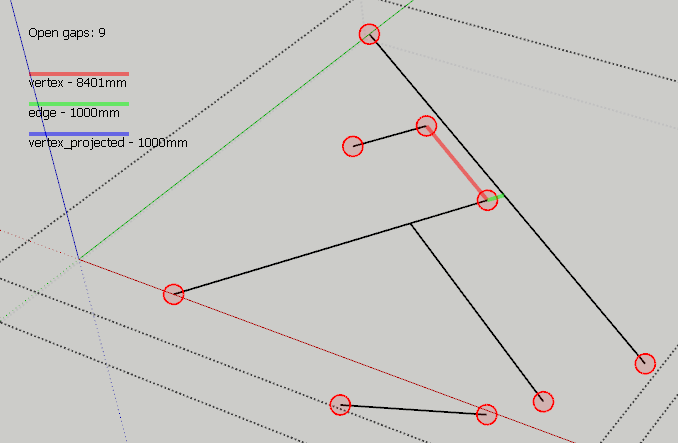
                    CloseGaps.png

                    Thomas Thomassen β€” SketchUp Monkey & Coding addict
                    List of my plugins and link to the CookieWare fund

                    1 Reply Last reply
                    Reply Quote 0
                    • R
                      rv1974
                      last edited by

                      You are unhealthy unstoppable πŸ™‚ But don't make it a separate tool. Insert it in the cleanup. Those rubies pullulate like cockroaches πŸ™‚

                      1 Reply Last reply
                      Reply Quote 0
                      • thomthomT
                        thomthom
                        last edited by

                        @rv1974 said:

                        But don't make it a separate tool. Insert it in the cleanup. Those rubies pullulate like cockroaches πŸ™‚

                        I was planning on adding it to Edge Tools. One completely automatic, one where on can inspect, like solid inspector.

                        Could add the automatic version to CleanUp3.

                        Thomas Thomassen β€” SketchUp Monkey & Coding addict
                        List of my plugins and link to the CookieWare fund

                        1 Reply Last reply
                        Reply Quote 0
                        • plot-parisP
                          plot-paris
                          last edited by

                          @thomthom said:

                          Could add the automatic version to CleanUp3.

                          oh, will that be in the near future?

                          1 Reply Last reply
                          Reply Quote 0
                          • thomthomT
                            thomthom
                            last edited by

                            @plot-paris said:

                            @thomthom said:

                            Could add the automatic version to CleanUp3.

                            oh, will that be in the near future?

                            CleanUp 3 and Edge Tools 2 will be out next week. ( And the feature of closing small caps will be in Edge Tools. )

                            Thomas Thomassen β€” SketchUp Monkey & Coding addict
                            List of my plugins and link to the CookieWare fund

                            1 Reply Last reply
                            Reply Quote 0
                            • Z
                              Zenhipster
                              last edited by

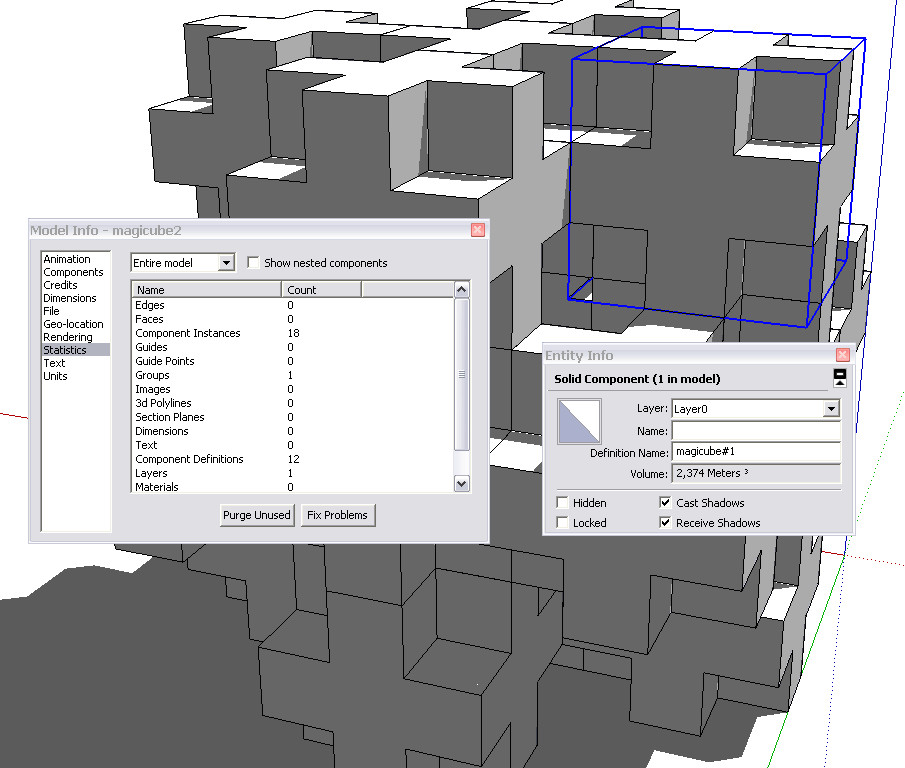
                              Tested the plug-in here on such a model. Does not work.
                              Inside a lot of extra polygons.


                              magicube

                              1 Reply Last reply
                              Reply Quote 0
                              • GaieusG
                                Gaieus
                                last edited by

                                There's nothing to clean up there. There's not a single line that is not part of the components (which are all perfectly solid so cannot be any stray geometry in them).

                                If you want to get rid of the separating edges/faces, you need to explode the whole thing first and run another plugin:
                                http://forums.sketchucation.com/viewtopic.php?f=180&t=12668&p=92295#p92295

                                (Nice model, by the way!) πŸ˜‰


                                Solids.jpg

                                Gai...

                                1 Reply Last reply
                                Reply Quote 0
                                • jason_marantoJ
                                  jason_maranto
                                  last edited by

                                  Or you could just use the "outer shell" command from the solid tools in Sketchup 8.

                                  Best,
                                  Jason.

                                  I create video tutorial series about several 2D & 3D graphics programs.

                                  1 Reply Last reply
                                  Reply Quote 0
                                  • honoluludesktopH
                                    honoluludesktop
                                    last edited by

                                    @zenhipster said:

                                    ............ Inside a lot of extra polygons.
                                    If you are trying to remove the polygons "out of view", this app will not do that.

                                    1 Reply Last reply
                                    Reply Quote 0
                                    • GaieusG
                                      Gaieus
                                      last edited by

                                      @jason_maranto said:

                                      Or you could just use the "outer shell" command from the solid tools in Sketchup 8.
                                      πŸ‘

                                      Gai...

                                      1 Reply Last reply
                                      Reply Quote 0
                                      • GaieusG
                                        Gaieus
                                        last edited by

                                        Well, had a closer look. Neither solution will work properly as the pieces are not aligned correctly (there are extremely small but gaps)

                                        Gai...

                                        1 Reply Last reply
                                        Reply Quote 0
                                        • Arty2A
                                          Arty2
                                          last edited by

                                          Not sure if it's the proper thread for this tip, but here goes.

                                          @unknownuser said:

                                          Wow, it looks promising. One suggestion, though: you could use big buttons instead of radio buttons and check-boxes. Such elements need more precision to click them (because they are small) and when using such plugin several times it can come more handy.

                                          This was a request about v3 in another thread, that is very easily solvable by just using some proper HTML and keeping the radio buttons / checkboxes too.

                                          Just make use of the <label> tag like this:

                                          
                                          <label for="idname">Descriptive text here; <input type="radio" name="whatever" id="idname" /></label>


                                          and that should keep everyone happy πŸ˜„

                                          1 Reply Last reply
                                          Reply Quote 0
                                          • thomthomT
                                            thomthom
                                            last edited by

                                            That it uses already, and thatΓ¦s what the initial v3 will be using. πŸ˜„

                                            Thomas Thomassen β€” SketchUp Monkey & Coding addict
                                            List of my plugins and link to the CookieWare fund

                                            1 Reply Last reply
                                            Reply Quote 0

                                            Hello! It looks like you're interested in this conversation, but you don't have an account yet.

                                            Getting fed up of having to scroll through the same posts each visit? When you register for an account, you'll always come back to exactly where you were before, and choose to be notified of new replies (either via email, or push notification). You'll also be able to save bookmarks and upvote posts to show your appreciation to other community members.

                                            With your input, this post could be even better πŸ’—

                                            Register Login
                                            • 1
                                            • 2
                                            • 25
                                            • 26
                                            • 27
                                            • 28
                                            • 29
                                            • 48
                                            • 49
                                            • 27 / 49
                                            • First post
                                              Last post
                                            Buy SketchPlus
                                            Buy SUbD
                                            Buy WrapR
                                            Buy eBook
                                            Buy Modelur
                                            Buy Vertex Tools
                                            Buy SketchCuisine
                                            Buy FormFonts

                                            Advertisement