[Plugin] Control points ver. 1.6.
-
Wonderful
-
The work on ver. 1.6. is still in progress...
The current stage new features:- wireframe preview of geometry group deformation is a bit faster now
- ability to interact with curve control points is also available now
Demo video (first 3 minutes are about faster wireframe, last ones about curve control points):
[flash=320,265:2fn1qvwi]http://www.youtube.com/v/dO8Nk40IypQ&hl=ru_RU&fs=1&" type="application/x-shockwave-flash" allowscriptaccess="always" allowfullscreen="true" width="320" height="265"[/flash:2fn1qvwi]@daniel s said:
Daniel S
PS: I suppose that ask to add automatic slicing to entities like Fredoscale does (Bend, Twist...) would be asking too much?Well, LibFredo6 is also free and open source and I think that almost everyone has it (Fredo tools are must-have ones), so, I guess, it is possible to utilize 'automatic slicing' if it is already implemented and present within the library. At least I'll try to.
Actually, I thought about something like adaptive tessellation around control point before, so I was going to make it anyway sooner or later.@dedmin said:
Ой! Кажется какая то "волшебная" водка дает тебе творческие силы!
Ога, "волшебная": 3,2% жирности, производится в Чебаркуле, называется ряженка (fermented baked milk). По 0,5 в день и творческих сил, хоть отбавляй

-
I see in your 1.5 update that you've fixed the "undo" error.
Fantastic, and thanks again for a great plugin!!
-
First steps of interactive face deformation:
[flash=480,385:2m8btgdg]http://www.youtube.com/p/8AB5C9C23863405C&hl=ru_RU&fs=1" type="application/x-shockwave-flash" width="480" height="385" allowscriptaccess="always" allowfullscreen="true"[/flash:2m8btgdg]
The initial face dividing was actually not so difficult. Treating deformed result surface as a single entity is more tricky... I don't know yet how to do it. So ver. 1.6. release is delayed again. -
Still prerelease...
ver. 1.6.(prerelease)- 2 modes of interactive curve control points dragging: 1) 'preview' mode: shows curve preview while dragging, 2) 'full' mode: deforms the curve (it affects instances 'glued' to curve immediately, but sometimes causes SU crashes...), <Home> key to switch to 'preview' mode, <End> key to switch to 'full' mode.
Video shows 2 modes difference, when curves which are under control are also in use within 'blended object' (sublend.rb)
[flash=480,385:1q5ubzq1]http://www.youtube.com/v/Wt_Isl5tzP8&hl=ru_RU&fs=1&" type="application/x-shockwave-flash" allowscriptaccess="always" allowfullscreen="true" width="480" height="385"[/flash:1q5ubzq1] -
thanks a million !!
Great Plugin -
Amazing !!!
Thank you so much !!! -
New version:
ver. 1.6.( prerelease)
New features:- the current version shows geometry deformation preview while moving control points (both geometry group control c-points and curve control c-points)
- it is possible to choose preview mode by hitting <Ins> key (3 modes available: 1. flat-faced surface, 2. surface + edges, 3. wire)
[flash=480,385:33h537rh]http://www.youtube.com/p/5077FD48856CD56D&hl=ru_RU&fs=1" type="application/x-shockwave-flash" width="480" height="385" allowscriptaccess="always" allowfullscreen="true"[/flash:33h537rh]
-
Kirill:
This looks excellent. I presume it will deform any volumetric mesh?
Are you by chance creating a bezier control mesh to do the deformations? -
@mitcorb said:
Are you by chance creating a bezier control mesh to do the deformations?
Not exactly. Ctrlpnts.rb utilizes 2 different methods:
- for curve shape changing: linear and cosine smoothed methods
- for geometry group deformation: the same method as pnts2mesh.rb uses for creating terrain surface (when 'according to distance' z-calculation method is chosen)
The second method calculates offset vectors lengths of each vertex according to distances from it to all control points. The degree of influence of each control c-point depends on <1/(distance^power)>. Power is an adjustable value.
Currently I'm thinking about making a kind of substitute for nurbs surface (I don't know what will come of this). It is necessary to add possibility to adjust the slope of the surface area, which is under control of each c-point.
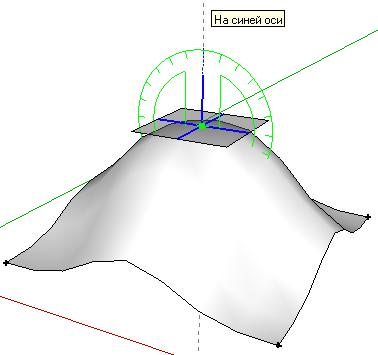
I guess it is possible after adding some linear terms to <1/(distance^power)>. -
Ok. Just curious. And thanks for your reply.
Does the plugin operate on ungrouped geometry, or groups, or components? Or, how does it deal with these. Even though I watched the video, I am missing something.
I presume this is better for smaller models, because I was trying to deform a rather dense mesh ungrouped. I made a selection of a portion of the mesh and the control point was lost in the blue highlights. It took me a while to find it. And I know I did something wrong because I saw the prompt at the bottom of the screen but I got no results--no action.
Also, I noted that in the plugins menu are some interact commands. But because there is no identifier in the command, I wasn't sure if this was related to Control Points. Perhaps you could do something there to identify with the script.
I was just the other day wishing for an operation like this that would do "smooth mesh deformations" such as in your video. I am using currently Sketchup 6 free version in Windows XP.
Thanks again,
mitcorb -
Sculpting in movement!

-
Kirill,
1.6 looks amazing!
I was wondering if it would be possible to add an option to lock the initial outer edges? To lock the edges from moving, but still deform the face would be a great solution for mounding surfaces.
-
@earthmover said:
I was wondering if it would be possible to add an option to lock the initial outer edges? To lock the edges from moving, but still deform the face would be a great solution for mounding surfaces.
 That would also be nice for making cushions.
 -
I agree Marcus...for me it would be great for terrains and mounding flower beds. I would love to be able to replace Soap Skin Bubble and get rid of that annoying time limit BS.
-
Kirill:
I think once you get this tool more or less finalized, you may want to have only one copy in the first post, and perhaps edit the post to reflect the current version number. You are probably already planning to do this.I am still testing it.
-
Kirill:
While testing, I am seeing the commands Interact with cpoints and Deform face interactive. The selection of the points is difficult because all I have is a pointer. It would be good to do a small selection box on the point. Is the deformation guided by a single point or multiple points? I am using construction points from D. Bur's Projections Toolbar.
I think this ruby needs a parameters interface so that the degree of influence can be selected and or edited. Maybe a PDF of instructions or proper procedure if not the parameter interface.Edit: Please note. Deleted erroneous Ruby Console excerpt. May have been a miss keyed right click context menu selection. If you viewed this post previously, please disregard those contents. Edit
-
@mitcorb said:
The selection of the points is difficult because all I have is a pointer. It would be good to do a small selection box on the point.
I was going to make a pointer apperture size bigger (don't know how yet) and process 'all_picked' entities instead of 'best_picked' method to find c-points. In short, I'm currently trying to make selection process easier.
@mitcorb said:
Is the deformation guided by a single point or multiple points? I am using construction points from D. Bur's Projections Toolbar.
Geometry group deformation takes in account all control c-points. Curve deformation takes in account the selected point and its 2 adjacent neighbours.
It is possible to select a set of existing construction points and then pick geometry group to make them control c-points for the picked group (Select c-points, right-click and choose 'Select a group to be under control...' command from the context menu).@mitcorb said:
I think this ruby needs a parameters interface so that the degree of influence can be selected and or edited. Maybe a PDF of instructions or proper procedure if not the parameter interface.
Well, yes, actually script became a bit more complex and unfortunately less intuitive, so I agree it requires now some kind of documentation or more detailed instructions.
Currently it is possible to affect the degree of influence of geometry group control c-points while 'Interact with control points...' command is active by hitting <up-arrow> and <down-arrow> keys, when the c-point is selected or under cursor. -
Kirill:
You wrote "Geometry group deformation takes in account all control c-points." This says that I must group the cpoints. You further suggest that the construction points I was using are not the source. I am getting no prompt to input any other cpoints, and I am unable to influence more than one poly at a time during deformation.
Does the entire mesh need to be peppered with cpoints? In your video, I don't see this, and yet you are able to affect the whole mesh?
I cannot access curve deformation?
I cannot adjust power, as seen in the bottom line prompt.
I am obviously doing something wrong, or missing a prompt. -
just noticed 1.6


i agree about locking edges, BTW.






Advertisement