Doh!
-
Just noticed the Match Color On Screen button in the material window. Never seen it before! And I've previously taken screenshots and picked the colour values from Photoshop and typed them manually into SU... Doh!
(And I couldn't find the Doh! thread either - because the search systems doesn't search for anything that's less than four letters long... doh!)
-
Wow, that's new for me, too.
Here's the thread you're looking for:
http://forums.sketchucation.com/viewtopic.php?f=15&t=17315&hilit=+thread -
You can't find the Doh! thread because it's the Duh! thread!

ps What is this Match Color's Button? (image please

-
Pilou...

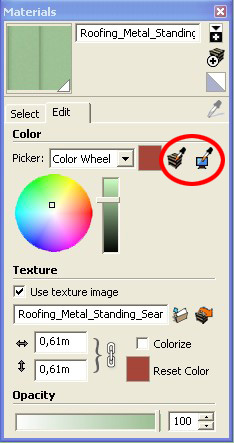
-
Ah yes, this one is very useful for change the aspect texture colors in a glitch!

I had believed that was something else
-
And the Internet has a zillion colour charts, for all kinds of products.
Anssi
-
@massimo said:
Pilou...
This thread is making me crazy, and happy, all at the same time.
Thank you everyone for being totally honest.
-
lol... doh! indeed you guys! That was one of the first buttons I went looking for because I was of the opinion that it should exist
I've been using it for years! -
Oh just read through the whole "duh" thread, then it gets really fun






Hello! It looks like you're interested in this conversation, but you don't have an account yet.
Getting fed up of having to scroll through the same posts each visit? When you register for an account, you'll always come back to exactly where you were before, and choose to be notified of new replies (either via email, or push notification). You'll also be able to save bookmarks and upvote posts to show your appreciation to other community members.
With your input, this post could be even better 💗
Register Login


Advertisement