sketchucation logo sketchucation
    • 登入
    Oops, your profile's looking a bit empty! To help us tailor your experience, please fill in key details like your SketchUp version, skill level, operating system, and more. Update and save your info on your profile page today!
    ⚠️ Important | Libfredo 15.6b introduces important bugfixes for Fredo's Extensions Update

    [Plugin] 2D Tools

    已排程 已置頂 已鎖定 已移動 Plugins
    785 貼文 178 Posters 491.0k 瀏覽 177 Watching
    正在載入更多貼文
    • 從舊到新
    • 從新到舊
    • 最多點贊
    回覆
    • 在新貼文中回覆
    登入後回覆
    此主題已被刪除。只有擁有主題管理權限的使用者可以查看。
    • TIGT 離線
      TIG Moderator
      最後由 編輯

      @unknownuser said:

      Im just loaded the 2D tools myself. Fillet doesn't work very well for me as well. I get one corner to work (after some effort) but then when I try to get the 2nd one to work. . .BUG SPLAT> has happened to me about 1/2 dozen times.

      OTherwise, great tool set.

      Thanks.

      D

      Never had a Blugsplat report on 2dFillet - ever! 😕
      Can you supply a SKP that does it - or PM it if it's not for public-gaze!
      😒

      TIG

      1 條回覆 最後回覆 回覆 引用 0
      • david_hD 離線
        david_h
        最後由 編輯

        No. . it's not a big deal. I was just trying it on a simple rectangle as a test. Not any specific model.

        If I make it look easy...It is probably easy

        1 條回覆 最後回覆 回覆 引用 0
        • TIGT 離線
          TIG Moderator
          最後由 編輯

          😕

          TIG

          1 條回覆 最後回覆 回覆 引用 0
          • david_hD 離線
            david_h
            最後由 編輯

            Yeah. .it's pretty weird. If I have a chance, I'll post a screen shot at least. I wonder if 2D tools is clashing with another plugin? ya think??? maybe? I only have 400. Should be no trouble checking to see which one. 💚

            D

            If I make it look easy...It is probably easy

            1 條回覆 最後回覆 回覆 引用 0
            • M 離線
              MartinK
              最後由 編輯

              I'm having a problem with the 2dLinestyle tool. When I choose <Custom Style>,I don't get the new dialog window where you can set up the Custom Style. The Linestyle just remains whatever it was before I picked <Custom Style>. I have the latest version installed and everything else works, at least the tools I've tried. Thanks in advance for any help.

              1 條回覆 最後回覆 回覆 引用 0
              • TIGT 離線
                TIG Moderator
                最後由 編輯

                MartinK

                It works fine for me [and everyone else as far as I know]...

                To reiterate...
                Right-click in 'empty space' to get the options main-dialog.
                Select <Custom Style>, and then OK...
                Another dialog appears for you to name and also design your own custom-style, and then OK...
                The original main-dialog now reappears...
                Scroll through the style-list to find your newly made custom-style... select it and also set other options for the LineStyle and OK...
                Style the lines as desired...
                [Custom Styles should also be saved with the Model??]

                TIG

                1 條回覆 最後回覆 回覆 引用 0
                • I 離線
                  ingeh
                  最後由 編輯

                  Does this plugin work on Mac too ?

                  1 條回覆 最後回覆 回覆 引用 0
                  • TIGT 離線
                    TIG Moderator
                    最後由 編輯

                    Yes.
                    Although some of the MAC modifier key options have different names than the guide...

                    TIG

                    1 條回覆 最後回覆 回覆 引用 0
                    • I 離線
                      ingeh
                      最後由 編輯

                      @tig said:

                      Yes.
                      Although some of the MAC modifier key options have different names than the guide...

                      Great ! I'll try it asap... Looks like a wonderful tool.

                      Many thanks,
                      Inge

                      1 條回覆 最後回覆 回覆 引用 0
                      • M 離線
                        marziaf
                        最後由 編輯

                        Hi,

                        if I press the <0> key in 2D Line tool the Z-plane resetting function starts, so I can't type all the lengths containing a "0".

                        I've noticed that in the 2DlineTool.rb, line 306, the key 48 is linked to the <TAB> function (" if key == 9 or key == 15 or key == 48### TAB sets Z, 9 for PC 15 for MAC ?"...).
                        I'm not a programmer but if I change this line and delete the string " or key == 48" the command works well.

                        Is it a needed change to the plugin or I'm doing something wrong?
                        (sorry for my English)

                        1 條回覆 最後回覆 回覆 引用 0
                        • TIGT 離線
                          TIG Moderator
                          最後由 編輯

                          I think some linux versions have key 48 as tab ?
                          I hadn't realized that it was the main keyboard '0' !
                          Feel free to disable the key press test as
                          if key == 9 or key == 15 ###or key == 48
                          I'll issue an update shortly...

                          TIG

                          1 條回覆 最後回覆 回覆 引用 0
                          • M 離線
                            marziaf
                            最後由 編輯

                            Thanks for your reply and also for your plugin, very useful!

                            1 條回覆 最後回覆 回覆 引用 0
                            • TIGT 離線
                              TIG Moderator
                              最後由 編輯

                              Here's v5.1 http://forums.sketchucation.com/viewtopic.php?p=185760#p185760
                              It fixes the recently reported glitch whereby on a PC the 2dLine tool jumped into the Z-height tool IF you typed a '0' from the main keyboard while typing a dimension, this was because the 'key codes' for 'TAB' for PC/MAC were messy [pressing TAB activates the Z-height tool]... 😒
                              If the three and a half thousand or so of you who have previously downloaded would like to get the updated toolset then please form an orderly queue 😉

                              TIG

                              1 條回覆 最後回覆 回覆 引用 0
                              • J 離線
                                justinhough77
                                最後由 編輯

                                Running a MacBook Pro...I cannot get this plugin to work. I have had success with other plugins but cannot get this one or the cline tool to work properly. Any help is appreciated.

                                1 條回覆 最後回覆 回覆 引用 0
                                • Dave RD 離線
                                  Dave R
                                  最後由 編輯

                                  You really haven't given us much to go on in order to help you. I can tell you that I have this plugin installed on my MacBook Pro and it works as expected. This would lead me to believe you've not installed it correctly. Why not throw us a bone and post a screen shot of your Plugins directory to show us how you have the plugin installed.

                                  Etaoin Shrdlu

                                  %

                                  (THERE'S NO PLACE LIKE)

                                  G28 X0.0 Y0.0 Z0.0

                                  M30

                                  %

                                  1 條回覆 最後回覆 回覆 引用 0
                                  • TIGT 離線
                                    TIG Moderator
                                    最後由 編輯

                                    I recall some reports about 'modifier-keys' being flaky on MACs, or them being the wrong-way-round or somehthing weird ?
                                    If an experienced MAC user could chip I ?
                                    I have been waiting to get some advice/fixes back on this issue for ages...

                                    However, if you just want to draw some 'clines' there are already several other tools available for this too... There was a recent topic on it and some links...

                                    TIG

                                    1 條回覆 最後回覆 回覆 引用 0
                                    • E 離線
                                      emjay125
                                      最後由 編輯

                                      I set a 2d line style and draw a series of dashed lines (drains under and alongside a house). The lines are dashed until I stop drawing them. A single left click at the end of a line makes all the earlier ones in the set appear dashed. Then moving the mouse makes the whole set continuous. Another left click turns the set into dashed lines. A double click to end the line-set makes the set solid lines.

                                      What is going wrong, what edge settings or other factors do I have to set ?

                                      1 條回覆 最後回覆 回覆 引用 0
                                      • TIGT 離線
                                        TIG Moderator
                                        最後由 編輯

                                        @emjay125 said:

                                        I set a 2d line style and draw a series of dashed lines (drains under and alongside a house). The lines are dashed until I stop drawing them. A single left click at the end of a line makes all the earlier ones in the set appear dashed. Then moving the mouse makes the whole set continuous. Another left click turns the set into dashed lines. A double click to end the line-set makes the set solid lines.

                                        What is going wrong, what edge settings or other factors do I have to set ?
                                        You right-click in empty space to get the line-style dialog ? Thereafter any lines you 'style' match that [width/color/pattern].
                                        Have you got view > hidden-geometry 'off' [should be]...
                                        Can you post an example SKP ?

                                        TIG

                                        1 條回覆 最後回覆 回覆 引用 0
                                        • E 離線
                                          emjay125
                                          最後由 編輯

                                          Thanks TIG, for a quick response.

                                          Here is a sample SKP. DashedLines1. I am using the Sketchup v 8.0.11752 here. There are no 2d layers that I can see. Seems to be the same in v8.0.4811.

                                          What are the settings that could affect printing the dashed lines.
                                          Is the deletion process that I describe on the SKP usual.

                                          Emjay


                                          A very simple model of my incompetence.

                                          1 條回覆 最後回覆 回覆 引用 0
                                          • TIGT 離線
                                            TIG Moderator
                                            最後由 編輯

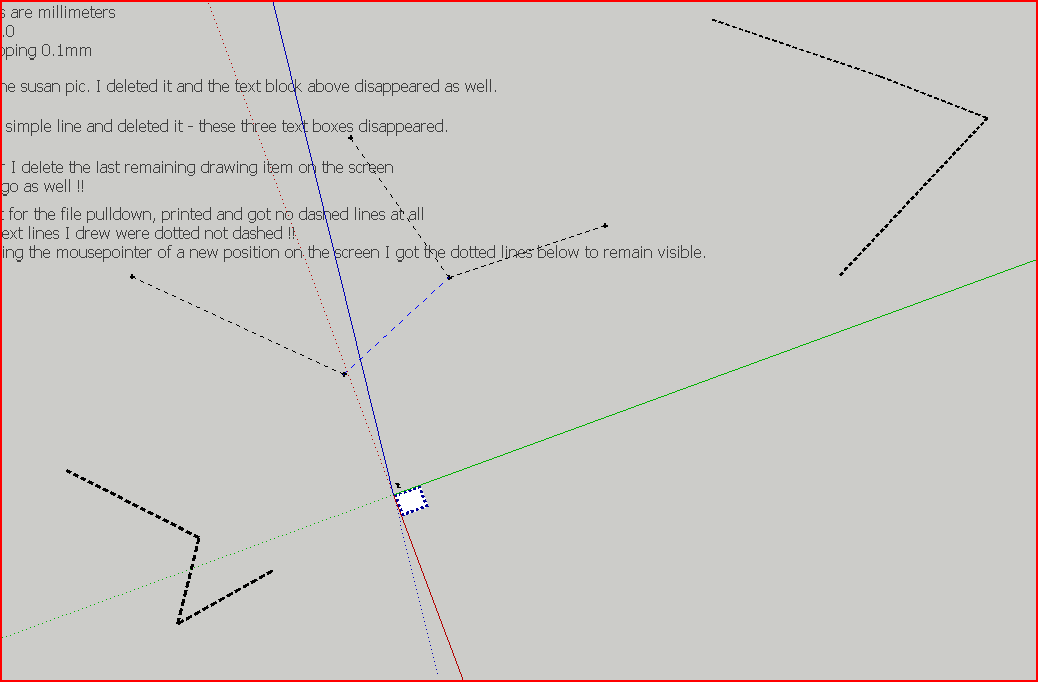
                                            Your lines' dims are quite large - if you have a line 100m long it probably needs to be 1000mm wide to be visible in meaningful views!
                                            The 'dotted-ness' depends also on the line's width...
                                            I found that adjusting the width/style produced acceptable results 😕
                                            Your 'guide-lines' are not relevant to this as it only works on lines/edges...
                                            Also you example face is 'upside down', so the 'styled edges' appear below it...
                                            [correctly oriented to the face... but 'upside down' for what you hoped for - facing 'down' !] !
                                            Reverse the face and you get an acceptable result... 😒Capture.PNG

                                            TIG

                                            1 條回覆 最後回覆 回覆 引用 0
                                            • 1
                                            • 2
                                            • 17
                                            • 18
                                            • 19
                                            • 20
                                            • 21
                                            • 39
                                            • 40
                                            • 19 / 40
                                            • 第一個貼文
                                              最後的貼文
                                            Buy SketchPlus
                                            Buy SUbD
                                            Buy WrapR
                                            Buy eBook
                                            Buy Modelur
                                            Buy Vertex Tools
                                            Buy SketchCuisine
                                            Buy FormFonts

                                            Advertisement

