sketchucation logo sketchucation
    • 登入
    Oops, your profile's looking a bit empty! To help us tailor your experience, please fill in key details like your SketchUp version, skill level, operating system, and more. Update and save your info on your profile page today!
    🔌 Smart Spline | Fluid way to handle splines for furniture design and complex structures. Download

    [Plugin] Scale2Face.rb

    已排程 已置頂 已鎖定 已移動 Plugins
    27 貼文 10 Posters 43.5k 瀏覽 10 Watching
    正在載入更多貼文
    • 從舊到新
    • 從新到舊
    • 最多點贊
    回覆
    • 在新貼文中回覆
    登入後回覆
    此主題已被刪除。只有擁有主題管理權限的使用者可以查看。
    • S 離線
      su30
      最後由 su30 編輯

      Hi all,

      I have a collection of groups and components, they are in different dimensions and different shapes, and I want them to become taller or shorter in the way of scaling by z, so that all the grp/compo will have a certain height defined by the target face I gave. Actually I hope the target face is not only a flat face, but also some slope or curve face or a face collection, I think this script may have some relationship with the drop.rb, but I am not sure if it's easy to write.I wish someone can help me on this!
      Many thanks for taking care no matter it's solved or not!
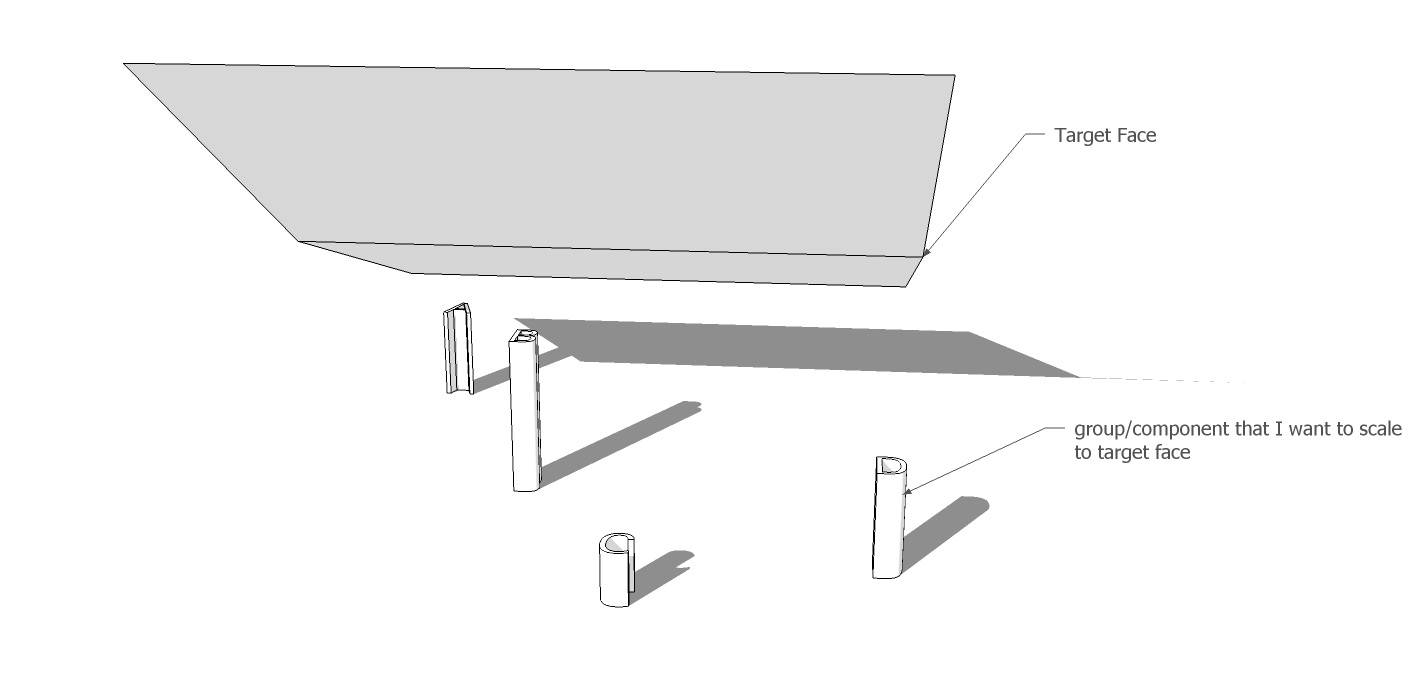

      Scale2Face_01.jpg


      Scale2Face_02.jpg


      Scale2Face_03.jpg

      su30

      1 條回覆 最後回覆 回覆 引用 0
      • daikuD 離線
        daiku
        最後由 編輯

        Check out FredoScale. In particular, the "scale to target" and "stretch to target" modes.

        Clark Bremer
        http://www.northernlightstimberframing.com

        1 條回覆 最後回覆 回覆 引用 0
        • free agentF 離線
          free agent
          最後由 編輯

          wow TIG nice one, and good idea, that couldve saved me some time a couple projects ago 👍

          http:i167.photobucket.comalbumsu143FreeAgent84bug.gif

          1 條回覆 最後回覆 回覆 引用 0
          • utilerU 離線
            utiler
            最後由 編輯

            Very cool indeed!!! Just wondering TIG; will this script work when you want to extend a wall top to a sloping roof for instance? 👍

            Just Curious...

            1 條回覆 最後回覆 回覆 引用 0
            • S 離線
              su30
              最後由 編輯

              @tig said:

              Here's a Ruby that'll do it [please change the original post's title to [Plugin]...]
              . scale2face.rb
              Usage: Select a face and some groups/component-instances that are
              located below that face.
              Pick 'Scale2Face' off the Plugins Menu or type scale2face in the Ruby
              Console.
              Unacceptable selections produce error dialogs.
              The selected items will be
              scaled upwards [in the Z] until their CLs meet the face.
              If items CLs do not intersect with the face then they are not scaled
              and there's a closing message...
              Any intermediate faces etc are ignored and the scaling passes through
              them.
              It has a one step un-do.

              To Do: Alternative orientations not just the UP in Z.

              TIG,
              I have to say you are great! It's not the first time that my request answered by you quickly,
              your describe for the script is what exactly what I am searching for, and even more that I didn't image.
              I changed the title of this thread and tested the script, but some unexpected results comes,
              the items were not scaled correctly, I think there must be some difference happens between our system condition,
              do you remember the 'lines2component.rb' last time you write? I found nearly the same thing happened this time.

              su30

              1 條回覆 最後回覆 回覆 引用 0
              • TIGT 離線
                TIG Moderator
                最後由 編輯

                su30

                What's the nature of the problem you are having ? I quickly churned out this first version... It might be buggy. Are you components originally drawn so that their eventual Z is the model Z etc ? Please try it using a simple box component (say 500x500x1000mm high and see if that [or several copies] scales up to a selected face ? Because the component instance is stretched up in the Z it must be consistent in its XY cross-section, otherwise it will distort... If you want to keep the base detail unchanged and simply want the top faces of the instances' to stretch up [with the base detail remaining unchanged] then the script would need to make each instance 'unique' and then change its definition - finding its top face and then using '.move!' on it to relocate it up at the face-intersect Z to suit...

                Please feedback - I don't like flaky scripts out there with my name on...

                TIG

                1 條回覆 最後回覆 回覆 引用 0
                • S 離線
                  su30
                  最後由 編輯

                  TIG

                  I used the script and followed the steps, but this happened every time,
                  this is the feed back, please check the picture bellow:
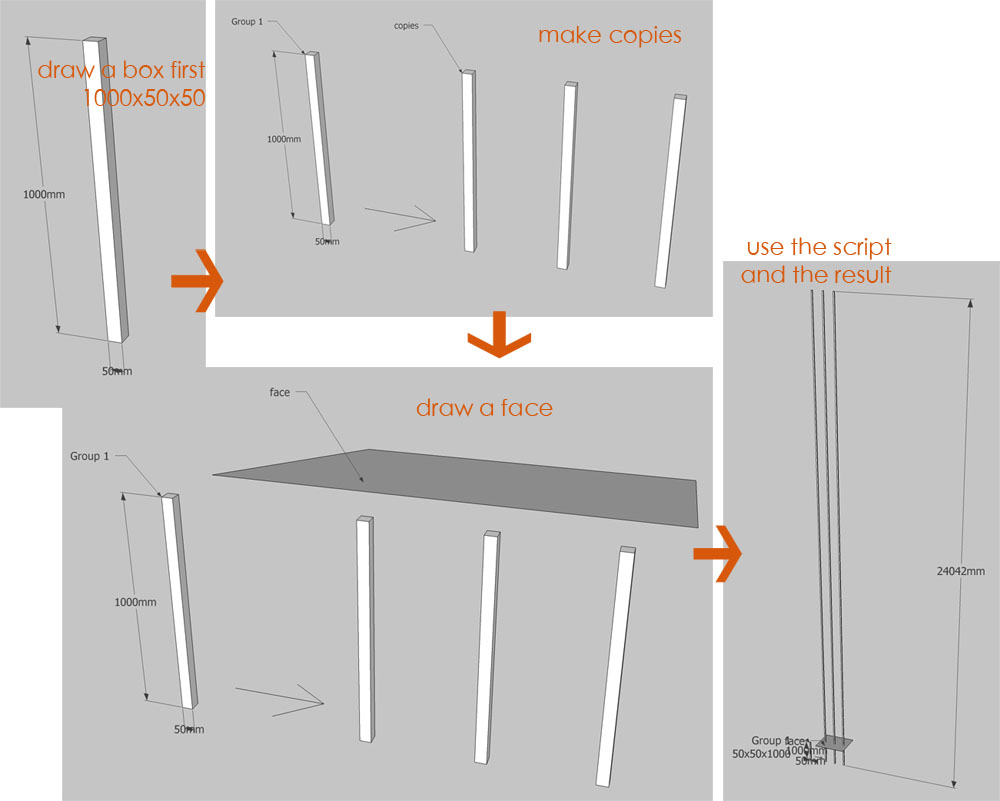

                  scale2face1.0.jpg

                  su30

                  1 條回覆 最後回覆 回覆 引用 0
                  • TIGT 離線
                    TIG Moderator
                    最後由 編輯

                    su30

                    I'm getting the exact same problems ! I didn't before - I am investigating...

                    TIG

                    1 條回覆 最後回覆 回覆 引用 0
                    • TIGT 離線
                      TIG Moderator
                      最後由 編輯

                      Version 1.1 is here...
                      http://forums.sketchucation.com/viewtopic.php?p=173374#p173374
                      Fixed the glitch [I think]...
                      Code was all messed up somehow !!!

                      TIG

                      1 條回覆 最後回覆 回覆 引用 0
                      • S 離線
                        su30
                        最後由 編輯

                        TIG

                        Here is a simple feedback of the script,
                        scale items to a single slope.
                        It works pretty fine with the boxes in group and component,
                        but a little problem with 'Bryce', a face camera component.
                        picture followed...
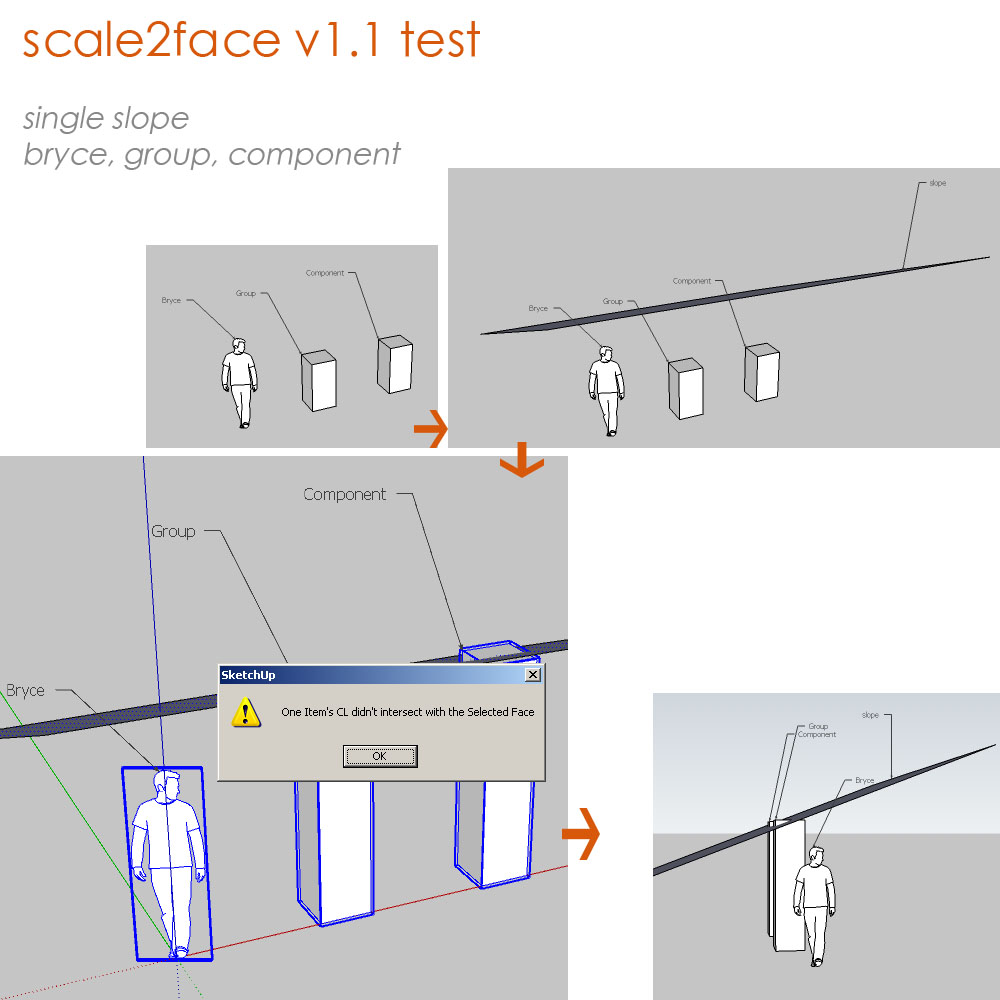

                        scale2face101a.jpg

                        su30

                        1 條回覆 最後回覆 回覆 引用 0
                        • S 離線
                          su30
                          最後由 編輯

                          This is another test for v1.1
                          groups, components, single slope
                          components are in different x,y,z position, and in different x,y,z scale,
                          it proves good with these items.
                          now the plugin works when only 1 face was selected, I don't know if it is possible to do it on multi faces or curve face,
                          maybe you have already worked on it, TIG.
                          Sorry that I can't reply on time because the time difference...
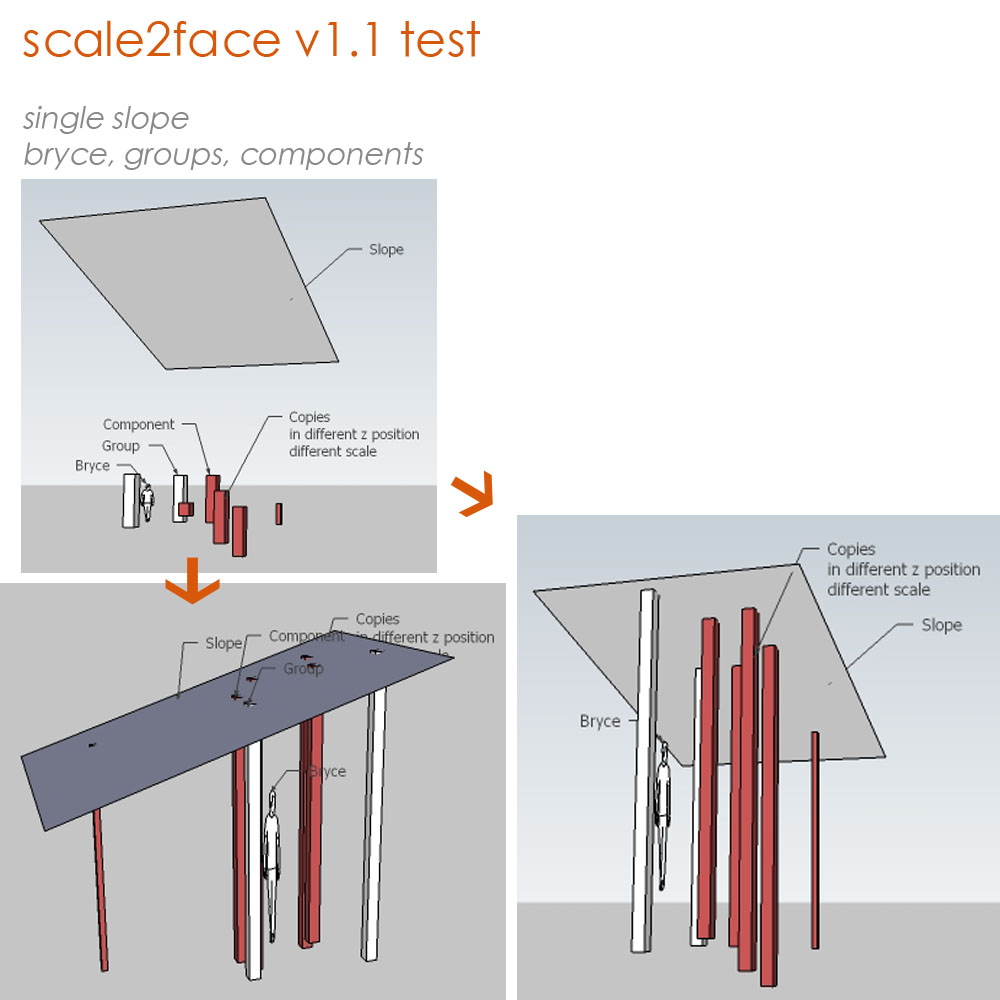

                          scale2face101b.jpg

                          su30

                          1 條回覆 最後回覆 回覆 引用 0
                          • TIGT 離線
                            TIG Moderator
                            最後由 編輯

                            I have considered multiple faces and have a draft almost ready...

                            I don't know why 'Bryce' fails - I suspect it's because the face was originally draw flat on the Z plane and then tilts up to 'face-me' ? I'll look at it...

                            In passing: I've also got an early draft for a 'Stretch2Face' Ruby that takes works with groups and faces; the topmost vertices of any vertical faces in the group get moved up to snap onto the face(s) selected - that way you could easily stretch the top of a wall face up to the underside of a sloping or even curved roof ?

                            Thanks for the feedback, any other ideas or problems please let me know... 😄

                            TIG

                            1 條回覆 最後回覆 回覆 引用 0
                            • S 離線
                              su30
                              最後由 編輯

                              yes I am looking forward for the multi_face version
                              this script will be very efficiency while editing a big amount of components, and I think it is promising.
                              thank you TIG for the excellent work!
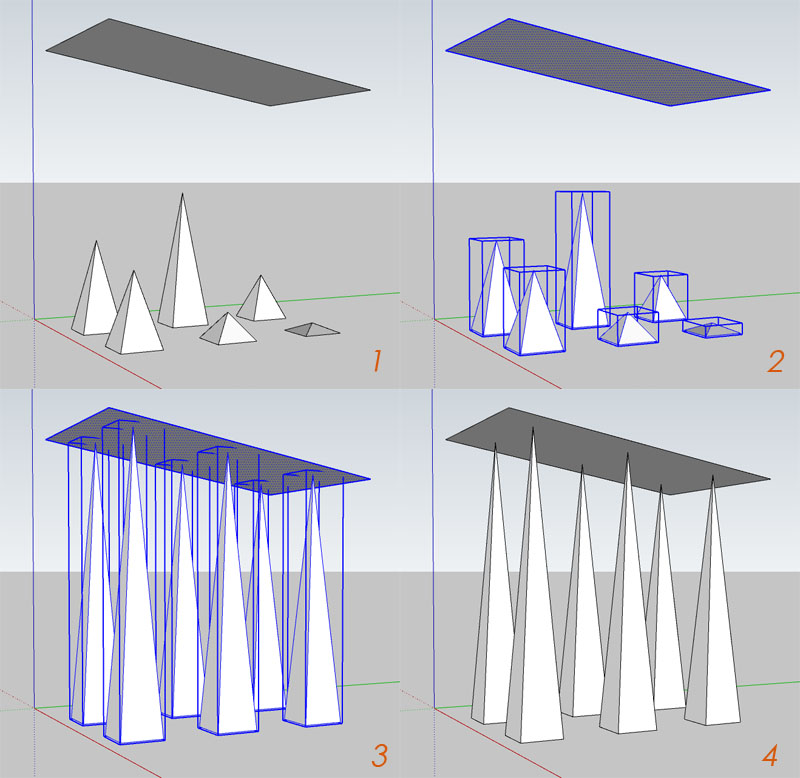

                              scale2face101 copy.jpg

                              su30

                              1 條回覆 最後回覆 回覆 引用 0
                              • S 離線
                                su30
                                最後由 編輯

                                TIG, I am wondering if you have some process script I can have a try?
                                still watching this ^_^

                                su30

                                1 條回覆 最後回覆 回覆 引用 0
                                • TIGT 離線
                                  TIG Moderator
                                  最後由 編輯

                                  Very busy - maybe next week ? 😐

                                  TIG

                                  1 條回覆 最後回覆 回覆 引用 0
                                  • D 離線
                                    dtrarch
                                    最後由 編輯

                                    Hi All
                                    Didier's [Project_faces_vector.rb] will put selected face on inclined plane.
                                    Just draw a reference line vector in the direction wanted for projection path.

                                    dtr


                                    SCALE TO FACE.png

                                    1 條回覆 最後回覆 回覆 引用 0
                                    • S 離線
                                      su30
                                      最後由 編輯

                                      @tig said:

                                      Very busy - maybe next week ? 😐

                                      Sure TIG, in no hurry 😄

                                      su30

                                      1 條回覆 最後回覆 回覆 引用 0
                                      • J 離線
                                        j_forrester
                                        最後由 編輯

                                        Great Plugin btw,
                                        Just wondered if there are any developments of a version that takes into account a sloped surface instead of a flat plane?

                                        Many thanks

                                        1 條回覆 最後回覆 回覆 引用 0
                                        • utilerU 離線
                                          utiler
                                          最後由 編輯

                                          @j_forrester said:

                                          Great Plugin btw,
                                          Just wondered if there are any developments of a version that takes into account a sloped surface instead of a flat plane?

                                          Many thanks

                                          Ditto.
                                          I think this would be neat!!!

                                          Just Curious...

                                          1 條回覆 最後回覆 回覆 引用 0
                                          • J 離線
                                            j_forrester
                                            最後由 編輯

                                            TIG,

                                            Tried and tested.

                                            Works absolutely perfect! Many thanks this will be a great help.

                                            1 條回覆 最後回覆 回覆 引用 0
                                            • 1
                                            • 2
                                            • 2 / 2
                                            • 第一個貼文
                                              最後的貼文
                                            Buy SketchPlus
                                            Buy SUbD
                                            Buy WrapR
                                            Buy eBook
                                            Buy Modelur
                                            Buy Vertex Tools
                                            Buy SketchCuisine
                                            Buy FormFonts

                                            Advertisement