sketchucation logo sketchucation
    • Login
    Oops, your profile's looking a bit empty! To help us tailor your experience, please fill in key details like your SketchUp version, skill level, operating system, and more. Update and save your info on your profile page today!
    Mac User? | Join the Rayscaper Beta for Mac Learn More

    [Plugin] Import OBJ with Materials v2.1 20131118

    Scheduled Pinned Locked Moved Plugins
    279 Posts 87 Posters 448.6k Views 87 Watching
    Loading More Posts
    • Oldest to Newest
    • Newest to Oldest
    • Most Votes
    Reply
    • Reply as topic
    Log in to reply
    This topic has been deleted. Only users with topic management privileges can see it.
    • 3
      3rdEye
      last edited by

      Hi TIG,

      First:(I wrote to you in another thread, about the texture mapping import)

      After testing the last days with Maya 2009 I can say the following:
      Your Plugin imports the Geometry very fine and accurate, and it additionally imports the maya mental ray shader I used there. If the shader has only normal mapping applied without diffuse mapping, on import the mapping seems to get lost. When i applied the same map to the diffuse channel it worked, but:

      The texture mapping is applied to the shader, not to the object, because when i replace the shader in SU 8, the texture mapping gets lost.

      When I tried to render the object in SU 8 with V-Ray 1.49.91 it did work for hours, but could not complete the Render. When I replace the imported shader with a new one with same textures applied, it renders in usual time, but - as i said - the mapping is lost.

      am I doing something wrong?

      thx again for your great plugin!
      cheers, 3rdEye

      1 Reply Last reply
      Reply Quote 0
      • C
        cublique
        last edited by

        Hi TIG

        I Have little problem when import a complex big obj file

        its very heavy in my little machines..

        I made the obj from ivy generator filling full a wall which dimension 5 x 12 meter2

        could you teach me..how I can import complex big obj file?

        thanks a lot

        1 Reply Last reply
        Reply Quote 0
        • TIGT
          TIG Moderator
          last edited by

          @cublique said:

          Hi TIG

          I Have little problem when import a complex big obj file

          its very heavy in my little machines..

          I made the obj from ivy generator filling full a wall which dimension 5 x 12 meter2

          could you teach me..how I can import complex big obj file?

          thanks a lot

          With complex data it takes time...
          Try simpler forms...
          OR wait overnight... πŸ˜’

          TIG

          1 Reply Last reply
          Reply Quote 0
          • GaieusG
            Gaieus
            last edited by

            Ivy generator creates extremely complex geometry (mostly unusable in SU actually).

            Gai...

            1 Reply Last reply
            Reply Quote 0
            • TIGT
              TIG Moderator
              last edited by

              Here's v1.9 http://forums.sketchucation.com/viewtopic.php?p=172790#p172790
              A glitch with occasional 'reversed faces' on import has been addresses...

              TIG

              1 Reply Last reply
              Reply Quote 0
              • W
                wyatt
                last edited by

                TIG, the fixtreed.rb is fantastic! The script eliminates several steps from a fairly lengthy process I developed to use Tree[d] models. Thank you!

                1 Reply Last reply
                Reply Quote 0
                • I
                  imaxx
                  last edited by

                  Hi TIG!
                  There are problems with import of this file. Familiarize please, and whether it is possible that or to make?
                  In advance thanks!
                  Max

                  1 Reply Last reply
                  Reply Quote 0
                  • I
                    imaxx
                    last edited by

                    Sorry! I forget attach fileOBJ file

                    1 Reply Last reply
                    Reply Quote 0
                    • TIGT
                      TIG Moderator
                      last edited by

                      @imaxx said:

                      ...
                      Imaxx
                      You only included the OBJ file ! πŸ˜’
                      Therefore when it imports there is no MTL to set materials and of course NO texture/image files either...
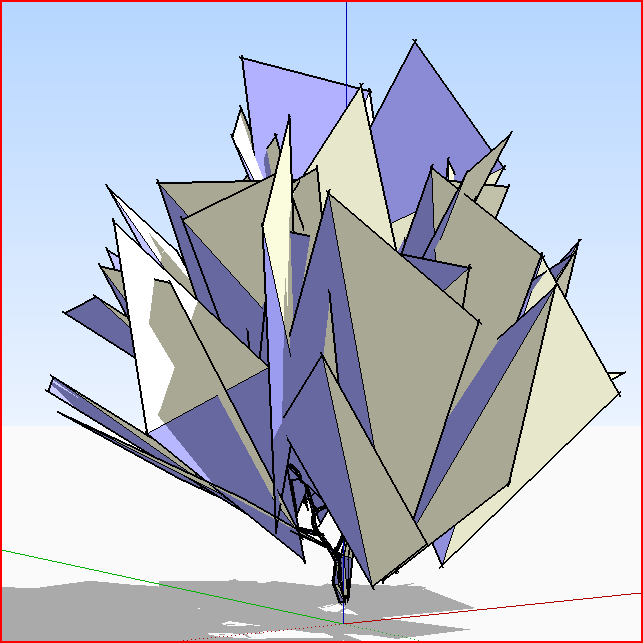
                      Here is what imports with what you supplied.
                      The trunk is there and I suspect the branches/leaves too [as the rectangular slabs at various angles], BUT these need to have PNG texture materials with transparency to look right.
                      Also the app that has made these triangulated faces AND reversed one part - this is fixable using the 'tree[d]' techniques described in the recent thread BUT you need the OBJ file, the MTL file and the images specified in the MTL file in a subfolder IF given in the MTL; then process the import to remove the coplanar edge, add the material to BOTH sides of the face and hide edges etc..........
                      This is the present versionCapture.PNG
                      TIG

                      1 Reply Last reply
                      Reply Quote 0
                      • J
                        Justo
                        last edited by

                        FixtreeD.rb works well with OBJ importer's imports of Xfrog plants as well
                        Thanks

                        Cheers
                        Justin

                        1 Reply Last reply
                        Reply Quote 0
                        • O
                          onesimo
                          last edited by

                          from 3ds max, how do you export the files properly to have all the textures? in max it is properly textured but when you import to sketchup there is no texture. is it possible?

                          1 Reply Last reply
                          Reply Quote 0
                          • M
                            MartinK
                            last edited by

                            Thanks TIG. Your generous plugins and help on this forum have been invaluable to me. Much appreciated.

                            1 Reply Last reply
                            Reply Quote 0
                            • Rich O BrienR
                              Rich O Brien Moderator
                              last edited by

                              Don't laugh but I'm getting 'Error: 666' in the Ruby console? Some files import but most don't? They're fine in Modo and 3DS Max?

                              Download the free D'oh Book for SketchUp πŸ“–

                              1 Reply Last reply
                              Reply Quote 0
                              • GaieusG
                                Gaieus
                                last edited by

                                Those must be some evil files, Rich. Pray to St Patrick today πŸ˜•

                                Gai...

                                1 Reply Last reply
                                Reply Quote 0
                                • TIGT
                                  TIG Moderator
                                  last edited by

                                  @unknownuser said:

                                  Don't laugh but I'm getting 'Error: 666' in the Ruby console? Some files import but most don't? They're fine in Modo and 3DS Max?

                                  The '666' is my joke error value - it means I don't know what the bleep is causing this but I'll struggle on regardless !
                                  It is quite possible to get some 666 error messages but to end up with what appears to be a perfect result anyway. Some OBJ files seem to have a few faces coded in an awkward way that won't get made - usually too small to handle or perhaps with three effectively co-linear points - I can trap for these but NOT 'fix' them - so it just puts '666' when it is presented with one that fails... Do you say that some files fail completely? Can you post or PM me one so I can test with perhaps so more helpful error messages temporarily allowed on my own setup... Have you tried just doing the import as a 'mesh' - this can overcome some issues with this type of problem...

                                  TIG

                                  1 Reply Last reply
                                  Reply Quote 0
                                  • honoluludesktopH
                                    honoluludesktop
                                    last edited by

                                    TIG, thanks for this importer. I am playing with the "3D Modeling with Silhouettes" application, and using your plugin to bring its models into sketchup.

                                    1 Reply Last reply
                                    Reply Quote 0
                                    • P
                                      pibuz
                                      last edited by

                                      Hei TIG, sorry to bother...
                                      I can run your script easily, but at the end of the transformation progress SU exits giving a BUGsplat message... How can I fix this?

                                      WEB (ita) - https://filipposcarso.wixsite.com/ordinentropico

                                      1 Reply Last reply
                                      Reply Quote 0
                                      • TIGT
                                        TIG Moderator
                                        last edited by

                                        @pibuz said:

                                        Hei TIG, sorry to bother...
                                        I can run your script easily, but at the end of the transformation progress SU exits giving a BUGsplat message... How can I fix this?

                                        Not sure - without loads more details about version, OS the OBJ itself etc...
                                        Have you tried the OBJimporter by Fluidimporter http://forums.sketchucation.com/viewtopic.php?p=316470#p316470 that is quicker and less prone to error than my old thing...

                                        TIG

                                        1 Reply Last reply
                                        Reply Quote 0
                                        • P
                                          pibuz
                                          last edited by

                                          No I didn't! I'll try that thanks!

                                          WEB (ita) - https://filipposcarso.wixsite.com/ordinentropico

                                          1 Reply Last reply
                                          Reply Quote 0
                                          • I
                                            Immer
                                            last edited by

                                            Hi TIG, I've got a few more patches for you, on your importer this time. I've been running into " - Material already exists..." errors a lot, which cause the associated group to be imported untextured.

                                            I changed the following code to reuse the existing material, but it might be nice to have an option to automatically mangle the material name if it really is a different texture.

                                            
                                            	when "newmtl"
                                            		mat_name=values[0]
                                                            matnames=[];materials.each{|mat|matnames << mat.display_name}
                                                            if matnames.include?(mat_name)
                                                              puts mat_name+" - Material already exists..."
                                                              ### traps for usemtl called x2 in obj or pre-existing materials
                                                              current_mat=nil
                                            		  ## NEW; make sure pre-existing materials are re-used
                                            		  if nil==new_mats.find{|mat|mat.name==mat_name}
                                            			new_mats << materials[mat_name]
                                            		  end


                                            I also noticed that the vast majority of import time is spent updating the progress bar. A quick fix that shortens a minute-long import to a few seconds:

                                            
                                            change 
                                            	Sketchup.set_status_text("Processing line #{line_cnt} of #{lines.length}")
                                            to
                                            	 if line_cnt % 73 == 0 # could be any number, 73 just makes the digits spin nicely
                                            		Sketchup.set_status_text("Processing line #{line_cnt} of #{lines.length}")
                                            	 end


                                            Finally, one of my test models suffered from the "some faces get reversed" bug mentioned above - but I noticed that when I then imported the same object again, without my material reuse code so it ended up untextured, the problem disappeared. When I tested by commenting out the "position_material" line in the following code the problem also went away, but obviously so did the texture.

                                            
                                            if new_face and @current_mat!= nil 
                                            	if @current_mat.texture != nil
                                            		pt_array=[]
                                            		pt_array=[verts[0],face_uvs[0],verts[1],face_uvs[1],verts[2],face_uvs[2]]if verts_length==3 and face_uvs
                                            		pt_array=[verts[0],face_uvs[0],verts[1],face_uvs[1],verts[2],face_uvs[2],verts[3],face_uvs[3]]if verts_length>3 and face_uvs
                                            		# new_face.position_material(@current_mat,pt_array,true)
                                            	else
                                            ...


                                            I'll keep poking at it, but I'm having to figure out both Ruby and Sketchup's API as I go, so you might have more luck.

                                            Here's the globe model I noticed the problem on for referencetextured globe that suffers from some face-inversions when imported

                                            1 Reply Last reply
                                            Reply Quote 0

                                            Hello! It looks like you're interested in this conversation, but you don't have an account yet.

                                            Getting fed up of having to scroll through the same posts each visit? When you register for an account, you'll always come back to exactly where you were before, and choose to be notified of new replies (either via email, or push notification). You'll also be able to save bookmarks and upvote posts to show your appreciation to other community members.

                                            With your input, this post could be even better πŸ’—

                                            Register Login
                                            • 1
                                            • 2
                                            • 10
                                            • 11
                                            • 12
                                            • 13
                                            • 14
                                            • 13 / 14
                                            • First post
                                              Last post
                                            Buy SketchPlus
                                            Buy SUbD
                                            Buy WrapR
                                            Buy eBook
                                            Buy Modelur
                                            Buy Vertex Tools
                                            Buy SketchCuisine
                                            Buy FormFonts

                                            Advertisement

