sketchucation logo sketchucation
    • 登入
    Oops, your profile's looking a bit empty! To help us tailor your experience, please fill in key details like your SketchUp version, skill level, operating system, and more. Update and save your info on your profile page today!
    🔌 Easy Offset | Offset selected faces in SketchUp in positive and negative offsets. Download

    [Plugin] SectionCutFace

    已排程 已置頂 已鎖定 已移動 Plugins
    565 貼文 170 Posters 360.8k 瀏覽 169 Watching
    正在載入更多貼文
    • 從舊到新
    • 從新到舊
    • 最多點贊
    回覆
    • 在新貼文中回覆
    登入後回覆
    此主題已被刪除。只有擁有主題管理權限的使用者可以查看。
    • B 離線
      Bob_CP
      最後由 編輯

      I've used this for years on multiple versions of SU. All of a sudden, it crashes SU 2023 Pro. Yesterday it worked, today it's causing SU to hang

      1 條回覆 最後回覆 回覆 引用 0
      • TIGT 離線
        TIG Moderator
        最後由 編輯

        Everything you have set up looks correct.
        Try reverting to an earlier version.
        It has changed from RBS to RBE filetypes which might be causing the heartache...
        SectionCutFace_v6.2.rbz

        TIG

        1 條回覆 最後回覆 回覆 引用 0
        • A 離線
          alskaro
          最後由 編輯

          Hello! Love this extension thank you ! Do you think it would be possible to be able to change the fill individually after the cut ? (like when you cut trough multiple materials) or simply having a color style that would color the face in the same material as the cut object ? That would be dope, especially with the 2025 "patterns" material!
          Thank you ! Have a nice day ! 🙂

          TIGT Dave RD 2 條回覆 最後回覆 回覆 引用 0
          • TIGT 離線
            TIG Moderator @alskaro
            最後由 TIG 編輯

            @alskaro
            You can already do that to a section cut face group.
            Unlock it [if needed], then edit the group, and apply the different materials you want to the faces.
            If you regenerate the section cut face then those changes are lost.

            TIG

            1 條回覆 最後回覆 回覆 引用 0
            • Dave RD 離線
              Dave R @alskaro
              最後由 編輯

              @alskaro do you mean something like this? As TIG says, apply whatever materials you want to the various faces in the SectionCut Face.
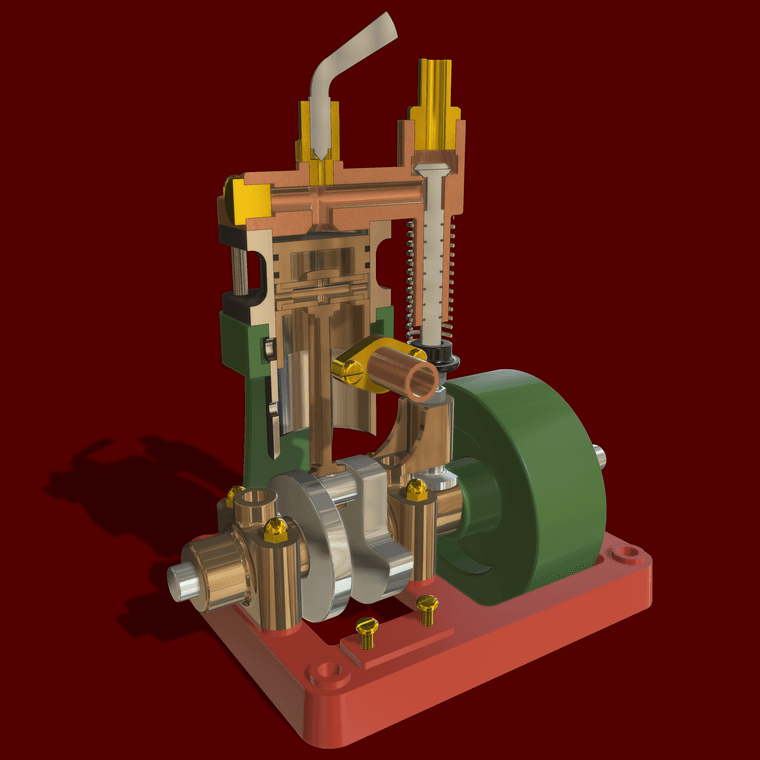

              Uniflow Steam Engine Cut away Small.png

              Etaoin Shrdlu

              %

              (THERE'S NO PLACE LIKE)

              G28 X0.0 Y0.0 Z0.0

              M30

              %

              1 條回覆 最後回覆 回覆 引用 1
              • 1
              • 2
              • 25
              • 26
              • 27
              • 28
              • 29
              • 29 / 29
              • 第一個貼文
                最後的貼文
              Buy SketchPlus
              Buy SUbD
              Buy WrapR
              Buy eBook
              Buy Modelur
              Buy Vertex Tools
              Buy SketchCuisine
              Buy FormFonts

              Advertisement
