sketchucation logo sketchucation
    • 登入
    Oops, your profile's looking a bit empty! To help us tailor your experience, please fill in key details like your SketchUp version, skill level, operating system, and more. Update and save your info on your profile page today!
    🔌 Smart Spline | Fluid way to handle splines for furniture design and complex structures. Download

    [Plugin][$] RoundCorner - v3.4a - 31 Mar 24


    已排程 已置頂 已鎖定 已移動 Plugins
    1.5k 貼文 473 Posters 3.4m 瀏覽 472 Watching
    正在載入更多貼文
    • 從舊到新
    • 從新到舊
    • 最多點贊
    回覆
    • 在新貼文中回覆
    登入後回覆
    此主題已被刪除。只有擁有主題管理權限的使用者可以查看。
    • Dave RD 離線
      Dave R
      最後由 編輯

      @taktakplz said:

      where i can install the higher version of libfredo6?i install it using extension warehouse

      It's clearly spelled out for you in the first post on the first page of this thread.

      2014-10-22_05-58-49.png

      Which takes you to the first post on the first page of the LibFredo6 thread which has the link you need.

      2014-10-22_05-59-57.png

      Get the SCF Plugin Store tool and use it to auto install your plugins.

      Etaoin Shrdlu

      %

      (THERE'S NO PLACE LIKE)

      G28 X0.0 Y0.0 Z0.0

      M30

      %

      1 條回覆 最後回覆 回覆 引用 0
      • T 離線
        taktakplz
        最後由 編輯

        @fredo6 said:

        @mattiab said:

        SketchUp crashes each time i try to use this plugin, do you know why?

        Do you have an old version of Vray?

        fredo i do have the same problem

        i have installed V-Ray for SketchUp v1.60.22

        1 條回覆 最後回覆 回覆 引用 0
        • Dave RD 離線
          Dave R
          最後由 編輯

          Remove VRay for SketchUp. It is has been known to cause problems with other plugins. Or at least use the current version of it. The current version appears to be 2.0.

          Etaoin Shrdlu

          %

          (THERE'S NO PLACE LIKE)

          G28 X0.0 Y0.0 Z0.0

          M30

          %

          1 條回覆 最後回覆 回覆 引用 0
          • T 離線
            taktakplz
            最後由 編輯

            thanks for the help fredo

            1 條回覆 最後回覆 回覆 引用 0
            • cottyC 離線
              cotty
              最後由 編輯

              @taktakplz said:

              thanks for the help fredo

              Dave!?

              my SketchUp gallery

              1 條回覆 最後回覆 回覆 引用 0
              • L 離線
                littleche
                最後由 編輯

                @unknownuser said:

                oundCorner cannot do anything for this model, because it is triangulated.

                The method is to use Subdivision, which you may possibly try with Artisan by Whaat.

                Fredo

                thank you fredo for your help .
                I thought this work is Possible whit your plugin .

                I hope this Reliability Be included in future versions. 😛

                1 條回覆 最後回覆 回覆 引用 0
                • G 離線
                  goblinteasemaid
                  最後由 編輯

                  very nice tool, works on SU6
                  doesnt do groups so you need to group edit or explode

                  and you only get one chance for offset input. Get it wrong and you must revert to sharp edge start - obvious really, no big deal

                  think of the time spent doing it manually YUK

                  thanx mille foix

                  Goblint

                  1 條回覆 最後回覆 回覆 引用 0
                  • G 離線
                    goblinteasemaid
                    最後由 編輯

                    F6 one thing I forgot to mention, I have an annoying issue with the drop down window in Round corners, its squashed up.
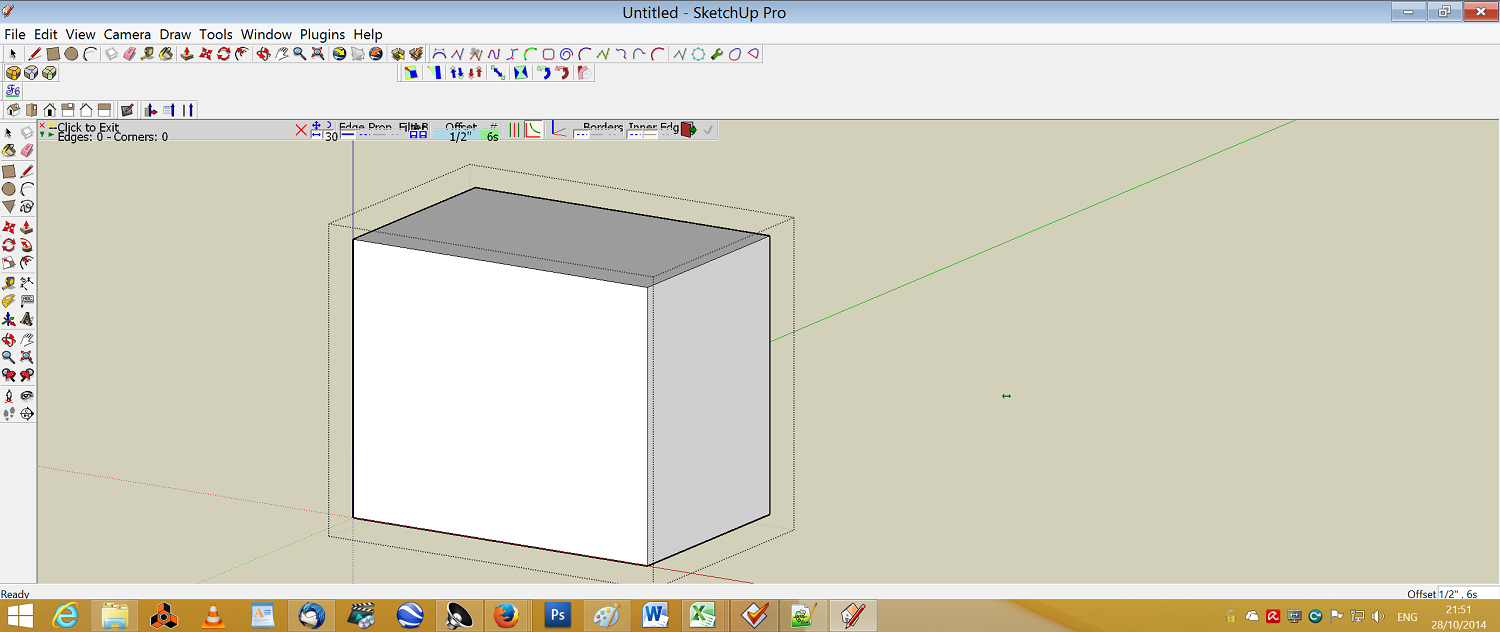

                    window problem

                    1 條回覆 最後回覆 回覆 引用 0
                    • M 離線
                      marcostakahasi
                      最後由 編輯

                      i'm trying to install. where's the archive?

                      1 條回覆 最後回覆 回覆 引用 0
                      • Dave RD 離線
                        Dave R
                        最後由 編輯

                        @marcostakahasi said:

                        i'm trying to install. where's the archive?

                        It's very clearly spelled out in the first post on the first page of this thread.
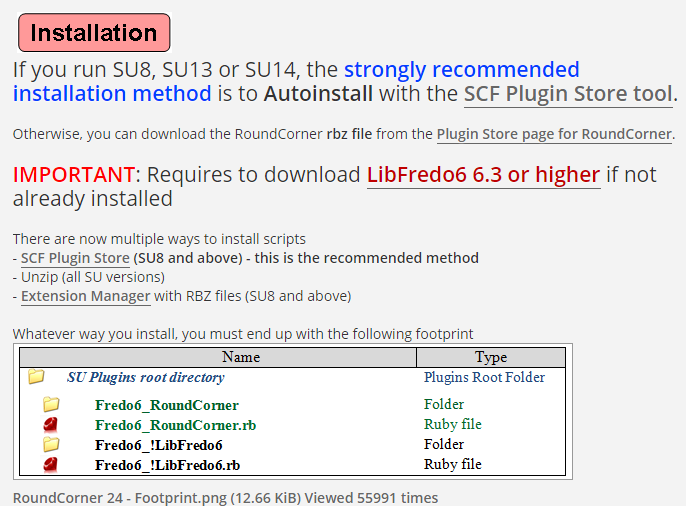
                        Screenshot - 10_29_2014 , 4_46_52 AM.png

                        Don't forget to read and follow the rest of the directions.

                        Screenshot - 10_29_2014 , 4_46_23 AM.png

                        Etaoin Shrdlu

                        %

                        (THERE'S NO PLACE LIKE)

                        G28 X0.0 Y0.0 Z0.0

                        M30

                        %

                        1 條回覆 最後回覆 回覆 引用 0
                        • fredo6F 離線
                          fredo6
                          最後由 編輯

                          @marcostakahasi said:

                          i'm trying to install. where's the archive?

                          Installation of my Plugins is now done via the SCF Plugin Store.

                          Fredo

                          1 條回覆 最後回覆 回覆 引用 0
                          • fredo6F 離線
                            fredo6
                            最後由 編輯

                            @goblinteasemaid said:

                            F6 one thing I forgot to mention, I have an annoying issue with the drop down window in Round corners, its squashed up.

                            You must have a screen with high resolution, analog to Retina screens on Mac.

                            Nothing to do, because this dépends on Sketchup and these problem of high résolutions screen are not fixed yet.

                            Possibly you can select the option "Retina screen" in the Default parameters of LibFredo6, but the correction is not guaranteed (see this thread).

                            Fredo

                            1 條回覆 最後回覆 回覆 引用 0
                            • G 離線
                              gruzdev_f
                              最後由 編輯

                              Install all the instructions.
                              but what is it?
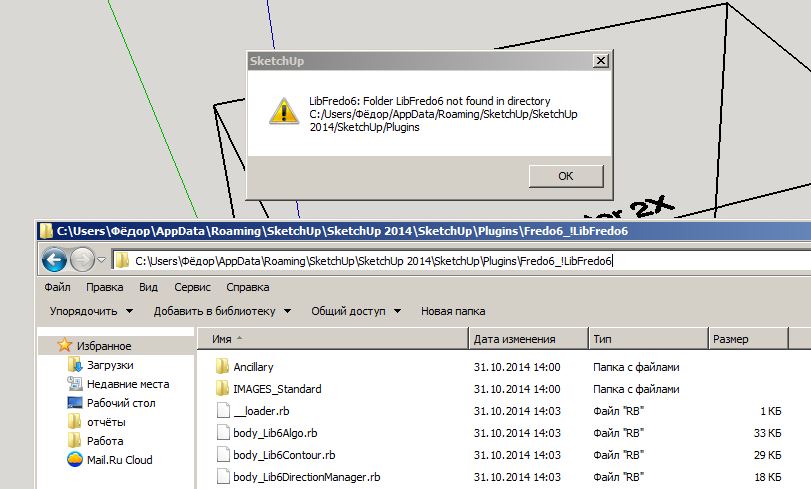

                              Безымянный.jpg

                              1 條回覆 最後回覆 回覆 引用 0
                              • TIGT 離線
                                TIG Moderator
                                最後由 編輯

                                If you read the tool's installation guidance it explains that, as with most of Fredo's tools, it need a set of helper files installed too - 'LibFredo6'
                                You can get that from the PluginStore...

                                http://sketchucation.com/pluginstore?pln=LibFredo6

                                Install it, then restart SketchUp to ensure everything gets reintegrated...

                                TIG

                                1 條回覆 最後回覆 回覆 引用 0
                                • G 離線
                                  gruzdev_f
                                  最後由 編輯

                                  As you can see in the screenshot, LibFredo6 installed but sketchup not see him.
                                  LibFredo6 folder is where it is necessary

                                  1 條回覆 最後回覆 回覆 引用 0
                                  • TIGT 離線
                                    TIG Moderator
                                    最後由 編輯

                                    Sorry, I now see the problem.
                                    You have a 'Cyrillic name'.
                                    In v2014 FILE can return incorrectly if there are no ASCII characters in the Plugins folder's path, at least without further 'trapping' of errors.
                                    I though Fredo has addressed the issue recently, when he updated his Lib and all of his tools.
                                    Have you installed the very latest versions of all of Fredo's tools AND Lib from the PluginStore... ?

                                    If so... if you make a Windows User account with an ASCII name [like "Fedos" ?] does it work ?

                                    TIG

                                    1 條回覆 最後回覆 回覆 引用 0
                                    • S 離線
                                      SketchMax
                                      最後由 編輯

                                      Hello Sketchupers!

                                      First post here for me ever, I'm currently working as a 3d-modeler for a company in Sweden and I've been on it for soon 2½ months.
                                      With that said I've tried to learn everything by myself now for 2½ months, so I'm still quite new to sketchup.

                                      But I finally have come to some struggle and i tried to look around for solutions, but unsuccessful unfortunately.
                                      My problem is that I got a dome-shaped object which is not entirely domy(Jokes aside) and I need the sloped side to the top to be more round without having to raise the top a few MM just to round the top of that(which also does not change the fact it won't look right).
                                      I'll insert a picture for better understanding my situation(I hope).

                                      http://i.imgur.com/kqcLh2j.png

                                      The reason I post here is because I'm not to familiar with forums and such,
                                      and for that I use your "Round Corners" ALOT! Kudos to that plugin.
                                      I'm also sorry if I posted in the wrong forum.

                                      I hope I didn't make this to complicated for you guys to understand and I thank you in advance.

                                      //Max

                                      1 條回覆 最後回覆 回覆 引用 0
                                      • S 離線
                                        snapster42
                                        最後由 編輯

                                        Roundcorner is a very useful plugin. But I am having some trouble using it for my purpose. I am trying to create a model for 3D printing, and one of the design requirements is that sharp edges should be avoided. Another requirement, however, is that the object must be a "water-tight" solid in the end, and I am having trouble satisfying that with roundcorner. For example, if I try to round the corners on something like this:
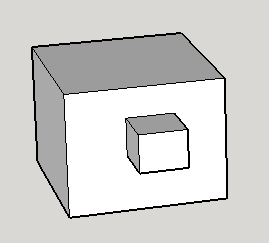
                                        Screen Shot 2014-10-31 at 3.32.46 PM.png

                                        The plugin appears to work, but when I group it, it doesn't become a solid. I use the "solid inspector" plugin to see what's wrong, and it shows me this:
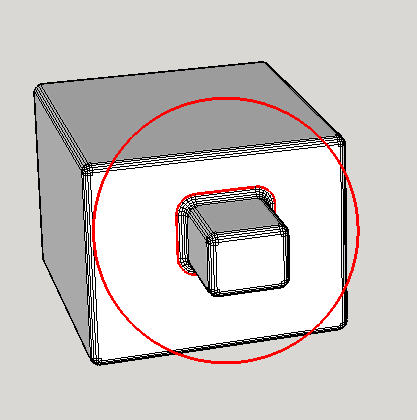
                                        Screen Shot 2014-10-31 at 3.33.30 PM.png

                                        When I zoom in to this, I can't see any problem:
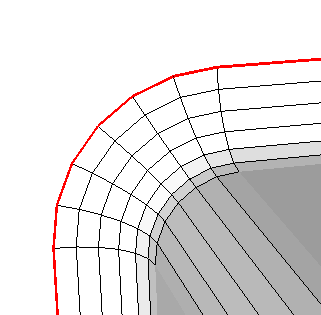
                                        Screen Shot 2014-10-31 at 3.33.41 PM.png

                                        Has anyone encountered this type of problem, and found a solution?
                                        Thanks

                                        1 條回覆 最後回覆 回覆 引用 0
                                        • cottyC 離線
                                          cotty
                                          最後由 編輯

                                          RoundCorner sometimes creates additional faces, in your case there is an internal face created and after you deleted this face, the object will get solid.

                                          my SketchUp gallery

                                          1 條回覆 最後回覆 回覆 引用 0
                                          • fredo6F 離線
                                            fredo6
                                            最後由 編輯

                                            @cotty said:

                                            RoundCorner sometimes creates additional faces, in your case there is an internal face created and after you deleted this face, the object will get solid.

                                            That's probably the explanation. A face is created between the big and the small cube.

                                            Actually, RoundCorner does not create the face, it is rather Sketchup that does it automatically (i.e. find_face).

                                            Fredo

                                            1 條回覆 最後回覆 回覆 引用 0
                                            • 1
                                            • 2
                                            • 70
                                            • 71
                                            • 72
                                            • 73
                                            • 74
                                            • 74 / 74
                                            • 第一個貼文
                                              最後的貼文
                                            Buy SketchPlus
                                            Buy SUbD
                                            Buy WrapR
                                            Buy eBook
                                            Buy Modelur
                                            Buy Vertex Tools
                                            Buy SketchCuisine
                                            Buy FormFonts

                                            Advertisement




