[Plugin][$] RoundCorner - v3.4a - 31 Mar 24




-
@dizain said:
Hello,
I have uploaded ROUNDCORNER_Dir_23 (with ZLoader__RoundCorner) and LIBFREDO6_Dir_40 (with LibFredo6) in the dir \ Program Files \ Google \ Google SketchUp 8 \ Plugins, but the plugin does not load, there is not even the toolbar, or and not appear any error message.
I ask for help ...Since you have LibFredo6 40, could you go to Window > LibFredo6 Settings > View Trace Log files and check if it says something about RoundCorner (and other scripts).
Thanks
Fredo
-
Hello Fredo,
I attach the txt file View trace log files.
I do not see anomalies ...
thank you very much
-
@dizain said:
Hello Fredo,
I attach the txt file View trace log files.
I do not see anomalies ...
thank you very muchIt seems you do not have a folder ROUNDCORNER_Dir_23 in the Plugins directory (or if you have it, it is not properly unzipped - you must have a RoundCorner.plugin file). I suggest you check the content, which should be something like
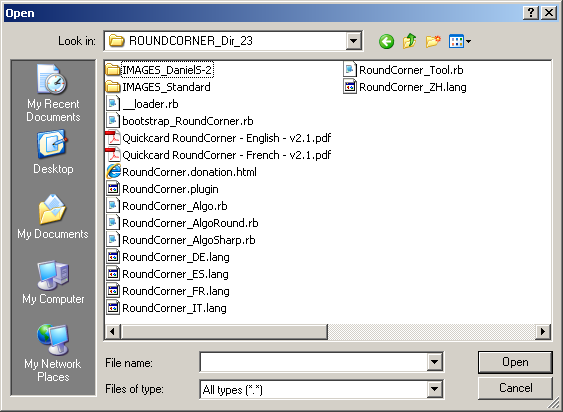
Note that the Zloader__RoundCorner.rb with LibFredo6 4.0+ is of no use (you can delete it).
Fredo
-
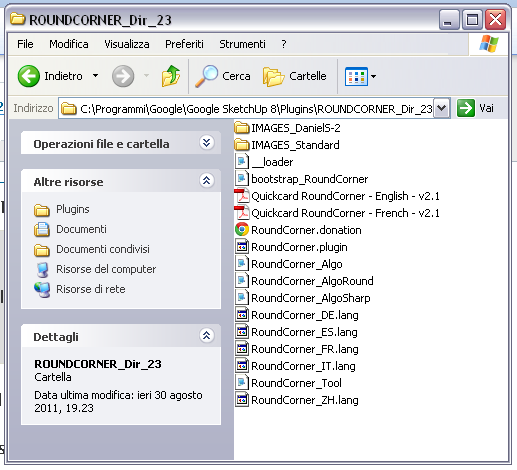
Dear Fredo,
my file is identical to your!
Where is the problem??
thank you very much
-
@dizain said:
Dear Fredo,
my file is identical to your!
Where is the problem??
thank you very muchVery simple!
From the trace file, I see that you have put LibFredo6 in an additional folder Plugin_8.
You must move all my plugins (FredoScale, RoundCorner, etc...) in this folder as well (this is indicated in the doc). It should then work.Fredo
PS: I could of course allow to have my plugins in other folders, but I decided not to because it could quickly become messy if you have version in different places.
-
Thanks Fredo,
I had suspected that was what the problem resolved.
Thanks again. -
Greetings.
I am somewhat new to the forum & just getting into the whole Plugin's scene, but very excited.
I have enjoyed the RoundCorner tool for sometime, but after installing the "training" version of TGI3D Amorph (link below), now I get a "Bug Splat" everytime I try to execute a "RoundCorners" option, even on the most simple box. I have updated the Fredo6 Library to 4.2, but the results are the same. Does anyone have any ideas?http://www.tgi3d.com/index.php?Page=Download
Thanks for any feedback, Shawn
Google Splat Log files for this problem -
I have Tgi and round corner under the same SU 8 install (on XP) and have never had an issue. Try to remove Tgi plugin (or rather simply rename the
tgi3d.rbsto something else with a different extension liketgi3d.txt) and restart SU. See if round corner crashes now. -
@gaieus said:
I have Tgi and round corner under the same SU 8 install (on XP) and have never had an issue. Try to remove Tgi plugin (or rather simply rename the
tgi3d.rbsto something else with a different extension liketgi3d.txt) and restart SU. See if round corner crashes now.Thanks! That was a followup question actually, how to "deactivate" or "uninstall" a Plugin.. Some seem to be just very simple Ruby scripts (not that I know how to read them, I don't), but others (like TGI3d Amorph) seem to propagate through many of the menus, etc.. and do not offer an obvious "uninstall/deactivate" option that I could see.
Anyway, tried what you said (eg. renaming TGI3DS.RPS to *.TXT and observed 2 things
(1) ALL things related to TGI3dS disappeared from SU 8 (cool)
(2) My BugSplat on Edging 1 face of a simple cube is still there (Not cool)Any other suggestions? I have attached the new BugSplat log files for any of you why can glean something from them?

Help!Thx, Shawn
-
As you have learnt, any file in the Plugins folder ending in .rb or .rbs is auto-loaded by Sketchup as it starts.
I usually add .TXT after the .rb/.rbs ending of name [rather than instead of], as I then don't have to decide what the original suffix was! [others add a '!']. If later on you decide you want to load a particular tool for that session only you can do so by opening Window > Ruby Console and typingload "filename.rb.TXT"and it will then load for that session only.
Now onto the problem... Have you loaded or updated any other plugins recently?
If so try disabling these is turn by 'renaming' and restarting Sketchup and trying RoundCorner each time to see if it still splats... Once you have success you have a suspect - try renaming all of the other ones back again and see if all is well with the one suspect script disabled - if you find it let us know!
There are rarely clashes between scripts - most of the ones available from here are relatively stable/friendly ... -
Thanks TIG. I am learning a bit more about the Architecture here.
I renamed my Plugin's directory & created a new empty one.
Then I started re-installing the Plugin's 1-by-1, and so far RoundCorners as such, is working again.
When (if) i figure out the offending Plugin, I will post it here.Thanks for helping a Newbie!
-
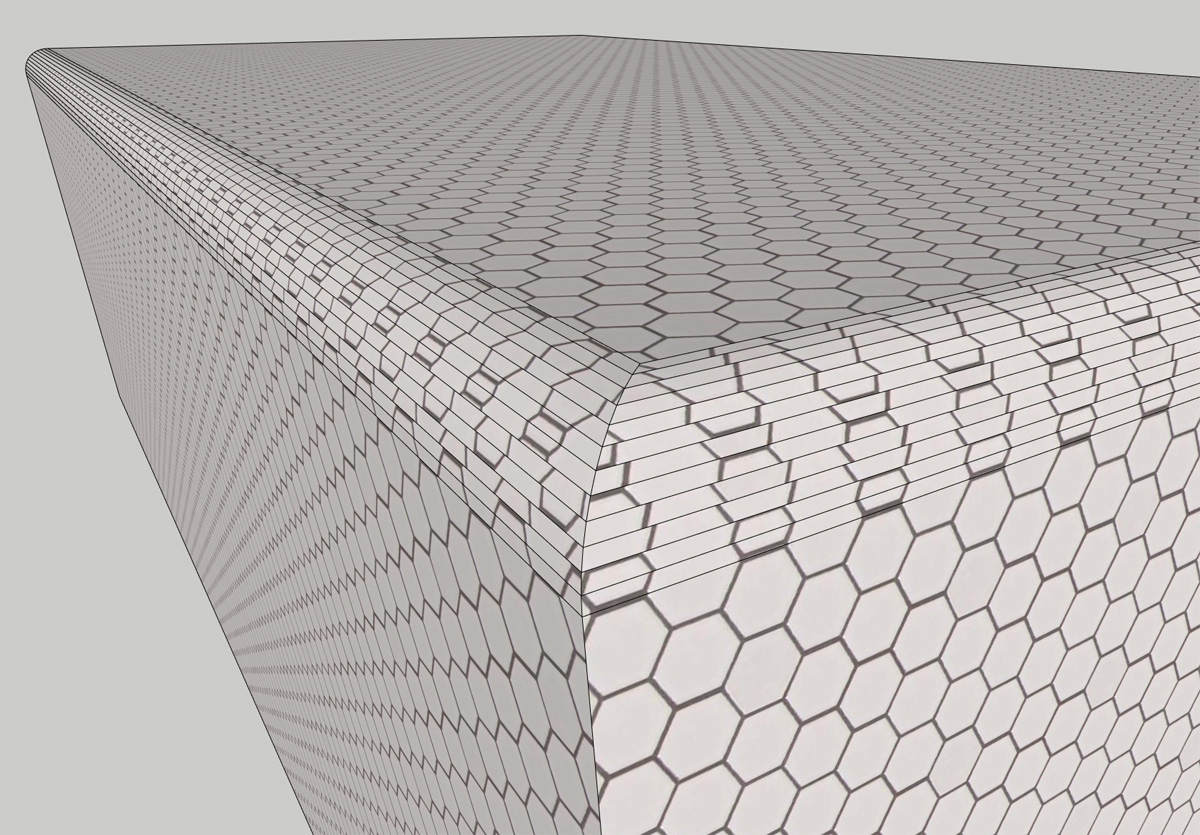
Fredo, you're a God-send! Thank you so much. One question for you...is there a way to map textures to the curves or have it to use already placed maps? It doesn't seem to like image maps

-
@rollerhaus said:
...is there a way to map textures to the curves or have it to use already placed maps? It doesn't seem to like image maps
Do you have an example to illustrate it?
Fredo
-
Voila! Obviously not a real-world example but it's easier to understand the issue vs. if had i shown wood. Not sure if there's a way around this though given SU's limited texture/uvw functionality...
-
@stoneshawnp said:
Thanks TIG. I am learning a bit more about the Architecture here.
I renamed my Plugin's directory & created a new empty one.
Then I started re-installing the Plugin's 1-by-1, and so far RoundCorners as such, is working again.
When (if) i figure out the offending Plugin, I will post it here.Thanks for helping a Newbie!
Small Update...
I went through 1-by-1 and re-installed every plugin I have until I found the conflict with RoundCorners.. It seem to be the Ledas Driving Dimensions (http://forums.sketchucation.com/viewtopic.php?f=80&t=13808&hilit=ledas+driving+dimension or otherwise http://drivingdimensions.com/. When I disable this plugin, my "BugSplats" with RoundCorners disappear.
... Great Forum! also very interested to see the feedback to the Texture question just posted
-
I have already told the Driving Dimensions author [Dmitry Ushakov] about the conflicts the tool has with other plugins about a month ago - the faults are on his side because he messes with base class/methods... It seemed OK in v8, but v7 was causing problems with a few tools [similar to SketchyPhysics] - but your problem occurs in v8 ? ...

-
@tig said:
I have already told the Driving Dimensions author [Dmitry Ushakov] about the conflicts the tool has with other plugins about a month ago - the faults are on his side because he messes with base class/methods... It seemed OK in v8, but v7 was causing problems with a few tools [similar to SketchyPhysics] - but your problem occurs in v8 ? ...
Yes. Problem occurs in SU Pro 8 (installed on both Windows XP & Windows 7 machines).
Thx
Shawn -
i am using google sketchup 8 i am not able to use this plugin in 8 version. how can i install that??
thx
-
@jai goel said:
i am using google sketchup 8 i am not able to use this plugin in 8 version. how can i install that??
Have you installed it as the instructions, with the supporting files etc, as explained on the download page ?
If so why can't you 'use it'?
Do you get Preferences>extension_to_activate/menu_items/view>toolbar>toolbar?
Do you get error messages when using it?
Do you get error messages in the Ruby Console when using it?
Please give more details, to help us help you... -
how can i get the icons back up...i closed them by accident? .......been trying for half an hour where to find them?
thanks!





Advertisement