[Plugin][$] RoundCorner - v3.4a - 31 Mar 24




-
Hello,
About two weeks ago I received an error message about RoundCorner when starting Sketchup 2018 Pro. I didn't save the message, and don't know exactly what it said, but RoundCorner was no longer available. I'm on macOS High Sierra (can't upgrade any higher). I updated Fredo6 to the latest version, restarted Sketchup, and then updated RoundCorner and restarted. The toolbar appears, but is completely unresponsive. I also tried installing FredoCorner. Its toolbar has never appeared, but I can put the icons in my main toolbar. It is also unresponsive.In the "Fredo6 Collection" under Tools both RoundCorner and FredoCorner are showing, along with their menus, but I can't do anything with them. I've been using RoundCorner for years, and can barely function without it (many thanks, Fredo). Please, somebody help!
(I did install through Extension Manager in Sketchup).Thank you, and hope everybody had a Merry Christmas.
-
You seem to use Sketchup 8. Can you confirm?
Can you open the Ruby Console, and check for error message when you launch RoundCorner.
Thanks
Fredo
-
@fredo6 said:
You seem to use Sketchup 8. Can you confirm?
Can you open the Ruby Console, and check for error message when you launch RoundCorner.
Thanks
Fredo
Hello Fredo, I use SU2018 Pro. I did open Ruby Console, and the LibFredo6 plugin seems to be the problem. I installed the latest version through Extension Manager and followed instructions carefully, closing and re-starting Sketchup before installing RoundCorner. I then closed and re-started before installing FredoCorner. As I said, the toolbars and icons are there, but they don't do anything.
This problem started suddenly, after I had been away from the computer for a week. When I launched SketchUp, the error message about RoundCorner was on the screen, and its toolbar had disappeared. I'm going to try deleting and re-installing LibFredo6 again, but have already done that several times. Can I post the Ruby Console info here if I have no luck?
-
-
Error: #<Errno::ENOENT: No such file or directory @ rb_sysopen - /Users/21imac/Library/Application Support/.LIBFREDO6_DATA_Dir/LibFredo6_all_defaults.dat>
/users/21imac/library/application support/sketchup 2018/sketchup/plugins/fredo6_!libfredo6/lib6registry.rbe:144:ininitialize' /users/21imac/library/application support/sketchup 2018/sketchup/plugins/fredo6_!libfredo6/lib6registry.rbe:144:inopen'
/users/21imac/library/application support/sketchup 2018/sketchup/plugins/fredo6_!libfredo6/lib6registry.rbe:144:inwrite_to_file' /users/21imac/library/application support/sketchup 2018/sketchup/plugins/fredo6_!libfredo6/lib6registry.rbe:127:instore'
/users/21imac/library/application support/sketchup 2018/sketchup/plugins/fredo6_!libfredo6/lib6plugin.rbe:1278:inusage_use' /users/21imac/library/application support/sketchup 2018/sketchup/plugins/fredo6_!libfredo6/lib6plugin.rbe:1266:incommand_invoke'
/users/21imac/library/application support/sketchup 2018/sketchup/plugins/fredo6_!libfredo6/lib6plugin.rbe:1249:inblock (2 levels) in build_config_commands' /users/21imac/library/application support/sketchup 2018/sketchup/plugins/fredo6_!libfredo6/lib6traductor.rbe:1348:incall'
/users/21imac/library/application support/sketchup 2018/sketchup/plugins/fredo6_!libfredo6/lib6traductor.rbe:1348:inblock in add_command' SketchUp:1:incall' -
It seems you may have some restriction (security-based) to create subdirectories in /Users/21imac/Library/Application Support/.LIBFREDO6_DATA_Dir.
Possibly, this has to do with the mode of your finder, which may require "View Hidden files".
Can you check.
Worse case, create the directory manually: /Users/21imac/Library/Application Support/.LIBFREDO6_DATA_Dir.
Please note that there is a 'dot' before LIBFREDO6_DATA_Dir. On Mac, I think this to make the directory hidden.
-
The directory is there, but it is hidden. I was able to see it by opening Terminal. Now what should I do? (The dot does make it hidden.)
-
@oyercab said:
The directory is there, but it is hidden. I was able to see it by opening Terminal. Now what should I do? (The dot does make it hidden.)
Could you enable the option "view hidden file" in your Finder.
In the Terminal, type
defaults write com.apple.finder AppleShowAllFiles YES; killall FINDERIf it does not work, then it would mean that your Support folder is protected against file creation by program, and then you'll have to find how to allow it via changing some security settings.
Fredo
-
@fredo6 said:
Could you enable the option "view hidden file" in your Finder.
In the Terminal, type
defaults write com.apple.finder AppleShowAllFiles YES; killall FINDERIf it does not work, then it would mean that your Support folder is protected against file creation by program, and then you'll have to find how to allow it via changing some security settings.
Fredo
When I did that, I got this response "No matching processes belonging to you were found."
But I can see the folder by typing the following two lines, one at a time:defaults write com.apple.finder AppleShowAllFiles TRUE
killall Finder
What should be inside that hidden folder? It only contains a folder named DefaultParameters,
which has two files: FredoCorner.def and ROundCorNer.def (spelled just like that)Gail
-
@oyercab said:
What should be inside that hidden folder? It only contains a folder named DefaultParameters,
which has two files: FredoCorner.def and ROundCorNer.def (spelled just like that)LibFredo6 tries to create a file named "LibFredo6_all_defaults.dat", but apparently it cannot, based on the error that you get in the Ruby console.
So, this may be related to some security settings.
In the Ruby console, could you copy and paste the following command and press Enter
File.open(File.join(LibFredo6.appdata_dir, "LibFredo6_all_defaults.dat"), 'w') { |f| f.puts "###" }Do you get an error?
If so, could you type (same command, but with a .txt extension)
File.open(File.join(LibFredo6.appdata_dir, "LibFredo6_all_defaults.txt"), 'w') { |f| f.puts "###" } -
I deleted the hidden folder .LIBFREDO6_DATA_Dir.
and then uninstalled LibFredo6, FredoCorner and RoundCorner.
After doing that, when I re-installed LibFredo6, another file showed up below the folder DefaultParameters inside the hidden folder. It wasn't there before.Then I re-installed FredoCorner and RoundCorner, and now they are both working!!
Thank you so much for your help and time, Fredo.
-
OK. Strange, but glad it worked. This may be useful to know for other Mac users.
Fredo
-
découverte de ce plugin malin, bien que son interface ne rende pas son utilisation des plus pratiques; heureusement la généreuse et très détaillée documentation est là.
Par contre, impossible de savoir ce que le plugin considère comme étant une arête invalide. Et si je pose la question, c'est justement parce que sur un modèle simple (un anneau type bague semi ouverte) aucune arête et aucune surface ne peuvent être sélectionnés. Bon c'est vrai que je ne suis pas super à l'aide avec Sketchup, mais j'ai réussi à faire fonctionner ce plugin sur d'autres modèles.
Quelque chose m'échappe encore avec Sketchup; une fois de plus!
-
@notapoireau said:
Par contre, impossible de savoir ce que le plugin considère comme étant une arête invalide.
RoundCorner permet de filtrer les arêtes selon leur propriétés (plain, soft, smooth, hidden). En general, on ne considère que les arêtes plain (donc non-soft, non-smooth, non-hidden).
Dans la palette de boutons, tu as un filtre qui peut être modifié.
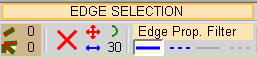
Dans ton modèle, utilise l'option pour montrer la géométrie cachée.
Fredo
PS: J'ai publié recemment le plugin FredoCorner qui est un peu plus puissant que RoundCorner.
-
Merci Fredo pour cette précision.
Je n'avais pas perçu cette partie filter des arêtes; bon pas plus succès quelle que soit le Edge Prop. Filter sélectionné, non seulement aucune sélection d'arête n'est possible, mais en plus Sketchup plante (du moins suis-je obligé de "forcer à quitter")Je vais suivre ta suggestion en installant FredCorner, peut être aurais-je plus de succès...
ah ben non, décidément quand ça veut pas!Dès que je fais appel au plugin, j'ai un message d'erreur, et il me faut cliquer sur OK une bonne vingtaine de fois pour en sortir. Une fois sortie de ce message d'erreur, même si le contour de la pièce apparait en rouge (donc sélectionné je suppose), je ne parviens pas à arrondir le bord. Je laisse tomber, je le ferai au papier de verre, une fois la pièce imprimée en 3D (je mettrai sans doute moins de temps).
-
Merci Fredo pour cet éclaircissement.
Reste que sur le fichier que j'avais joint, quel que soit le type d'arête sélectionné, le plugin ne fonctionne pas; il ne se passe rien, aucun arrondi n'est effectué.
Quant à FredoCorner, ce n'est pas mieux, voire pire, puisque dès que le plugin est appelé j'ai un message d'erreur.
Bon, je laisse tomber. Pour moi c'est trop compliqué de parvenir à faire fonctionner Sketchup de manière logique et fiable. Je ferai mes arrondis au papier verre, au moins là je suis certain d'y arriver.
-
Verifie la valeur de l'offset qui est probablement trop grand.
Ouvre RoundCorner ou FredoCorner sans aucune pre-selection
Tu peux taper une nouvelle valeur dans la VCB ou en cliquant sur le bouton. -
Première tentative: dès le lancement du plugin (roundcorner) Sketchup plante.
je relance.
Le plugin est activé (roundcorner): je vois en bas à droite Offset: 30mm , 6s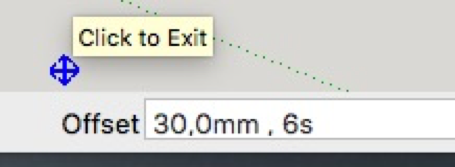
je change la valeur de 30 par 1: ne change rien, aucune arête sélectionnable.
Puis je vois en haut à gauche cette cas qui semble est désignée par VCB;
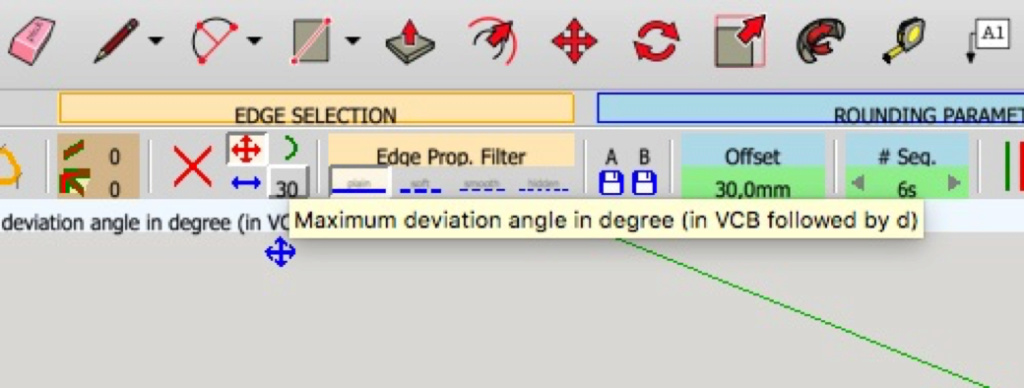
je souhaite donc changer la valeur. impossible; que je mette 10 ou 1, la boite de dialogue demandant de valider le nouveau choix ne cesse de revenir demandant la validation de cette valeur.
Bref cela ne marche toujours pas, ou bien ce qui est plus probable c'est moi qui ne sait pas utiliser cela....alors que je suis bien plus à l'aise avec de la toile émeri.
-
Please excuse my inexperience with both Sketchucation and this forum. I am I think replying to a thread when in fact I want to post a new thread for RoundCorner. I can't find a 'new thread' type button so again, my apologies.
My Post Title would be: "Help with RoundCorner toolbar size in Sketchup 2016"
Problem: I have had Round Corner installed for some time and always struggled with the fact that in my installation, the toolbar (the pop-up window for settings that appears after I select either S
harpCorner or say RoundCorner - Bevel) is so small that I can not enter parameters for my roundcorner use. I am able to use the extension, but my problem is with the 'settings window' that appears when I select one of the three main options.Any help or direction on how to properly ask this question (and your patience is appreciated) would be much appreciated.
Thank you in advance
-
You must have a high-resolution screen.
For Sketchup 2016, you have to indicate the scale factor manually.
Go to Window > LibFredo6 Settings > Default Parameters... to display the Default Parameters of LibFredo6.
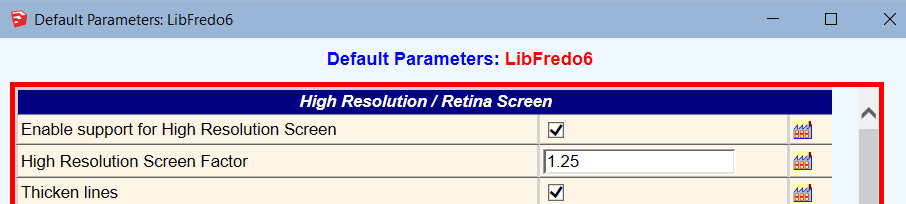
At the top of the dialog box, you should adjust the value of the field "High Resolution Screen Factor". Probably a factor 2.
Note that this adjustment is automatic for SU2017, SU2018 and SU2019.
Fredo



Advertisement