sketchucation logo sketchucation
    • 登入
    Oops, your profile's looking a bit empty! To help us tailor your experience, please fill in key details like your SketchUp version, skill level, operating system, and more. Update and save your info on your profile page today!
    🔌 Smart Spline | Fluid way to handle splines for furniture design and complex structures. Download

    [Plugin] extrudeEdgesByEdges.rb

    已排程 已置頂 已鎖定 已移動 Plugins
    190 貼文 76 Posters 219.2k 瀏覽 76 Watching
    正在載入更多貼文
    • 從舊到新
    • 從新到舊
    • 最多點贊
    回覆
    • 在新貼文中回覆
    登入後回覆
    此主題已被刪除。只有擁有主題管理權限的使用者可以查看。
    • TIGT 離線
      TIG Moderator
      最後由 編輯

      @deanlegg said:

      Hi all
      Love the plugin really good
      2 things, I can't get the toolbar to show up, I have the outer box where about 6 icons would be but no icons
      And could you direct me to some good tutorials
      Cheers

      Have you kept all of the icon image/lingvo files [~51 of them] etc in the TIGtools subfolder inside Plugins - not having done so is the usual cause of this issue... Do a new install, extract the zip file's contents into a temporary folder - perhaps on your Desktop - keeping all the files in the appropriate subfolder. Then move or copy that subfolder and the other rb files into Plugins folder... If this fixes it then I suggest you look through the Plugins folder and tidy up any files that are in TIGtools and also incorrectly installed in there 🤓

      TIG

      1 條回覆 最後回覆 回覆 引用 0
      • K 離線
        khashayar
        最後由 編輯

        hi
        thank you for the great great plugin. i was trying to make a tent structure with it but i couldn't do it.
        here i attached the sketchup file. i'd be really glad if you could check it out and tell me if it's possible to make a tent out of it or ....not.
        thanks


        tent.skp

        1 條回覆 最後回覆 回覆 引用 0
        • TIGT 離線
          TIG Moderator
          最後由 編輯

          Kahashayar

          EEbyEdges is not the right tool to make that form.
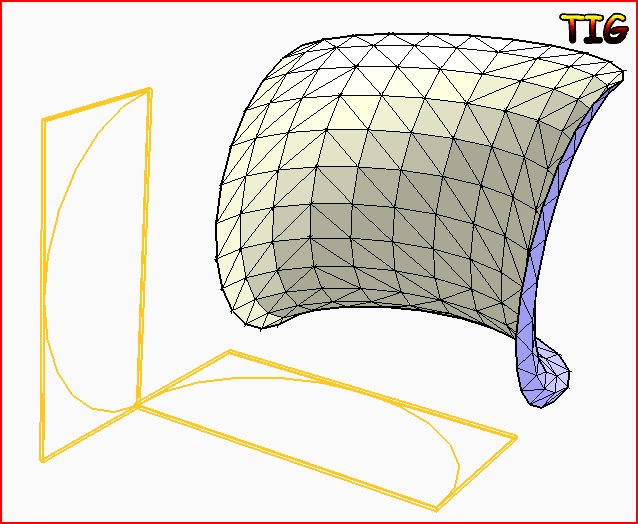
          Try its cousin - EEbyRails - and make each side one of four meshes, as this example Capture.PNG
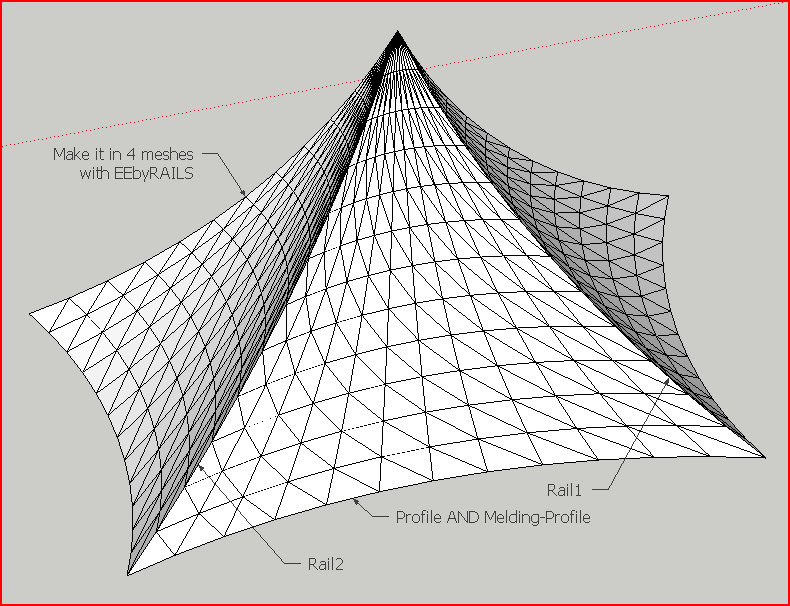
          TIG

          1 條回覆 最後回覆 回覆 引用 0
          • K 離線
            khashayar
            最後由 編輯

            thank you TIG. that was a big help .

            @tig said:

            Kahashayar
            EEbyEdges is not the right tool to make that form.
            Try its cousin - EEbyRails - and make each side one of four meshes, as this example

            1 條回覆 最後回覆 回覆 引用 0
            • 66searcher6 離線
              66searcher
              最後由 編輯

              thanks TIG
              👍


              012.jpg

              http://hamidtoliat.deviantart.com/

              1 條回覆 最後回覆 回覆 引用 0
              • mitcorbM 離線
                mitcorb
                最後由 編輯

                Hi, irwanwr:
                In answer to your question and based on the image by TIG above, this plugin "Extrude Edges by Edges" is not the one. As TIG showed in that image, you would need "Extrude Edges by Rails" and assemble the form.
                I also replied in your Carnival Tent posting.

                I take the slow, deliberate approach in my aimless wandering.

                1 條回覆 最後回覆 回覆 引用 0
                • I 離線
                  Iho
                  最後由 編輯

                  why it doesn't work?

                  http://i.imgur.com/3aZXU.jpg

                  In pictures line are two simple lines regruped in two different group.

                  1 條回覆 最後回覆 回覆 引用 0
                  • TIGT 離線
                    TIG Moderator
                    最後由 編輯

                    It works fine for me ?
                    How large are your grouped arcs ?
                    Can you post your simple SKP for us to test...Capture.PNG
                    TIG

                    1 條回覆 最後回覆 回覆 引用 0
                    • K 離線
                      kieran28
                      最後由 編輯

                      hope this doesn't sound stupid but does this plugin work on mac OS?

                      1 條回覆 最後回覆 回覆 引用 0
                      • TIGT 離線
                        TIG Moderator
                        最後由 編輯

                        @kieran28 said:

                        hope this doesn't sound stupid but does this plugin work on mac OS?
                        Yes. 😒
                        Most scripts as cross platform, they clearly say if they aren't...
                        Make sure you are putting things into the MAC's HD path 'plugins' folder NOT the 'user' one, and extracting files preserving subfolders etc as clearly spelled out in the instructions...
                        🤓

                        TIG

                        1 條回覆 最後回覆 回覆 引用 0
                        • I 離線
                          isir1313
                          最後由 編輯

                          hello:D im new at this and i would really like to use this pluggin! can anybody help me install it? THANNNKS in advanced:P

                          1 條回覆 最後回覆 回覆 引用 0
                          • TIGT 離線
                            TIG Moderator
                            最後由 編輯

                            @isir1313 said:

                            hello:D im new at this and i would really like to use this pluggin! can anybody help me install it? THANNNKS in advanced:P
                            This link gets you the ZIP file http://forums.sketchucation.com/viewtopic.php?p=217663#p217663 that includes ALL of my 'Extrusion' tools...
                            If you are brave you can follow the link's instructions... and move the extracted files/subfolder_of_files into your 'Plugins' folder and restart Sketchup...
                            If you are complete novice then may I suggest that you go here http://forums.sketchucation.com/viewtopic.php?p=375454#p375454 and firstly install the 'simple-installer' - its installation/use is very clearly explained in that thread - to install it use the Window > Preferences > Extensions > Install_Archive... button - selecting the tool's RBZ file...
                            Once that's installed it and restarted Sketchup you can use it to install any scripts/zip/rbz/etc you might download... it beats using any brain cells... 😒

                            TIG

                            1 條回覆 最後回覆 回覆 引用 0
                            • S 離線
                              sryu006
                              最後由 編輯

                              Hi Thank you for your nice plugins..

                              Don't know what's wrong with it but when I try to use 'ExtrudeEdgesByEdge' I'm keep getting 'Select 2 Groups of Edges ! ....' even I already have two grouped edges selected...

                              1 條回覆 最後回覆 回覆 引用 0
                              • TIGT 離線
                                TIG Moderator
                                最後由 編輯

                                @sryu006 said:

                                Hi Thank you for your nice plugins..

                                Don't know what's wrong with it but when I try to use 'ExtrudeEdgesByEdge' I'm keep getting 'Select 2 Groups of Edges ! ....' even I already have two grouped edges selected...

                                Please post a simple example SKP that you can't get to work...
                                We can then test it and see where you are going wrong...
                                Remember that you must have two groups-of-edges.
                                Those groups must both contain edges - they cannot be inside a subgroup or component-instance.
                                The groups must be in the same 'context'.
                                Only select the two groups, nothing else.
                                They must be able to be extruded into a 3d form.
                                So two 'flat' sets won't achieve much...

                                TIG

                                1 條回覆 最後回覆 回覆 引用 0
                                • B 離線
                                  Bua
                                  最後由 編輯

                                  It is great, Thanks 😄 👍

                                  1 條回覆 最後回覆 回覆 引用 0
                                  • C 離線
                                    chaleampol
                                    最後由 編輯

                                    thank you TIG

                                    1 條回覆 最後回覆 回覆 引用 0
                                    • T 離線
                                      tkeepers
                                      最後由 編輯

                                      you sure this works for 2019?... the tool bar does not show up for me!

                                      1 條回覆 最後回覆 回覆 引用 0
                                      • Dave RD 離線
                                        Dave R
                                        最後由 編輯

                                        Yes. It works in SU2019.
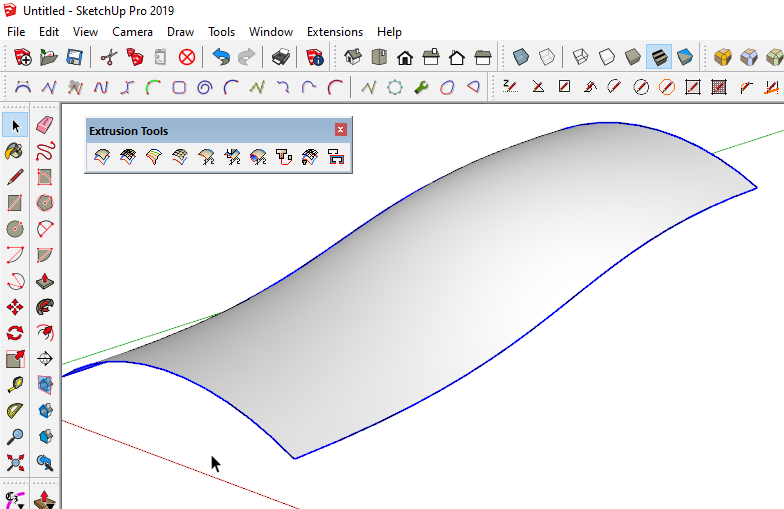
                                        Screenshot - 4_22_2020 , 8_09_49 PM.png

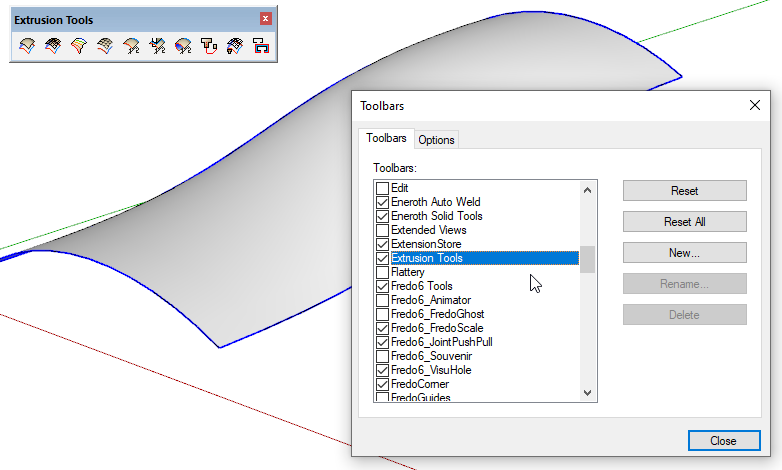
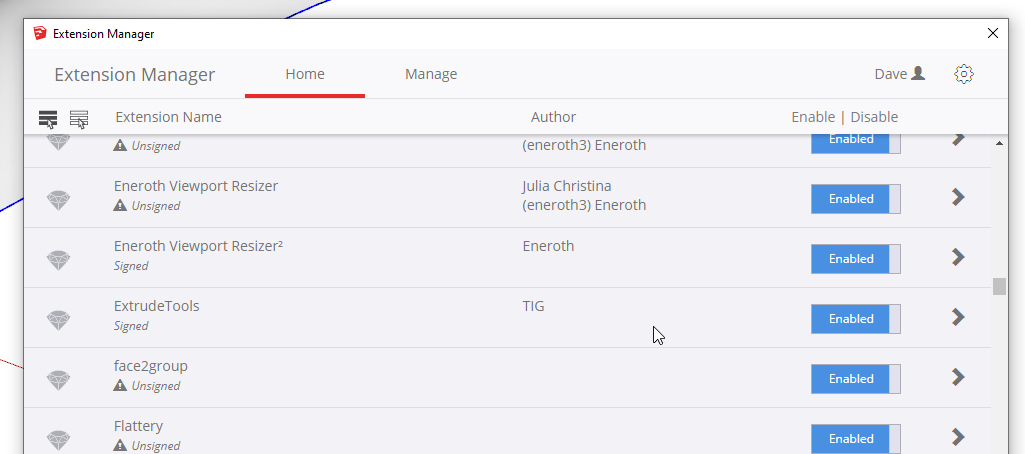
                                        Do you have the latest version installed? Is it enabled? Did you restart SketchUp to make sure it gets loaded?
                                        Screenshot - 4_22_2020 , 8_11_26 PM.png

                                        Screenshot - 4_22_2020 , 8_11_50 PM.png

                                        Etaoin Shrdlu

                                        %

                                        (THERE'S NO PLACE LIKE)

                                        G28 X0.0 Y0.0 Z0.0

                                        M30

                                        %

                                        1 條回覆 最後回覆 回覆 引用 0
                                        • TIGT 離線
                                          TIG Moderator
                                          最後由 編輯

                                          You've probably posted in the old thread that relates to just this tool.
                                          The various 'EEby' tools were merged long ago into the "Extrusion Tools"...
                                          It works in all current versions of SketchUp - including v2020, although its guidance notes currently stop at v2019. Since v2017 it has become more prone to Bugsplats during very complex modeling operations, so "always-save-before-using"...
                                          Get the RBZ from here and install it...
                                          https://sketchucation.com/pluginstore?pln=ExtrudeTools
                                          As DaveR says you should then see the 'signed' entry in the Extension Manager as 'ExtrudeTools' [TIG], and the toolbar can be activated, there are also menu entries...

                                          TIG

                                          1 條回覆 最後回覆 回覆 引用 0
                                          • 1
                                          • 2
                                          • 3
                                          • 4
                                          • 5
                                          • 6
                                          • 7
                                          • 8
                                          • 9
                                          • 10
                                          • 6 / 10
                                          • 第一個貼文
                                            最後的貼文
                                          Buy SketchPlus
                                          Buy SUbD
                                          Buy WrapR
                                          Buy eBook
                                          Buy Modelur
                                          Buy Vertex Tools
                                          Buy SketchCuisine
                                          Buy FormFonts

                                          Advertisement