sketchucation logo sketchucation
    • Login
    Oops, your profile's looking a bit empty! To help us tailor your experience, please fill in key details like your SketchUp version, skill level, operating system, and more. Update and save your info on your profile page today!
    Mac User? | Join the Rayscaper Beta for Mac Learn More

    [Plugin] extrudeEdgesByEdges.rb

    Scheduled Pinned Locked Moved Plugins
    190 Posts 76 Posters 242.4k Views 76 Watching
    Loading More Posts
    • Oldest to Newest
    • Newest to Oldest
    • Most Votes
    Reply
    • Reply as topic
    Log in to reply
    This topic has been deleted. Only users with topic management privileges can see it.
    • bazB
      baz
      last edited by

      @adskad said:

      TIG,

      I am very excited to use this plugin, but sadly, I seem to lack the skill - I have sketchup 8 pro, I have made 2 groups of edges and named them 'path' and 'profile', it seems to be working giving a "multiplying edges" message, but then - nothing. I am including a pic, but it isn't revealing much to me.
      [attachment=2:2xkjp7xk]<!-- ia2 -->EEsad.png<!-- ia2 -->[/attachment:2xkjp7xk]
      Thank you for your time

      Adam

      Dont wish to butt in, but I was having a play with tigs plugin. I duplicated your attempt, and it works fine for me....
      I notice that your left hand group seems to have a larger than necessary bounding box, do you have some extraneous geometry in there which is confusing the plugin?
      baz[attachment=1:2xkjp7xk]<!-- ia1 -->ee.png<!-- ia1 -->[/attachment:2xkjp7xk][attachment=0:2xkjp7xk]<!-- ia0 -->ee.png<!-- ia0 -->[/attachment:2xkjp7xk]
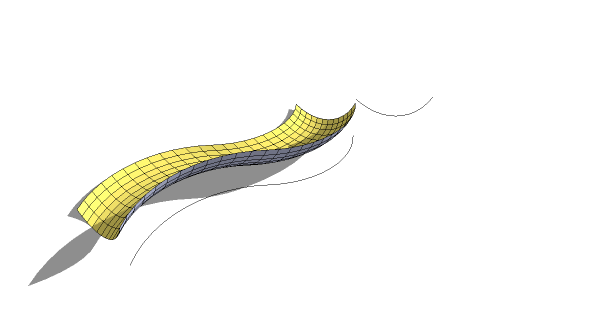
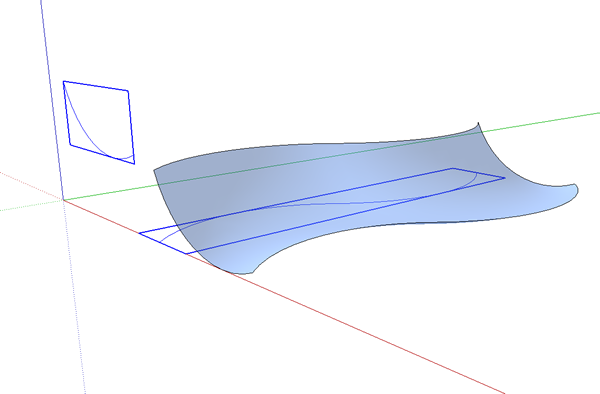
      ee.png


      ee.png

      1 Reply Last reply
      Reply Quote 0
      • A
        adskad
        last edited by

        Baz,

        I have three lines grouped, so it looks like it may have hidden stuff, but I checked. Do you think it might be windows 64 bit that is the problem?

        Adam

        1 Reply Last reply
        Reply Quote 0
        • bazB
          baz
          last edited by

          @adskad said:

          Baz,

          I have three lines grouped, so it looks like it may have hidden stuff, but I checked. Do you think it might be windows 64 bit that is the problem?

          Adam

          I dont know much about 64bit stuff, but I have'nt noticed anything on this forum about problems with it.
          Why not post the skp? I bet you its something in there. Or start again from scratch and see how you go. Tigs plugins are some of the best you will come across, so I think it must be something you are doing, (or not doing).
          baz

          1 Reply Last reply
          Reply Quote 0
          • thomthomT
            thomthom
            last edited by

            @adskad said:

            Do you think it might be windows 64 bit that is the problem?

            No - SU's runs like a normal 32bit application anyway.

            Thomas Thomassen — SketchUp Monkey & Coding addict
            List of my plugins and link to the CookieWare fund

            1 Reply Last reply
            Reply Quote 0
            • TIGT
              TIG Moderator
              last edited by

              adskad
              Can you post the simple SKP you are having the problem with...
              With EEbyE two simple groups containing some edges/curves with interact to form a mesh - are you sure you haven't 'nest-grouped' them or something.
              This is one of the simplest EEby... tools... 😕

              TIG

              1 Reply Last reply
              Reply Quote 0
              • A
                adskad
                last edited by

                I installed it on a 32 bit computer, and it works perfectly. I appreciate the help - I will re-install on my current computer and try again.

                It is fantastic BTW - thank you TIG!

                1 Reply Last reply
                Reply Quote 0
                • R
                  rv1974
                  last edited by

                  Thank you TIG as always.
                  Some humble sugestion if I may:
                  Your scripts would gain even more popularity if you'd put concentrated set of gif's (like this for example http://www.polyboost.com/)

                  1 Reply Last reply
                  Reply Quote 0
                  • TIGT
                    TIG Moderator
                    last edited by

                    @rv1974 said:

                    Thank you TIG as always.
                    Some humble sugestion if I may:
                    Your scripts would gain even more popularity if you'd put concentrated set of gif's (like this for example http://www.polyboost.com/)

                    There are several movie tut's 'in progress' - meanwhile there are quite a lot of static step-by-step tut's...

                    TIG

                    1 Reply Last reply
                    Reply Quote 0
                    • D
                      deanlegg
                      last edited by

                      Hi all

                      Love the plugin really good
                      2 things, I can't get the toolbar to show up, I have the outer box where about 6 icons would be but no icons
                      And could you direct me to some good tutorials

                      Cheers

                      1 Reply Last reply
                      Reply Quote 0
                      • TIGT
                        TIG Moderator
                        last edited by

                        @deanlegg said:

                        Hi all
                        Love the plugin really good
                        2 things, I can't get the toolbar to show up, I have the outer box where about 6 icons would be but no icons
                        And could you direct me to some good tutorials
                        Cheers

                        Have you kept all of the icon image/lingvo files [~51 of them] etc in the TIGtools subfolder inside Plugins - not having done so is the usual cause of this issue... Do a new install, extract the zip file's contents into a temporary folder - perhaps on your Desktop - keeping all the files in the appropriate subfolder. Then move or copy that subfolder and the other rb files into Plugins folder... If this fixes it then I suggest you look through the Plugins folder and tidy up any files that are in TIGtools and also incorrectly installed in there 🤓

                        TIG

                        1 Reply Last reply
                        Reply Quote 0
                        • K
                          khashayar
                          last edited by

                          hi
                          thank you for the great great plugin. i was trying to make a tent structure with it but i couldn't do it.
                          here i attached the sketchup file. i'd be really glad if you could check it out and tell me if it's possible to make a tent out of it or ....not.
                          thanks


                          tent.skp

                          1 Reply Last reply
                          Reply Quote 0
                          • TIGT
                            TIG Moderator
                            last edited by

                            Kahashayar

                            EEbyEdges is not the right tool to make that form.
                            Try its cousin - EEbyRails - and make each side one of four meshes, as this example Capture.PNG
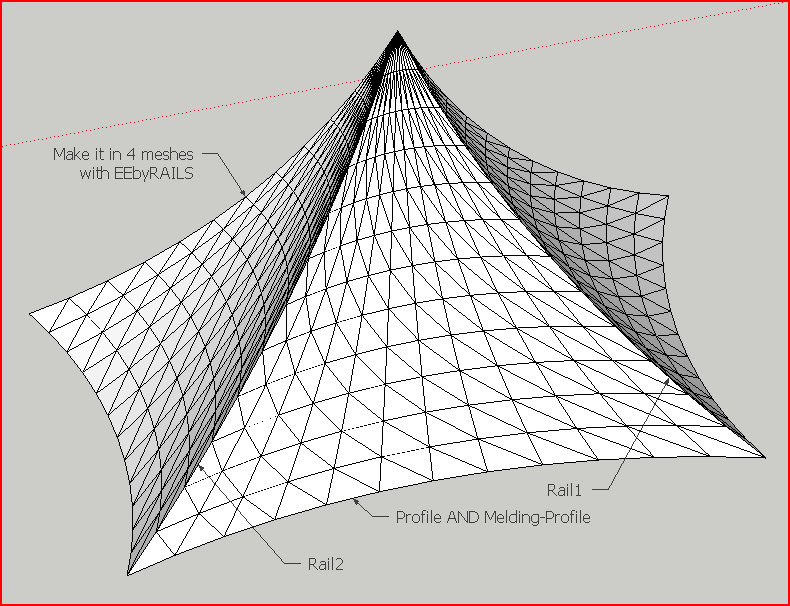
                            TIG

                            1 Reply Last reply
                            Reply Quote 0
                            • K
                              khashayar
                              last edited by

                              thank you TIG. that was a big help .

                              @tig said:

                              Kahashayar
                              EEbyEdges is not the right tool to make that form.
                              Try its cousin - EEbyRails - and make each side one of four meshes, as this example

                              1 Reply Last reply
                              Reply Quote 0
                              • 66searcher6
                                66searcher
                                last edited by

                                thanks TIG
                                👍


                                012.jpg

                                http://hamidtoliat.deviantart.com/

                                1 Reply Last reply
                                Reply Quote 0
                                • mitcorbM
                                  mitcorb
                                  last edited by

                                  Hi, irwanwr:
                                  In answer to your question and based on the image by TIG above, this plugin "Extrude Edges by Edges" is not the one. As TIG showed in that image, you would need "Extrude Edges by Rails" and assemble the form.
                                  I also replied in your Carnival Tent posting.

                                  I take the slow, deliberate approach in my aimless wandering.

                                  1 Reply Last reply
                                  Reply Quote 0
                                  • I
                                    Iho
                                    last edited by

                                    why it doesn't work?

                                    http://i.imgur.com/3aZXU.jpg

                                    In pictures line are two simple lines regruped in two different group.

                                    1 Reply Last reply
                                    Reply Quote 0
                                    • TIGT
                                      TIG Moderator
                                      last edited by

                                      It works fine for me ?
                                      How large are your grouped arcs ?
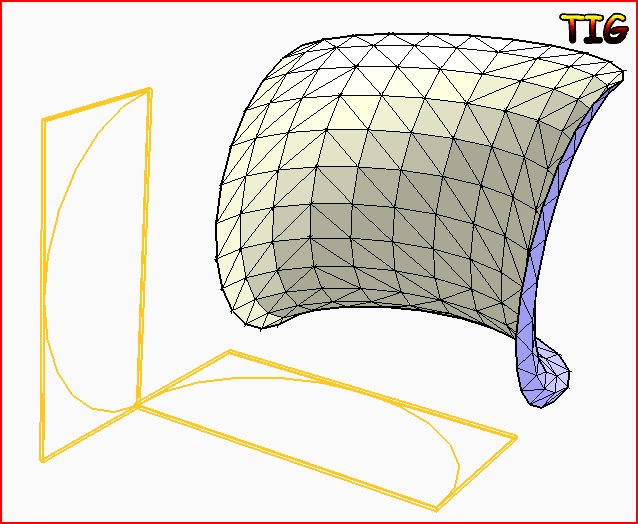
                                      Can you post your simple SKP for us to test...Capture.PNG
                                      TIG

                                      1 Reply Last reply
                                      Reply Quote 0
                                      • K
                                        kieran28
                                        last edited by

                                        hope this doesn't sound stupid but does this plugin work on mac OS?

                                        1 Reply Last reply
                                        Reply Quote 0
                                        • TIGT
                                          TIG Moderator
                                          last edited by

                                          @kieran28 said:

                                          hope this doesn't sound stupid but does this plugin work on mac OS?
                                          Yes. 😒
                                          Most scripts as cross platform, they clearly say if they aren't...
                                          Make sure you are putting things into the MAC's HD path 'plugins' folder NOT the 'user' one, and extracting files preserving subfolders etc as clearly spelled out in the instructions...
                                          🤓

                                          TIG

                                          1 Reply Last reply
                                          Reply Quote 0
                                          • I
                                            isir1313
                                            last edited by

                                            hello:D im new at this and i would really like to use this pluggin! can anybody help me install it? THANNNKS in advanced:P


                                            1 Reply Last reply
                                            Reply Quote 0

                                            Hello! It looks like you're interested in this conversation, but you don't have an account yet.

                                            Getting fed up of having to scroll through the same posts each visit? When you register for an account, you'll always come back to exactly where you were before, and choose to be notified of new replies (either via email, or push notification). You'll also be able to save bookmarks and upvote posts to show your appreciation to other community members.

                                            With your input, this post could be even better 💗

                                            Register Login
                                            • 1
                                            • 2
                                            • 6
                                            • 7
                                            • 8
                                            • 9
                                            • 10
                                            • 9 / 10
                                            • First post
                                              Last post
                                            Buy SketchPlus
                                            Buy SUbD
                                            Buy WrapR
                                            Buy eBook
                                            Buy Modelur
                                            Buy Vertex Tools
                                            Buy SketchCuisine
                                            Buy FormFonts

                                            Advertisement