[Plugin] [CityGen] - Core [WIP] (0.1.3a) — 19 September 2009
-
Awesome work folks...
-
Hi Guys, I've been trying to make time to spend playing with this plugin so I loaded it and intend to give it a whirl ovber the weekend...
a few things:
I loaded it OK but not really sure how you are assigning color to lines: is that by material or layer?
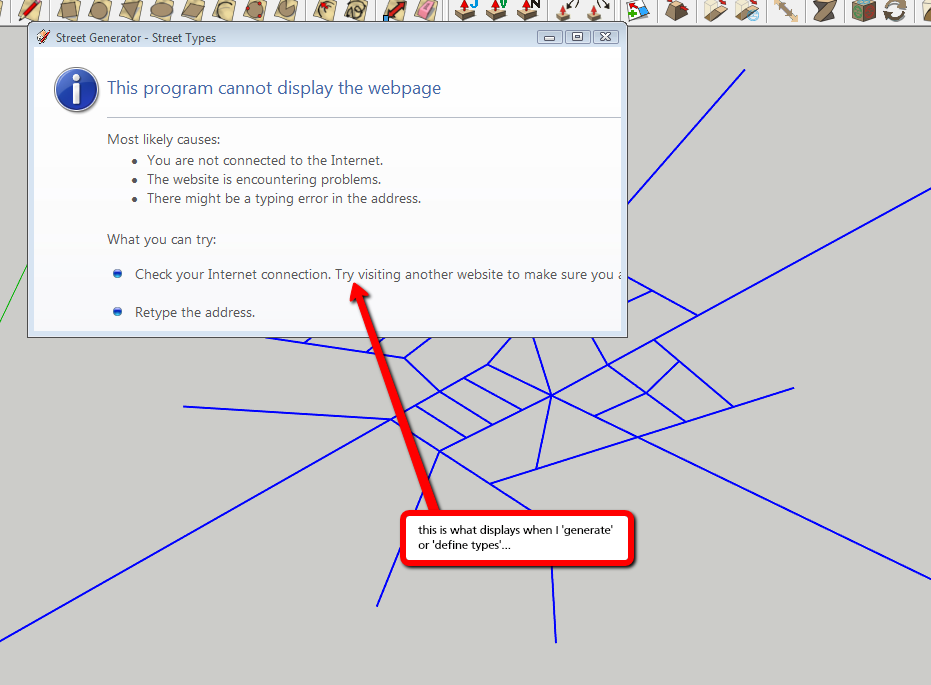
Also, when I run the plugin the dialogue activates and goes blank. [see attached screen shot]Looking forward to giving it a run!!

-
@utiler said:
not really sure how you are assigning color to lines: is that by material or layer?[see attached screen shot]
Looking forward to giving it a run!!
Wondering the same thing too.
-
Here is a screenshot, thomthom. Any ideas?
Many thanks,
-
What Windows, SketchUp and Internet Explorer versions do you have?
-
Win 7, SU 8.0.4811 and Firefox 3.6.15....
-
@utiler said:
Win 7, SU 8.0.4811 and Firefox 3.6.15....
No - not what browser you use, what Internet Explorer version is installed? SketchUp use the Internet Explorer engine for the windows we can create with the Ruby API. The Internet Explorer engine is used by many application in similar way.
-
Buggered if I know, Thomas!!
 What should I have installed to make it work more to the point..... Then I'll go work out what I need to alter....
OK, back in the office now.... downloading IE 9 as i didn't have 8 loaded. maybe that was the problem... I'll see if it works now.
thanks Thom.
-
OK, IE 9 loaded and still the problem is apparent....
-
Thom, I have IE8 64bit loaded on my PC. Would this be conflicting with it?
-
Sorry for the delay - I've been away in Dubai for a week.
So you got IE8 or IE9 ?

-
Thanks Thomas, I heard you were away...
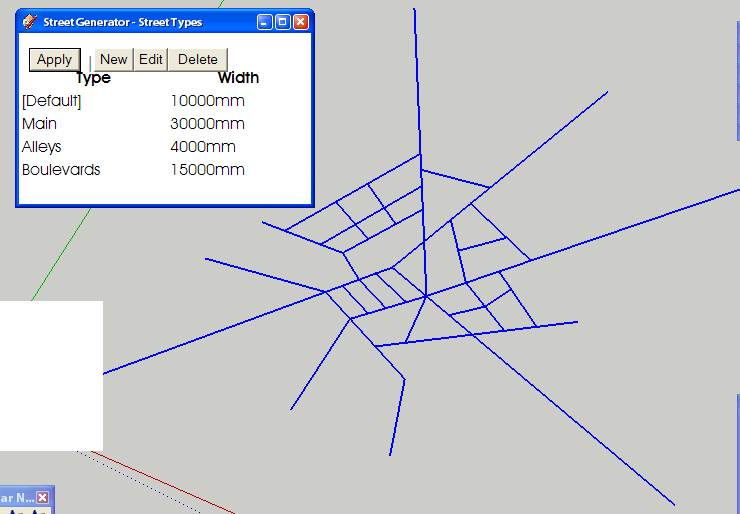
I uninstalled IE9 9 because it said that a Flash plugin was not yet available.... So I'm left with IE 8 [64bit]I tried it on my laptop [Windows XP, 32bit, IE 8] also and got this as a result of running Street Generator:
-
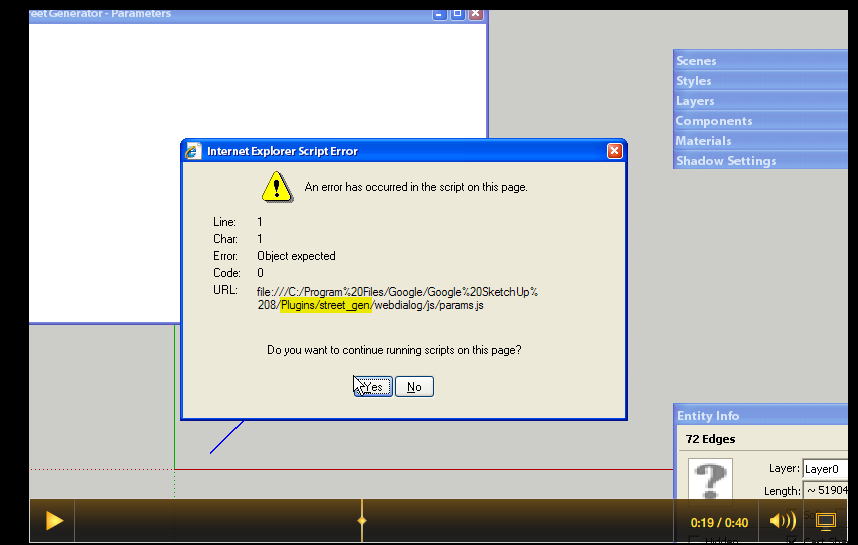
There's your problem. It's not installed correctly.
CityGen and StreetGen is a very experimental project - it has some special extra installation requirements.See the installation notes of this thread in the first post.
-
Thanks Thomas!! Neat little tool....
One thing: When you 'Define Types', the New / Edit / Delete functions do not seem to provide any options. [see attached]
Questions:
- How does color get assigned to street types?
- The resulting road system creates an interpolating line which is hidden. Is there a way to be able to create the face as a whole so if you need to pushpull you only need to select on face...?
An idea:
- Is there a way to include merging lanes such as acceleration and deceleration lanes? Maybe byway of color....? Break a line where the lane widens to two and color differently.....
Anyhow, thanks for helping out getting it loaded.
 I've been asked to collaborate on an Urban Renewal Proposal so I hope to give this a try for it!
Cheers,
-
HI HOW ARE YOU, THIS PLUGON IS GREAT I JUST HAVE A QUESTION. IS THERE ANY WAY THAT I BE ABLE TO GENERATE BUILDING TOO? THANKS...
-
@Andrew: Sorry - I've yet not been able to look into this. I've gotten a leak in my ceiling I'm currently trying to deal with (along side my full time job)

@grakeskull said:
HI HOW ARE YOU, THIS PLUGON IS GREAT I JUST HAVE A QUESTION. IS THERE ANY WAY THAT I BE ABLE TO GENERATE BUILDING TOO? THANKS...
Chris and Jim was working on a building module - though I don't think anything is released.
-
No worries Thomas. Sounds like you need a Plugon.......

-
Hi, I tried installing this plugin like what the instruction said in the readme file
Plugins\city_gen.rb <- Core CityGen file
Plugins\Gity_Gen\street_gen.rb <- Core Street Generator module file - loaded by city_gen.rb
Plugins\City_Gen\Street_Gen\ <- Street Generator's support folderBut, I still get the File cannot load error "Even the file is in the correct folder".. Is there a way to fix it?
@thomthom said:
This plugin is a work in progress. It's made public because it is a collaboration project.
This is in it's very early beginning, so lots of things will change, and lots of bugs are to be expected. Feel free to share your ideas or join in on this project. See this thread for the discussion of the overall project. This thread is an overview of the related modules and the development thread for the core files.CityGen - Core
Core and Installation Check
This is the main file that centralise information and load the other modules.
Modules are located inPlugins\CityGen\modules\.Please remove any old CityGen installations prior to installing.
Menu entry is located under the
Toolsmenu. Should this be underPluginsyou think?Modules
For Module Developers
Core and Installation Check
You can add this code to your module to check if the core is installed and that the module is installed in the correct location.> ### CORE & INSTALLATION CHECK ### ------------------------------------------------------------------ > # Core check > if not file_loaded?('city_gen.rb') > if Sketchup.find_support_file('city_gen.rb', 'Plugins') == nil > UI.messagebox('The CityGen\'s core files is missing. Install the required core files.') > else > UI.messagebox('The CityGen\'s core files is not loaded. Ensure you installed this plugin correctly.') > end > raise 'CityGen Core error.' > end > # Correct installation check > if Sketchup.find_support_file('City_Gen/' + File.basename(__FILE__), 'Plugins') == nil > UI.messagebox("This module (#{File.basename(__FILE__)}) has not been installed properly. It should be installed under Plugins\\City_Gen\\") > raise 'CityGen Module path error.' > end > > module City_Gen > module Some_Module > # stuff > end > end >> # CHANGELOG > # 0.1.0a - 31.05.2009 (Thom) > # * Initial build. > # > # 0.1.1a - 31.05.2009 (Thom) > # * Change in the module error checking routine. > # > # 0.1.2a - 31.05.2009 (Thom) > # * Added version constant. > # > # 0.1.3a - 31.05.2009 (Thom) > # * Updated to the new file structure for use with Tortoise. > -
You're missing the full path. Observe: Plugins\CityGen*modules*\
-
Guys,
I hope someone can help.
I have loaded City-Gen (correctly, I think!).
When I attempt to use the plug-in (for example when I click on Tools > City Generator > Streets > Define Types, I get a pop-up box stating that*"This program cannot display the webpage"*.
I am not sure the plug-in would be attempting to connect to the internet.
Any advice, please, on how I might be able to fix this?
Cheers....Scotty


Hello! It looks like you're interested in this conversation, but you don't have an account yet.
Getting fed up of having to scroll through the same posts each visit? When you register for an account, you'll always come back to exactly where you were before, and choose to be notified of new replies (either via email, or push notification). You'll also be able to save bookmarks and upvote posts to show your appreciation to other community members.
With your input, this post could be even better 💗
Register Login


Advertisement