sketchucation logo sketchucation
    • 登入
    Oops, your profile's looking a bit empty! To help us tailor your experience, please fill in key details like your SketchUp version, skill level, operating system, and more. Update and save your info on your profile page today!
    ⚠️ Important | Libfredo 15.6b introduces important bugfixes for Fredo's Extensions Update

    Transitions in a pool

    已排程 已置頂 已鎖定 已移動 Newbie Forum
    sketchup
    32 貼文 6 Posters 2.2k 瀏覽 6 Watching
    正在載入更多貼文
    • 從舊到新
    • 從新到舊
    • 最多點贊
    回覆
    • 在新貼文中回覆
    登入後回覆
    此主題已被刪除。只有擁有主題管理權限的使用者可以查看。
    • C 離線
      coach59
      最後由 編輯

      hello,

      I'd like to draw transitions in a pool which have different heights and radius.

      then put a texture...

      I tried different ways but I can't do it correctly.

      Thanks

      1 條回覆 最後回覆 回覆 引用 0
      • D 離線
        dylan
        最後由 編輯

        I'm not sure exactly what you are asking here, but maybe this thread will be useful.
        http://www.sketchucation.com/forums/scf/viewtopic.php?f=79&t=16891&p=150952&hilit=pool#p150952

        http://dmdarchitecture.co.uk/

        1 條回覆 最後回覆 回覆 引用 0
        • C 離線
          coach59
          最後由 編輯

          yes of course.

          http://img6.hostingpics.net/pics/49834pool.jpg

          http://img6.hostingpics.net/pics/328666pool2.jpg

          http://img6.hostingpics.net/pics/621224pool3.jpg

          1 條回覆 最後回覆 回覆 引用 0
          • jeff hammondJ 離線
            jeff hammond
            最後由 編輯

            'transitions in a pool' -- that means round walls. the skin ruby would just connect with straight lines so rule that one out.

            it's hard for me to advise without knowing how accurate you're trying to be (the more accurate, the more time and techniques needed).. the follow me tool (or one of it's ruby variations) will cover the majority.. soap skin bubble or subdivide/smooth will handle the blends between radii.

            this pool was designed in sketchup only. it has multiple heights and radii so it is possible to do what you want.

            http://homepage.mac.com/jeffhammond/.Public/scf_epic/scfepic19.jpg

            dotdotdot

            1 條回覆 最後回覆 回覆 引用 0
            • C 離線
              coach59
              最後由 編輯

              nice job for the pool, i never seen this bowl...

              I deleted the edge, did the little part that is flat with the radius I want by using "follow me". then for the deep end, "Follow me" doesn't work.

              1 條回覆 最後回覆 回覆 引用 0
              • C 離線
                coach59
                最後由 編輯

                bad result our manipulation for me

                http://img6.hostingpics.net/pics/887098pool4.jpg

                1 條回覆 最後回覆 回覆 引用 0
                • GaieusG 離線
                  Gaieus
                  最後由 編輯

                  You cannot achieve a varying cross section of the extruded face with the Follow me tool. I think there won't be a "one button" solution for such a shape but combining methods and plugins suggested above can give you a desired result.

                  Gai...

                  1 條回覆 最後回覆 回覆 引用 0
                  • C 離線
                    coach59
                    最後由 編輯

                    I don't want to have a one button solution, just want to understand how i can do my project by trying everything I know (a little) with sketchup.

                    I tried to paste and copy my transitions and link them with the bottom but no texture appear, so I tried "Follow me"....

                    1 條回覆 最後回覆 回覆 引用 0
                    • jeff hammondJ 離線
                      jeff hammond
                      最後由 編輯

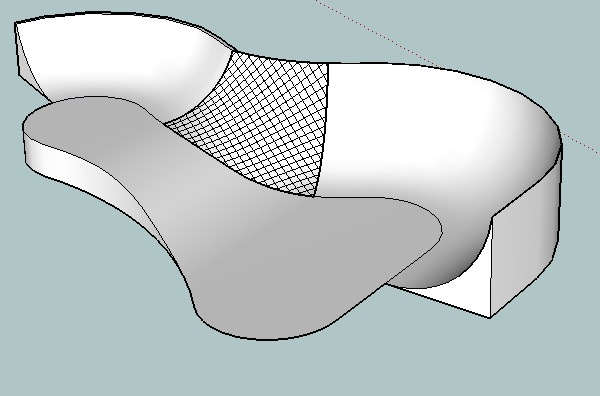
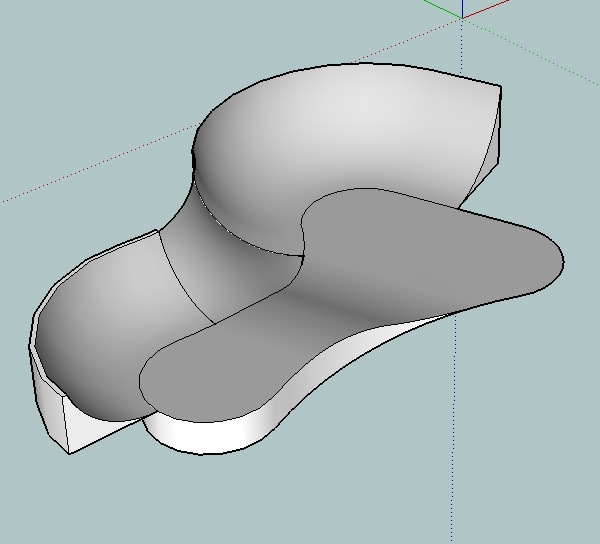
                      i'll have more time later but for now, here's a method using the soap skin bubble plugin which can be downloaded here:
                      http://www.tensile-structures.de/sb_software.html

                      use the follow me tool for the flat parts: (note the deep end and shallow end are different radii cut off a different heights to create a level top)
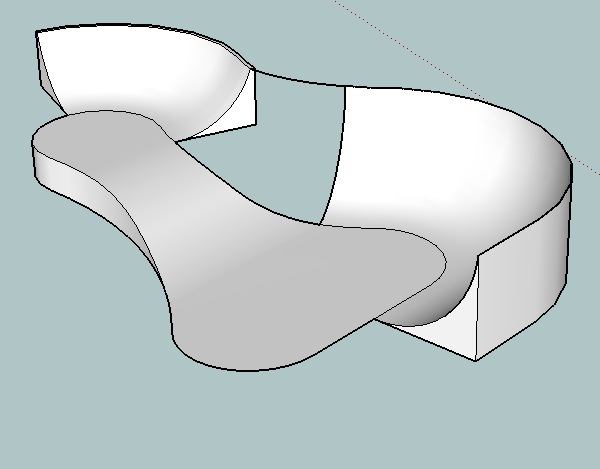
                      screen 2.jpg

                      fill in the blend using a soap skin:
                      screen 3.jpg

                      after smoothing:
                      screen 4.jpg

                      this is the fast method and visually, it will look right. That said, you can't really use this method to generate working drawings (well, unless the pool is going to be concrete because precise measurements aren't so important when using mud for this type of stuff)

                      dotdotdot

                      1 條回覆 最後回覆 回覆 引用 0
                      • C 離線
                        coach59
                        最後由 編輯

                        nice pedagogy Jeff and the plug in semm really nice for what i want to do. So that means if I want to create complexe curves pool soap skin is ideal.

                        So for the deep end and side of water fall is nice too.

                        I don't understand why the little part is not smooth as the deep end I tried...

                        1 條回覆 最後回覆 回覆 引用 0
                        • jeff hammondJ 離線
                          jeff hammond
                          最後由 編輯

                          @coach59 said:

                          I don't understand why the little part is not smooth as the deep end I tried...

                          you should check out the weld ruby. basically, it makes segments that are joined act as a single line. when you extrude a welded line, it will come out smooth instead of having all the lines as in your drawing.

                          people that don't even like using rubies still have this one 😄
                          http://www.smustard.com/script/Weld

                          [edit] that is, if you're talking about what i think you're talking about.

                          dotdotdot

                          1 條回覆 最後回覆 回覆 引用 0
                          • GaieusG 離線
                            Gaieus
                            最後由 編輯

                            @coach59 said:

                            I don't want to have a one button solution, just want to understand how i can do my project by trying everything I know (a little) with sketchup...

                            Sorry, I didn't mean like that. What I was trying to say is that this project could (probably) be done by using several (or at least a few) tools not just one.

                            SoapSkin and Bubble is generally an ideal tool for it however you will need to "stitch" your pool together from more pieces as well as you will need to experiment with the plugin before reaching the desired result.

                            @coach59 said:

                            I don't understand why the little part is not smooth as the deep end I tried...

                            The meshes created with the SSB plugin are different from the ones created with the follow me tool Plus it's a group which you should explode once you are satisfied with the shape (only then because after exploding, you won't be able to edit it as a SSB mesh any more).

                            After the explosion, the side edges of the SSB mesh should "merge" with the edges of the other meshes thus making one, continuous surface after smoothing.

                            To smooth the whole surface, triple click on it (everything will be selected) then right click on the selection and choose "Soften/smooth edges" from the context menu. A dialog will pop op where check "smooth coplanar edges" then pull the slider to the right until everything gets smooth. If you encounter some "stubborn" lines that don't want to smooth (sometimes it happens), instead of pulling the slider too much to the extreme right (over 90 degrees for instance), use the Ctrl+Eraser tool to soften them individually.

                            Gai...

                            1 條回覆 最後回覆 回覆 引用 0
                            • C 離線
                              coach59
                              最後由 編輯

                              I have sketchup 6, I can't open your file.

                              I uploaded my last file where I can't use soap skin bubble plug in...and I don't know why. I select more than 3 edges on my transitions. I created more than 3 horizontal edges, and can't creat a skin....can't use SSB

                              http://img6.hostingpics.net/pics/411455test5.jpg

                              1 條回覆 最後回覆 回覆 引用 0
                              • GaieusG 離線
                                Gaieus
                                最後由 編輯

                                For the SSB plugin you need to select a series of edges (at least three) that form [url]a closed loop[/url]. In your model, there are no edges that would make a closed loop. If you go closer, you'll also notice that many of the edges of the current faces do not even meet each other so even closing them on the top wouldn't help much.

                                Gai...

                                1 條回覆 最後回覆 回覆 引用 0
                                • C 離線
                                  coach59
                                  最後由 編輯

                                  So do I need to rebuilt the transitions ? or create a "group of edges" ?

                                  One of the matter for me as a beginner, was to link directly the transitions with bottom, is there a way to do that? (like selecting a point on the transition and ask to link with bottom?

                                  1 條回覆 最後回覆 回覆 引用 0
                                  • GaieusG 離線
                                    Gaieus
                                    最後由 編輯

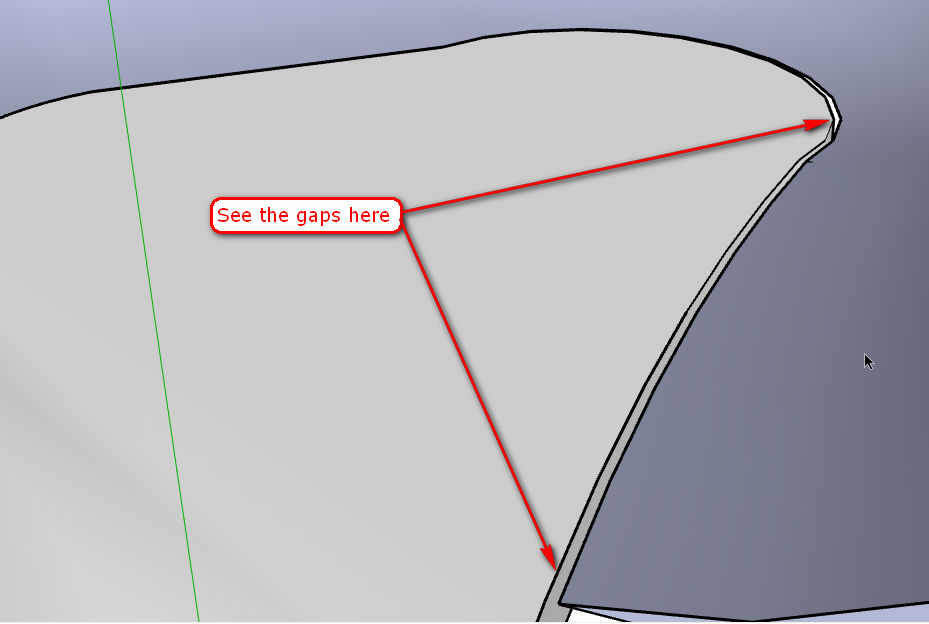
                                    Problem is that the edges of the (curved) surfaces of your sides do not meet (and merge) with the bottom face. There's a gap between them therefore you'll never achieve a smooth transition between the sides and the bottom.

                                    This also "results" in the lack of closed loops which would be needed for SSB to carry on modelling the pool.

                                    Gai...

                                    1 條回覆 最後回覆 回覆 引用 0
                                    • GaieusG 離線
                                      Gaieus
                                      最後由 編輯

                                      See what I mean:


                                      ScreenShot002.png

                                      Gai...

                                      1 條回覆 最後回覆 回覆 引用 0
                                      • GaieusG 離線
                                        Gaieus
                                        最後由 編輯

                                        OK, I've made some modifications in your skp file and what is already done in there is okay. I could even make the SSB surface on one segment (closing the loop on the top -see attached file). However there are still some glitches in the file, see this screenshot. Without fixing them, you won't be able to perform the skinning.
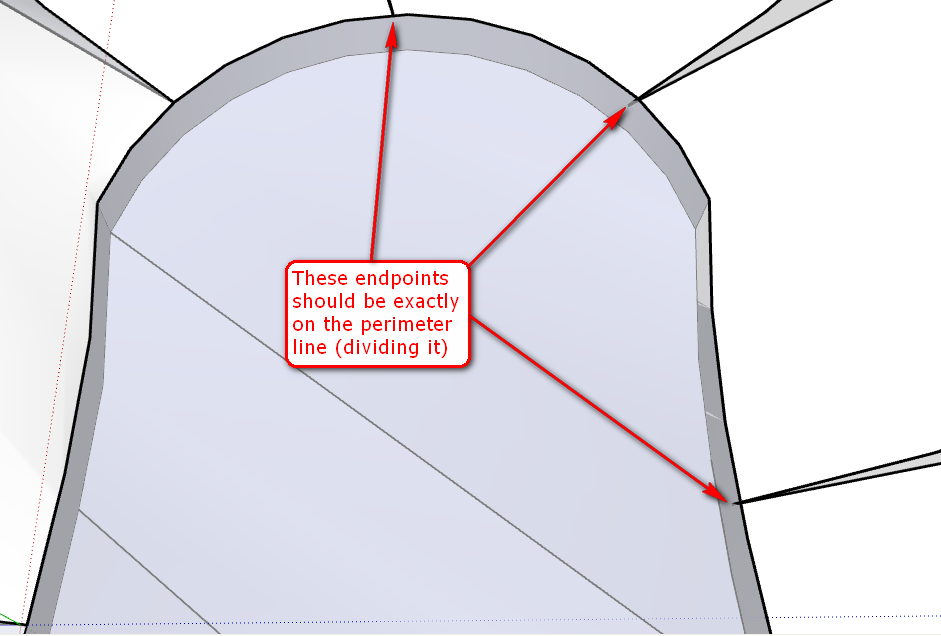
                                        ScreenShot003.png
                                        (I saved the skippy back to version 6 for you)


                                        test5-1.skp

                                        Gai...

                                        1 條回覆 最後回覆 回覆 引用 0
                                        • soloS 離線
                                          solo
                                          最後由 編輯

                                          Using SDS, just an idea.

                                          http://img223.imageshack.us/img223/6848/pol1a.gif

                                          http://www.solos-art.com

                                          If you see a toilet in your dreams do not use it.

                                          1 條回覆 最後回覆 回覆 引用 0
                                          • GaieusG 離線
                                            Gaieus
                                            最後由 編輯

                                            BTW Pete, why didn't you "challenge" the SDS tutorial contest?
                                            I mean with so much "experience" in organic modelling, you could probably have made some really nice examples.

                                            Gai...

                                            1 條回覆 最後回覆 回覆 引用 0
                                            • 1
                                            • 2
                                            • 1 / 2
                                            • 第一個貼文
                                              最後的貼文
                                            Buy SketchPlus
                                            Buy SUbD
                                            Buy WrapR
                                            Buy eBook
                                            Buy Modelur
                                            Buy Vertex Tools
                                            Buy SketchCuisine
                                            Buy FormFonts

                                            Advertisement