sketchucation logo sketchucation
    • 登入
    Oops, your profile's looking a bit empty! To help us tailor your experience, please fill in key details like your SketchUp version, skill level, operating system, and more. Update and save your info on your profile page today!
    ⚠️ Important | Libfredo 15.6b introduces important bugfixes for Fredo's Extensions Update

    Tris to Quads

    已排程 已置頂 已鎖定 已移動 Newbie Forum
    sketchup
    39 貼文 9 Posters 3.0k 瀏覽 9 Watching
    正在載入更多貼文
    • 從舊到新
    • 從新到舊
    • 最多點贊
    回覆
    • 在新貼文中回覆
    登入後回覆
    此主題已被刪除。只有擁有主題管理權限的使用者可以查看。
    • pilouP 離線
      pilou
      最後由 編輯

      Can you post an of your file Skp example?

      Frenchy Pilou
      Is beautiful that please without concept!
      My Little site :)

      1 條回覆 最後回覆 回覆 引用 0
      • R 離線
        raduteo
        最後由 編輯

        I tried to export it to blender and then to Zbrush and still, nothing.
        I attached a model as an example.

        Thanks.


        SR.skp

        1 條回覆 最後回覆 回覆 引用 0
        • R 離線
          raduteo
          最後由 編輯

          Hate to be a pest but is there a clear solution on how to export/edit/re-export from another program a SU model so that it can be usable in Zbrush?

          Thanks for your time.

          1 條回覆 最後回覆 回覆 引用 0
          • K 離線
            Khai
            最後由 編輯

            ok I can see why thats not working for you.

            you need to split the faces into four sided polygons.

            here's what I mean.

            http://farm4.static.flickr.com/3550/3539876836_cb8ff1a70f_o.jpg

            see how on the right I've split the face into four sided polygons? thats what you need to to. Quads (four sided) are preferable, but if you need to use a Tri (triangle) do so.

            you can then use the linked Ruby Script I posted earlier to export the mesh as an OBJ straight into Zbrush with no other programs needed.

            1 條回覆 最後回覆 回覆 引用 0
            • pilouP 離線
              pilou
              最後由 編輯

              With any manipulation I obtain that 😉
              As I have SU free version I must use DoublecadXT-Blender-Zbrush
              (trying the obj plug export in the past but had some problems with complex models)
              Seems works fine! ☀
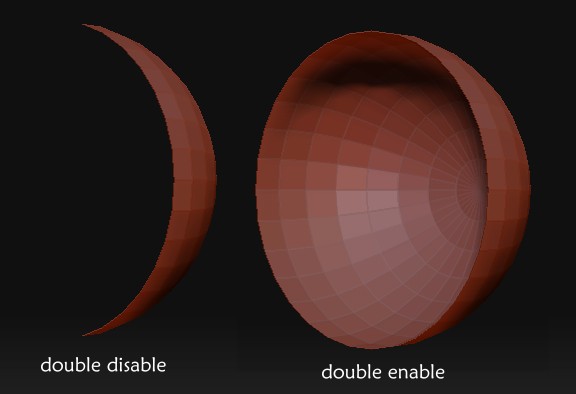
              You must enable "Double" in the Menu Tool / Initialize) for have double-side faces 🤓
              (click image for zoom 1/1 )


              test.jpg

              Frenchy Pilou
              Is beautiful that please without concept!
              My Little site :)

              1 條回覆 最後回覆 回覆 引用 0
              • K 離線
                Khai
                最後由 編輯

                @unknownuser said:

                With any manipulation I obtain that 😉
                As I have SU free version I must use DoublecadXT-Blender-Zbrush
                (trying the obj plug export in the past but had some problems with complex models)
                Seems works fine! ☀
                You must enable "Double" in the Menu Tool / Initialize) for have double-side faces 🤓
                (click image for zoom 1/1 )

                doublesided faces?

                ye gods man. those don't play well with a lot of 3D apps. the method I've shown, using Quads will work with any 3D app that imports OBJ files.

                but I'll leave you to your convoluted workflow...

                1 條回覆 最後回覆 回覆 引用 0
                • pilouP 離線
                  pilou
                  最後由 編輯

                  @unknownuser said:

                  double-side faces?

                  Internal, external so your are sure to have an opaque face!
                  But that take double time to calculate 😒

                  Frenchy Pilou
                  Is beautiful that please without concept!
                  My Little site :)

                  1 條回覆 最後回覆 回覆 引用 0
                  • K 離線
                    Khai
                    最後由 編輯

                    @unknownuser said:

                    @unknownuser said:

                    double-side faces?

                    Internal, external so your are sure to have an opaque face!
                    But that take double time to calculate 😒

                    double siding the face makes it opaque from both sides. if you are only viewing from 1 side, you don't need to double side the faces at all.

                    with a solid that has no requirement for a view from inside that would require a solid view, all you are doing is doubling the polygon count and also with a few applications introducing a zero thickness doublesided polygon.. not good, since they clash and when displayed rendered you end up with 'hatching' as each face try to display at once.

                    1 條回覆 最後回覆 回覆 引用 0
                    • pilouP 離線
                      pilou
                      最後由 編輯

                      yes but in this case it's very more easy to manipulate object like this with "double" enable 😉

                      more_easy.jpg

                      Frenchy Pilou
                      Is beautiful that please without concept!
                      My Little site :)

                      1 條回覆 最後回覆 回覆 引用 0
                      • K 離線
                        Khai
                        最後由 編輯

                        @unknownuser said:

                        yes but in this case it's very more easy to manipulate object like this with "double" enable 😉

                        your missing my point. the object he posted was not hollow. it was a solid so doublesided is not needed since he'll have faces you'll never see.

                        your showing us a hollow object. that's something different.

                        1 條回覆 最後回覆 回覆 引用 0
                        • pilouP 離線
                          pilou
                          最後由 編輯

                          @unknownuser said:

                          the object he posted was not hollow

                          Yes but it's possible that some faces have not good "normal" oriented so double enable in Zbrush can help to see all the solid object even false normals 😉

                          Frenchy Pilou
                          Is beautiful that please without concept!
                          My Little site :)

                          1 條回覆 最後回覆 回覆 引用 0
                          • R 離線
                            raduteo
                            最後由 編輯

                            Khai and all who contributed, thank you very, very much! You saved me from a huge-huge problem. It works absolutely brilliantly!. So basically as long as I split Ngons into triangles or squares I'm ok, thank you again!

                            1 條回覆 最後回覆 回覆 引用 0
                            • Chris FullmerC 離線
                              Chris Fullmer
                              最後由 編輯

                              The subdivide and smooth plugin has a mesh triangluation feature built into it.

                              I don't know if it something that can be run on geometry just to triangulate it though, I think it might be deeply built into how the plugin works, and not really a standalone feature. But it might be possible to use it to help. Anyone out there with subdivide and smooth know more about it?

                              Chris

                              Lately you've been tan, suspicious for the winter.
                              All my Plugins I've written

                              1 條回覆 最後回覆 回覆 引用 0
                              • R 離線
                                remus
                                最後由 編輯

                                Im not sure how well using SDS to triangulate faces would work, in this case. The main problem is that the faces created are very uneven, and from what i can gather you need lots of small uniform faces for zbrush.

                                http://remusrendering.wordpress.com/

                                1 條回覆 最後回覆 回覆 引用 0
                                • pilouP 離線
                                  pilou
                                  最後由 編輯

                                  You have not on the export option of the Pro Version "triangulate" all volumes?
                                  So any problem when you import it in obj inside zbrush 😉

                                  Frenchy Pilou
                                  Is beautiful that please without concept!
                                  My Little site :)

                                  1 條回覆 最後回覆 回覆 引用 0
                                  • O 離線
                                    otb designworks
                                    最後由 編輯

                                    As much as I wish there was an easy way to accomplish this, there is really only one way.

                                    You have to manually construct your model so that it has nothing but quads, and all quads should be as uniform and square as possible. If you have to, a few triangles aren't the end of the world, but try to avoid them.

                                    While tri's work in Z-brush, quads work way way better, IMO,especially if you are planning on subdividing and sculpting after import.

                                    I find that, except for the simplest models, it can be a time wasting agony to actually retro your model into quads.

                                    To be honest, I try as hard as possible to never use SU and zbrush on the same model as it always seems to take way more time than I could ever bill out for.

                                    Cheers, Chuck

                                    Cheers, Chuck

                                    OTB Designworks is on Youtube

                                    6 core nMP, 32 gig RAM, (2) D700 GPU's, dual monitors

                                    1 條回覆 最後回覆 回覆 引用 0
                                    • R 離線
                                      raduteo
                                      最後由 編輯

                                      Actually, I plan to use Zbrush to paint the model and add small details such as imperfections, scratches and such on non-organic models, not really sculpting or subdividing as I noticed, like you said, it doesn't really work unless the quads are pretty even (for smooth subdividing), but I don't have any alternative so I have to make this work.

                                      I'm sure as I get more ambitious with my modelling that I will need to subdivide what I import in Zbrush but as there is no way to automatically transform a model into decent shaped quads I don't know..

                                      Thanks.

                                      1 條回覆 最後回覆 回覆 引用 0
                                      • O 離線
                                        otb designworks
                                        最後由 編輯

                                        I am not sure how well painting a SU model in Zbrush works, as I have never had an opportunity to try it out. I'd love to hear how well it works, for future reference.

                                        Adding scratches and such may be a whole lot easier if you put them in your textures and not sculpting them into the model. If you are planning on adding the scratches to the model as part of the mesh, then you will find that you will need quite a bit of subdividing to get them looking really nice.

                                        With Zbrush's awesome masking abilities, it may be a solution to quad the parts of your model where you want surface details, selectively mask them in Zbrush and just subdivide those places instead of the whole thing. It is a little bit fussy and time consuming, but it will keep the overall poly count somewhat reasonable.

                                        Cheers, Chuck

                                        Cheers, Chuck

                                        OTB Designworks is on Youtube

                                        6 core nMP, 32 gig RAM, (2) D700 GPU's, dual monitors

                                        1 條回覆 最後回覆 回覆 引用 0
                                        • R 離線
                                          raduteo
                                          最後由 編輯

                                          My plan is to do all mechanical modeling in SU, import it in Zbrush and subdivide it without the smooth option on, make the texture and add surface details.


                                          1 條回覆 最後回覆 回覆 引用 0
                                          • 1
                                          • 2
                                          • 2 / 2
                                          • 第一個貼文
                                            最後的貼文
                                          Buy SketchPlus
                                          Buy SUbD
                                          Buy WrapR
                                          Buy eBook
                                          Buy Modelur
                                          Buy Vertex Tools
                                          Buy SketchCuisine
                                          Buy FormFonts

                                          Advertisement