sketchucation logo sketchucation
    • 登入
    Oops, your profile's looking a bit empty! To help us tailor your experience, please fill in key details like your SketchUp version, skill level, operating system, and more. Update and save your info on your profile page today!
    🔌 Smart Spline | Fluid way to handle splines for furniture design and complex structures. Download

    [Plugin] UV Toolkit

    已排程 已置頂 已鎖定 已移動 Plugins
    377 貼文 86 Posters 321.0k 瀏覽 86 Watching
    正在載入更多貼文
    • 從舊到新
    • 從新到舊
    • 最多點贊
    回覆
    • 在新貼文中回覆
    登入後回覆
    此主題已被刪除。只有擁有主題管理權限的使用者可以查看。
    • R 離線
      robert111
      最後由 編輯

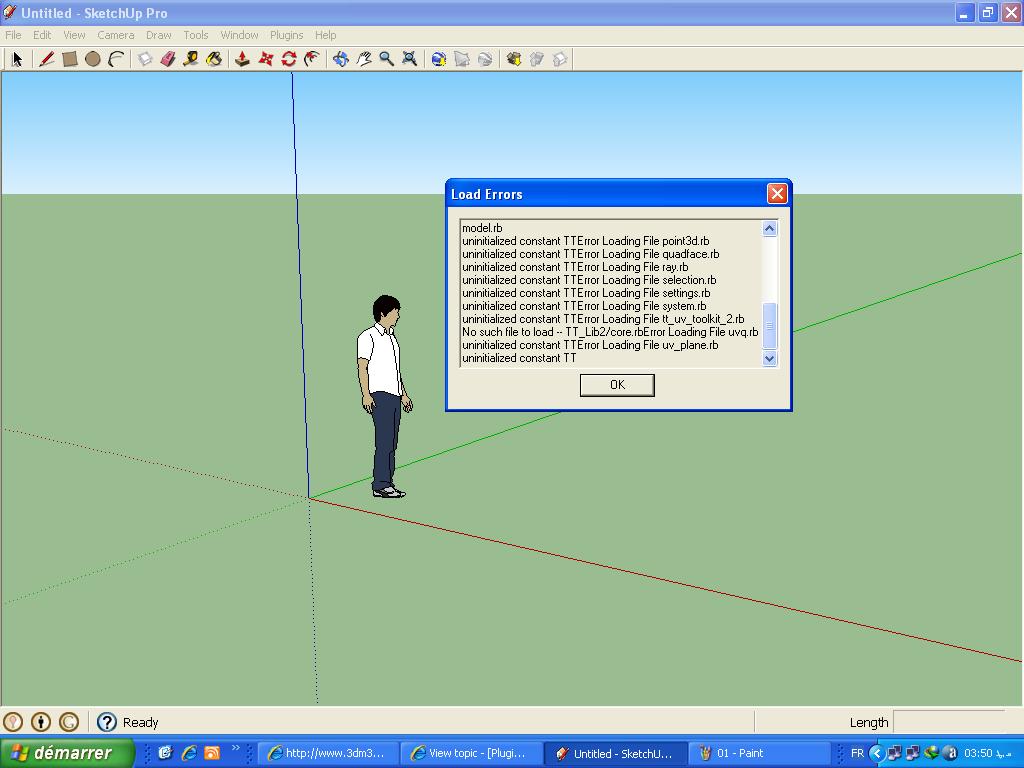
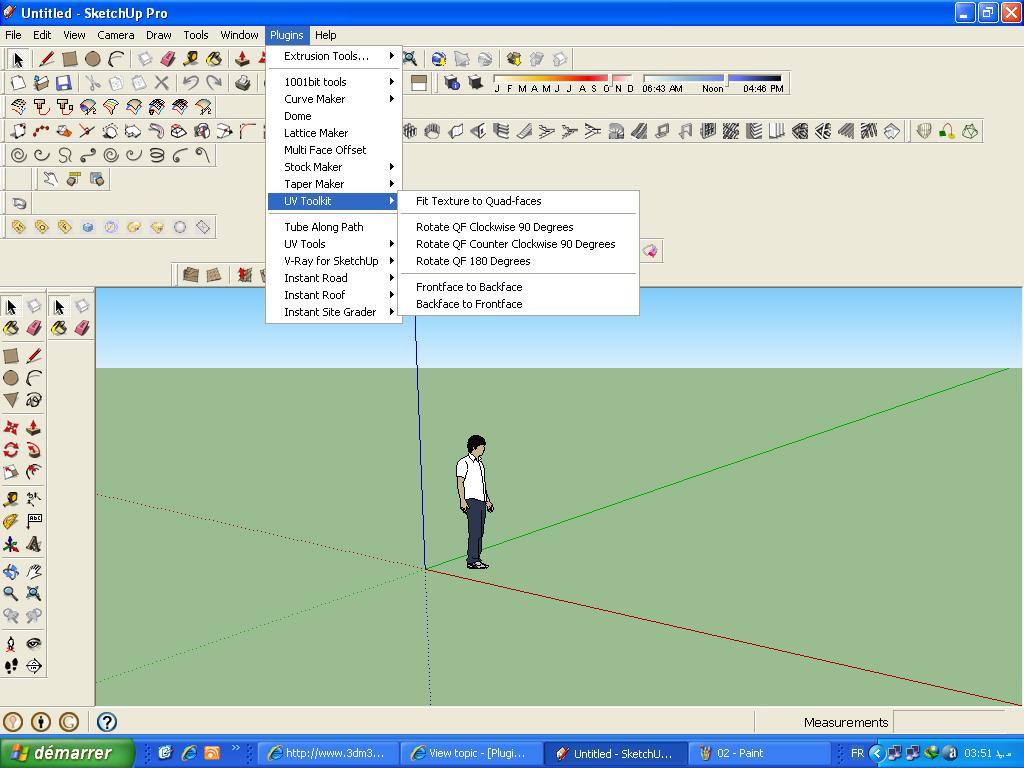
      thanks thomthom
      i have uv toolkit and not toolkit2
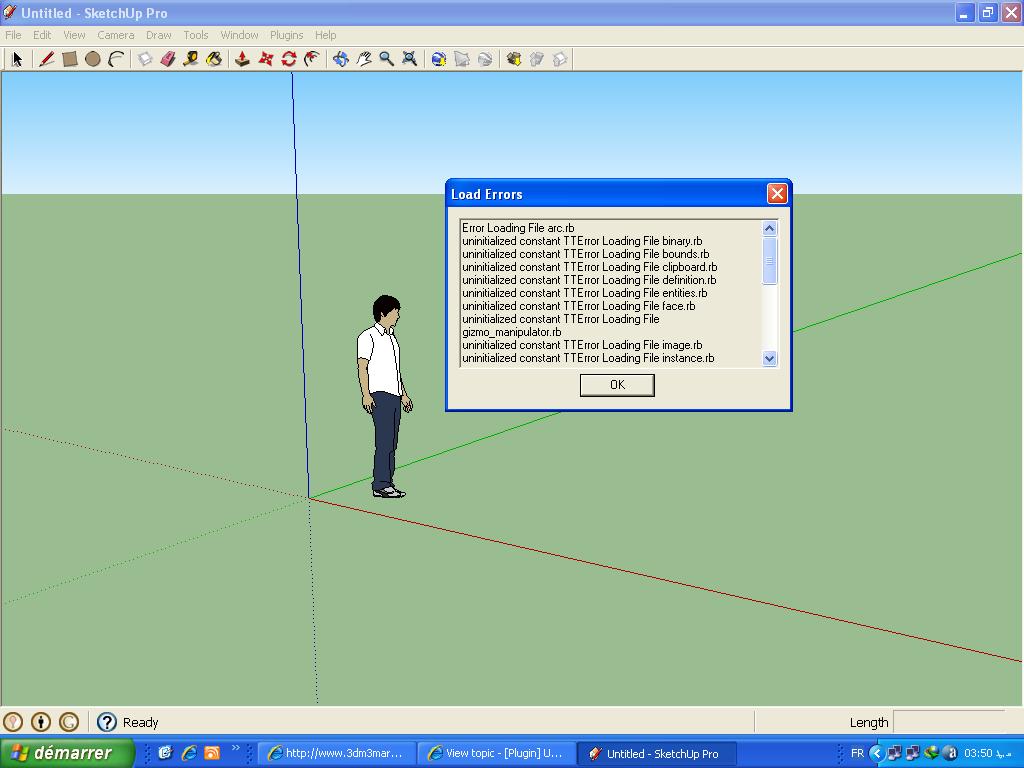

      01.JPG


      02.JPG


      03.JPG

      1 條回覆 最後回覆 回覆 引用 0
      • R 離線
        robert111
        最後由 編輯

        i have windows xp pack 3

        1 條回覆 最後回覆 回覆 引用 0
        • thomthomT 離線
          thomthom
          最後由 編輯

          I'm guessing you put all the content of the TT_Lib2 folder directly into the plugins folder?
          Have a look at the footprint description of TT_Lib2 - towards the bottom of the first post.

          Thomas Thomassen — SketchUp Monkey & Coding addict
          List of my plugins and link to the CookieWare fund

          1 條回覆 最後回覆 回覆 引用 0
          • R 離線
            robert111
            最後由 編輯

            yes i put all the content of the TT_Lib2 folder directly into the plugins folder

            1 條回覆 最後回覆 回覆 引用 0
            • thomthomT 離線
              thomthom
              最後由 編輯

              It should be there.
              It should be ...\Plugins\TT_Lib2\<*.rb> - like the footprint description for TT_Lib illustrates.

              Thomas Thomassen — SketchUp Monkey & Coding addict
              List of my plugins and link to the CookieWare fund

              1 條回覆 最後回覆 回覆 引用 0
              • R 離線
                robert111
                最後由 編輯

                I did not understand, can you explain more clearly

                1 條回覆 最後回覆 回覆 引用 0
                • J 離線
                  JoZ
                  最後由 編輯

                  Ehy ThomThom, great plugin 😄
                  Any chance you would look into increasing it with numerical input transformations like: translation, rotation, scale as possible in 3dpaintbrush for example (see this part of video: http://www.youtube.com/watch?feature=player_detailpage&v=h_7ZOgjxREM#t=125s) ?
                  That would be very usefull, avoiding me the need to often switch to other 3d app just for this (I often need precise numerical transform) 😄

                  1 條回覆 最後回覆 回覆 引用 0
                  • thomthomT 離線
                    thomthom
                    最後由 編輯

                    When I finish the transoformation gizmo you'll be able to use numerical input for some transformations.

                    Thomas Thomassen — SketchUp Monkey & Coding addict
                    List of my plugins and link to the CookieWare fund

                    1 條回覆 最後回覆 回覆 引用 0
                    • J 離線
                      JoZ
                      最後由 編輯

                      Perfect... now I must remind of that... everything I think... You have yet thought about! 😛

                      1 條回覆 最後回覆 回覆 引用 0
                      • W 離線
                        wannabe
                        最後由 編輯

                        hi

                        I'm using sketchup for a while now (i got used to sketchup6 and this plugin works fine with it 😄 )
                        well I haven't got any request for a plugin before but this one just peaks my curiosity...

                        I thought of "linking" all faces (by id or something) to a brother object which we could deform and even unwrap (^^), texture and use remember uvs so it saves the current material position
                        BUT
                        restore it on the original

                        what do u think ? possible ?

                        deforming the face was nice however without I'd be happy too 😎

                        great work so far works great

                        1 條回覆 最後回覆 回覆 引用 0
                        • R 離線
                          rv1974
                          最後由 編輯

                          @thomthom said:

                          I have lots of ideas myself. I just don't know if I can do them. 😉

                          Is 'align texture to the selected edge' among them?

                          1 條回覆 最後回覆 回覆 引用 0
                          • thomthomT 離線
                            thomthom
                            最後由 編輯

                            @rv1974 said:

                            @thomthom said:

                            I have lots of ideas myself. I just don't know if I can do them. 😉

                            Is 'align texture to the selected edge' among them?

                            That one is doable. 😄

                            Thomas Thomassen — SketchUp Monkey & Coding addict
                            List of my plugins and link to the CookieWare fund

                            1 條回覆 最後回覆 回覆 引用 0
                            • R 離線
                              rv1974
                              最後由 編輯

                              @thomthom said:

                              @rv1974 said:

                              @thomthom said:

                              I have lots of ideas myself. I just don't know if I can do them. 😉

                              Is 'align texture to the selected edge' among them?

                              That one is doable. 😄

                              Good ...I'll listen Röyksop while you doing this doable 🙂

                              1 條回覆 最後回覆 回覆 引用 0
                              • GaieusG 離線
                                Gaieus
                                最後由 編輯

                                @wannabe said:

                                hi

                                I'm using sketchup for a while now (i got used to sketchup6 and this plugin works fine with it 😄 )
                                well I haven't got any request for a plugin before but this one just peaks my curiosity...

                                I thought of "linking" all faces (by id or something) to a brother object which we could deform and even unwrap (^^), texture and use remember uvs so it saves the current material position
                                BUT
                                restore it on the original

                                what do u think ? possible ?

                                deforming the face was nice however without I'd be happy too 😎

                                great work so far works great

                                That's one of my major wishes with the tool.

                                Or put in a different way; not only remember then restore on the same geometry but copy from one geometry and apply on another one.

                                Of course, the geometry should be the same as far as faces' number and shape is concerned.

                                Gai...

                                1 條回覆 最後回覆 回覆 引用 0
                                • J 離線
                                  Justo
                                  最後由 編輯

                                  Hey
                                  getting this error below;
                                  Error Loading File tt_uv_toolkit_2.rb
                                  undefined method `add_item' for nil:NilClass

                                  Ive got the latest lib in the plugin folder as well
                                  any help would be appreciated

                                  Cheers
                                  Justin

                                  Cheers
                                  Justin

                                  1 條回覆 最後回覆 回覆 引用 0
                                  • thomthomT 離線
                                    thomthom
                                    最後由 編輯

                                    @justo said:

                                    Hey
                                    getting this error below;
                                    Error Loading File tt_uv_toolkit_2.rb
                                    undefined method `add_item' for nil:NilClass

                                    Ive got the latest lib in the plugin folder as well
                                    any help would be appreciated

                                    Cheers
                                    Justin

                                    I'm guessing you didn't extract it correctly and places all .rb files in the Plugins folder?
                                    If you look at the bottom of the first post you see an example of the footprint for the files.
                                    In the plugins folder you should have tt_uv_toolkit_2.rb and a folder TT_UV_Toolkit which contains other .rb files.

                                    Thomas Thomassen — SketchUp Monkey & Coding addict
                                    List of my plugins and link to the CookieWare fund

                                    1 條回覆 最後回覆 回覆 引用 0
                                    • J 離線
                                      Justo
                                      最後由 編輯

                                      i believe they're in the right spots?
                                      tt_uv_toolkit_2.rb is in plugin folder
                                      and folder TT_UV_Toolkit contains clipboard, core, memory, and quadface .rb files.
                                      TT_Lib2 is in plugin folder.

                                      if it makes a difference, this is the first time ive tried to use this plugin (no older versions)

                                      Cheers
                                      Justin

                                      1 條回覆 最後回覆 回覆 引用 0
                                      • thomthomT 離線
                                        thomthom
                                        最後由 編輯

                                        hm...

                                        Ok - do this for me:
                                        Open the Ruby Console (Window > Ruby Console)

                                        Type: load 'tt_uv_toolkit_2.rb'
                                        Post back the full message it reports back.

                                        Thomas Thomassen — SketchUp Monkey & Coding addict
                                        List of my plugins and link to the CookieWare fund

                                        1 條回覆 最後回覆 回覆 引用 0
                                        • J 離線
                                          Justo
                                          最後由 編輯

                                          load 'tt_uv_toolkit_2.rb'
                                          D:/Applications/Google/Google Sketchup 8/Plugins/TT_Lib2/core.rb:59: warning: already initialized constant BB_LEFT_FRONT_BOTTOM
                                          D:/Applications/Google/Google Sketchup 8/Plugins/TT_Lib2/core.rb:60: warning: already initialized constant BB_RIGHT_FRONT_BOTTOM
                                          D:/Applications/Google/Google Sketchup 8/Plugins/TT_Lib2/core.rb:61: warning: already initialized constant BB_LEFT_BACK_BOTTOM
                                          D:/Applications/Google/Google Sketchup 8/Plugins/TT_Lib2/core.rb:62: warning: already initialized constant BB_RIGHT_BACK_BOTTOM
                                          D:/Applications/Google/Google Sketchup 8/Plugins/TT_Lib2/core.rb:63: warning: already initialized constant BB_LEFT_FRONT_TOP
                                          D:/Applications/Google/Google Sketchup 8/Plugins/TT_Lib2/core.rb:64: warning: already initialized constant BB_RIGHT_FRONT_TOP
                                          D:/Applications/Google/Google Sketchup 8/Plugins/TT_Lib2/core.rb:65: warning: already initialized constant BB_LEFT_BACK_TOP
                                          D:/Applications/Google/Google Sketchup 8/Plugins/TT_Lib2/core.rb:66: warning: already initialized constant BB_RIGHT_BACK_TOP
                                          D:/Applications/Google/Google Sketchup 8/Plugins/TT_Lib2/core.rb:68: warning: already initialized constant BB_CENTER_FRONT_BOTTOM
                                          D:/Applications/Google/Google Sketchup 8/Plugins/TT_Lib2/core.rb:69: warning: already initialized constant BB_CENTER_BACK_BOTTOM
                                          D:/Applications/Google/Google Sketchup 8/Plugins/TT_Lib2/core.rb:70: warning: already initialized constant BB_CENTER_FRONT_TOP
                                          D:/Applications/Google/Google Sketchup 8/Plugins/TT_Lib2/core.rb:71: warning: already initialized constant BB_CENTER_BACK_TOP
                                          D:/Applications/Google/Google Sketchup 8/Plugins/TT_Lib2/core.rb:73: warning: already initialized constant BB_LEFT_CENTER_BOTTOM
                                          D:/Applications/Google/Google Sketchup 8/Plugins/TT_Lib2/core.rb:74: warning: already initialized constant BB_LEFT_CENTER_TOP
                                          D:/Applications/Google/Google Sketchup 8/Plugins/TT_Lib2/core.rb:75: warning: already initialized constant BB_RIGHT_CENTER_BOTTOM
                                          D:/Applications/Google/Google Sketchup 8/Plugins/TT_Lib2/core.rb:76: warning: already initialized constant BB_RIGHT_CENTER_TOP
                                          D:/Applications/Google/Google Sketchup 8/Plugins/TT_Lib2/core.rb:78: warning: already initialized constant BB_LEFT_FRONT_CENTER
                                          D:/Applications/Google/Google Sketchup 8/Plugins/TT_Lib2/core.rb:79: warning: already initialized constant BB_RIGHT_FRONT_CENTER
                                          D:/Applications/Google/Google Sketchup 8/Plugins/TT_Lib2/core.rb:80: warning: already initialized constant BB_LEFT_BACK_CENTER
                                          D:/Applications/Google/Google Sketchup 8/Plugins/TT_Lib2/core.rb:81: warning: already initialized constant BB_RIGHT_BACK_CENTER
                                          D:/Applications/Google/Google Sketchup 8/Plugins/TT_Lib2/core.rb:83: warning: already initialized constant BB_LEFT_CENTER_CENTER
                                          D:/Applications/Google/Google Sketchup 8/Plugins/TT_Lib2/core.rb:84: warning: already initialized constant BB_RIGHT_CENTER_CENTER
                                          D:/Applications/Google/Google Sketchup 8/Plugins/TT_Lib2/core.rb:85: warning: already initialized constant BB_CENTER_FRONT_CENTER
                                          D:/Applications/Google/Google Sketchup 8/Plugins/TT_Lib2/core.rb:86: warning: already initialized constant BB_CENTER_BACK_CENTER
                                          D:/Applications/Google/Google Sketchup 8/Plugins/TT_Lib2/core.rb:87: warning: already initialized constant BB_CENTER_CENTER_TOP
                                          D:/Applications/Google/Google Sketchup 8/Plugins/TT_Lib2/core.rb:88: warning: already initialized constant BB_CENTER_CENTER_BOTTOM
                                          D:/Applications/Google/Google Sketchup 8/Plugins/TT_Lib2/core.rb:90: warning: already initialized constant BB_CENTER_CENTER_CENTER
                                          D:/Applications/Google/Google Sketchup 8/Plugins/TT_Lib2/core.rb:91: warning: already initialized constant BB_CENTER
                                          D:/Applications/Google/Google Sketchup 8/Plugins/TT_Lib2/core.rb:96: warning: already initialized constant MB_ICONHAND
                                          D:/Applications/Google/Google Sketchup 8/Plugins/TT_Lib2/core.rb:97: warning: already initialized constant MB_ICONSTOP
                                          D:/Applications/Google/Google Sketchup 8/Plugins/TT_Lib2/core.rb:98: warning: already initialized constant MB_ICONERROR
                                          D:/Applications/Google/Google Sketchup 8/Plugins/TT_Lib2/core.rb:99: warning: already initialized constant MB_ICONQUESTION
                                          D:/Applications/Google/Google Sketchup 8/Plugins/TT_Lib2/core.rb💯 warning: already initialized constant MB_ICONEXCLAMATION
                                          D:/Applications/Google/Google Sketchup 8/Plugins/TT_Lib2/core.rb:101: warning: already initialized constant MB_ICONWARNING
                                          D:/Applications/Google/Google Sketchup 8/Plugins/TT_Lib2/core.rb:102: warning: already initialized constant MB_ICONASTERISK
                                          D:/Applications/Google/Google Sketchup 8/Plugins/TT_Lib2/core.rb:103: warning: already initialized constant MB_ICONINFORMATION
                                          D:/Applications/Google/Google Sketchup 8/Plugins/TT_Lib2/core.rb:104: warning: already initialized constant MB_ICON_NONE
                                          D:/Applications/Google/Google Sketchup 8/Plugins/TT_Lib2/core.rb:106: warning: already initialized constant MB_DEFBUTTON1
                                          D:/Applications/Google/Google Sketchup 8/Plugins/TT_Lib2/core.rb:107: warning: already initialized constant MB_DEFBUTTON2
                                          D:/Applications/Google/Google Sketchup 8/Plugins/TT_Lib2/core.rb:108: warning: already initialized constant MB_DEFBUTTON3
                                          D:/Applications/Google/Google Sketchup 8/Plugins/TT_Lib2/core.rb:109: warning: already initialized constant MB_DEFBUTTON4
                                          D:/Applications/Google/Google Sketchup 8/Plugins/TT_Lib2/core.rb:120: warning: already initialized constant VERSION
                                          D:/Applications/Google/Google Sketchup 8/Plugins/TT_Lib2/core.rb:124: warning: already initialized constant V_MAJOR
                                          D:/Applications/Google/Google Sketchup 8/Plugins/TT_Lib2/core.rb:128: warning: already initialized constant V_MINOR
                                          D:/Applications/Google/Google Sketchup 8/Plugins/TT_Lib2/core.rb:132: warning: already initialized constant V_REV
                                          Error: #<NoMethodError: undefined method add_item' for nil:NilClass> D:/Applications/Google/Google Sketchup 8/Plugins/tt_uv_toolkit_2.rb:27 D:/Applications/Google/Google Sketchup 8/Plugins/TT_Lib2/core.rb:213:in require'
                                          D:/Applications/Google/Google Sketchup 8/Plugins/TT_Lib2/core.rb:213
                                          D:/Applications/Google/Google Sketchup 8/Plugins/TT_Lib2/core.rb:212:in each' D:/Applications/Google/Google Sketchup 8/Plugins/TT_Lib2/core.rb:212 D:/Applications/Google/Google Sketchup 8/Plugins/tt_uv_toolkit_2.rb:27:in require'
                                          D:/Applications/Google/Google Sketchup 8/Plugins/tt_uv_toolkit_2.rb:27
                                          (eval):58:in `load'
                                          (eval):58

                                          Cheers
                                          Justin

                                          1 條回覆 最後回覆 回覆 引用 0
                                          • thomthomT 離線
                                            thomthom
                                            最後由 編輯

                                            😲 😕
                                            I'm not making any sense out of this.

                                            
                                            Error; #<NoMethodError; undefined method `add_item' for nil;NilClass>
                                            D;/Applications/Google/Google Sketchup 8/Plugins/tt_uv_toolkit_2.rb;27
                                            D;/Applications/Google/Google Sketchup 8/Plugins/TT_Lib2/core.rb;213;in `require'
                                            D;/Applications/Google/Google Sketchup 8/Plugins/TT_Lib2/core.rb;213
                                            D;/Applications/Google/Google Sketchup 8/Plugins/TT_Lib2/core.rb;212;in `each'
                                            D;/Applications/Google/Google Sketchup 8/Plugins/TT_Lib2/core.rb;212
                                            D;/Applications/Google/Google Sketchup 8/Plugins/tt_uv_toolkit_2.rb;27;in `require'
                                            D;/Applications/Google/Google Sketchup 8/Plugins/tt_uv_toolkit_2.rb;27
                                            (eval);58;in `load'
                                            (eval);58


                                            tt_uv_toolkit_2.rb doesn't have any add_item at line 27. ...it doesn't have any .add_item at all.
                                            Nor do I understand the backtrace why TT_Lib2/core.rb is referred... It looks like it throws an error while loading TT_Lib2, but also that doesn't use .att_item.

                                            😢 😕

                                            Just to be sure: you installed UV Toolkit 2.1.0 and TT_Lib2 2.4.0 ?
                                            Can I see a screenshot of your TT_Lib2 folder? (And your Plugins folder? (Maybe there's a conflict somewhere...) )

                                            What OS do you use? If Windows, have you got an User or Administrator account? UAC enabled?

                                            Thomas Thomassen — SketchUp Monkey & Coding addict
                                            List of my plugins and link to the CookieWare fund

                                            1 條回覆 最後回覆 回覆 引用 0
                                            • 1
                                            • 2
                                            • 3
                                            • 4
                                            • 5
                                            • 6
                                            • 7
                                            • 8
                                            • 18
                                            • 19
                                            • 6 / 19
                                            • 第一個貼文
                                              最後的貼文
                                            Buy SketchPlus
                                            Buy SUbD
                                            Buy WrapR
                                            Buy eBook
                                            Buy Modelur
                                            Buy Vertex Tools
                                            Buy SketchCuisine
                                            Buy FormFonts

                                            Advertisement