sketchucation logo sketchucation
    • 登入
    Oops, your profile's looking a bit empty! To help us tailor your experience, please fill in key details like your SketchUp version, skill level, operating system, and more. Update and save your info on your profile page today!
    ⚠️ Important | Libfredo 15.8b introduces important bugfixes for Fredo's Extensions Update

    Ruby download

    已排程 已置頂 已鎖定 已移動 Newbie Forum
    sketchup
    31 貼文 9 Posters 3.3k 瀏覽 9 Watching
    正在載入更多貼文
    • 從舊到新
    • 從新到舊
    • 最多點贊
    回覆
    • 在新貼文中回覆
    登入後回覆
    此主題已被刪除。只有擁有主題管理權限的使用者可以查看。
    • R 離線
      rodsheart
      最後由 編輯

      Hi

      i have downloaded windowizer

      it has been unzipped and have placed it

      c/ program files/google/sketchup 7/ plugins

      the files are visible but is not there when i open sketchup

      help!!

      1 條回覆 最後回覆 回覆 引用 0
      • Chris FullmerC 離線
        Chris Fullmer
        最後由 編輯

        Hi Rod, first, every ruby installs itself in different places. I am not sure where windowizer installs itself. so check the right click menu, the Plugins menu, the Draw menu, Tools menu. Those are probably the most logical laces it would be.

        Also, it needs to be installed correctly. Make sure when you unzip the file, you are maintaining the same directory structure that is inside the file. Some unzip programs DO NOT show you the directories inside the zip file, so its hard to know if there are any. To be safe, choose the unzip to location method of unzipping the file. that should keep sub directories intact.

        Or you could save the .zip file to your desktop and right click on it and choose "explore". That will open it in the windows explorer, which will show the directories correctly. Then just drag and drop it all into the plugins folder.

        Does that make any sense? I'm sure I over explained a fairly simple task - as always.

        Chris

        Lately you've been tan, suspicious for the winter.
        All my Plugins I've written

        1 條回覆 最後回覆 回覆 引用 0
        • GaieusG 離線
          Gaieus
          最後由 編輯

          Also note that a zip file has a name and that name is practically a folder name so Windows will (if automatically) unzip everything in a new folder named as the zip file instead of putting everything (incuding the rb file and subfolders) straight under the main Plugins directory. Make sure this doesn't happen.
          One version of windowizer at least goes into the contet (right click) menu if you cannot find it after proper installation.

          Gai...

          1 條回覆 最後回覆 回覆 引用 0
          • Jean LemireJ 離線
            Jean Lemire
            最後由 編輯

            Hi Rod, hi folks.

            Also, some Ruby scripts are treated as extensions, they need to be activated using the Extensions control pannel, like the Sandbox Tools, for example.

            Use Menu Window --> Preferences --> Extensions. Verify if there is an entry for Windowiser. If so, make sure that the checkbox next to it is checked.

            Close the window and, to be sure, quit SU and restart it.

            Just ideas.

            Jean (Johnny) Lemire from Repentigny, Quebec, Canada.

            1 條回覆 最後回覆 回覆 引用 0
            • A 離線
              August
              最後由 編輯

              @jean lemire said:

              ... some Ruby scripts ... need to be activated using the Extensions control pannel, like the Sandbox Tools, for example.

              Use Menu Window --> Preferences --> Extensions. Verify if there is an entry for Windowiser. ...
              Hi Jean,

              I just checked, and Windowizer (v3, the one I have) does not use the Extensions mechanism. That is done using Sketchup.register_extension which uses an object created by SketchupExtension.new which takes a title string and a path.

              Does anyone happen to know of any plugins, other than those that Google ships with the installation, that use the Extensions mechanism? I've been searching and have only found references like this one, that are more theoretical than practical.

              Thanks,
              August

              “An idea, like a ghost, must be spoken to a little before it will explain itself.”
              [floatr:v1mcbde2]-- Charles Dickens[/floatr:v1mcbde2]

              1 條回覆 最後回覆 回覆 引用 0
              • J 離線
                Jim
                最後由 編輯

                August,

                there are numerous plugins that use it, are you looking for an example? I know some of Chris Fullmer's tools use it.

                Hi

                1 條回覆 最後回覆 回覆 引用 0
                • GaieusG 離線
                  Gaieus
                  最後由 編輯

                  The following are listed under my Extensions tab in Preferences (apart from the original SU extensions):

                  • shape bender (Chris Fullmer)
                  • subdivide and smooth (Dale Martens)
                  • free scale (Fredo) (oops, BTW it's now called "Fredo Scale")
                  • soap skin and bubble (Josef Leibinger)

                  Gai...

                  1 條回覆 最後回覆 回覆 引用 0
                  • R 離線
                    remus
                    最後由 編輯

                    A couple more to add to the list:
                    -profile builder (whaat)
                    -lightup (AdamB)

                    http://remusrendering.wordpress.com/

                    1 條回覆 最後回覆 回覆 引用 0
                    • A 離線
                      August
                      最後由 編輯

                      @jim said:

                      ... are you looking for an example? I know some of Chris Fullmer's tools use it.
                      Yes, I am looking for examples. Thanks.

                      I just received a list from Chris in another thread: http://forums.sketchucation.com/viewtopic.php?f=180&t=19345.

                      @gaieus said:

                      • shape bender (Chris Fullmer)
                      • subdivide and smooth (Dale Martens)
                      • free scale (Fredo) (oops, BTW it's now called "Fredo Scale")
                      • soap skin and bubble (Josef Leibinger)

                      @remus said:

                      • profile builder (whaat)
                      • lightup (AdamB)
                        Thank you both.

                      I also just found:

                      • Custom Toolbars (Jim Foltz)

                      I think I have enough examples now. I was initially having a very hard time finding any scripts that used it; randomly downloading my way through 678 scripts in the Extensions Index was not working and the only references I found in forum discussions were oblique references like the one earlier in this thread.

                      I'm writing an article on how to use the Registered Extensions system as a tutorial for Ruby beginners and I want to specifically mention developers and/or scripts who/which already use it.

                      And my apologies for hijacking the thread.

                      Thanks again,
                      August

                      “An idea, like a ghost, must be spoken to a little before it will explain itself.”
                      [floatr:v1mcbde2]-- Charles Dickens[/floatr:v1mcbde2]

                      1 條回覆 最後回覆 回覆 引用 0
                      • J 離線
                        Jim
                        最後由 編輯

                        And don't forget about Google's own Sandbox tools and Dynamic Components.

                        Hi

                        1 條回覆 最後回覆 回覆 引用 0
                        • GaieusG 離線
                          Gaieus
                          最後由 編輯

                          @jim said:

                          And don't forget about Google's own Sandbox tools and Dynamic Components.

                          Then the ocean modelling tool (new to M1 of SU 7), utilities and one other I'm too lazy now to look up should also be counted.

                          Gai...

                          1 條回覆 最後回覆 回覆 引用 0
                          • Chris FullmerC 離線
                            Chris Fullmer
                            最後由 編輯

                            I think he is interested in who outside of Google is taking advantage of this feature - especially since it is relatively easy to write into a ruby script.

                            I'm curious if people ever disable extensions using the extensions enable/disable window?

                            Chris

                            Lately you've been tan, suspicious for the winter.
                            All my Plugins I've written

                            1 條回覆 最後回覆 回覆 引用 0
                            • J 離線
                              Jim
                              最後由 編輯

                              I'm curious if the Extensions dialog will still be usable and easy-to-use if there were, let's say 25 or more extensions in there.

                              Hi

                              1 條回覆 最後回覆 回覆 引用 0
                              • Chris FullmerC 離線
                                Chris Fullmer
                                最後由 編輯

                                Exactly, thats another great question! It probably becomes just as unwieldly as the plugins menu does. If every plugin installs itself there, that could be rather tedious to work with.

                                But then again, if you're just turning some things on and off occasionally to keep the plugins menu clean and tidy, maybe its a good trade-off?

                                Lately you've been tan, suspicious for the winter.
                                All my Plugins I've written

                                1 條回覆 最後回覆 回覆 引用 0
                                • Al HartA 離線
                                  Al Hart
                                  最後由 編輯

                                  What is the effect of the second parameter (true/false) in Sketchup.register_extension

                                  [edit]It looks like the .rb file gets loaded whether true or false is set.

                                  Al Hart

                                  http:wiki.renderplus.comimageseefRender_plus_colored30x30%29.PNG
                                  IRender nXt from Render Plus

                                  1 條回覆 最後回覆 回覆 引用 0
                                  • A 離線
                                    August
                                    最後由 編輯

                                    @al hart said:

                                    What is the effect of the second parameter (true/false) in Sketchup.register_extension

                                    [edit]It looks like the .rb file gets loaded whether true or false is set.

                                    I found this page of doc:
                                    http://code.google.com/apis/sketchup/docs/ourdoc/sketchup.html#register_extension
                                    which includes this section:
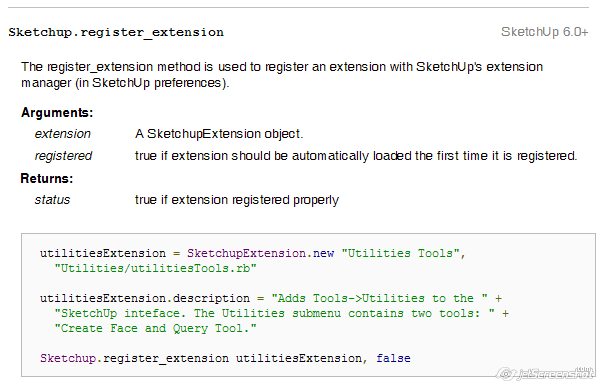
                                    Sketchup.register_extension doc

                                    Here's the text from that image (so that it is searchable), formatted as best as my experience with SCF will allow:

                                    Sketchup.register_extensionSketchUp [6.0+]

                                    The register_extension method is used to register an extension with SketchUp's extension manager (in SketchUp preferences).

                                    Arguments:

                                    • extension -- A SketchupExtension object.
                                    • registered -- true if extension should be automatically
                                      loaded the first time it is registered.

                                    Returns:

                                    • status -- true if extension registered properly
                                    utilitiesExtension = SketchupExtension.new "Utilities Tools",
                                      "Utilities/utilitiesTools.rb"
                                    
                                    utilitiesExtension.description = "Adds Tools->Utilities to the " +
                                      "SketchUp inteface. The Utilities submenu contains two tools; " +
                                      "Create Face and Query Tool."   
                                    
                                    Sketchup.register_extension utilitiesExtension, false
                                    

                                    That formatting is way too much trouble. Code boxes should be wider so it will display readably and there really should be some way of indenting, creating lists bullets, etc.

                                    ANYBODY know of any doc for formatting SCF posts that goes beyond the buttons at the top of the text entry window?

                                    I hope this helps,
                                    August

                                    “An idea, like a ghost, must be spoken to a little before it will explain itself.”
                                    [floatr:v1mcbde2]-- Charles Dickens[/floatr:v1mcbde2]

                                    1 條回覆 最後回覆 回覆 引用 0
                                    • Chris FullmerC 離線
                                      Chris Fullmer
                                      最後由 編輯

                                      The SCF uses BBCode. When you are replying, over on the right, under all the smileys, there is a small section with this:

                                      BBCode is ON
                                      [img] is ON
                                      [flash] is ON
                                      [url] is ON
                                      Smilies are ON

                                      and the BBCode is a link to this:
                                      http://forums.sketchucation.com/faq.php?mode=bbcode

                                      So when you are posting, you can use that as a aguide to help with formatting.

                                      Chris

                                      Lately you've been tan, suspicious for the winter.
                                      All my Plugins I've written

                                      1 條回覆 最後回覆 回覆 引用 0
                                      • M 離線
                                        mirami
                                        最後由 編輯

                                        Hi!
                                        I have loaded the soap bubble skin from tensil structure.de but cannot open it.. I am using Vista and SU6.
                                        I unzip the files as mentionned , I create C>program>google>su6>tools but get a message telling me the file cannot be created, immposible to open... I tried to unzip on the desktop, copied the files in su6, this worked fine. But np new toolbar in SU6 at all.. I tried to take away the anti virus and firewall, ,no results..
                                        Has anyone got this problem before ?
                                        Thanks a lot

                                        1 條回覆 最後回覆 回覆 引用 0
                                        • GaieusG 離線
                                          Gaieus
                                          最後由 編輯

                                          Hi Mirami,

                                          Even if successfully installed (you may have administration right issues with this on Vista), SSB needs to be activated from the Window > Preferences > Extensions tab. Also, you may need to activate the toolbar itself from View > Toolbars.

                                          Gai...

                                          1 條回覆 最後回覆 回覆 引用 0
                                          • M 離線
                                            mirami
                                            最後由 編輯

                                            Hello!
                                            Well, could you be so kind to refresh my memory and explain me how to go in window>preference and what you excatly do one you are there ?
                                            In SU toolbar all is apparently activated..
                                            Thanks a lot

                                            1 條回覆 最後回覆 回覆 引用 0
                                            • 1
                                            • 2
                                            • 1 / 2
                                            • 第一個貼文
                                              最後的貼文
                                            Buy SketchPlus
                                            Buy SUbD
                                            Buy WrapR
                                            Buy eBook
                                            Buy Modelur
                                            Buy Vertex Tools
                                            Buy SketchCuisine
                                            Buy FormFonts

                                            Advertisement
