sketchucation logo sketchucation
    • 登入
    Oops, your profile's looking a bit empty! To help us tailor your experience, please fill in key details like your SketchUp version, skill level, operating system, and more. Update and save your info on your profile page today!
    🔌 Smart Spline | Fluid way to handle splines for furniture design and complex structures. Download

    Irender nxt

    已排程 已置頂 已鎖定 已移動 Extensions & Applications Discussions
    extensions
    23 貼文 4 Posters 3.5k 瀏覽 4 Watching
    正在載入更多貼文
    • 從舊到新
    • 從新到舊
    • 最多點贊
    回覆
    • 在新貼文中回覆
    登入後回覆
    此主題已被刪除。只有擁有主題管理權限的使用者可以查看。
    • GaieusG 離線
      Gaieus
      最後由 編輯

      Should have a look at that png file but it can be because pgn transparency only works above a certain number of bit colour (can't remember) and otherwise the transparent channel simply renders black. But I am not very good at these things so you'd better check elsewhere, too. Or share the png image here so we can see.

      Gai...

      1 條回覆 最後回覆 回覆 引用 0
      • Al HartA 離線
        Al Hart
        最後由 編輯

        As was implied in Gai's response - you have to be sure that you used a PNG file with a transparent background.

        Al Hart

        http:wiki.renderplus.comimageseefRender_plus_colored30x30%29.PNG
        IRender nXt from Render Plus

        1 條回覆 最後回覆 回覆 引用 0
        • C 離線
          csilewski
          最後由 編輯

          Here is the png. i used.


          Pear Blossom copy.png

          1 條回覆 最後回覆 回覆 引用 0
          • Al HartA 離線
            Al Hart
            最後由 編輯

            @csilewski said:

            Here is the png. i used.

            It is definitely transparent and works in treemaker properly.

            We are probably not passing it to the renderer properly.

            (I placed the image as leaves on this tree. It looks fine inside of treemaker)
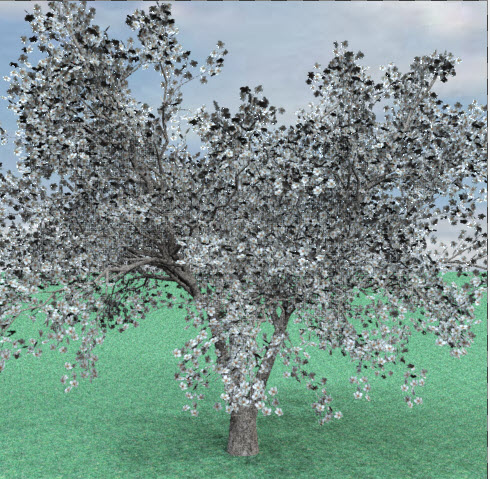
            tulip.jpg

            Al Hart

            http:wiki.renderplus.comimageseefRender_plus_colored30x30%29.PNG
            IRender nXt from Render Plus

            1 條回覆 最後回覆 回覆 引用 0
            • C 離線
              csilewski
              最後由 編輯

              ya i don't know what to think of it.. i rendered the trees in a sperate file that contained just the trees and they look great but when there rendered in the my big file they turn black.

              1 條回覆 最後回覆 回覆 引用 0
              • C 離線
                csilewski
                最後由 編輯

                So i figured out why the trees where rendering black,

                I made the trees with Tree Maker on one computer and then transfered them over to another computer to render out with Irender. when i did that apparently the leaf information did not transfer resulting in no images to make the leafs.

                1 條回覆 最後回覆 回覆 引用 0
                • GaieusG 離線
                  Gaieus
                  最後由 編輯

                  That would still be weird. Components are supposed to be transferable between computers and SU versions.

                  Gai...

                  1 條回覆 最後回覆 回覆 引用 0
                  • C 離線
                    csilewski
                    最後由 編輯

                    The components where transfered but it seamed like the rendering information that went along with the trees got lost in the transfer.

                    1 條回覆 最後回覆 回覆 引用 0
                    • Al HartA 離線
                      Al Hart
                      最後由 編輯

                      The RpTreeMaker definition contains the path name of the leaf, but not the leaf itself.

                      We need to store the leaf on the the definition or on the component to make them more portable. We will have to add that to RpTreeMaker.

                      Al Hart

                      http:wiki.renderplus.comimageseefRender_plus_colored30x30%29.PNG
                      IRender nXt from Render Plus

                      1 條回覆 最後回覆 回覆 引用 0
                      • GaieusG 離線
                        Gaieus
                        最後由 編輯

                        That's OK but once a SU component is made,it does contain the image (well, the whole, rendered image I mean), doesn't it?

                        I see we are talking about two different thing however - I thought the component showed up black, sorry.

                        Gai...

                        1 條回覆 最後回覆 回覆 引用 0
                        • C 離線
                          csilewski
                          最後由 編輯

                          They rendered black, on a different computer. But after i downloaded rp Tree Maker to that computer and then replaced all the original leaves with custome ones they rendered out great. So lesson learned i guess.

                          1 條回覆 最後回覆 回覆 引用 0
                          • Al HartA 離線
                            Al Hart
                            最後由 編輯

                            I'm glad you found a way to make the trees work. However, it is our feeling that our users shouldn't have to do that much work. But it will be a little while before I get around to saving the leaf images on the component itself.

                            I am still getting ready to take a look at your large model. (There were some other things I had to clear up first)

                            Al Hart

                            http:wiki.renderplus.comimageseefRender_plus_colored30x30%29.PNG
                            IRender nXt from Render Plus

                            1 條回覆 最後回覆 回覆 引用 0
                            • Al HartA 離線
                              Al Hart
                              最後由 編輯

                              Interim Report

                              The trees were indeed the problem during the extract. We sere exploding the trees into 3D faces, which we did not need to do until we were ready to render. I should be able to get the extract to work. (It is at 36% now and is not running out of memory yet.)

                              The trees will probably be a problem when the Batch Rendering process starts. (It will take some time to get that far - this is a very large model even without exploding the trees). I will see what I can do, but we may have to hide any trees which are not visible.

                              We have the ability to explode the geometry for similar trees only once - but we have not implemented that feature yet. I'll see what happens when the Batch Process starts.

                              Al Hart

                              http:wiki.renderplus.comimageseefRender_plus_colored30x30%29.PNG
                              IRender nXt from Render Plus

                              1 條回覆 最後回覆 回覆 引用 0
                              • C 離線
                                csilewski
                                最後由 編輯

                                Thanks Al I just made a seperate file for every view and deleted the trees that were not showing up in that view. We made it work... right now i have the NXT version of Irender is that and bonus to using the Beta Version, and how well does the landscape side of the program work with revit? Specifically the trees and sod.?

                                1 條回覆 最後回覆 回覆 引用 0
                                • Al HartA 離線
                                  Al Hart
                                  最後由 編輯

                                  Getting rid of geometry which doesn't effect the scene - including reflection and shadows - is always a good idea. Layers are find too - and you can just turn off the layers for each view.--
                                  The trees work in Revit - we haven't added ground cover yet.

                                  I'mm stil waiting to see if the large model renders. These large models aren't very fast.

                                  Al Hart

                                  http:wiki.renderplus.comimageseefRender_plus_colored30x30%29.PNG
                                  IRender nXt from Render Plus

                                  1 條回覆 最後回覆 回覆 引用 0
                                  • 1
                                  • 2
                                  • 2 / 2
                                  • 第一個貼文
                                    最後的貼文
                                  Buy SketchPlus
                                  Buy SUbD
                                  Buy WrapR
                                  Buy eBook
                                  Buy Modelur
                                  Buy Vertex Tools
                                  Buy SketchCuisine
                                  Buy FormFonts

                                  Advertisement
