sketchucation logo sketchucation
    • 登入
    Oops, your profile's looking a bit empty! To help us tailor your experience, please fill in key details like your SketchUp version, skill level, operating system, and more. Update and save your info on your profile page today!
    🔌 Smart Spline | Fluid way to handle splines for furniture design and complex structures. Download

    [Plugin] Shape Bender Beta

    已排程 已置頂 已鎖定 已移動 Plugins
    1.3k 貼文 331 Posters 1.8m 瀏覽 329 Watching
    正在載入更多貼文
    • 從舊到新
    • 從新到舊
    • 最多點贊
    回覆
    • 在新貼文中回覆
    登入後回覆
    此主題已被刪除。只有擁有主題管理權限的使用者可以查看。
    • Z 離線
      zunkian
      最後由 編輯

      I'm getting bug splat with SU 8 in Win 7 each time I press enter after picking the object, then the straight line, then the curved line. What's causing this and how do I resolve the problem?

      Any help would be appreciated.
      Thanks!

      zunkian

      1 條回覆 最後回覆 回覆 引用 0
      • TIGT 離線
        TIG Moderator
        最後由 編輯

        Please post a simple example SKP.

        Are you absolutely sure you have installed the required files properly as set out in the download page [including progressbar.rb] ??

        Try it with the Window > Ruby Console to see if there are any error messages...

        The process is this:-

        Place the Group.
        Add/locate/size a Line parallel to the X/red-axis
        Add/locate/size a Curve to bend around.
        Select the Group.
        Run the Tool.
        Pick the Line.
        Pick the Curve.
        A bent version [as a component] is added to the SKP...

        TIG

        1 條回覆 最後回覆 回覆 引用 0
        • Z 離線
          zunkian
          最後由 編輯

          Hi Tig,

          I did what you suggest applying the ruby while the ruby console is open.
          It started with an error message then suddenly the script runs down the
          console until it completed it's task! The shape bender worked with no
          bug splat!
          Thanks!!!

          zunkian

          1 條回覆 最後回覆 回覆 引用 0
          • TIGT 離線
            TIG Moderator
            最後由 編輯

            @zunkian said:

            Hi Tig,

            I did what you suggest applying the ruby while the ruby console is open.
            It started with an error message then suddenly the script runs down the
            console until it completed it's task! The shape bender worked with no
            bug splat!
            Thanks!!!

            zunkian
            What was this 'message' ?
            Perhaps about 'make_unique' being 'deprecated' ?
            It's kind to share this kind of thing, so that we can help others with related issues...

            TIG

            1 條回覆 最後回覆 回覆 引用 0
            • G 離線
              GK65
              最後由 編輯

              I had the same problem. The plugin works great when I bend a simple shape, but when I try to bend a more complex shape I get the following error code:
              Error: #<NoMethodError: undefined method all_connected' for nil:NilClass> C:/Program Files (x86)/Google/Google SketchUp 8/Plugins/clf_shape_bender/clf_shape_bender.rb:364:in curve_picker'
              C:/Program Files (x86)/Google/Google SketchUp
              8/Plugins/clf_shape_bender/clf_shape_bender.rb:242:in `onLButtonUp'

              The error comes up after I select the straight line. Then when I select the curved line it goes to 15% then splat!

              I love the plugin, hope I can get it working.
              Thanks!
              GK

              1 條回覆 最後回覆 回覆 引用 0
              • W 離線
                Wlado87
                最後由 編輯

                I have a problem with Shape Bender. The object is incomplete.
                see:

                https://lh3.googleusercontent.com/Ktj4QcHhGKOlIq-17yFlo72xUWgv21Xw3LZVye8uKB7kSAU2tsbN9GncEcf1ZD7FE-trkfoGhHM

                https://lh3.googleusercontent.com/7-_KTFhou6ZBcFkIL9IrBzHLThw8V2Qq4SjItYizF-Ykbq8gf7-KPSnTT4ipdbQCLmd-x_OsxOc

                What is wrong.
                skp is in attachment.


                Untitled.skp

                1 條回覆 最後回覆 回覆 引用 0
                • Dave RD 離線
                  Dave R
                  最後由 編輯

                  What is wrong is that your original is only 1/4 of a centimeter long. Too small for SketchUp. It works perfectly if you scale it up to a reasonable size, first.


                  shape bend.skp

                  Etaoin Shrdlu

                  %

                  (THERE'S NO PLACE LIKE)

                  G28 X0.0 Y0.0 Z0.0

                  M30

                  %

                  1 條回覆 最後回覆 回覆 引用 0
                  • W 離線
                    Wlado87
                    最後由 編輯

                    I had the same problem when I was doing with the larger size. But the problem was gone when i removed the SketchyPhysics plugin.
                    I have new problem (in picture). The green grid is out of way.

                    https://lh6.googleusercontent.com/af0n09oRwWEsOVhBeh-gLb30N1Lxvu2AZ7f1BuwpSW_8Dj5Bifren5mOLYiW1XWUUgc22DE5BNA

                    Thanks for first answer.


                    Struna1.skp

                    1 條回覆 最後回覆 回覆 引用 0
                    • Dave RD 離線
                      Dave R
                      最後由 編輯

                      I don't know what you mean by "out of way" but it seems to me that you would benefit from learning more about the basics of using SketchUp before you get to trying stuff like this. What you're asking SketchUp to do is create a huge number of edges and faces which is going to cause it to bog down at best. You could create this shape much more easily if you made only a single revolution of the helix and copied it enough times to make up the length you need.

                      And work at a larger scale to give SketchUp half a chance to do what you want.

                      Etaoin Shrdlu

                      %

                      (THERE'S NO PLACE LIKE)

                      G28 X0.0 Y0.0 Z0.0

                      M30

                      %

                      1 條回覆 最後回覆 回覆 引用 0
                      • S 離線
                        Shirin2u
                        最後由 編輯

                        Hi,
                        I have a problem with using this plugin. Im new to sketchup, I downloaded the file and the processor but I dont know how to make it work lol anyone can help me here please?
                        when I click on the file its like I cant open or install anything.

                        1 條回覆 最後回覆 回覆 引用 0
                        • BurkhardB 離線
                          Burkhard
                          最後由 編輯

                          There are some threads here, which explains how to install Plugins. Here is one:
                          http://forums.sketchucation.com/viewtopic.php?f=323&t=35746

                          http://www.ia-plus.de

                          1 條回覆 最後回覆 回覆 引用 0
                          • W 離線
                            winnersky
                            最後由 編輯

                            thank you

                            1 條回覆 最後回覆 回覆 引用 0
                            • H 離線
                              hlferrell
                              最後由 編輯

                              This tool looks incredible! I haven't gotten it to work yet, though. I have created a ramp and an arc and a line that stretches the length of the ramp - the line is on the red axis as the instructions indicate. I select the component (the ramp), then I select the shape bender tool and then try to select the single line. It doesn't seem to recognize the line - or anything once I've selected the shape bender tool.

                              Any advice would be greatly appreciated. Thanks!!

                              1 條回覆 最後回覆 回覆 引用 0
                              • Dave RD 離線
                                Dave R
                                最後由 編輯

                                There are a number of things that it could be. Could you post at least a screen shot of the setup?

                                Etaoin Shrdlu

                                %

                                (THERE'S NO PLACE LIKE)

                                G28 X0.0 Y0.0 Z0.0

                                M30

                                %

                                1 條回覆 最後回覆 回覆 引用 0
                                • TIGT 離線
                                  TIG Moderator
                                  最後由 編輯

                                  Also try doing it it with the Ruby Console open and post us any error messages - this might help us see what's wrong.
                                  The picked line and then picked curve can't touch each other, or any other 'raw' geometry.
                                  We can but hope that you have correctly extracted and then installed the tool's subfolder with all of its cursor/toolbar image files etc intact, and that you have also installed 'progressbar.rb' from Smustard.com, all as advised on the download tool's page.
                                  These are the two "most popular" screw-ups 😮

                                  TIG

                                  1 條回覆 最後回覆 回覆 引用 0
                                  • C 離線
                                    cizqa
                                    最後由 編輯

                                    Hello guys, please help me 😄

                                    This is my first time using this plugin and I am having error
                                    ERROR: skpHelperClasses.rb:updateSkpMaterial, curMat is nil

                                    It shows continuously after I click on the Shape Bender icon, it stops when I click on the red-axis line, and it starts to show again after I click the curve. I get to the screenshot I attached, but when I click enter to finalize the bending --> bugsplat!

                                    Anybody knows what's wrong? Thank you very much.

                                    Siska
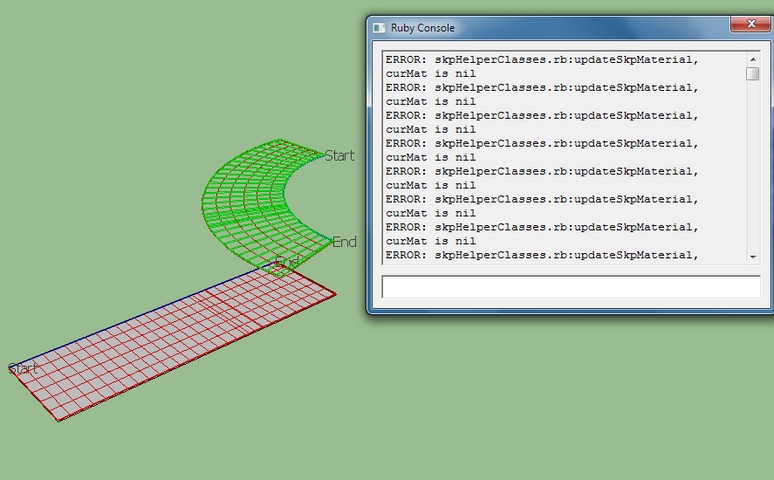

                                    error.jpg

                                    1 條回覆 最後回覆 回覆 引用 0
                                    • TIGT 離線
                                      TIG Moderator
                                      最後由 編輯

                                      This is a V-ray related error and sometimes appears in other tools when it's not working properly.
                                      http://forums.sketchucation.com/viewtopic.php?p=327671#p327671
                                      If you disable V-ray and restart Sketchup does the error stop ?
                                      Thomthom also has a script that disables V-ray's load until you need it, which also speeds up startups...
                                      Also check on the latest V-ray version etc as he advises in the link above...

                                      TIG

                                      1 條回覆 最後回覆 回覆 引用 0
                                      • C 離線
                                        cizqa
                                        最後由 編輯

                                        I have disabled Vray from the preferences. Error message doesn't show anymore, but still, I got bugsplat whenever I try to hit Enter (finalize the bending). Thanks in advance 😄

                                        1 條回覆 最後回覆 回覆 引用 0
                                        • thomthomT 離線
                                          thomthom
                                          最後由 編輯

                                          @cizqa said:

                                          I have disabled Vray from the preferences. Error message doesn't show anymore, but still, I got bugsplat whenever I try to hit Enter (finalize the bending). Thanks in advance 😄

                                          What version of SketchUp are you using? The latest SU8M3 fixed even more bugsplats.

                                          Thomas Thomassen — SketchUp Monkey & Coding addict
                                          List of my plugins and link to the CookieWare fund

                                          1 條回覆 最後回覆 回覆 引用 0
                                          • TIGT 離線
                                            TIG Moderator
                                            最後由 編輯

                                            Can you post the simple SKP - group/line/curve - that you are trying to use...

                                            TIG

                                            1 條回覆 最後回覆 回覆 引用 0
                                            • 1
                                            • 2
                                            • 38
                                            • 39
                                            • 40
                                            • 41
                                            • 42
                                            • 63
                                            • 64
                                            • 40 / 64
                                            • 第一個貼文
                                              最後的貼文
                                            Buy SketchPlus
                                            Buy SUbD
                                            Buy WrapR
                                            Buy eBook
                                            Buy Modelur
                                            Buy Vertex Tools
                                            Buy SketchCuisine
                                            Buy FormFonts

                                            Advertisement


