sketchucation logo sketchucation
    • 登入
    Oops, your profile's looking a bit empty! To help us tailor your experience, please fill in key details like your SketchUp version, skill level, operating system, and more. Update and save your info on your profile page today!
    🔌 Smart Spline | Fluid way to handle splines for furniture design and complex structures. Download

    [Plugin] Shape Bender Beta

    已排程 已置頂 已鎖定 已移動 Plugins
    1.3k 貼文 331 Posters 1.8m 瀏覽 329 Watching
    正在載入更多貼文
    • 從舊到新
    • 從新到舊
    • 最多點贊
    回覆
    • 在新貼文中回覆
    登入後回覆
    此主題已被刪除。只有擁有主題管理權限的使用者可以查看。
    • H 離線
      huckrorick
      最後由 編輯

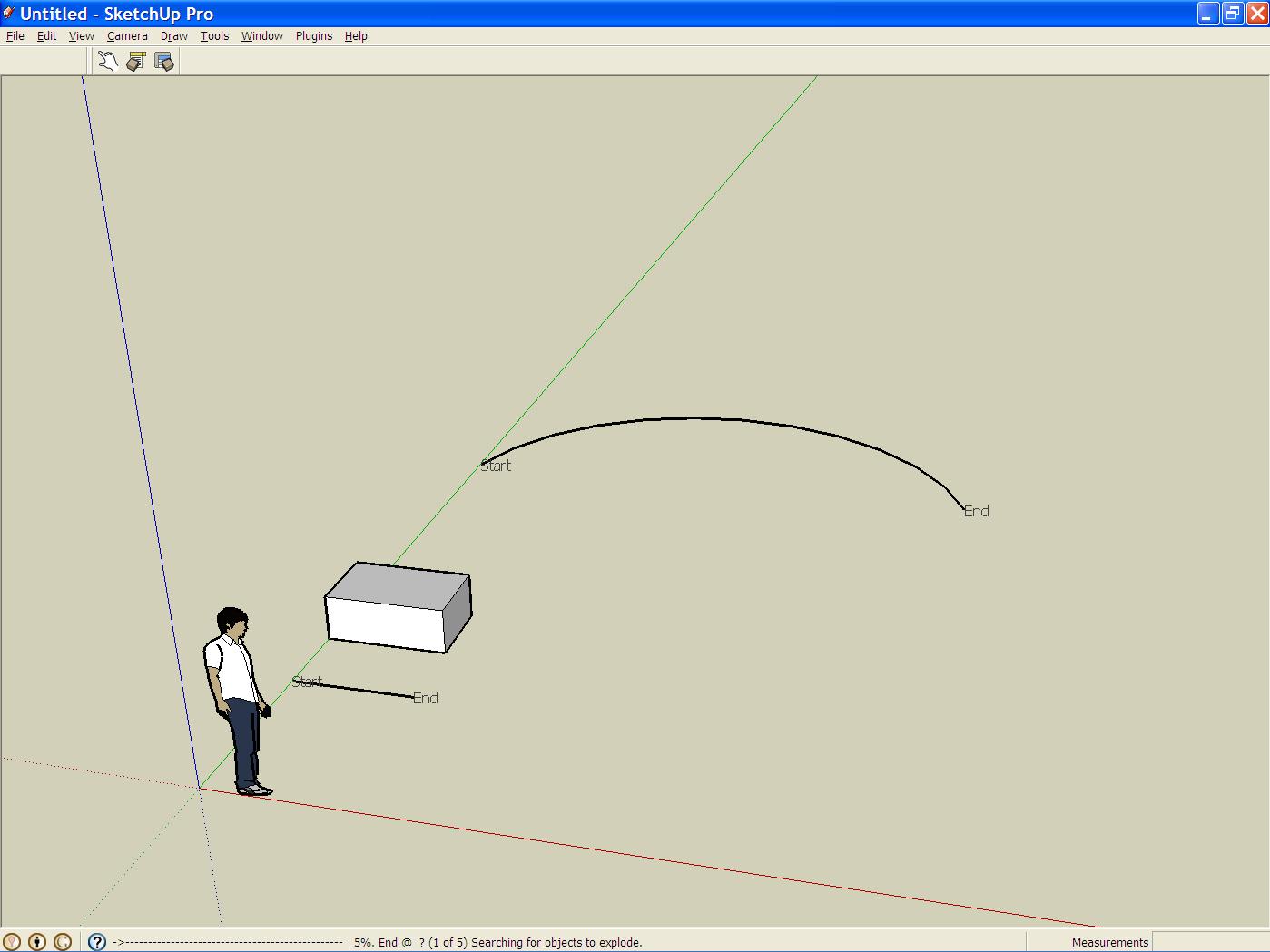
      I tried all the suggestions:

      1. I did as Pilou suggested.
      2. I reinstalled progressbar.rb
      3. It does appear that the program is still running considering the message at the bottom. However, I waited one half hour with no result. I thought the cube and arc would be a very simple test.

      Is there some setting in Sketchup that could affect this?
      Any other help?

      I attached the screen shot of the new test.
      I also am attaching the Sketchup file.

      HuckShapeBenderProb.jpg


      ShapeBenderProb.skp

      1 條回覆 最後回覆 回覆 引用 0
      • Dave RD 離線
        Dave R
        最後由 編輯

        Well, it isn't a problem with your SKP file. I was able to run the plugin with no problem.

        Out of curiosity, is clf_shape_bender.rb is the the clf_shape_bender folder?

        Etaoin Shrdlu

        %

        (THERE'S NO PLACE LIKE)

        G28 X0.0 Y0.0 Z0.0

        M30

        %

        1 條回覆 最後回覆 回覆 引用 0
        • A 離線
          August
          最後由 編輯

          @august said:

          ... Shape Bender slices up the Original Object with vertical slices, according to how many segments there are in the Target Curve. One of the keys to predicting how it is going to work is that it will keep those slice faces vertical. It will rotate them in the Red-Green plane, but the slices will stay vertical. ...

          It's a little more complicated than that. The slices stay vertical, but it's not a straight linear projection, as I was implying.

          Based on the attached drawing, I think the Guide Line gets evenly divided into the number of segments in the Target Curve, so if the segments in the Target Curve are not evenly spaced, different segments in the Result will be stretched or compressed horizontally.

          In the drawing, a straight projection of the Target Curve onto the Guide line results in uneven spacing, but where the Source Object is divided is different, those places are evenly spaced along the length of the Guide line.

          I hope this helps,
          August
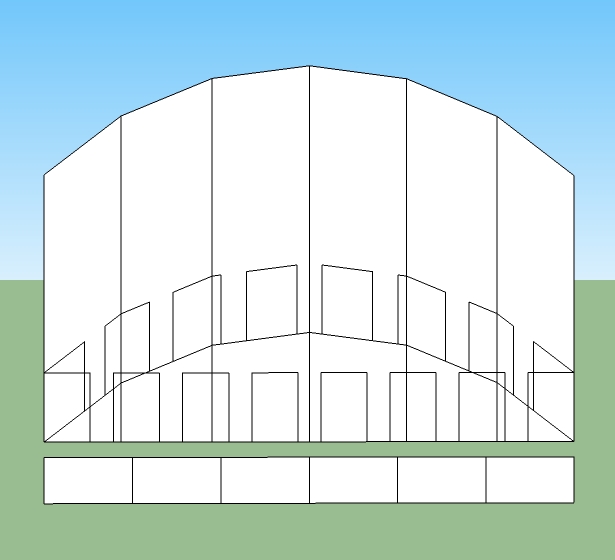

          Shape Bender with Vertical Curve

          “An idea, like a ghost, must be spoken to a little before it will explain itself.”
          [floatr:v1mcbde2]-- Charles Dickens[/floatr:v1mcbde2]

          1 條回覆 最後回覆 回覆 引用 0
          • A 離線
            August
            最後由 編輯

            Here's a similar drawing for a horizontal (red-green plane) Target Curve.
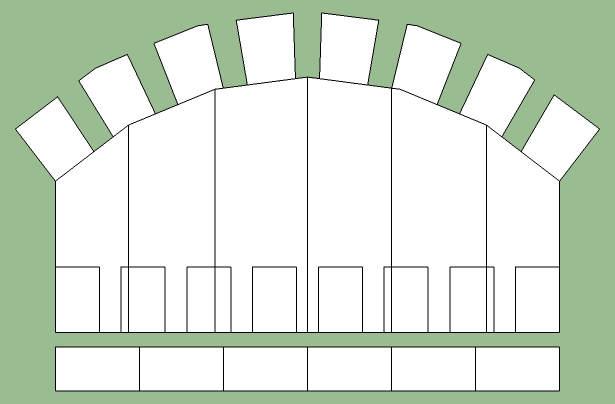

            shape bender horizontal.jpg

            “An idea, like a ghost, must be spoken to a little before it will explain itself.”
            [floatr:v1mcbde2]-- Charles Dickens[/floatr:v1mcbde2]

            1 條回覆 最後回覆 回覆 引用 0
            • Chris FullmerC 離線
              Chris Fullmer
              最後由 編輯

              @huckrorick said:

              I can't seem to get the ruby to work.

              Do you by chance have component spray installed? That plugin seems to be breaking progressbar. If you have it installed, remove it and then restart SU and then try to run shape bender again.

              Chris

              Lately you've been tan, suspicious for the winter.
              All my Plugins I've written

              1 條回覆 最後回覆 回覆 引用 0
              • pilouP 離線
                pilou
                最後由 編輯

                Maybe but I have both and no problem 😉

                Frenchy Pilou
                Is beautiful that please without concept!
                My Little site :)

                1 條回覆 最後回覆 回覆 引用 0
                • H 離線
                  huckrorick
                  最後由 編輯

                  Yes, clf_shape_bender.rb is in the clf_shape_bender folder.d

                  @dave r said:

                  Well, it isn't a problem with your SKP file. I was able to run the plugin with no problem.

                  Out of curiosity, is clf_shape_bender.rb is the the clf_shape_bender folder?

                  1 條回覆 最後回覆 回覆 引用 0
                  • H 離線
                    huckrorick
                    最後由 編輯

                    Yes, I have component spray installed. I removed it and shape bender worked fine.

                    Since I like to use component spray occassionally, is there a solution to using both?

                    Also, I'm wondering if having lots of plugins installed slows sketchup? (I have quite a few and some I use infrequently).

                    Huck

                    @chris fullmer said:

                    @huckrorick said:

                    I can't seem to get the ruby to work.

                    Do you by chance have component spray installed? That plugin seems to be breaking progressbar. If you have it installed, remove it and then restart SU and then try to run shape bender again.

                    Chris

                    1 條回覆 最後回覆 回覆 引用 0
                    • thomthomT 離線
                      thomthom
                      最後由 編輯

                      @huckrorick said:

                      Since I like to use component spray occassionally, is there a solution to using both?

                      Download the updated version of Component Spray.

                      Thomas Thomassen — SketchUp Monkey & Coding addict
                      List of my plugins and link to the CookieWare fund

                      1 條回覆 最後回覆 回覆 引用 0
                      • thomthomT 離線
                        thomthom
                        最後由 編輯

                        Chris - why not make your script detect the offending version of Component Spray? Get the file size for instance and use that to determine if the installed Component Spray (if any) is the conflicting version and prompt the user to update it.

                        Thomas Thomassen — SketchUp Monkey & Coding addict
                        List of my plugins and link to the CookieWare fund

                        1 條回覆 最後回覆 回覆 引用 0
                        • H 離線
                          hchiava2
                          最後由 編輯

                          Can't seem to get shape bender to work.
                          I select group, then Fullmer - tools - sb.
                          When I try to select the horizontal line - nothing happens.

                          1 條回覆 最後回覆 回覆 引用 0
                          • Chris FullmerC 離線
                            Chris Fullmer
                            最後由 編輯

                            I think that the current posted version of component spray might still be bugged. I tested it a month or two ago and the bug had reverted somehow 😞 I should test it again.

                            @Thom - that is a very wise idea. The componnent spray thing is the #1 headahce with this script. Maybe I'll find some time tonight to update it. I might just make iut not use progressbar if the user has any version of component spray installed.

                            @hchiava2 Perhaps make sure that your world axis has not been changed. Shape bender only recognizes the original model exis. Try right clicking on one of the axis lines and if the option to "reset" is available, then select that and it should reset your axis to the original world axis. Then try lining everything up on the red axis again.

                            Chris

                            Lately you've been tan, suspicious for the winter.
                            All my Plugins I've written

                            1 條回覆 最後回覆 回覆 引用 0
                            • GaieusG 離線
                              Gaieus
                              最後由 編輯

                              @huckrorick said:

                              ...Since I like to use component spray occassionally, is there a solution to using both?...

                              I simply rename the rb extension to rbb (but anything will do just do not use rbs) and it does not load. When I occasionally need it, rename it again. I do this with all my rarely used plugins even just because they clutter my Plugins menu list.

                              Gai...

                              1 條回覆 最後回覆 回覆 引用 0
                              • thomthomT 離線
                                thomthom
                                最後由 編輯

                                @chris fullmer said:

                                @Thom - that is a very wise idea. The componnent spray thing is the #1 headahce with this script. Maybe I'll find some time tonight to update it. I might just make iut not use progressbar if the user has any version of component spray installed.

                                Yes - you could revert to just simple % in the statusbar.

                                So - are you saying the latest still has this problem?

                                Thomas Thomassen — SketchUp Monkey & Coding addict
                                List of my plugins and link to the CookieWare fund

                                1 條回覆 最後回覆 回覆 引用 0
                                • thomthomT 離線
                                  thomthom
                                  最後由 編輯

                                  Is progressbar bundled with Component Spray?
                                  How is it distributed?

                                  Your plugin use it? But it works unless a faulty version of CompSpray is installed? Installed after your plugin - or does that not matter?

                                  Thomas Thomassen — SketchUp Monkey & Coding addict
                                  List of my plugins and link to the CookieWare fund

                                  1 條回覆 最後回覆 回覆 引用 0
                                  • Chris FullmerC 離線
                                    Chris Fullmer
                                    最後由 編輯

                                    What happened is that Didier put the progressbar code into his script and added some new functions to it. But he did not protect his new version from overwriting any versions that a user might have installed (not correctly wrapped in its own new class I think). So if you component spray installed, it interferes with progressbar and ANY script that runs progressbar will fail.

                                    Lately you've been tan, suspicious for the winter.
                                    All my Plugins I've written

                                    1 條回覆 最後回覆 回覆 引用 0
                                    • A 離線
                                      August
                                      最後由 編輯

                                      @huckrorick said:

                                      ... Since I like to use component spray occassionally, is there a solution to using both?

                                      Also, I'm wondering if having lots of plugins installed slows sketchup? (I have quite a few and some I use infrequently). ...

                                      Chris has set up Shape Bender to use the Window > Preferences > Extensions checkbox list. I presume that Component Spray does not.

                                      If you have ever done any programming at all, of any kind, it's not too hard to follow how the Extensions are set up. It's a little obscure because there's an extra layer in all the Google Extensions to set the language file. But you "could" set up Component Spray to have the same kind of checkbox setup. Changing the file name is definitely easier.

                                      FWIW,
                                      August

                                      “An idea, like a ghost, must be spoken to a little before it will explain itself.”
                                      [floatr:v1mcbde2]-- Charles Dickens[/floatr:v1mcbde2]

                                      1 條回覆 最後回覆 回覆 引用 0
                                      • H 離線
                                        huckrorick
                                        最後由 編輯

                                        Where would I find the updated version?
                                        And, looking at the other posts, is it worth doing now? (I'm happy to give it a try, but couldn't find how to download the latest version).

                                        Huck

                                        @thomthom said:

                                        @huckrorick said:

                                        Since I like to use component spray occassionally, is there a solution to using both?

                                        Download the updated version of Component Spray.

                                        1 條回覆 最後回覆 回覆 引用 0
                                        • H 離線
                                          habisys
                                          最後由 編輯

                                          Its Really an amazing tool...!!
                                          Can you please let us know the procedure of uploading this in Sketchup..!!Since there is no exe file. We have tried to copy and paste in plugin folder but it says..unable to load.

                                          Please help

                                          Thanks
                                          Ash

                                          1 條回覆 最後回覆 回覆 引用 0
                                          • pilouP 離線
                                            pilou
                                            最後由 編輯

                                            You must unzipp (uncompress) it before put it in the Plugins folder!
                                            http://en.wikipedia.org/wiki/ZIP_%28file_format%29

                                            In general Right click on the file / Extract to a name of folder

                                            Frenchy Pilou
                                            Is beautiful that please without concept!
                                            My Little site :)

                                            1 條回覆 最後回覆 回覆 引用 0
                                            • 1
                                            • 2
                                            • 8
                                            • 9
                                            • 10
                                            • 11
                                            • 12
                                            • 63
                                            • 64
                                            • 10 / 64
                                            • 第一個貼文
                                              最後的貼文
                                            Buy SketchPlus
                                            Buy SUbD
                                            Buy WrapR
                                            Buy eBook
                                            Buy Modelur
                                            Buy Vertex Tools
                                            Buy SketchCuisine
                                            Buy FormFonts

                                            Advertisement