sketchucation logo sketchucation
    • 登入
    Oops, your profile's looking a bit empty! To help us tailor your experience, please fill in key details like your SketchUp version, skill level, operating system, and more. Update and save your info on your profile page today!
    🔌 Smart Spline | Fluid way to handle splines for furniture design and complex structures. Download

    [Plugin] Shape Bender Beta

    已排程 已置頂 已鎖定 已移動 Plugins
    1.3k 貼文 331 Posters 1.8m 瀏覽 329 Watching
    正在載入更多貼文
    • 從舊到新
    • 從新到舊
    • 最多點贊
    回覆
    • 在新貼文中回覆
    登入後回覆
    此主題已被刪除。只有擁有主題管理權限的使用者可以查看。
    • D 離線
      driven
      最後由 編輯

      @jamma-pcb said:

      For some reason it doesnt work... Maybe something is wrong with the shape.

      some pointers,

      draw your line the same length as your arc line

      move your group so the line is centroid to it, edit group with move/copy and scale to match line length, remove at least one end, exposing the line

      rotate your arc line (or copies) until it lies on the red plane and has both ends are parallel to the blue plane

      off plane and off parallel will give less accurate 'real material' bends, but you may want that, so play around with copies of the arc line

      john
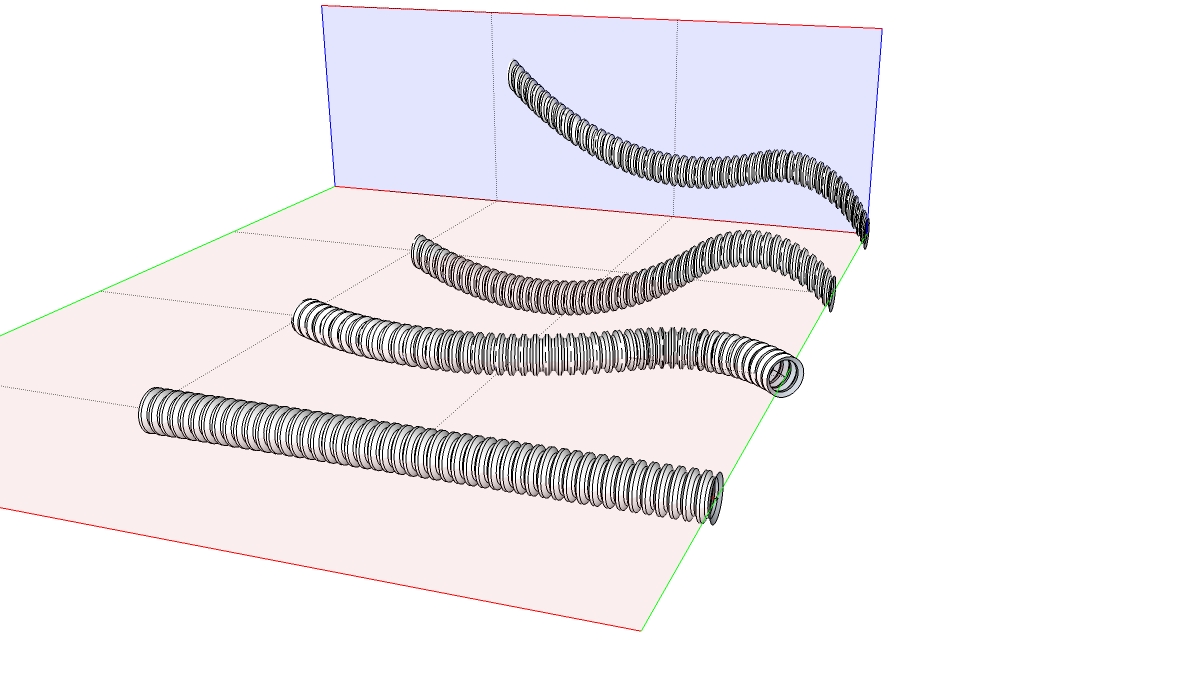
      First line centroid to tube...play around with line lengths, positions and arc segment counts as well

      learn from the mistakes of others, you may not live long enough to make them all yourself...

      1 條回覆 最後回覆 回覆 引用 0
      • S 離線
        sbolduc
        最後由 編輯

        Hey,

        I'm having some trouble with the selection of the line lying on the red axis, following the selection of the grouped shape to be bent. Any suggestions?

        Thanks!

        1 條回覆 最後回覆 回覆 引用 0
        • Chris FullmerC 離線
          Chris Fullmer
          最後由 編輯

          Well it sounds like you've got the basic idea. Probably the best thing to do at this point is to upload a small model that shows what you're trying to do and I'll take a look at it to see what might need to change.

          Chris

          Lately you've been tan, suspicious for the winter.
          All my Plugins I've written

          1 條回覆 最後回覆 回覆 引用 0
          • A 離線
            August
            最後由 編輯

            @driven said:

            draw your line the same length as your arc line

            Not necessary, but you do need to allow in your planning for the fact that your guide line will be stretched or shrunk to match the target line, and your shape along with it.

            @unknownuser said:

            move your group so the line is centroid to it, edit group with move/copy and scale to match line length, remove at least one end, exposing the line

            Not necessary, and may not be what you want. If the guide line is centered, some parts of the shape will be compressed and some stretched, depending on what side of the guide line they start out on, but the guide line can be some distance from the shape. You just have to visualize the results properly so that you are not surprised.

            @unknownuser said:

            rotate your arc line (or copies) until it lies on the red plane and has both ends are parallel to the blue plane

            Neither part is necessary.

            See the attached image for a Target line that is in the Blue-Green plane with a guide line that is parallel to the Red axis, perpendicular to the plane of the Target line.

            @unknownuser said:

            off plane and off parallel will give less accurate 'real material' bends, ...

            I agree that to simulate bending of a solid material you may want to follow the rules you outlined like having the Guide Line and Target Line the same length and for the Guide Line to be centroid to the shape.

            But for a wide variety of problems that Shape Bender solves, and for an even wider variety of ways to play with it, it has nothing to do with trying to simulate bending a solid material.

            I hope this helps,
            August
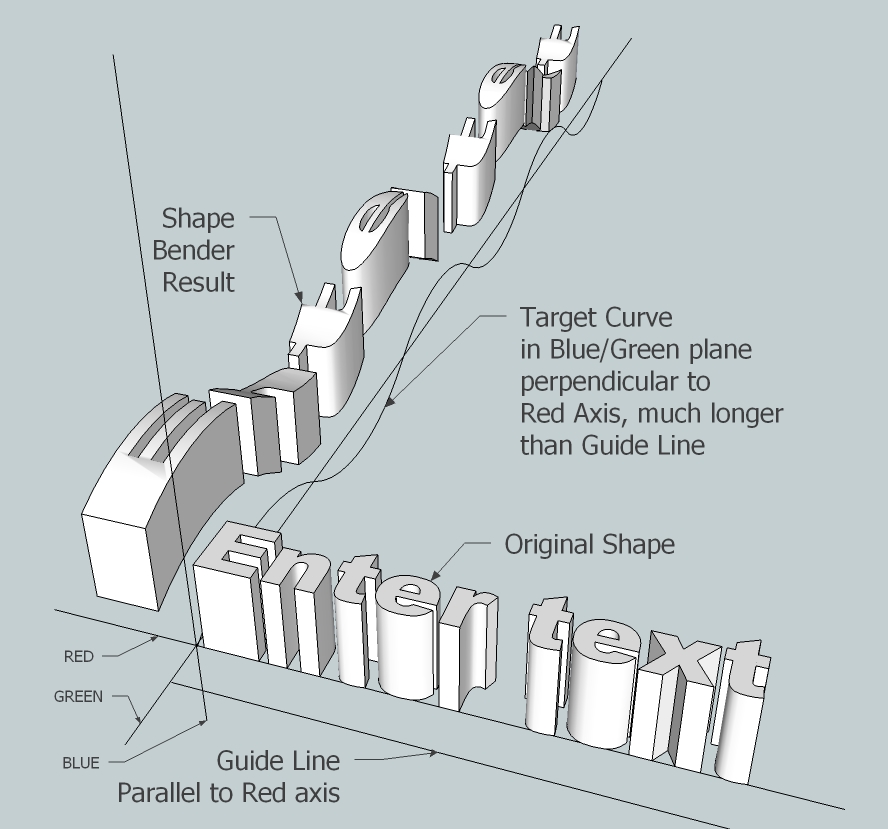

            The Axes are marked since SU does not export them.

            “An idea, like a ghost, must be spoken to a little before it will explain itself.”
            [floatr:v1mcbde2]-- Charles Dickens[/floatr:v1mcbde2]

            1 條回覆 最後回覆 回覆 引用 0
            • M 離線
              MarkEMark
              最後由 編輯

              Hi All:

              I am trying to use Shape Bender to bend 2 flanges on a metal bracket that joins an engine mount to a wooden fuselage of an airplane.

              I have drawn the bracket as shown on the plans (attached). The bracket has 2 'ears' on the top and bottom of the bracket that are bent 90 degrees to wrap around the front end of the fuselage. I want to just bend the 'ear' parts, and not the larger rounded portion of the bracket which is the attachment point for the engine mount. I have removed the holes on the side portion of the bracket that will be used for the attachment to the wooden fuse sides, as I wish to place them after bending.

              My concern is that in the bending process with this plug in is that the entire front of the bracket gets bent 90 degrees and not simply the 'ear' portions. Can someone show me how this might work, or is there another script that would do this better?

              Thanks so much for the help!

              Mark


              My Pietenpol Build.skp

              1 條回覆 最後回覆 回覆 引用 0
              • TIGT 離線
                TIG Moderator
                最後由 編輯

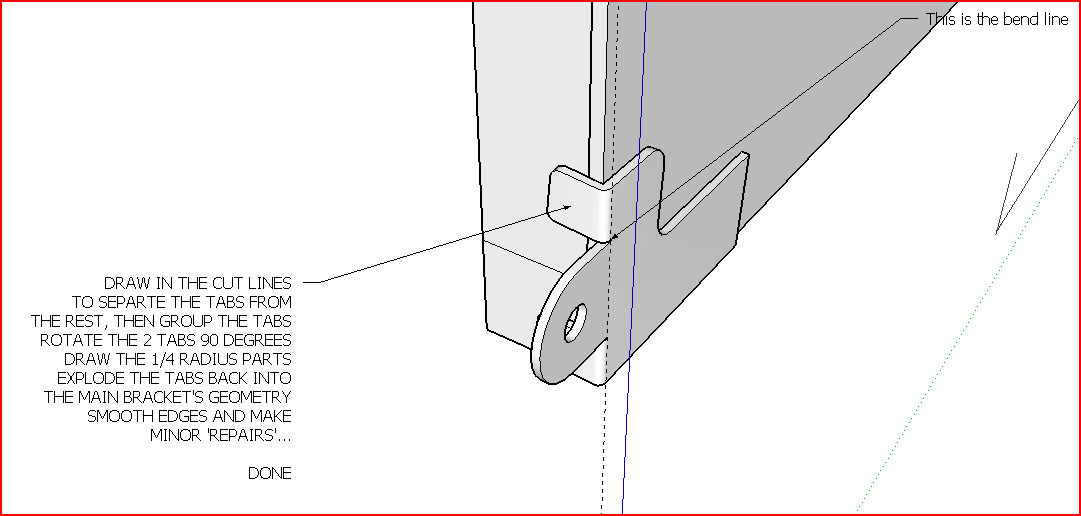
                This is best done manually...Capture.PNG

                TIG

                1 條回覆 最後回覆 回覆 引用 0
                • M 離線
                  MarkEMark
                  最後由 編輯

                  Thanks TIG... I'll try that. I thought it might exceed the plug in's capability... Thanks again for the pic/explaination.

                  Mark

                  1 條回覆 最後回覆 回覆 引用 0
                  • M 離線
                    MarkEMark
                    最後由 編輯

                    OK... this is embarrassing: I've forgotten how to cut the tabs off... Which command will sever them at the cut line..?

                    1 條回覆 最後回覆 回覆 引用 0
                    • M 離線
                      maxandvv
                      最後由 編輯

                      cool! I like it!!

                      1 條回覆 最後回覆 回覆 引用 0
                      • A 離線
                        albayzem
                        最後由 編輯

                        @ben ritter said:

                        Chris, I can hardly keep up with your wonderful scripts. Most importantly though, you are very much appreciated for your kindness to the SU community.

                        1 條回覆 最後回覆 回覆 引用 0
                        • TIGT 離線
                          TIG Moderator
                          最後由 編輯

                          @markemark said:

                          OK... this is embarrassing: I've forgotten how to cut the tabs off... Which command will sever them at the cut line..?

                          I thought I posted a reply to this... 😕
                          Read the notes in the image..................
                          Make sure that you draw lines all round the tabs so they select separately.
                          Then select all of the tab's geometry and group it, then rotate the group etc etc...

                          TIG

                          1 條回覆 最後回覆 回覆 引用 0
                          • M 離線
                            madorney
                            最後由 編輯

                            Hi - Can anyone help a poor soul find out how / where to download Shape Bender for Mac? Thanks!!!!

                            1 條回覆 最後回覆 回覆 引用 0
                            • M 離線
                              MarkEMark
                              最後由 編輯

                              Hey TIG:

                              Thanks again. You did send me a PM on this. I posted this question about how to cut the tabs off before I PMed you. I posted the question a couple of days before I sent you the PM. I apologize if it appeared that I was badgering ya!

                              The PM detailed how to do this perfectly. Thanks again!

                              Mark

                              1 條回覆 最後回覆 回覆 引用 0
                              • Chris FullmerC 離線
                                Chris Fullmer
                                最後由 編輯

                                Hi Mark, the download is in the very first message in this thread. so go back to page 1 and scroll down to the bottom of my first post. You will also need to install progressbar.rb from smustard. There is a link to that in my first post also. Good luck!

                                Chris

                                Lately you've been tan, suspicious for the winter.
                                All my Plugins I've written

                                1 條回覆 最後回覆 回覆 引用 0
                                • M 離線
                                  madorney
                                  最後由 編輯

                                  Hi Chris - I've managed to install the Shape Bender Plug-in, but it doesn't seem to work at all on my Mac. The tool clearly shows up under my Plugins menu, and I'm able to place the tool icon in my toolbar. But as I follow your video-tutorial to a tee, it's not working: I'm able to select the component, then the Shape Bender tool. But then I'm unable to select anything at all (nothing highlights). Help?

                                  Thanks so much!

                                  1 條回覆 最後回覆 回覆 引用 0
                                  • Chris FullmerC 離線
                                    Chris Fullmer
                                    最後由 編輯

                                    It sounds like maybe your straight line is not placed ont he red axis. And if your axis has been altered from its original orientation, then that will mess things up. So try resetting the global axis, then align the straight line to the red axis. See if that works. If not, could you upload a small test model?

                                    Chris

                                    Lately you've been tan, suspicious for the winter.
                                    All my Plugins I've written

                                    1 條回覆 最後回覆 回覆 引用 0
                                    • T 離線
                                      truffel50
                                      最後由 編輯

                                      Wonderfull plugin! Very Thanx

                                      truffel, Netherlands

                                      1 條回覆 最後回覆 回覆 引用 0
                                      • B 離線
                                        berniedog
                                        最後由 編輯

                                        Chris,
                                        This looks exciting. I guess I'm a noob,
                                        but I do not know where to download
                                        the shape bender plugin????

                                        Thank you so much!

                                        bob

                                        1 條回覆 最後回覆 回覆 引用 0
                                        • thomthomT 離線
                                          thomthom
                                          最後由 編輯

                                          @unknownuser said:

                                          Chris,
                                          This looks exciting. I guess I'm a noob,
                                          but I do not know where to download
                                          the shape bender plugin????

                                          Thank you so much!

                                          bob

                                          At the end of the first post in this thread.

                                          Thomas Thomassen — SketchUp Monkey & Coding addict
                                          List of my plugins and link to the CookieWare fund

                                          1 條回覆 最後回覆 回覆 引用 0
                                          • B 離線
                                            berniedog
                                            最後由 編輯

                                            Thanks Thomas for the quick reply!
                                            Found the link, I originally thought
                                            it was the french version- Cheers- bob

                                            1 條回覆 最後回覆 回覆 引用 0
                                            • 1
                                            • 2
                                            • 3
                                            • 4
                                            • 5
                                            • 6
                                            • 7
                                            • 63
                                            • 64
                                            • 5 / 64
                                            • 第一個貼文
                                              最後的貼文
                                            Buy SketchPlus
                                            Buy SUbD
                                            Buy WrapR
                                            Buy eBook
                                            Buy Modelur
                                            Buy Vertex Tools
                                            Buy SketchCuisine
                                            Buy FormFonts

                                            Advertisement