sketchucation logo sketchucation
    • 登入
    Oops, your profile's looking a bit empty! To help us tailor your experience, please fill in key details like your SketchUp version, skill level, operating system, and more. Update and save your info on your profile page today!
    ⚠️ Important | Libfredo 15.6b introduces important bugfixes for Fredo's Extensions Update

    Call to Mac users for script portability

    已排程 已置頂 已鎖定 已移動 Developers' Forum
    101 貼文 10 Posters 6.7k 瀏覽 10 Watching
    正在載入更多貼文
    • 從舊到新
    • 從新到舊
    • 最多點贊
    回覆
    • 在新貼文中回覆
    登入後回覆
    此主題已被刪除。只有擁有主題管理權限的使用者可以查看。
    • fredo6F 離線
      fredo6
      最後由 編輯

      @takesh h said:

      te]
      Fredo,
      Thanks for the new version, Default Setting Window seems to be working normally now.
      But you left out Translation window... please fix translation windows as well when you have time.

      Takeshi,

      I hope the attached file would improve the display for all web dialog boxes. On the remaining problem of small button pictures not displaying, can you tell me if there is any improvement.

      Thanks again

      Fredo


      to drop into LIBFREDO6_Dir_31 folder

      1 條回覆 最後回覆 回覆 引用 0
      • G 離線
        gohch
        最後由 編輯

        hi Jeff, Takeshi,
        I've included a toolbar manager function in the latest update (version 1.1.4)of 1001bit tools.
        (now ready for download.)
        You can use it to manage what to show and hide. You'll need to restart SU once for the settings to take effect, after that it remains persistent for future sessions.
        http://www.sketchucation.com/forums/scf/viewtopic.php?f=180&t=15927&p=148542#p148542
        Please try it out 😄
        cheers!

        1 條回覆 最後回覆 回覆 引用 0
        • I 離線
          ideas_arte
          最後由 編輯

          Mr Fredo, sincere thanks, in fact their work has value for my very special ..!
          Thank you very much to include people who use OSX ...!

          1 條回覆 最後回覆 回覆 引用 0
          • fredo6F 離線
            fredo6
            最後由 編輯

            Hi again, dear Mac users,

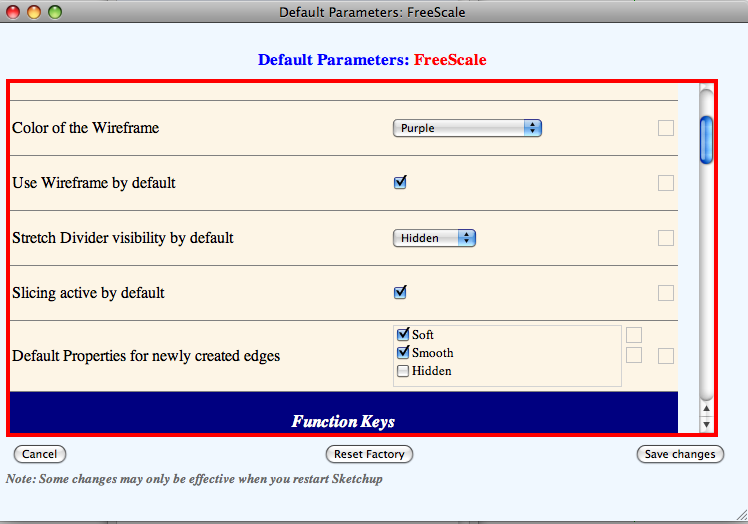
            If any of you can post a screenshot of a Default Parameter dialog box, it would help me to continue sorting out some of the issues. As far as I know, the little icon buttons still do not show their associated picture, and I need to check the question of Height dimensioning for table rows.

            Thanks in advance

            Fredo

            PS: I checked that I cannot do anything for the Color picker combo box. Background colors won't show up with Safari, due to the Mac implementation of the browser. At least the color name is shown!

            1 條回覆 最後回覆 回覆 引用 0
            • jeff hammondJ 離線
              jeff hammond
              最後由 編輯

              oops, i almost missed this post 😄

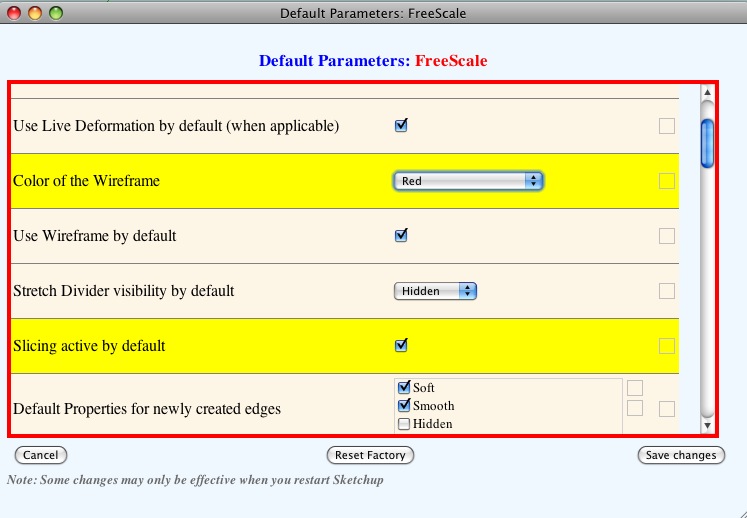
              here's a screenshot of the parameter dialog upon opening:
              screenshot 2.jpg

              i should also add that the colors now work for the wireframe and the various deformation boxes. i haven't tested the colors for the last few updates so i'm not sure exactly which version fixed it.. (i'm using 'e' now)

              as far as safari is concerned, i'm using a public beta for version 4.. i really don't know if that will affect anything but i'm letting you know just in case..

              dotdotdot

              1 條回覆 最後回覆 回覆 引用 0
              • Bob JamesB 離線
                Bob James
                最後由 編輯

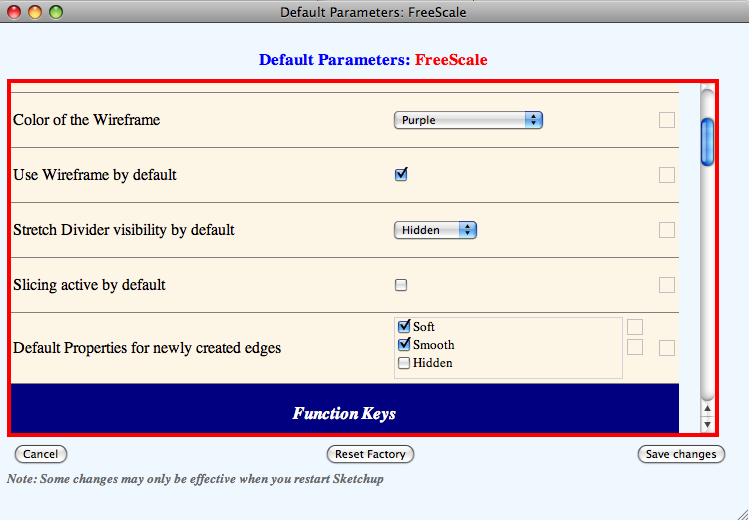
                I can't seem to make "Slicing Active by Default" preference "stick".

                I went into preferences and marked the "Slicing Active by Default" box.
                Then I restarted SU7 (mac) and when I went to preferences the box was empty again.

                Comments?


                Checking the box


                After restarting SU7 (Mac)

                i7-4930K 3.4Ghz, 2x GTX780 6GB, 32GB DDR3-1600 ECC, OCZ Vertex 4 500GB, WD Black 3TB, 32TB NAS, 4x 27" Monitors, SpaceMouse Pro, X-keys XK-60

                1 條回覆 最後回覆 回覆 引用 0
                • jeff hammondJ 離線
                  jeff hammond
                  最後由 編輯

                  hey bob.

                  i noticed that too.. some of the parameters are acting up now but they are still changeable..

                  try clicking the box once so the check appears..click it again so it turns yellow then one more time so it's checked and yellow.. make sure to use the 'save changes' button..
                  screenshot 5.jpg

                  dotdotdot

                  1 條回覆 最後回覆 回覆 引用 0
                  • fredo6F 離線
                    fredo6
                    最後由 編輯

                    @unknownuser said:

                    Jeff,

                    That works 👍

                    Thanks, now I can bend 😉

                    Interesting: I made a circle, pulled it into a column, then bent it over. I have no idea how the "windows" got in it, but it's sort of neat ❗

                    Bob,

                    Default parameters are really for configuration of the plugin and default behaviors. You normally don't need to go there frequently. If you change something in the dialog box, please make sure you do a SAVE.

                    For Bend, use F4 (or contextual menu) for activating the slicer. The script will remember the settings thorughout the Sketchup session.

                    For you example, do you mean it is not 'intentional'?

                    Fredo

                    1 條回覆 最後回覆 回覆 引用 0
                    • Bob JamesB 離線
                      Bob James
                      最後由 編輯

                      @unknownuser said:

                      For you example, do you mean it is not 'intentional'?

                      Fredo

                      Right. It was not intentional. I just drew a circle with the circle tool, pulled it up into a column, made it a group and bent it over. Much to my surprise it developed those neat "windows". Made me think of the Arch in St. Louis.

                      i7-4930K 3.4Ghz, 2x GTX780 6GB, 32GB DDR3-1600 ECC, OCZ Vertex 4 500GB, WD Black 3TB, 32TB NAS, 4x 27" Monitors, SpaceMouse Pro, X-keys XK-60

                      1 條回覆 最後回覆 回覆 引用 0
                      • Bob JamesB 離線
                        Bob James
                        最後由 編輯

                        Right. It was not intentional. I just drew a circle with the circle tool, pulled it up into a column, made it a group and bent it over. Much to my surprise it developed those neat "windows". Made me think of the Arch in St. Louis.

                        i7-4930K 3.4Ghz, 2x GTX780 6GB, 32GB DDR3-1600 ECC, OCZ Vertex 4 500GB, WD Black 3TB, 32TB NAS, 4x 27" Monitors, SpaceMouse Pro, X-keys XK-60

                        1 條回覆 最後回覆 回覆 引用 0
                        • Bob JamesB 離線
                          Bob James
                          最後由 編輯

                          Jeff,

                          That works 👍

                          Thanks, now I can bend 😉

                          Interesting: I made a circle, pulled it into a column, then bent it over. I have no idea how the "windows" got in it, but it's sort of neat ❗
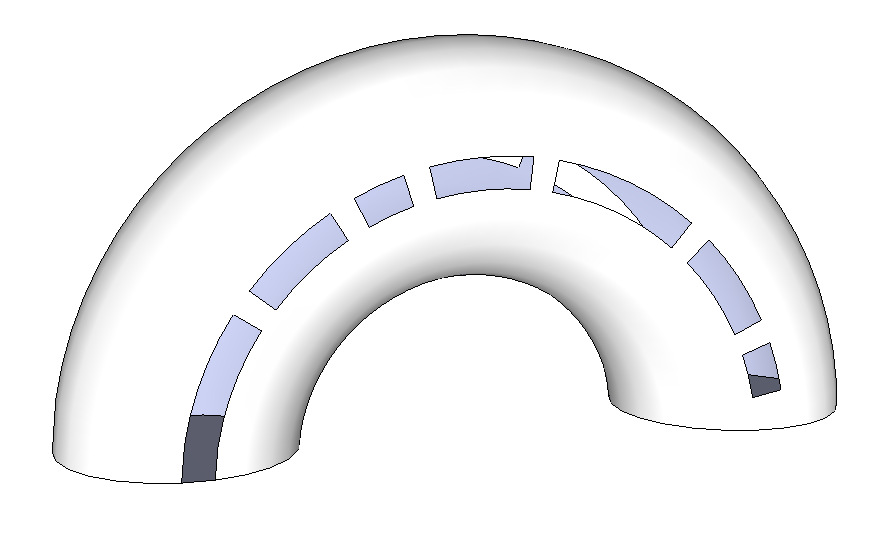

                          Picture 25.png

                          i7-4930K 3.4Ghz, 2x GTX780 6GB, 32GB DDR3-1600 ECC, OCZ Vertex 4 500GB, WD Black 3TB, 32TB NAS, 4x 27" Monitors, SpaceMouse Pro, X-keys XK-60

                          1 條回覆 最後回覆 回覆 引用 0
                          • fredo6F 離線
                            fredo6
                            最後由 編輯

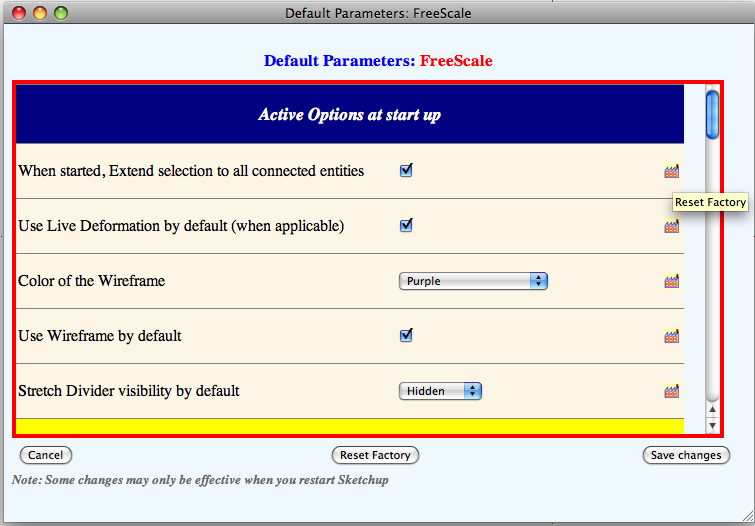
                            New test concerning image buttons

                            Could any kind Mac user use the attach file and advise if the image buttons in the Default Parameter dialog boxes are displayed.
                            Also, please tell me if the cursor is transformed into a hand when mouse is moved over the buttons

                            Thanks in advance

                            Fredo


                            to drop into LIBFREDO6_Dir_31 folder

                            1 條回覆 最後回覆 回覆 引用 0
                            • Bob JamesB 離線
                              Bob James
                              最後由 編輯

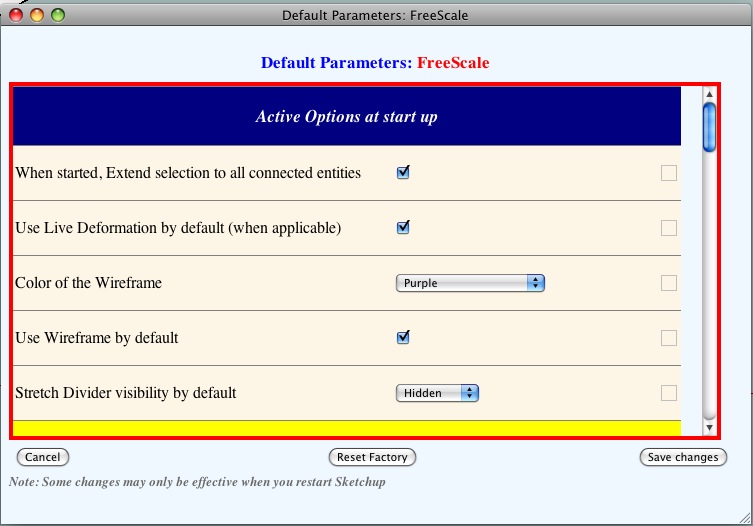
                              I don't see any image buttons nor any change in the cursor.
                              Is this the view you wanted to see?
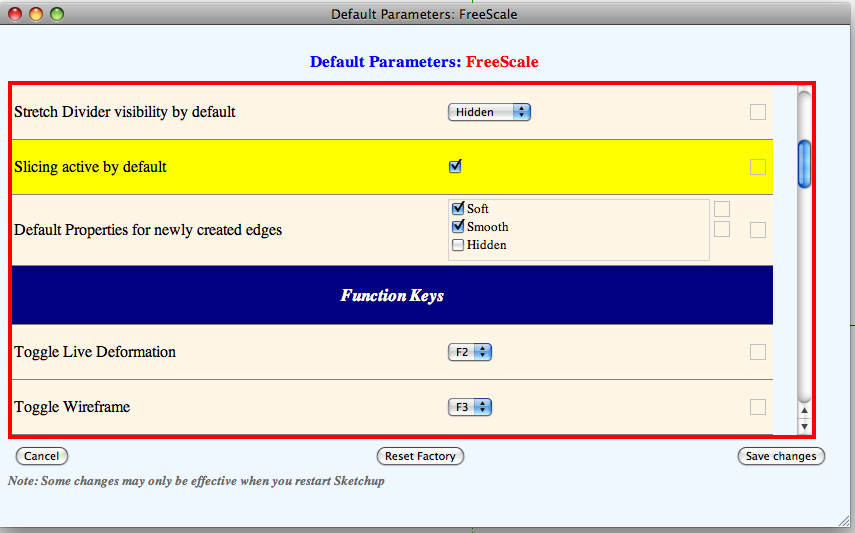

                              Picture 2.png

                              i7-4930K 3.4Ghz, 2x GTX780 6GB, 32GB DDR3-1600 ECC, OCZ Vertex 4 500GB, WD Black 3TB, 32TB NAS, 4x 27" Monitors, SpaceMouse Pro, X-keys XK-60

                              1 條回覆 最後回覆 回覆 引用 0
                              • jeff hammondJ 離線
                                jeff hammond
                                最後由 編輯

                                bob, are you sure you're putting the new file in the right spot? it's supposed to replace a file by the same name located in the folder 'LIBFREDO6_Dir_31'..

                                the icons are there.. no hand though.
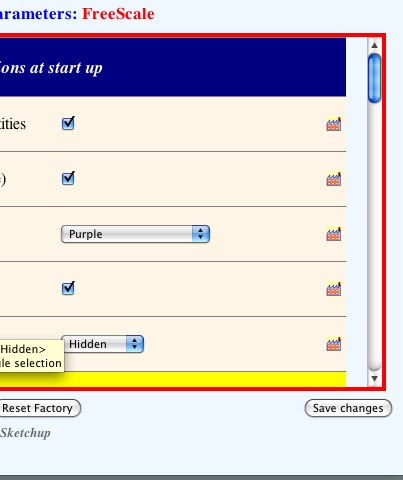
                                screenshot.jpg

                                [edit] actually, only the factory icons are showing up.. the 'select all' check and 'clear all' X aren't showing up.

                                dotdotdot

                                1 條回覆 最後回覆 回覆 引用 0
                                • Bob JamesB 離線
                                  Bob James
                                  最後由 編輯

                                  Deleted it and re-installed it...


                                  Picture 8.png

                                  i7-4930K 3.4Ghz, 2x GTX780 6GB, 32GB DDR3-1600 ECC, OCZ Vertex 4 500GB, WD Black 3TB, 32TB NAS, 4x 27" Monitors, SpaceMouse Pro, X-keys XK-60

                                  1 條回覆 最後回覆 回覆 引用 0
                                  • jeff hammondJ 離線
                                    jeff hammond
                                    最後由 編輯

                                    where's the newest update posted at?

                                    dotdotdot

                                    1 條回覆 最後回覆 回覆 引用 0
                                    • fredo6F 離線
                                      fredo6
                                      最後由 編輯

                                      Jeff, Bob,

                                      This was just a trial on one button type, but it happens to work!

                                      Could you try with with new update, which should hopefully show all button images.

                                      Thanks

                                      Fredo


                                      to drop into LIBFREDO6_Dir_31 folder

                                      1 條回覆 最後回覆 回覆 引用 0
                                      • fredo6F 離線
                                        fredo6
                                        最後由 編輯

                                        Jeff

                                        You've too quick. The Forum went down for me a few minutes. I was updating the update to also include a change for the 'Hand'.

                                        Thanks

                                        1 條回覆 最後回覆 回覆 引用 0
                                        • jeff hammondJ 離線
                                          jeff hammond
                                          最後由 編輯

                                          haha.. sorry.

                                          so the latest one is:

                                          no icons at all.
                                          the hand appears when hovering over the 'select all' and 'clear all' boxes but not with the factories.

                                          dotdotdot

                                          1 條回覆 最後回覆 回覆 引用 0
                                          • fredo6F 離線
                                            fredo6
                                            最後由 編輯

                                            I made a mistake. this one should be better, hopefully
                                            Thanks for the 'hand'
                                            Fredo


                                            to drop into LIBFREDO6_Dir_31 folder

                                            1 條回覆 最後回覆 回覆 引用 0
                                            • 1
                                            • 2
                                            • 3
                                            • 4
                                            • 5
                                            • 6
                                            • 2 / 6
                                            • 第一個貼文
                                              最後的貼文
                                            Buy SketchPlus
                                            Buy SUbD
                                            Buy WrapR
                                            Buy eBook
                                            Buy Modelur
                                            Buy Vertex Tools
                                            Buy SketchCuisine
                                            Buy FormFonts

                                            Advertisement